Table of Contents >> Show >> Hide
- Quick Scroll Checklist (30 Seconds)
- Table of Contents
- 1) The Username and Display Name Look “Off” (The Sneaky Clone Move)
- 2) The Profile Is Low-Effort: Generic Bio, Vague Claims, Weird Links
- 3) The Post History Is Thin, Recycled, or Suspiciously New
- 4) The Follower-to-Following Ratio Is a Red Flag (Or the Reverse)
- 5) Engagement Looks Weird: Bot Comments, Emoji Spam, Generic Praise
- 6) The Profile Photo (or Posts) Look Stolen or Too Perfect
- 7) Their Messages Sound Like a Robot Trying to Flirt (Or “Support” You)
- 8) Urgency + Threats + “Policy Violation” Claims (Phishing’s Favorite Costume)
- 9) They Push You Off-Platform or Ask for “Verification” (Codes, Payments, Gift Cards)
- 10) Impersonation Clues: Slight Handle Changes, Fake Authority, and “Official” Vibes
- What to Do When You Spot a Fake Instagram Account
- Common Examples of Fake Instagram Accounts (So You Can Recognize the Pattern)
- FAQ: Quick Answers That Save You from Pain
- Conclusion: Trust Your Gut, Then Verify Like a Pro
- Real-World Experiences: What People Commonly Run Into (and How They Unwind It)
Instagram is basically a digital city: there are artists, chefs, dog accounts that deserve Nobel Prizes,
andunfortunatelypickpockets in sunglasses. Fake Instagram accounts aren’t always obvious, and they’re not
just “annoying.” They can be used for impersonation scams, phishing links, counterfeit shops, crypto cons,
or hijacking your account and using it to scam your friends.
The good news: you don’t need a cybersecurity degree to spot most fakes. You just need a repeatable checklist
(and the willingness to be slightly suspicious, like a cat who’s been offered a “new” brand of treats).
Below are 10 easy ways to recognize fake Instagram accountsplus what to do next, specific examples, and
real-world scenarios people run into every day.
Quick Scroll Checklist (30 Seconds)
- Does the profile feel “empty” (few posts, generic bio, random username)?
- Do the photos look stolen, stock, or strangely perfect?
- Is engagement weird (lots of followers, tiny likes, bot comments)?
- Are they rushing you into a link, a payment, or moving to another app?
- Do details clash (location, content theme, language, “brand” vibe)?
Table of Contents
- Username + display name look “off”
- Low-effort profile (bio, photo, highlights)
- Post history feels thin, recycled, or brand-new
- Follower-to-following ratio screams “I bought this”
- Engagement patterns don’t match the audience
- Photos look stolen (reverse-image-worthy)
- Comments and DMs sound like a robot doing improv
- Urgency + threats + “policy violation” messages
- They push you off-platform or ask for “verification”
- Impersonation clues: slight handle changes + fake authority
1) The Username and Display Name Look “Off” (The Sneaky Clone Move)
Fake accounts often copy real people or brands by using look-alike usernamesextra underscores, swapped letters,
or a stray “.official” sprinkled on top like fake parmesan.
What you’ll notice
- Handle is a near-duplicate: @brandname_support_ vs. @brandname
- Random numbers or odd punctuation: @jessica_482910
- Display name says “Customer Support” but handle is unrelated
Fast reality check
Search the name inside Instagram. Real brands usually have consistent handles across platforms and a clear,
official presence. If the “support” account is unverified, has few posts, and exists mainly to DM people, be cautious.
Safe move
Don’t reply with personal info. Go to the brand’s official website (typed manually) and use their official contact methods.
2) The Profile Is Low-Effort: Generic Bio, Vague Claims, Weird Links
Many fake profiles feel like they were built in a hurry during a microwave timer. They’ll have a minimal bio,
a generic “entrepreneur” title, or a link that looks like it came from a coupon site in 2009.
What you’ll notice
- Bio is empty or overly broad: “Love to travel 🌍 DM me”
- Claims don’t match content: “Official charity” but no proof, no history
- Suspicious link-in-bio: misspellings, odd domains, link shorteners with no context
Fast reality check
Ask: Does the bio explain who they are and why they exist? Real accounts tend to provide stable identifiers:
website, location, consistent theme, recognizable contact points.
Safe move
Treat unknown links like you’d treat a mystery smoothie someone hands you on the street: politely decline.
If you must verify a link, do it via the organization’s official website, not the profile’s link.
3) The Post History Is Thin, Recycled, or Suspiciously New
Fake accounts often have very few posts, or they post a burst of content in a short time to look legit.
Sometimes the posts are recycled memes, stock images, or content scraped from other creators.
What you’ll notice
- 0–3 posts, all uploaded recently
- Content looks generic: stock photos, recycled quotes, stolen Reels
- No personal context: no captions, no story highlights, no “normal life” moments
Fast reality check
Scroll their grid and open a few posts. Are there meaningful captions? Do the comments look real?
Do they tag consistent people/places? Accounts that exist mainly to DM people are especially risky.
Safe move
If they’re contacting you out of nowhere, and their profile is basically a cardboard cutout, don’t engage.
4) The Follower-to-Following Ratio Is a Red Flag (Or the Reverse)
Numbers aren’t everything, but they can whisper clues. Some fakes follow hundreds or thousands of people to bait follow-backs.
Others buy followers to look “established,” but their engagement doesn’t match.
What you’ll notice
- Following 2,500 accounts, but only 37 followers
- 50,000 followers, but posts get 40 likes (possible bought followers)
- Follower growth looks sudden (especially for “new” accounts)
Fast reality check
Compare several posts: do likes/comments stay oddly flat no matter the content? That can indicate
inorganic audiences or automated activity.
Safe move
Don’t let big follower counts override common sense. Scammers know people trust numbers.
5) Engagement Looks Weird: Bot Comments, Emoji Spam, Generic Praise
Fake accounts often have engagement that feels… scripted. You’ll see the same three comments repeated,
weird emoji chains, or praise that doesn’t match the post.
What you’ll notice
- “Nice pic 🔥” repeated dozens of times
- Comments from accounts with no photos and random usernames
- Replies that ignore the actual caption (“So inspiring!” on a photo of a sandwich)
Fast reality check
Tap a few commenter profiles. If they’re all empty, newly created, or similarly “manufactured,”
you’re likely looking at an engagement farm.
Safe move
Don’t trust an account just because it looks popular. Trust consistency: real people, real conversation, real history.
6) The Profile Photo (or Posts) Look Stolen or Too Perfect
A classic tell: the profile photo is model-perfect, but everything else is vague. Security experts commonly recommend
a reverse image search when a photo looks suspiciously “stock.”
What you’ll notice
- Headshot looks like a magazine cover
- Photos feel scraped from influencers or catalogs
- Multiple “lifestyles” that don’t connect (luxury cars + random baby photos + crypto quotes)
Fast reality check
Use a reverse image search tool (outside Instagram). If the same photo appears under multiple names,
or on unrelated sites, that’s a strong sign it’s stolen.
Safe move
If the account is pushing money, links, or romance while using a possibly stolen identity, disengage and report.
7) Their Messages Sound Like a Robot Trying to Flirt (Or “Support” You)
Fake accounts often rely on copy-paste scripts: generic compliments, awkward phrasing, sudden intimacy,
or “customer support” language that doesn’t match how real companies communicate.
What you’ll notice
- Immediate escalation: “Hello dear, I need you urgently”
- Overly formal or oddly generic phrasing
- They avoid specifics, but push actions: click, pay, verify, download
Fast reality check
Ask one simple question that requires a real answer (not “yes/no”). Example:
“Which of my posts made you reach out?” A scammer often dodges or replies vaguely.
Safe move
Don’t “help them out” by providing codes, emails, phone numbers, or screenshots.
If it feels off, it’s okay to stop responding.
8) Urgency + Threats + “Policy Violation” Claims (Phishing’s Favorite Costume)
One of the most common scam patterns is a fake “Instagram warning” that claims your account will be deleted,
suspended, or sued unless you act immediately. This is designed to short-circuit your judgment.
What you’ll notice
- “Your account will be deleted in 24 hours”
- “Copyright violationappeal now”
- Links to “confirm your identity” or “restore your account”
Fast reality check
Real platforms rarely demand immediate action via random DMs. If you receive a scary message,
open Instagram’s official settings and notifications instead of clicking a link.
Safe move
Don’t click. Don’t log in through a link. Navigate directly inside the app, and report the message/account.
9) They Push You Off-Platform or Ask for “Verification” (Codes, Payments, Gift Cards)
Many scams try to move you to WhatsApp/Telegram/email fast, where there’s less friction and fewer safety checks.
Others ask for “verification” codes (often used to hijack accounts) or money via gift cards, crypto, or unusual transfers.
What you’ll notice
- “Message me on WhatsAppIG is glitchy”
- “Send a code to prove you’re real”
- “Pay the fee first, then you’ll get the prize/refund/verification”
Fast reality check
Ask: Why can’t this be handled inside Instagram or through official channels?
Scammers want to isolate you and speed you up.
Safe move
Never share login codes or security codes. Never send gift cards or crypto to someone you only know online.
If the “deal” requires secrecy or urgency, it’s probably not a deal.
10) Impersonation Clues: Slight Handle Changes, Fake Authority, and “Official” Vibes
Impersonation accounts often pretend to be a celebrity, a brand, a government agency, or even the “recovery team”
that can get your money back. Spoiler: that last one is especially suspicious.
What you’ll notice
- Account name mimics a public figure or company, but details are inconsistent
- They claim authority: “We are the official investigation team”
- They ask for personal information, payments, or sensitive details
Fast reality check
Look for signals of authenticity: clear history, consistent branding, and (when applicable) a verified badge for notable
public figures or brands. Also check Instagram’s “About this account” details when available, such as the date joined,
to see whether the account is brand-new.
Safe move
If an “authority” account contacts you unexpectedly and wants money or sensitive info, disengage and verify through official,
independently found contact methods (not the profile’s link).
What to Do When You Spot a Fake Instagram Account
- Don’t click links in DMs, bios, or comments from suspicious accounts.
- Stop the conversationyou don’t owe anyone continued replies.
- Report the account (especially for impersonation). Reporting helps platforms identify patterns faster.
- Block the account so they can’t message you again.
- Warn friends if your account or someone you know is being impersonated.
- Secure your account: use a strong unique password and enable two-factor authentication.
Common Examples of Fake Instagram Accounts (So You Can Recognize the Pattern)
- Fake customer support: “Your account is suspendedverify here.”
- Giveaway scams: “You won! Pay shipping/fee to claim.”
- Romance + investment combo: fast intimacy, then “opportunity” talk.
- Fake stores: great prices, stolen product photos, disappears after payment.
- Account takeover bait: “Can you help me log in? I’ll send a code.”
FAQ: Quick Answers That Save You from Pain
Can a fake account have lots of followers?
Yes. Followers can be bought, engagement can be manipulated, and hacked accounts can be repurposed. Use multiple
signals: content consistency, engagement quality, message behavior, and whether they push links or urgency.
Is the verified badge a guarantee?
It’s a helpful authenticity signal for notable people/brands, but you should still use common sense. Scams can come
from compromised accounts tooso look for unusual behavior and unexpected messages.
What’s the single biggest red flag?
Urgency + a link + a demand. “Do this now or lose access” is a classic manipulation pattern.
Slow down, verify inside the app, and avoid clicking.
Conclusion: Trust Your Gut, Then Verify Like a Pro
Spotting fake Instagram accounts is less about one “gotcha” clue and more about stacking evidence:
odd handles, empty profiles, recycled photos, weird engagement, and pressure tactics. If you notice two or three
red flags at once, you’re not being paranoidyou’re being efficient.
Remember: real people and real brands can usually handle a reasonable verification question. Scammers can’t.
They rush, they dodge, they push links, and they try to move you off-platform. Slow down, check the profile like
a detective, and keep your account locked down with strong security settings.
Real-World Experiences: What People Commonly Run Into (and How They Unwind It)
Here are experiences that come up again and again when people deal with fake Instagram accountsshared in forums,
consumer warnings, and everyday “wait… is this real?” group chats. Names and details vary, but the patterns are
remarkably consistent.
Experience #1: The “Friendly Stranger” With a Golden Opportunity. Someone follows you, likes three photos,
and messages: “Love your vibe. Want to collaborate?” Sounds flatteringuntil they immediately ask you to click a link to
“apply,” or they offer to pay you… after you pay a “processing fee.” In real influencer partnerships, brands typically
communicate through verified channels, provide clear contracts, and don’t require you to pay money to get paid.
A simple test is to ask for specifics: “Which campaign is this for, and can you email me from your company domain?”
The scammer usually gets vague or disappears.
Experience #2: The “Account Will Be Deleted in 24 Hours” Panic DM. People receive an official-looking warning
claiming copyright infringement or policy violations. The message pushes a link that looks like a login page. The trap:
you “appeal,” enter credentials, and your account gets hijacked. The emotional lever is urgencybecause if you feel rushed,
you won’t notice the weird URL or the awkward wording. The best move is to ignore the link, open the Instagram app directly,
and check your real account status and notifications.
Experience #3: The Fake Customer Support Account That Replies to Comments. You comment on a brand’s post like
“My order hasn’t arrived,” and suddenly “Support” replies: “DM us your email and phone number.” Next comes a request for an
OTP code, a password reset screenshot, or a payment “verification.” Real companies may ask for order numbersbut they won’t
need your login codes. The safer approach: navigate to the brand’s official website and use the contact form you find there,
or message the brand only through the verified account you already know is legitimate.
Experience #4: The “Friend” Who Needs Help Logging In. A familiar account messages: “Can you help me? I’m locked
out. I’ll send you a code.” Sometimes it’s a hijacked friend account; sometimes it’s a look-alike account. Either way, that
code is often a key to compromising your account or a tool to reset someone else’s. People who avoid getting scammed
here do one simple thing: they contact the friend outside Instagram (text, call, email) and confirm. If the friend says
“That wasn’t me,” you just saved yourself a mess.
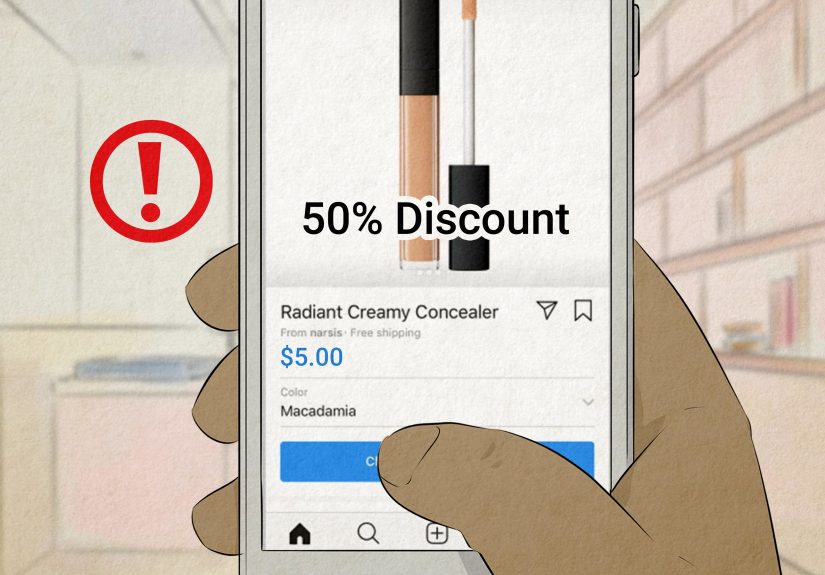
Experience #5: The Too-Good-To-Be-True Shop. A page runs slick Reels, offers huge discounts, and has comments
full of “I just ordered!” The products look realbecause the photos are stolen from legitimate stores. After payment, tracking
never updates, support vanishes, and the account changes names or disappears. Savvy shoppers check for basic legitimacy:
clear business info, consistent posting history, reviews off-platform, and payment methods with buyer protections. If the shop
pressures you to pay via odd methods or “DM to purchase,” it’s time to back away.
The takeaway from all these experiences is the same: fake accounts don’t just look fakethey behave fake. They rush you,
they isolate you, and they try to get something valuable fast (money, credentials, codes, or personal data). Once you train
yourself to notice behavior patterns, spotting fake Instagram accounts becomes much easierand a lot less stressful.