Table of Contents >> Show >> Hide
- Quick Reality Check: When “Last Active” Works (and When It Doesn’t)
- How to Turn On Activity Status (So You Can See Theirs)
- Way #1: Check the DM Inbox List (The Fastest Method)
- Way #2: Open the DM Thread and Look Near the Top
- Way #3: Watch for the Green Dot in Messaging Surfaces (Share Menu Included)
- Why Instagram “Last Active” Might Look Wrong (or Confusing)
- Privacy, Etiquette, and the “Don’t Be Weird” Rule
- Real-World Experiences Related to Seeing “Last Active” on Instagram (500+ Words)
- Conclusion
Instagram is basically a giant digital neighborhood: you wave, you scroll, you accidentally like a photo from 2017,
and then you panic like you just knocked over a priceless vase. Somewhere in that chaos is a surprisingly useful feature:
Activity Statusthe little hints that show whether someone is Active now, Active 15m ago,
or Active today.
If you’re trying to time a message (or you’re just curious whether your friend is ignoring you or simply living a life),
this guide walks you through three simple ways to see “last active” on Instagram. We’ll also cover what the
green dot means, why the status sometimes “lies,” and how to keep things respectful and privacy-friendlybecause nobody
wants to become the villain in someone else’s group chat.
Quick Reality Check: When “Last Active” Works (and When It Doesn’t)
Before we get into the three methods, it helps to know the rules of the road. Instagram’s “last active” details are not
a public billboard. They typically show up in messaging contextsespecially for people you follow or have messagedand
only when Activity Status is enabled on both sides.
What you need for “Last Active” to appear
- You and the other person must have Activity Status turned on. If either of you turns it off, the status disappears.
- You’ll usually see it for accounts you follow and/or accounts you’ve messaged. Random accounts generally won’t show you anything.
- The status is shown in/around Instagram Direct (DMs). That’s the main “home base” for Activity Status.
Also: this feature is meant for smoother conversations, not for “CSI: Instagram.” If you find yourself building timelines
like a detective with too much coffee, it may be time to log off and touch grasspreferably without posting a Story about it.
How to Turn On Activity Status (So You Can See Theirs)
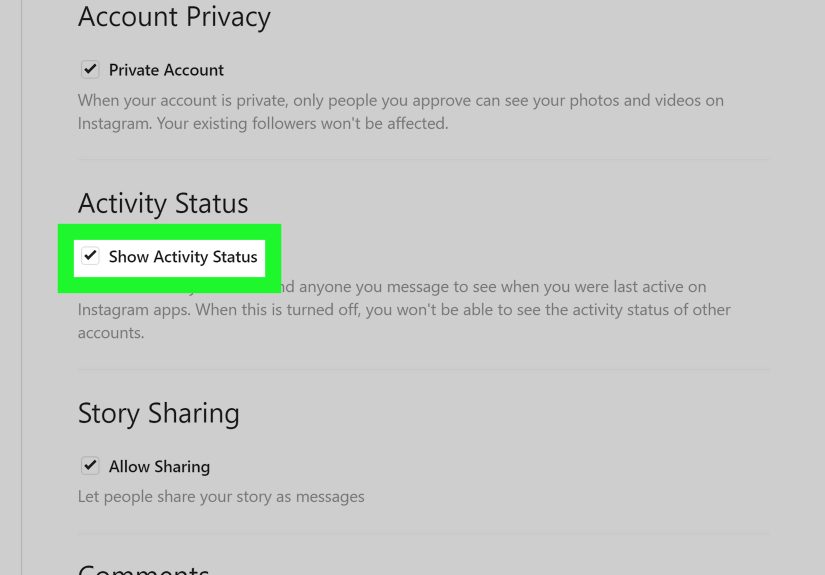
This is the part many people miss: if your Activity Status is off, you typically can’t see other people’s activity status either.
The setting name can look slightly different depending on the app version, but it usually lives in the same neighborhood.
Steps (common path on current Instagram apps)
- Go to your Profile.
- Tap the menu (three lines) in the top-right.
- Open Settings and privacy.
- Find Messages and story replies (wording may vary slightly).
- Tap Show activity status and toggle it on.
If you prefer Instagram on a computer, you can also manage Activity Status on the web in the privacy/security settings area.
Just remember: turning Activity Status on means you’re also shareable as “active” to relevant peopleso consider your comfort level.
Way #1: Check the DM Inbox List (The Fastest Method)
If Instagram had a “front desk” for online status, it would be the DM inbox. This is the quickest, most direct way to see
someone’s last active timeno digging required.
What to do
- Open Instagram and go to your DM inbox (the paper-plane/message icon).
- Look at your chat list.
- Under the person’s name (or near their profile picture), you may see status text like:
- Active now
- Active 10m ago
- Active today
Why this works
Instagram’s Activity Status was designed to help people know when friends are around to chat, and the inbox is where that
information is most commonly surfaced.
A quick example
Imagine you’re messaging your friend about meeting up. If you see “Active now”, you’ll likely get a faster reply.
If you see “Active today”, they might respond lateror they might be busy doing something wild, like reading a book.
Tips if you don’t see any status in the chat list
- Make sure your Activity Status is on.
- Confirm you’ve actually messaged the person before (or that you follow each other).
- Update the app and reopen itsometimes the status refresh is a little sleepy.
Way #2: Open the DM Thread and Look Near the Top
The inbox list gives you a quick scan, but the DM thread view can provide a clearer readespecially if you’re
already mid-conversation.
What to do
- Go to your DM inbox.
- Tap the conversation with the person you’re checking.
- Look near the top of the thread, around the name/header area.
- If Activity Status is available, you may see:
- Active now (often paired with a green dot elsewhere)
- Active [time] ago
- Active today
Bonus: Use “Seen” as a separate clue (not the same as last active)
Instagram also shows read receipts in many chats. If you see “Seen” with a timestamp, that means they opened your message,
which can sometimes be more useful than “Active today.” Just remember: “Seen” is about that messageActivity Status is about the app being used.
When this method is especially helpful
- You have lots of chats and the inbox view is cluttered.
- You’re verifying a specific person rather than scanning everyone.
- Status text isn’t showing in the list but appears in the thread header.
Way #3: Watch for the Green Dot in Messaging Surfaces (Share Menu Included)
The green dot is Instagram’s “available” indicator. It’s not always shown in the exact same place across every account or app version,
but it commonly appears in messaging-related areaslike your Direct inboxand also in the friend list that pops up when you share a post.
Where to look
- Direct (DM) inbox: a green dot can appear on/near profile pictures for people who are currently active.
- Share sheet / Send menu: when you tap “send” on a post or Reel, the friend list may show a green dot for active people.
- Within messaging contexts: you may see the dot alongside “Active now.”
What the green dot really means
The green dot generally signals that the person is currently active or recently active in a way Instagram interprets as “available.”
It does not guarantee they’re staring at your DM, composing a reply, or even holding the phone right-side up.
Think of it like a porch light: it suggests someone is home, not that they’re ready to host a dinner party.
Practical example
You want to send a time-sensitive message“Are we still on for 6?” If you see the green dot in the share list or DM inbox,
it’s a good moment to send. If there’s no dot and no “active” label, you might choose a message that doesn’t demand an instant reply.
Why Instagram “Last Active” Might Look Wrong (or Confusing)
Activity Status is helpful, but it’s not a courtroom witness. Sometimes it’s delayed or misleadingespecially if someone’s phone is doing
background refresh, if their connection is spotty, or if Instagram hasn’t updated the status instantly.
Common reasons you can’t see someone’s last active
- They turned Activity Status off (and you won’t get a notification saying so).
- You turned Activity Status off, which often prevents you from seeing others’ status too.
- You don’t follow each other and you haven’t messaged them.
- You were restricted or blocked (some messaging visibility can change in those cases).
- App/version differencesInstagram rolls out UI changes constantly.
How to troubleshoot in 60 seconds
- Confirm your Show activity status is turned on.
- Close Instagram completely and reopen it.
- Update the app (iOS App Store / Google Play).
- Check the status on both Wi-Fi and cellular (sometimes one is flaky).
- If it still doesn’t show, assume privacy settings are the reasonbecause they usually are.
Privacy, Etiquette, and the “Don’t Be Weird” Rule
Seeing last active is convenient, but it’s also personal. If someone has Activity Status off, that’s a boundarytreat it like one.
Avoid third-party apps or “tracker” tools that claim to reveal hidden activity. They’re often risky for privacy and account security,
and they can violate platform rules. The safest and most accurate info is what Instagram shows you directly inside the app.
Healthy ways to use Activity Status
- Timing: send time-sensitive messages when someone is likely to see them.
- Courtesy: avoid double-texting if you can see they’re not around.
- Context: remember that being “active” doesn’t mean “available.”
If you want more privacy for yourself
You can turn Activity Status off at any time in settings. Just know it’s typically a two-way street: once you hide your activity status,
you usually can’t view other people’s activity status either. That trade-off is intentional.
Real-World Experiences Related to Seeing “Last Active” on Instagram (500+ Words)
People don’t use Activity Status in a vacuumthey use it in real conversations with real expectations. And that’s where things get interesting.
Below are common, experience-based scenarios people run into when they start paying attention to “Active now,” “Active today,” and the green dot.
Think of these as practical lessons from the trenches (no camouflage required).
1) The “They’re Active but Not Replying” Spiral
One of the most common experiences is noticing that someone appears Active now while a message sits unanswered.
It’s easy to interpret that as intentional ignoring. But in practice, there are tons of normal explanations: they opened Instagram to watch a Reel,
got distracted, received another message, or simply didn’t want to respond immediately. Many people also have notifications enabled, so they can see
a message preview without opening the thread right away. The healthiest approach is to treat Activity Status as a rough indicator, not a verdict.
If the conversation matters, a straightforward follow-uplateroften beats mind-reading.
2) The “Green Dot Means They Want to Chat” Myth
Another frequent experience: someone sees the green dot and assumes it’s an invitation. In real life, the green dot is more like “the app is open”
than “I’m emotionally prepared for a deep conversation at 11:47 p.m.” People open Instagram for quick downtime, not always to message.
A practical habit is to match the urgency of your message to the relationship and context. Sending “Quick questionare you free tomorrow?”
is different from dropping a five-paragraph essay about your life choices. The dot doesn’t tell you which one is welcome.
3) The “Activity Status Turns Into a Scheduling Superpower” Win
When used well, Activity Status becomes a simple scheduling tool. Friends coordinating rides, students working on group projects, creators collaborating
on content, and families planning dinners often use “Active now” as a cue to send time-sensitive details. In these cases, the status reduces friction:
fewer missed messages, fewer “sorry I didn’t see this,” and more quick confirmations. The experience many people report is that it works best when the
message is short, specific, and easy to answersomething like “Still good for 6?” or “Can you check the doc when you’re free?”
4) The “Privacy Reset” Moment
A surprisingly common experience is realizing Activity Status is on by default (or was turned on during a settings change), and then deciding to turn it off.
People often do this during stressful periodswork deadlines, exams, family situationsor after noticing that others respond differently when they can see
you’re online. Turning Activity Status off can reduce pressure, especially for people who want to browse without feeling obligated to reply instantly.
The trade-off (losing visibility into others’ status) is often worth it for peace of mind.
5) The “Use It, Don’t Worship It” Rule
Over time, many people settle into a balanced approach: Activity Status is useful information, but not the center of the social universe.
It helps with timing, but it doesn’t replace communication. If there’s confusionlike someone constantly saying they didn’t see messages while
appearing activepeople often solve it by clarifying expectations: “No rush to reply,” “Text me if it’s urgent,” or “I’m not always on DMs.”
The best “experience” takeaway is simple: use the feature as a tool, not a scoreboard.
Conclusion
If you want to see someone’s last active on Instagram, the simplest path is to stay in the messaging world:
(1) check the DM inbox list, (2) open the DM thread header, and (3) watch for green dots in DM and share surfaces.
If you can’t see anything, it usually comes down to Activity Status settings, relationship/message history, or privacy choices.
Use Activity Status for better timing and smoother conversationsnot as a tool for overthinking. Instagram is already chaotic enough without turning
“Active today” into a full-time hobby.