Table of Contents >> Show >> Hide
- How We Ended Up in Cable Chaos: A Short History
- Enter USB-C: One Port to Rule Them All… Sort Of
- So Why Does It Still Feel Like Every Apple Device Has Its Own Charger?
- The EU Finally Steps In: Toward a Common Charger
- Are Apple Chargers Really That Different from Everyone Else’s?
- How to Simplify Your Apple Charging Life (Without Losing Your Mind)
- The Future: Fewer Ports, More Wireless, Less Weird
- Real-World Experiences With Apple’s “Weird” Chargers
If you’ve ever dumped your tech drawer onto the floor and discovered a tangle of
white bricks, skinny cables, chunky cables, and something that might be from 2010,
you’ve probably asked the eternal question: “Why do Apple devices have all these weird chargers?”
iPhone, iPad, MacBook, Apple Watch, AirPods each seems to have its own cable,
wattage, or connector story. One uses Lightning, another uses USB-C, your older
MacBook has MagSafe 2, your newer one has MagSafe 3 and USB-C, and your Apple
Watch refuses to talk to anything that isn’t a puck. It feels chaotic, but there
actually are reasons behind the madness even if they sometimes lean more
“business strategy” than “pure convenience.”
Let’s walk through how we got here, why Apple chargers seem so strange, and how
you can simplify your life without needing a separate suitcase just for charging gear.
How We Ended Up in Cable Chaos: A Short History
The 30-Pin Era: When One Cable Ruled Everything (Mostly)
Long before Lightning and USB-C, Apple used the wide 30-pin dock connector on
iPods, early iPhones, and some iPads. It wasn’t pretty, but it was versatile: the
connector carried power, data, analog audio, video, and more through a single port.
If you had an iPod dock back then, that 30-pin plug was everywhere.
The problem? The connector was physically large, increasingly clunky as devices got
thinner, and not very future-proof. It was designed for an earlier generation of
gadgets that didn’t prioritize ultra-slim designs and high-speed digital data.
Lightning Arrives: Smaller, Reversible, Very Apple
In 2012, Apple introduced the Lightning connector with the iPhone 5. It was a
big upgrade for everyday users: smaller, more durable, andmost importantly
reversible, years before USB-C caught on. No more flipping the plug three
times to get it in.
Lightning also moved fully into the digital age, supporting digital audio and
accessories that could do more than just charge or sync. For Apple, it offered a
compact, tightly controlled connector tailored to iPhones and iPads, instead of
relying on slower-moving industry standards.
But that control came with strings attached (pun intended): third-party Lightning
accessories needed to be certified under Apple’s MFi (Made for iPhone)
program, helping ensure quality and safety while also giving Apple more say (and
more revenue) in its accessory ecosystem.
MagSafe for Mac: The Charger That Saved Laptops from Flying Off Desks
Meanwhile, MacBooks went their own way with MagSafe. This magnetic power
connector snapped into place and popped off harmlessly if someone tripped over the
cable. It was one of those rare features that felt both clever and truly helpful.
Older MacBooks used MagSafe and later MagSafe 2, each with its own adapter shape
and wattage. Great safety and usability, but now we’ve got yet another connector
type in the Apple universe – and a pretty proprietary one at that.
Enter USB-C: One Port to Rule Them All… Sort Of
Then came USB-C, the oval, reversible connector that the entire tech industry
(eventually) decided to rally around. USB-C wasn’t just a new plug; it was designed
to carry data, video, and a lot more power than older USB-A ports.
Modern USB-C with USB Power Delivery (USB-PD) can negotiate different voltages
and currents, allowing the same physical port to charge tiny earbuds or power-hungry
laptops that need up to or even beyond 100 watts. That’s why you can plug a MacBook
into the same style of USB-C port you see on an Android phone, docking station,
or portable monitor.
Apple embraced USB-C first on the MacBook line, then on iPad Pro and other iPads,
and most recently on the iPhone 15 family. On paper, this should mean fewer weird
chargers. In reality, the transition period is where things get messy.
So Why Does It Still Feel Like Every Apple Device Has Its Own Charger?
If USB-C is supposed to simplify everything, why does the Apple ecosystem still
feel like a cable safari? A few key reasons:
1. Different Devices Need Different Amounts of Power
A tiny Apple Watch doesn’t need the same wattage as a 16-inch MacBook Pro. Your
iPhone will happily charge on a 5W brick (slowly), but it fast-charges much better
with a 20W or higher USB-C adapter. MacBooks commonly ship with 30W, 35W, 67W,
70W, 96W, or even 140W adapters, depending on the model and size.
Thanks to USB-C Power Delivery, the device and the charger “negotiate” how much
power to safely use. A high-wattage MacBook adapter won’t blow up your phone the
phone simply draws what it’s designed to handle. But the result is a confusing
lineup of adapters with different numbers printed on them, making it feel like
each device demands its own special brick.
2. Apple Has Been in a Long Transition Between Standards
For years, Apple has been juggling multiple connector eras at once:
- Older devices: 30-pin or older MagSafe connectors
- iPhones and some iPads (2012–2023): Lightning
- MacBooks and newer iPads: USB-C and MagSafe 3
- iPhone 15 and newer: USB-C
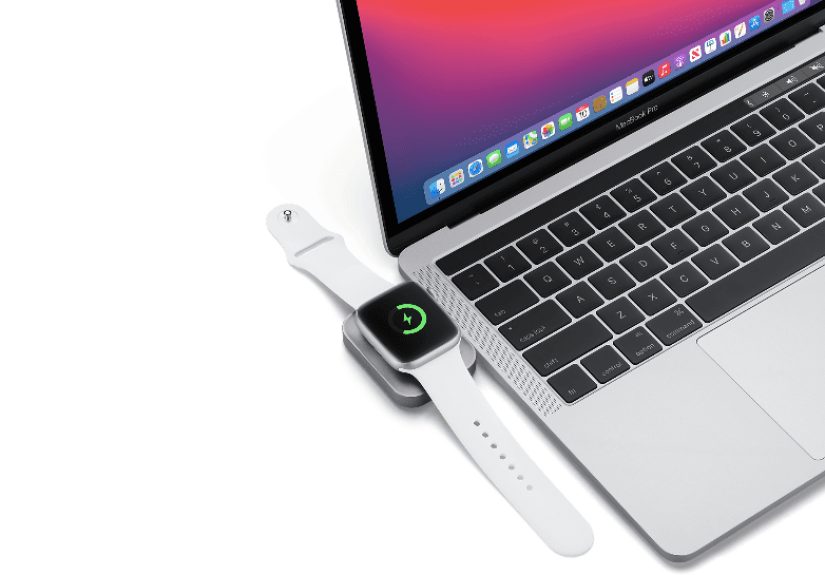
- Apple Watch: its own magnetic charging puck
Because Apple supports products for many years, you might still own devices from
several of these eras. That means multiple cables and bricks coexist in your home,
even as Apple slowly converges on USB-C for most things.
3. Design, Durability, and “Apple-ness”
Apple isn’t shy about making hardware decisions based on design and user experience,
sometimes ahead of industry standards. Lightning was smaller and more elegant than
the clunky micro-USB ports that dominated phones a decade ago, and MagSafe was a
clever way to protect laptops from cable-related disasters.
The trade-off: instead of waiting for the world to catch up with a perfect standard,
Apple often goes first with its own connector, then adapts later when universal
standards like USB-C finally mature and are pushed by regulators and the broader market.
4. Ecosystem Control and Accessory Revenue
There’s also a business angle. Proprietary connectors like Lightning gave Apple
tight control over the accessory ecosystem through certification programs. That
helped maintain quality and safety, but it also meant more licensing revenue, and
made it harder for truly cheap but questionable accessories to flood the market.
USB-C is an open standard, so while Apple still sells its own cables and chargers,
it has less control over who makes compatible accessories. Good for consumers in
terms of choice and pricing but it means Apple has to compete more directly with
brands like Anker, Belkin, and others.
The EU Finally Steps In: Toward a Common Charger
A big driver behind Apple’s move from Lightning to USB-C on the iPhone is
regulation specifically, the European Union’s decision to adopt a
common charger standard. The EU has mandated that phones, tablets, and many other
small electronics sold in Europe must use USB-C for charging, with similar rules
extending to laptops a bit later.
The goals are simple: reduce e-waste, simplify life for consumers, and avoid every
manufacturer inventing their own “special” port forever. Apple publicly argued
that regulation could stifle innovation, but at the end of the day, USB-C was
already widely adopted across the industry and the rules helped push things over
the finish line.
That’s why modern Apple gear is increasingly USB-C across the board: Macs, most
iPads, and now the latest iPhones all use that same, universal shape. Over time,
this should mean fewer unique chargers and more interchangeable cables.
Are Apple Chargers Really That Different from Everyone Else’s?
In some ways, yes. In other ways, not really.
On the technical side, Apple’s newer USB-C chargers follow the same
USB Power Delivery standards used by many PC laptops and Android phones. A
good third-party USB-C PD charger can usually power your iPhone, iPad, MacBook,
and even non-Apple devices just fine, as long as the wattage is appropriate.
Where Apple does differ is in the details:
-
Wattage options: Apple sells a wide range of USB-C adapters (20W, 35W, 70W,
96W, 140W, and more) that pair nicely with specific devices and fast-charging
features. -
MagSafe 3 on modern MacBooks: You can charge through MagSafe or the
USB-C ports. That flexibility is great but it means another cable type in your bag. -
Brand and build quality: Apple’s bricks and cables are usually well built,
but they’re not cheap. Many users mix Apple adapters with high-quality third-party
USB-C chargers that support the same standards, often at lower cost or with multiple
ports on a single brick.
So while Apple sometimes feels like it lives in its own charging universe, the
newest gear is much closer to the wider USB-C world than ever before.
How to Simplify Your Apple Charging Life (Without Losing Your Mind)
The era of “one charger per device” is over or at least, it can be, if you plan
your setup intentionally. Here’s how to tame the chaos.
1. Pick a Couple of Good USB-C Chargers, Not One for Every Device
Instead of hoarding individual bricks, invest in one or two solid multi-port
USB-C chargers that support USB-C Power Delivery. A 65W–100W GaN (gallium
nitride) charger with multiple ports can often handle:
- One MacBook
- One iPad or iPhone
- One extra device (AirPods, another phone, etc.)
This cuts down on clutter and makes travel much easier. Leave the older low-watt
adapters in a drawer as backups.
2. Standardize on USB-C Cables Where You Can
As more Apple devices move to USB-C, try to keep a small set of high-quality
USB-C cables rated for decent power (for example, up to 60W or 100W). Label them
or color-code them if you want to stay extra organized.
If you still have Lightning devices, keep a couple of USB-C to Lightning
cables instead of older USB-A versions. That way, they work with your modern USB-C
chargers and laptops, and you don’t need a completely separate ecosystem for just
one device.
3. Understand “Enough Wattage” Instead of Chasing Exact Numbers
You don’t need a separate brick for every wattage Apple sells. In general:
- A 20W USB-C adapter is great for iPhones and smaller iPads.
- 30–35W can handle MacBook Air and iPads efficiently.
- 60–70W+ is better for MacBook Pro models, especially larger ones.
Using a higher-wattage adapter than your device “needs” is usually safe the
device limits how much power it draws. The main downside is cost and size, not
safety, as long as the charger follows proper standards.
4. Keep a Dedicated Charging Station
Rather than scattering chargers in every room, create a small charging station:
- One multi-port USB-C charger
- One USB-C to USB-C cable for USB-C iPhones, iPads, or Macs
- One USB-C to Lightning cable (if you still have Lightning devices)
- One Apple Watch charging puck
- Optional: a MagSafe or Qi wireless charger for iPhone
Everything stays in one place, and you don’t have to play “guess the cable” every night.
The Future: Fewer Ports, More Wireless, Less Weird
Looking ahead, the Apple charging story is likely to keep shifting, but in a more
unified direction:
- USB-C everywhere: As older Lightning devices age out, USB-C will dominate.
-
Less in-box clutter: Apple already stopped including power adapters with
iPhones and many other products, nudging you to reuse chargers and cut down on e-waste. -
More wireless charging: MagSafe and other wireless standards continue to
improve. Over time, more people will drop their phones onto charging pads instead
of plugging them in, at least at home and at the office.
Will Apple ever create one magical, universal, works-with-everything charger? Maybe
not. But as USB-C and wireless standards continue to mature, the number of truly
unique, one-device-only chargers should shrink. Your junk drawer may one day hold
just a few cables, instead of a museum exhibit of Apple’s design history.
Real-World Experiences With Apple’s “Weird” Chargers
All the technical details are nice, but if you’ve lived with Apple gear for a
while, you probably have your own battle stories the late-night hunts for the
“right” charger, the frustration of grabbing the wrong cable from your bag, or the
joy of finally streamlining everything down to a few essentials.
Picture this: You’re heading out on a weekend trip. You toss your MacBook, iPad,
iPhone, Apple Watch, and AirPods into your backpack. Then comes the real puzzle:
which chargers do you bring? Years ago, that might have meant:
- A chunky MagSafe brick for the MacBook
- A USB-A power adapter and Lightning cable for the iPhone
- A separate USB-A charger for the iPad (ideally higher wattage)
- An Apple Watch charger puck and its USB cable
Four or five bricks later, your backpack weighed as much as your carry-on.
Fast-forward to the USB-C era. Now imagine packing a single 65W multi-port
USB-C charger, two USB-C cables, one USB-C to Lightning cable (if you still
have an older iPhone or accessories), and your Apple Watch puck. Suddenly that
chaotic pile becomes a neat, cable-managed kit that fits in a small pouch.
Many Apple users report a similar evolution: the more devices they upgrade to
USB-C, the less “weird” everything feels. A single multi-port charger can often
handle a MacBook Air, an iPad, and an iPhone all at once. A second, smaller
20W adapter lives in a purse, backpack, or car as a backup. The Apple Watch
still has its special puck, but when that’s the only truly unique piece of the
puzzle, it’s much easier to live with.
Another common experience is realizing, often by accident, that one charger
can do more than you thought. Maybe you plug your iPhone into your MacBook’s
70W adapter in a hurry and discover it fast-charges beautifully. Or you connect
your iPad to a third-party USB-C GaN charger that also powers your Nintendo
Switch and a work laptop and everything just works.
On the flip side, there’s the frustration of the “almost right” cable. You might
grab a USB-C cable that only supports basic charging and slow data, not realizing
that your external drive or monitor needs a higher-spec cable. Or you plug your
MacBook into a lower-wattage phone charger and wonder why the battery is barely
holding steady. These are the growing pains of a flexible standard: the cables
all look similar, but their capabilities can differ.
Over time, most Apple users develop a personal system. Some people keep a “home
base” charger on the nightstand with a dedicated iPhone cable, Apple Watch puck,
and AirPods wireless pad. Others build a “travel kit” with labeled cables and a
single, powerful USB-C adapter. A few tech-savvy folks even create charging
stations with cable organizers, desktop stands, and under-desk power strips so
everything has a place and purpose.
The common thread in these experiences is this: the more you understand what each
device actually needs and what your chargers and cables can deliver the less
mysterious Apple’s charging world becomes. Yes, there are still quirks, and older
devices will hang around with their legacy connectors for years. But with some
intentional choices, you can move from “Why are there so many weird chargers?” to
“Wow, I actually know what all of this does.”
In the end, Apple’s charging story is a mix of design decisions, evolving
technology standards, regulatory pressure, and a dash of business strategy. It’s
not always simple, but it’s slowly trending toward fewer connectors, more shared
standards, and a lot less cable confusion especially if you meet Apple halfway
by curating your own, streamlined charging setup.