Table of Contents >> Show >> Hide
- What Google Launched (and When)
- Meet the New Wired Nest Cam: Always-On, Indoors, and Surprisingly Decor-Friendly
- Nest Cam With Floodlight: The Porch Light That Can Actually Think
- The Google Home App Experience: Less App-Hopping, More “Just Show Me the Clip”
- Free vs. Paid: What You Get Without a Subscription
- How the Wired Nest Cam and Floodlight Cam Compare to Ring and Other Rivals
- Which One Should You Buy?
- Installation and Placement Tips (Because Angle Is Everything)
- Privacy, Security, and Camera Etiquette
- Bottom Line
- Real-World Experiences (Extra 500+ Words)
Google’s smart home cameras have always had a certain “helpful robot roommate” vibe: quietly watching the front door, politely telling you your dog is on the couch again, and never once asking for rent. On October 5, 2021, Google officially rounded out its refreshed Nest camera lineup by releasing two devices people had been waiting for: the Nest Cam (indoor, wired) and the Nest Cam with Floodlight. The goal was simple: make home security feel less like a complicated IT project and more like… plugging in a camera and going on with your life.
This launch mattered for three reasons. First, Google brought more intelligence on-device, so you could get useful alerts without paying just to learn that “a person is, in fact, a person.” Second, it pushed the experience deeper into the Google Home app (instead of splitting your life between apps). Third, it gave shoppers two practical choices: an always-powered indoor camera for everyday monitoring, and a bright, hardwired floodlight camera for outdoor deterrence. In other words: one for inside, one for outside, and both designed to reduce the number of times you mutter, “Why is it alerting me about a leaf?”
What Google Launched (and When)
Google first announced a new Nest Cam and Nest Doorbell lineup on August 5, 2021, with the battery-powered models going on sale on August 24, 2021. The wired indoor camera and the floodlight camera were teased as “coming soon.” Then, on October 5, 2021, Google made good on that promise and released the final two cameras: the $99.99 Nest Cam (wired, indoor) and the $279.99 Nest Cam with Floodlight.
If you’re reading this today, you might also notice Google’s smart home strategy has kept evolvingespecially around the Google Home app and subscriptions. But the core pitch of these two cameras remains very clear: always-on wired coverage indoors, and bright, motion-triggered, camera-backed lighting outdoors.
Meet the New Wired Nest Cam: Always-On, Indoors, and Surprisingly Decor-Friendly
The Nest Cam (indoor, wired) was positioned as Google’s most affordable Nest Cam at launch, starting at $99.99. It also came in multiple colorsbecause if a camera is going to live on your shelf forever, it shouldn’t look like a mysterious sci-fi pebble that fell out of a spaceship.
Key features that actually matter day-to-day
- 1080p HDR video designed to handle tricky lighting (like bright windows and shadowy corners).
- On-device intelligence that can detect people, animals, and vehicles and send more relevant alerts.
- Three hours of event video history included, plus Activity Zones to focus alerts on the spots you care about.
- Local storage backup for reliabilityif Wi-Fi goes out, it can keep recording and upload clips when the connection returns.
- Built for the Google Home app, with controls, notifications, and history designed around the Home experience.
One of the most practical parts of the wired model is exactly what “wired” implies: no recharging schedule. Battery cameras are greatuntil you realize you’ve been procrastinating on recharging one for three days, and it’s now an expensive wall decoration. A wired indoor cam is the “set it and forget it” option for continuous coverage in a hallway, entryway, home office, or anywhere you want steady monitoring.
Real placement examples (that don’t feel like a security bunker)
Indoor cameras often live in emotionally complicated spaces: kids’ playrooms, pet hangout zones, front entries, and home offices where your “work clothes” might be a hoodie with ambition. Google highlighted how Activity Zones can be used to focus on specific areaslike a sofa your dog has declared as their throneso you can get alerts that are helpful instead of nonstop.
Nest Cam With Floodlight: The Porch Light That Can Actually Think
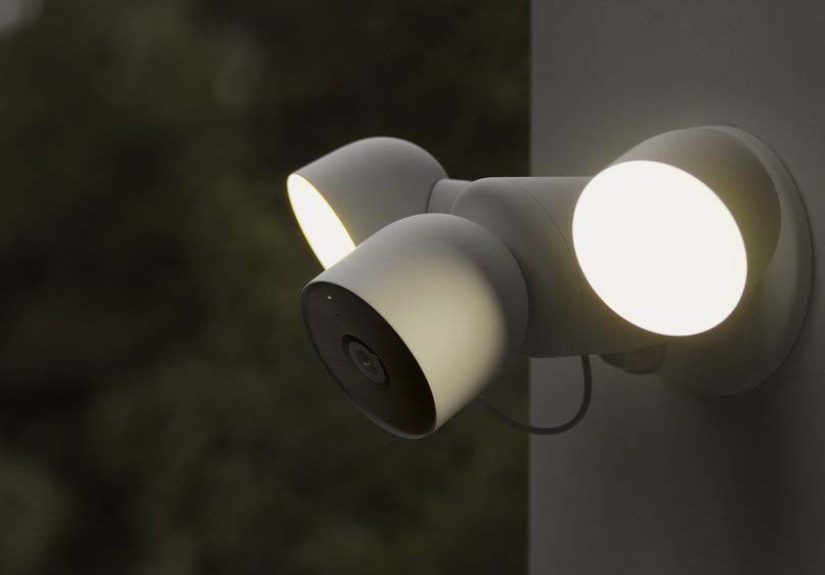
The Nest Cam with Floodlight combines a Nest camera with a bright dual-light fixture, aiming to do two jobs at once: record what’s happening and discourage it from happening again. This was notable because it was Google’s first real step into connected floodlighting hardware. In plain terms: it’s a security camera that can also turn your driveway into a well-lit stage when motion is detected.
What you get with the floodlight model
- 1080p HDR video with a wide field of view designed for outdoor coverage.
- Adjustable dual LED floodlights up to 2400 lumens (with adjustable brightness) and a daylight-like color temperature.
- Motion detection designed for outdoor use, with lighting behavior you can tune (sensitivity, duration, schedules, routines).
- Hardwired power that typically replaces an existing outdoor light fixture (standard junction box install).
- Smarter alerts thanks to on-device detection (so you’re less likely to get “ALERT: WIND EXISTS”).
Here’s why floodlight cams are different from regular outdoor cams: light changes the game. A standard infrared night-vision clip can show you that “something moved.” A well-lit clip can show you detailsclothing, objects, and clearer facial featuresbecause the scene isn’t relying solely on IR illumination.
One underrated perk: resilience during outages (for the camera module)
Reviews noted that the camera portion in the floodlight setup can offer a form of backup behavior: while the lights depend on your home’s power, the camera hardware can continue operating for a period, and can store some event video locally if the internet drops. That’s especially helpful for the exact moments when you least want a camera going dark: storms, brief outages, or unreliable Wi-Fi.
The Google Home App Experience: Less App-Hopping, More “Just Show Me the Clip”
A big part of this launch wasn’t just hardwareit was the push toward the Google Home app as the primary place to view live video, review events, manage alerts, and set routines. For most people, the value of a security camera isn’t the lens specs; it’s the speed and clarity of the experience when something happens.
What “good app experience” looks like in real life
- Fast, useful notifications (especially when alerts distinguish people vs. animals vs. vehicles).
- Activity Zones to cut noiselike excluding a busy street while keeping the front steps in view.
- Easy clip review so you can answer “What happened?” without scrubbing through frustration.
- Routines to automate behavior, such as turning cameras off when you’re home and on when you leave.
- Integration with Google Assistant and compatible displays, so you can pull up a live feed hands-free.
In other words: the camera is the hardware, but the Home app is the habit. The smoother the habit, the more likely you are to actually use the system instead of remembering it exists only after your neighbor texts, “Hey, did you see that?”
Free vs. Paid: What You Get Without a Subscription
Google emphasized more meaningful features without a paywallparticularly on-device detection for people, animals, and vehicles, plus three hours of event video history and Activity Zones. That’s a big deal because many competing camera ecosystems lock “useful alerts” behind a subscription.
If you want longer video history, 24/7 recording (where supported), or more advanced recognition features, Google offered subscription tiers historically known as Nest Aware and Nest Aware Plus (for longer event history and continuous recording options). Importantly, the naming has evolved: as of October 1, 2025, Nest Aware (2nd gen) became Google Home Premium. If you’re buying today, that’s the name you’ll likely see in Google’s current ecosystem.
Practical subscription decision-making
- Skip the subscription if you mainly want live view + quick event clips + smart alerts.
- Consider a subscription if you want to search back days or weeks, build a true “incident timeline,” or rely on 24/7 recording for certain areas.
- Think in “moments,” not months: if you only need recording during travel season, you can subscribe temporarily for coverage and peace of mind.
How the Wired Nest Cam and Floodlight Cam Compare to Ring and Other Rivals
Most camera systems are now playing the same core hits: HD video, night vision, motion alerts, two-way talk, and cloud clip storage. The differentiators tend to be:
- How smart the alerts are (and whether that costs extra).
- How usable the free tier is (three hours of event history is genuinely helpful).
- How clean the app experience feels when you’re trying to find “the thing that just happened.”
- How well lighting is handled outdoorsespecially with floodlights.
Google’s approach leaned into on-device processing and a free tier that isn’t just a teaser. The floodlight model, in particular, competes with dedicated floodlight cams by combining strong lighting with smarter detectionideally reducing unnecessary “light blasts” triggered by harmless movement.
Which One Should You Buy?
Choose the Wired Nest Cam (Indoor) if you want…
- Always-on indoor monitoring without battery maintenance.
- A simple setup (plug in, mount or set on a shelf, open the Home app).
- Smart alerts without a subscription for everyday awareness.
- A camera that blends in instead of screaming “SURVEILLANCE.”
Choose the Nest Cam With Floodlight if you want…
- Outdoor deterrence (light + camera is a powerful combination).
- Better night clips thanks to bright illumination, not just infrared.
- A replacement for an existing outdoor light fixture with smart control baked in.
- Alerts that try to be relevant so you’re not reacting to every moth with ambition.
Installation and Placement Tips (Because Angle Is Everything)
Indoor wired cam placement
- Cover entry points: entryways, doors, and main hallways give the most useful visibility.
- Avoid direct glare: aim away from large windows if possible, or rely on HDR to help manage backlight.
- Use Activity Zones: exclude high-motion areas (like a ceiling fan, a busy TV, or a frequently opened curtain).
- Use routines: many households prefer cameras to automatically turn off when people are home.
Floodlight cam placement
- Mount it high enough to avoid overexposure and to widen the viewing angle (many reviewers recommend mounting floodlights at typical exterior-light height or higher).
- Point lights, then point camera: adjust the floodlights for coverage first, then fine-tune the camera angle.
- Trim false triggers: sensitivity plus zones can help reduce alerts from trees, flags, or street traffic.
- If you’re not comfortable with wiring, hire a licensed prothis is a hardwired fixture, not a plug-in accessory.
Privacy, Security, and Camera Etiquette
Cameras are tools, not vibesand the vibe matters. If you’re installing indoor cameras, be clear with household members about where they are and why they exist. Use features like routines (on when away, off when home) and zones to avoid capturing more than you intend. Outdoors, aim cameras at your own property, not directly into neighbors’ windows. The best security system is the one that makes you feel safer without making everyone feel weird.
Bottom Line
With the Nest Cam (indoor, wired) and Nest Cam with Floodlight, Google delivered two practical, “everyday-use” security devices that focused on better alerts, a more useful free tier, and a cleaner Google Home app experience. The wired indoor model is ideal for consistent coverage without battery drama. The floodlight cam is built for outdoor moments where light and clarity matter most. Together, they made Nest’s refreshed lineup feel completeand more importantly, easier to live with.
Real-World Experiences (Extra 500+ Words)
To make this topic feel less like a spec sheet and more like real life, here are experiences and patterns that commonly come up when people actually live with a wired indoor Nest Cam and a floodlight cameraespecially in busy homes where deliveries, pets, and unpredictable front-yard happenings are basically a daily sitcom.
1) The “delivery proof” moment you didn’t know you needed
One of the first “aha” moments people describe is how quickly a camera becomes the household’s unofficial historian. A package arrives, someone asks, “Did it get here?” and instead of launching a neighborhood investigation, you check the timeline. With three hours of event history included, you can usually catch the important stuff in the near termlike a delivery drop-off, a visitor at the door, or that one friend who always rings the bell like they’re announcing a medieval duel.
2) Activity Zones = fewer alerts, more sanity
In the beginning, many users accidentally create an “alert factory.” A camera pointed at the street picks up every passing car. A backyard camera catches every tree branch with stage fright. The turning point is learning to set Activity Zones like you’re drawing boundaries on a map: “This is the walkway. This is the porch. That is the part of the yard where squirrels hold their meetingsignore it.” Once zones are tuned, notifications become more meaningful, and you stop treating your phone like a panic button.
3) Pets: adorable, chaotic, and surprisingly trackable
Indoor cameras often end up being “pet cams” whether you planned that or not. People commonly mention using animal alerts to check on dogs during the day, confirm a cat hasn’t knocked over a plant, or (let’s be honest) see what the pets do when humans leave. Two-way talk becomes the comedic feature: you can remind your dog to step away from the trash like you’re narrating a nature documentary. The key learning is that alerts should be dialed inotherwise your phone turns into a live-feed commentary track on every nap, stretch, and dramatic sigh.
4) Floodlights change behaviorboth yours and everyone else’s
Floodlights are part security and part psychology. Homeowners often notice that bright, sudden lighting immediately makes outdoor areas feel more controlleddriveways, side yards, and back patios become less “mystery zones.” Visitors also behave differently when a light turns on as they approach; it’s a clear signal that the area is monitored. The best experience tends to come when users adjust brightness and sensitivity so the light feels purposeful rather than jump-scare bright. When tuned well, it’s like having a smart porch guardian that says, “Hello, I see you,” without shouting it.
5) The biggest surprise: the app experience becomes the product
People expect to talk about video quality, but day-to-day satisfaction usually comes down to: how fast clips load, how easy it is to find the right moment, and whether notifications feel accurate. A wired indoor cam tends to feel dependable because it’s always powered and always there. The floodlight setup feels powerful because it adds visibility at night and gives you clips that are simply clearer. Over time, many users develop a rhythm: check a morning timeline, review any notable outdoor events, and rely on “only notify me about people” settings for the times when you truly want your phone to tap you on the shoulder.
In short, these devices tend to work best when you treat them like household systems, not gadgets: place them thoughtfully, tune zones and alerts, and build routines around when you want monitoring to be active. Do that, and you get the real promise of smart securityless anxiety, fewer false alarms, and a clearer picture of what’s happening at home.