Table of Contents >> Show >> Hide
- What an Amazon Storefront Really Does for Your Brand
- Before You Create Your Amazon Storefront
- How to Create Your Amazon Storefront Step by Step
- How to Edit Your Amazon Storefront Without Losing Your Mind
- Best Practices That Actually Help Build a Strong Brand
- Common Amazon Storefront Mistakes to Avoid
- A Simple Example of a Strong Amazon Storefront Strategy
- Experience: What Brands Usually Learn After Building and Editing an Amazon Storefront
- Conclusion
If your Amazon presence currently feels like a row of product listings wearing mismatched socks, an Amazon Storefront can fix that. A strong Storefront turns your brand from “random item in search results” into “oh, this company actually knows what it’s doing.” That matters because shoppers do not just buy products. They buy confidence, clarity, and the pleasant feeling that they are not about to spend money on something that looks like it was assembled in a dimly lit garage.
An Amazon Storefront gives your brand a dedicated place on Amazon to showcase products, organize collections, tell your story, and guide shoppers through a cleaner journey. It is part digital shelf, part brand billboard, and part trust machine. Better yet, it can become a high-performing landing page for ads, social campaigns, influencer traffic, and repeat customers who want more than one lonely ASIN on a detail page.
In this guide, you will learn how to create your Amazon Storefront, how to edit it without turning it into a cluttered coupon scrapbook, and how to use it to build a stronger brand identity over time. We will also cover practical strategy, design tips, common mistakes, and real-world experience so you can make your Storefront work harder than your third cup of coffee.
What an Amazon Storefront Really Does for Your Brand
Think of your Amazon Storefront as your brand’s home base inside Amazon. Instead of sending shoppers to a single product page filled with competing recommendations and distractions, you send them to a branded environment focused on your catalog, your story, and your product categories.
That matters for several reasons. First, it helps create brand consistency. When your logo, brand voice, product collections, photography, and messaging all line up, your business feels more established. Second, it improves product discovery. Shoppers who land on one product can quickly browse bundles, seasonal picks, best sellers, or related items. Third, it supports performance marketing. Sponsored Brands campaigns, external social traffic, email campaigns, and creator links become much more powerful when they land on a curated Store page instead of a generic product listing.
And yes, this is not just about looking pretty. A good Amazon brand store can support higher engagement, stronger cross-selling, and better shopper education. In plain English: more browsing, more trust, and more chances to sell something besides the one product people originally came to see.
Before You Create Your Amazon Storefront
1. Make Sure You Are Eligible
Before you start dreaming about dramatic hero banners and polished category pages, you need access. In most cases, sellers need to be enrolled in Amazon Brand Registry to create a Brand Store. That means your brand should be properly registered and connected to the correct selling account. If you are a serious brand building on Amazon, this step is not optional. It is the velvet rope between you and the Store builder.
2. Gather Your Brand Assets First
Do not open the builder and “figure it out as you go” unless your favorite hobby is avoidable rework. Gather the basics first:
- Your approved brand logo
- Clean lifestyle images and product photography
- Short brand story copy
- Category structure for your catalog
- Hero products and best sellers
- Seasonal or campaign-specific offers
- Videos, if available
Your Storefront should feel intentional. If your visuals look premium but your copy reads like it was written by a sleepy toaster, the brand experience falls apart. Consistency is the game.
3. Map the Shopper Journey
One of the smartest things you can do before building your Amazon Storefront is decide how shoppers should move through it. Start with your homepage. Then ask: what should a new visitor do next? Browse product categories? Learn your story? See bundles? Shop best sellers? Claim deals?
A strong Amazon Store does not just display products. It guides people. The goal is not to cram every SKU onto one page and hope for the best. The goal is to reduce friction, answer questions fast, and make the next click obvious.
How to Create Your Amazon Storefront Step by Step
Step 1: Open the Store Builder
Once your brand is eligible, go to the Amazon advertising or brand store area and create a new Store. Amazon’s Store builder is self-service, which is good news for brands that want control and bad news for anyone hoping the platform will magically understand their visual taste.
You will enter your brand display name, upload your logo, and begin creating the Store structure. Amazon typically lets you start with templates or a blank design. Templates are useful if you want speed. A custom layout is useful if you want more control.
Step 2: Choose a Structure That Matches How People Shop
Your homepage should introduce the brand quickly and make navigation simple. After that, create pages or subpages based on how customers naturally browse. Smart examples include:
- Best Sellers
- New Arrivals
- By Category
- By Need or Use Case
- Gift Ideas
- Bundles and Collections
- About the Brand
For example, if you sell skincare, your structure might be “Cleanser,” “Moisturizer,” “Sensitive Skin,” and “Travel Kits.” If you sell kitchen gear, try “Meal Prep,” “Coffee Tools,” “Best Sellers,” and “Starter Bundles.” The more intuitive the structure, the less mental work for the shopper.
Step 3: Build With Tiles, But Do Not Tile Yourself Into Chaos
Amazon Storefront design uses tiles and sections. That gives you flexibility, but it also tempts people to add everything everywhere all at once. Resist that urge. A clean Store usually beats a busy one.
Use large, attractive visual sections for your hero message and core collections. Add product grids where comparison shopping makes sense. Use text tiles to explain benefits, not to write a novel. Use shoppable images or collection layouts to create context. And remember that shoppers are often on mobile, so the layout needs to be easy to scan vertically.
A good rule of thumb is this: every section should earn its place. If a tile does not help customers discover, understand, or buy, it is just digital furniture.
Step 4: Add Products With Strategy
Do not dump your whole catalog onto the homepage like a clearance bin exploded. Lead with your strongest products first. Put hero items where they are easiest to find. Group related products in a way that encourages cross-selling. If customers buy Product A, what should they see next? Product B? A refill? A bundle? A premium upgrade?
Amazon shoppers like convenience. If your Storefront helps them shop in a logical sequence, you increase the odds that they buy more than one item. That is how a brand store starts acting like a sales engine instead of a decorative brochure.
Step 5: Write Copy That Sounds Human
Your Amazon Storefront copy should support conversion, not audition for a corporate buzzword contest. Keep headlines clear. Keep value propositions specific. Tell shoppers what the product line solves, who it is for, and why your brand is different.
Instead of saying “Innovative lifestyle solutions for modern living,” say “Compact kitchen tools designed for small apartments and fast weeknight meals.” One of those sentences helps shoppers. The other sounds like it was generated during a boardroom power outage.
Step 6: Preview and Submit for Review
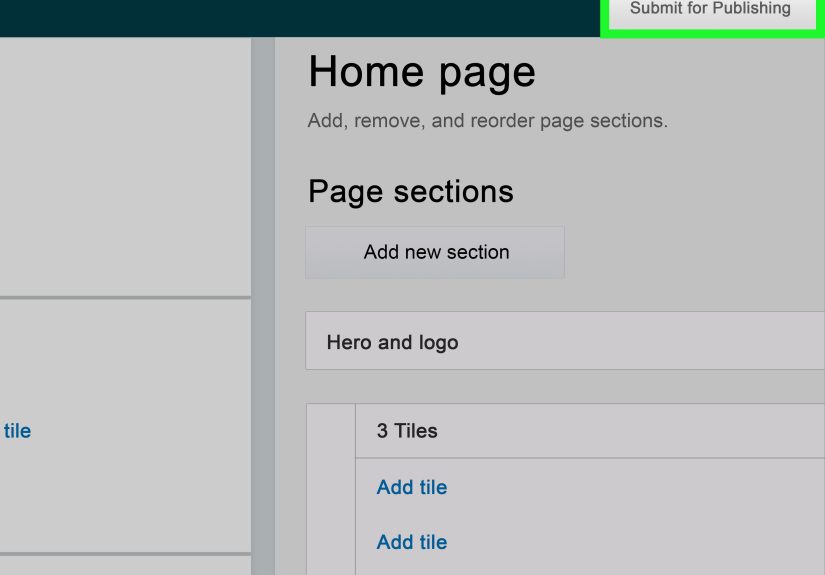
Before publishing, preview the Store carefully. Check spacing, image crops, mobile layout, spelling, broken flows, and product selection. Amazon reviews Stores before they go live, so make sure your creative and copy follow platform requirements. It is much easier to fix issues before launch than after your team has already posted the link everywhere.
How to Edit Your Amazon Storefront Without Losing Your Mind
Creating the Store is only the beginning. Editing is where the real brand building happens. Strong brands treat their Amazon Storefront as a living asset, not a one-time school project you finish at 11:58 p.m. and never open again.
Edit for Seasons, Campaigns, and New Product Launches
Your storefront should evolve with your business. Update banners for holidays, refresh top sections for Prime Day or Black Friday, feature launches, rotate seasonal products, and highlight limited-time bundles. If your summer campaign is still live in November, shoppers will notice. Not in a good way.
Amazon also supports Store versions and scheduling, which is especially useful for promotional periods. That means you can prepare a future version in advance instead of panic-editing your homepage the night before a major event while whispering “please save” at your laptop.
Edit Based on Performance, Not Guesswork
Use Store Insights to see what is working. Look at visits, page views, sales, traffic sources, and page-level performance. If one page gets traffic but weak engagement, the layout or message may be off. If one collection converts well, feature it more prominently. If a campaign sends traffic to a generic homepage but your category page converts better, change the landing destination.
In other words, edit like a strategist, not like someone redecorating a guest room no one uses.
Refresh Your Visual Identity Regularly
Amazon recommends updating your Store regularly, and that advice is solid. Refreshing imagery, promotions, featured collections, and campaign pages keeps the experience current for returning visitors. Even small edits can signal that the brand is active and paying attention.
That does not mean reinventing your Store every week. It means keeping it current, relevant, and aligned with what customers care about right now. A fresh hero image, new featured category, updated product set, or sharper message can make a meaningful difference.
Best Practices That Actually Help Build a Strong Brand
Tell a Clear Brand Story
Your Storefront should answer the unspoken customer question: “Why this brand?” Include your origin, mission, values, or design philosophy where relevant, but keep it concise. People want confidence, not your entire autobiography from middle school onward.
Good brand storytelling builds trust. Great brand storytelling connects product benefits to lifestyle, identity, or need. That connection is what makes a shopper remember your brand later, not just your listing in the moment.
Use Consistent Visual Language
Choose a visual direction and stick to it. If your homepage uses sleek minimal photography, do not follow it with random low-resolution graphics that look like they escaped from 2012. Use consistent color tones, typography treatment, image quality, and brand voice. A cohesive storefront feels more premium, more reliable, and easier to trust.
Organize by Intent, Not Just Product Type
Categories are useful, but intent-based collections can be even stronger. “Travel Essentials,” “Work From Home Setup,” “Gifts Under $50,” or “Sensitive Skin Favorites” can outperform plain old category labels because they match how real shoppers think. Customers do not always shop by SKU class. Often, they shop by problem, occasion, or goal.
Link Ads to the Most Relevant Page
If you run Sponsored Brands or external campaigns, do not always send traffic to the homepage. Send coffee-mug shoppers to the mug page. Send holiday traffic to your gift collection. Send new-customer acquisition campaigns to a page that introduces the brand and your hero products. Relevance wins. Randomness does not.
Track External Traffic Properly
If you promote your Amazon Storefront on social media, email, influencer content, or your brand site, use source tags and measurement tools so you can see where traffic is coming from and what it does next. This is one of the easiest ways to stop guessing which channels deserve more budget.
Design for Mobile First
Many shoppers will visit your Store on mobile. That means your first sections matter the most. Headlines should be punchy. Images should communicate quickly. Navigation should be simple. Avoid walls of text and overly complicated layouts. Your Storefront is not a museum exhibit. It is a shopping environment.
Common Amazon Storefront Mistakes to Avoid
- Overcrowding the homepage: Too many products, too many tiles, too little clarity.
- Weak creative: Low-quality visuals can make even good products feel cheap.
- No page hierarchy: If every section screams for attention, none of them win.
- Generic copy: Bland phrases do not build a memorable brand.
- Sending all traffic to one page: Different campaigns need different landing destinations.
- Never updating the Store: An outdated storefront signals an inattentive brand.
- Ignoring analytics: If the data tells you something is not working, believe it.
A Simple Example of a Strong Amazon Storefront Strategy
Imagine a brand that sells insulated water bottles, tumblers, and travel accessories. A weak Storefront would show a giant banner, a messy product grid, and a generic line like “Premium hydration for modern lifestyles.” Fine. Nobody is throwing a parade.
A stronger Storefront would organize pages around how customers actually shop:
- Homepage: Hero message, best sellers, brand promise, seasonal feature
- Hydration for Work: Desk-friendly bottles and coffee tumblers
- Gym and Outdoor: Larger bottles, rugged accessories, performance messaging
- Gift Sets: Bundles and limited-edition colors
- About the Brand: Materials, sustainability, care, and lifestyle story
Now the shopper can browse by need, discover more products, and understand the brand in seconds. That is how you build a stronger Amazon brand presence instead of just stacking products on a digital shelf.
Experience: What Brands Usually Learn After Building and Editing an Amazon Storefront
Here is the part that many guides skip: what it feels like after the Storefront goes live and real shoppers start using it. In practice, brands usually learn the same lesson very quickly. What looked “creative” in a planning meeting is not always what works best on Amazon. A homepage packed with dramatic images, poetic headlines, and ten competing calls to action may impress the internal team for five minutes, but shoppers usually prefer speed, clarity, and relevance.
One common experience is discovering that the best-performing Store page is not the prettiest one. It is usually the page that makes shopping easier. A clean “Best Sellers” page, a practical “Bundles” page, or a focused category landing page often beats the grand cinematic homepage that took forever to build. That is not a failure. It is a reminder that Amazon is still a buying environment. Branding matters, but branding works best when it helps people make decisions faster.
Another frequent experience is realizing how useful regular editing can be. Many brands publish the Store, celebrate for one afternoon, and then neglect it for months. Then they finally update the hero image, swap in seasonal collections, replace slow movers with best sellers, and adjust the landing page for paid traffic. Suddenly the Store feels sharper, the journey makes more sense, and performance starts to improve. Not because of magic. Because relevance improves when the storefront reflects what customers actually want right now.
Teams also learn that internal opinions can be hilariously wrong. The founder loves the brand manifesto. The designer loves the mood shots. The marketing manager loves the sale banner. Meanwhile, customers keep clicking the page with gift bundles and practical navigation. Data has a way of humbling everybody equally, which is honestly one of its best personality traits.
There is also a trust effect that sneaks up on brands. When shoppers land on a polished Amazon Storefront with consistent visuals, organized categories, and useful copy, the brand feels bigger. More legitimate. More established. Even small businesses can look impressively professional when the Store is built well. That perceived credibility can influence how customers view pricing, product quality, and whether they are willing to try additional items from the catalog.
Perhaps the biggest long-term experience is this: the Storefront becomes more valuable once it is tied into everything else. Ads work better when they land on relevant pages. Social media works better when it sends people to curated collections. Product launches feel more complete when the Store has a dedicated page ready. Holiday campaigns feel more coherent when the storefront changes with the season. Over time, the Storefront stops being “that extra Amazon page” and becomes a central part of the brand’s ecommerce strategy.
So yes, creating your Amazon Storefront matters. But editing it, measuring it, and improving it over time is what turns it into a true brand asset. The strongest stores are rarely built perfectly on day one. They get better because the brand pays attention, learns from shoppers, and keeps refining the experience. That is not flashy advice, but it is the kind that makes money.
Conclusion
If you want to build a strong brand on Amazon, your Storefront should not be an afterthought. It should be a planned, branded, measurable experience that helps shoppers understand who you are, what you sell, and why they should buy from you instead of the twelve other options sitting nearby in search results.
Create it with purpose. Edit it with data. Refresh it with intention. And always remember: a strong Amazon Storefront is not just a prettier page. It is a smarter path to trust, discovery, and long-term brand growth.