Table of Contents >> Show >> Hide
- What Makes a Light Sculpture Interactive?
- Start With the Experience, Not the LEDs
- Choose Addressable LEDs for Flexible Effects
- Shape the Light With Diffusion
- Pick Sensors That Match the Interaction
- Use Microcontrollers and Lighting Software Wisely
- Design Better Light Behaviors
- Build Sculptural Forms That Help the Electronics Shine
- Scale Up With DMX and Networked Control
- Do Not Ignore Power and Safety
- Prototype Small, Then Make It Beautiful
- Specific Project Ideas to Try
- Common Mistakes and How to Avoid Them
- Experience Notes: What Building Interactive Light Sculptures Teaches You
- Conclusion
Interactive light sculptures sit in that delightful middle zone between art, electronics, and “Wait, did that lamp just react to me?” They can glow when someone walks by, ripple like water when touched, pulse to music, or change color based on distance, motion, temperature, or even the mood of a room. Unlike a normal lamp, which has one job and performs it with the emotional range of a toaster, an interactive light sculpture invites people to participate.
The best part is that you do not need a giant museum budget to start. Modern addressable LEDs, microcontrollers, sensors, diffusion materials, and open-source lighting software have made it possible for artists, hobbyists, designers, students, and curious garage inventors to build surprisingly polished pieces. The trick is not simply sticking LEDs onto a frame. The trick is designing a sculpture that has a reason to respond, a body that makes light beautiful, and electronics that do not throw a tiny tantrum the moment someone claps.
This guide explores practical, creative, and reliable techniques for making interactive light sculptures, from choosing LEDs and sensors to shaping light, programming reactions, and planning for real-world durability. Think of it as a friendly studio notebook with fewer coffee stains and slightly better grammar.
What Makes a Light Sculpture Interactive?
A light sculpture becomes interactive when it responds to input. That input might come from a person, the environment, another device, or a programmed schedule. The sculpture senses something, interprets that data, and changes its lighting behavior in return.
For example, a wall sculpture might brighten as a viewer approaches. A hanging cloud of LEDs might shimmer when people speak nearby. A tabletop piece might light up under objects placed on its surface. A wearable or handheld sculpture might shift color when tilted. In each case, the object is not just displaying light; it is having a tiny conversation with the world.
The Three-Part Formula
Most interactive light sculptures can be understood as three connected layers:
- Input: Sensors detect motion, touch, sound, distance, pressure, light, or orientation.
- Logic: A microcontroller or small computer decides what the input means.
- Output: LEDs, fixtures, motors, or projection elements create a visual response.
Once you understand that formula, the possibilities multiply quickly. A motion sensor can trigger a wave. A microphone can drive brightness. A capacitive touch pad can turn a metal sculpture into a glowing instrument. A light sensor can make a piece behave differently at noon than it does at midnight, because apparently even sculptures deserve personality arcs.
Start With the Experience, Not the LEDs
Many beginners start by asking, “Which LED strip should I buy?” That is a useful question, but not the first one. Start with the experience. What should a person feel when they encounter the piece? Calm? Surprise? Curiosity? A mild suspicion that the furniture is judging them?
A strong concept makes technical decisions easier. If the sculpture should feel like breathing, you need soft fades and diffusion. If it should feel like lightning, you need fast response and high contrast. If it should feel like water, you might use wave algorithms, blue-green palettes, and curved reflective materials. If it should feel like a living creature, random pauses and subtle idle motion can help it seem less robotic.
Build a Reaction Map
Before wiring anything, sketch a simple reaction map:
- When nobody is nearby, the sculpture slowly glows in an idle pattern.
- When someone approaches, nearby LEDs brighten.
- When someone touches a panel, color spreads outward.
- When several people interact at once, the entire sculpture becomes more energetic.
This kind of map keeps the project focused. It also prevents the classic maker problem: adding twelve sensors, seventeen modes, and one feature nobody asked for, until your sculpture behaves less like art and more like a confused spaceship dashboard.
Choose Addressable LEDs for Flexible Effects
For most DIY interactive light sculptures, addressable LEDs are the star of the show. Unlike basic LED strips where the whole strip changes color together, addressable LEDs let you control each pixel individually. That means you can create waves, gradients, sparks, trails, animations, and location-based responses.
Common choices include WS2812B-style LEDs, often known in maker circles as NeoPixel-type LEDs, and SPI-based LEDs such as APA102 or SK9822. WS2812B strips are popular because they use only one data line and are widely supported. SPI-based strips use separate data and clock lines, which can be helpful for faster or more reliable animation in some projects.
Use Shorter Runs and Power Injection
Long LED runs can suffer from voltage drop, color shift, and weird behavior. If the end of the strip turns reddish when everything should be white, the LEDs are not haunted; they are hungry. Large sculptures should be planned with multiple shorter LED segments and power injected at several points.
A clean design often uses repeated modules. For example, instead of one enormous strip spiraling through the entire sculpture, divide the piece into identical sections. Each section can have connectors, its own power feed, and a known LED count. This makes installation easier and repairs far less dramatic. When a section fails, you swap a module instead of performing emergency surgery on the whole artwork while people politely pretend not to watch.
Protect the First Pixel
Addressable LEDs are powerful, but they can be sensitive. Good practice includes connecting ground first, using a resistor on the data line near the first pixel, and adding a capacitor across the LED power input for larger builds. These small parts can reduce glitches and protect the first LED from voltage spikes. They are not glamorous. Nobody has ever walked into a gallery and whispered, “Behold, the resistor.” But they help keep the magic alive.
Shape the Light With Diffusion
Raw LEDs are often too harsh for sculpture. They look like little laser-eyed bugs unless softened. Diffusion turns points of light into surfaces, clouds, lines, halos, or glowing volumes. It is one of the most important differences between a pile of electronics and an artwork that feels intentional.
Useful Diffusion Materials
Popular diffusion materials include frosted acrylic, translucent polypropylene, silicone LED channels, vellum, fabric, paper, 3D-printed translucent filament, milky resin, and textured glass. The right choice depends on the sculpture’s form, heat, brightness, viewing distance, and durability.
Distance matters. If LEDs are too close to the diffuser, you may see individual dots. Moving the LEDs farther back, using denser diffusion, or bouncing light off an interior surface can create a smoother glow. In a small tabletop piece, even a few extra millimeters can improve the look. In a larger installation, internal reflective surfaces can help spread light without requiring more LEDs.
Experiment Before Committing
Always test diffusion samples before building the final shell. Tape a few LED pixels behind different materials and view them in a dark room, a bright room, and from different angles. Take photos. Squint. Invite a brutally honest friend. If the diffuser makes the sculpture look like a refrigerator with ambitions, keep testing.
Pick Sensors That Match the Interaction
Sensors are the ears, skin, and nervous system of an interactive light sculpture. Choosing the right sensor is less about what is technically impressive and more about what feels natural to the viewer.
Motion and Presence Sensors
PIR motion sensors are simple and useful for detecting movement in a general area. They work well for pieces that wake up when someone enters the room. For more precise distance-based behavior, ultrasonic sensors, infrared proximity sensors, time-of-flight sensors, or depth cameras can provide richer data.
A distance sensor can let a sculpture respond gradually. For example, a vertical light column might glow softly from the bottom when a person is far away, then climb upward as they approach. This feels more alive than a simple on/off trigger.
Touch and Capacitive Sensors
Capacitive sensing can turn conductive surfaces into touch controls. Metal plates, copper tape, conductive paint, or embedded electrodes can become invisible buttons. This is excellent for sculptures where visible switches would ruin the mood. Nobody wants to see a beautiful glowing sculpture interrupted by a plastic button that looks borrowed from a broken microwave.
Touch interactions work especially well when the response appears to emerge from the contact point. If someone touches the left side, let the light bloom from that area. If they touch multiple points, let the colors blend. The closer the response is to the action, the more satisfying it feels.
Sound-Reactive Input
Microphones can make sculptures pulse to music or react to voice. Simple sound sensors can measure volume, while more advanced setups can analyze frequency bands. Bass might drive large slow pulses, midrange might create waves, and treble might trigger sparkles.
Sound-reactive sculptures can become chaotic if every noise causes a huge response. Add smoothing, thresholds, and quiet idle behavior. The goal is not to make the sculpture panic every time someone drops a spoon.
Light, Color, and Environmental Sensors
Ambient light sensors can help a sculpture adapt to the room. A piece might become brighter in daylight and softer at night. Color sensors can let it respond to nearby objects. Temperature, humidity, and air-quality sensors can create poetic environmental displays, where invisible conditions become visible patterns.
Use Microcontrollers and Lighting Software Wisely
The brain of the sculpture can be as simple as an Arduino-style board or as flexible as an ESP32, Raspberry Pi, or dedicated LED controller. The best choice depends on the number of LEDs, the type of sensors, the complexity of the animation, and whether the piece needs Wi-Fi, Bluetooth, web controls, or synchronization.
Arduino-Style Boards
Arduino-compatible boards are excellent for learning, prototyping, and building reliable single-purpose sculptures. They are good at reading buttons, sensors, analog inputs, and simple communication signals. With libraries for addressable LEDs, they can control beautiful animations without requiring a full computer.
ESP32 and Wi-Fi Control
ESP32 boards are popular because they combine microcontroller features with wireless connectivity. They can run custom code or lighting firmware, making it easier to control patterns from a phone, browser, or local network. For installations where you want remote configuration, presets, or multiple synchronized sculptures, wireless control can be very useful.
FastLED, NeoPixel Libraries, and WLED
FastLED is widely used for programming addressable LED animations. It provides tools for color palettes, gradients, noise, brightness control, and efficient pixel manipulation. NeoPixel-style libraries are beginner-friendly and great for direct control of LED strips. WLED, meanwhile, is a feature-rich firmware option for ESP8266 and ESP32 boards, with built-in effects, segments, palettes, and a web interface.
If you want complete artistic control, custom code is powerful. If you want quick setup, presets, and network control, WLED can save time. Many artists use both approaches: WLED for early testing and custom code once the behavior needs to become more specific.
Design Better Light Behaviors
Good interactive lighting is not just “sensor value goes up, brightness goes up.” That works, but it can feel flat. The best sculptures translate input into behavior with style.
Use Easing Instead of Abrupt Changes
Easing makes transitions feel natural. Instead of jumping from dark to bright, fade in quickly and fade out slowly. Instead of snapping from blue to red, blend through a palette. Human eyes enjoy motion that feels intentional. Abrupt changes are useful for lightning, alarms, and dramatic reveals, but constant snapping can make a sculpture feel nervous.
Create Idle States
An interactive sculpture should still look interesting when nobody is interacting with it. A slow breathing pattern, drifting gradient, or subtle sparkle gives the piece presence. Idle animation also helps people understand that the sculpture is alive and ready for interaction.
Make Responses Local
Local response is one of the neatest techniques. If a sensor is placed under a panel, light the area around that panel first. Then let the effect spread. This creates cause and effect. The viewer thinks, “I did that,” which is exactly the tiny spark of wonder you want.
Layer Multiple Behaviors
Complex sculptures often use layers: a base animation, a sensor-triggered response, and occasional accent effects. For example, a sculpture might always show a slow ocean-like gradient. When touched, a white ripple spreads across the surface. When music plays, the whole palette gently pulses. Layering makes the piece feel rich without making it chaotic.
Build Sculptural Forms That Help the Electronics Shine
The physical form matters as much as the code. A good structure hides wires, supports diffusion, guides the viewer’s attention, and makes maintenance possible.
Modular Frames
Modular construction is your friend. Build repeating cells, ribs, panels, rings, or tiles. Each module can contain LEDs, a sensor, connectors, and mounting points. This approach works for wall sculptures, geodesic domes, LED tables, hanging clouds, and cylindrical forms.
Modularity also helps with storytelling. A sculpture made of glowing cells can behave like a living organism. A dome can respond as a shared instrument. A table can become a field of light under objects. Form and interaction should support each other.
Hidden Cable Paths
Plan wire routes early. Wires should not block light, cast shadows, or become impossible to reach. Leave room for connectors, strain relief, ventilation, and service access. A sculpture that looks clean from the outside but is a spaghetti disaster inside will eventually demand payment, usually at the worst possible moment.
Scale Up With DMX and Networked Control
For larger installations, especially those using professional lighting fixtures, DMX control becomes useful. DMX512 is a standard lighting control protocol used for stage, event, architectural, and installation lighting. It lets controllers send channel-based values to fixtures such as RGB lights, dimmers, strobes, moving heads, and other effects.
DMX is especially helpful when a sculpture combines DIY LED elements with commercial lighting fixtures. A microcontroller can read sensors and send commands, or a computer can translate interaction data into lighting cues. For very large projects, network-based systems such as Art-Net or sACN may also appear in the workflow.
Do Not Ignore Power and Safety
Power planning is where many LED projects either become reliable artworks or dramatic learning experiences. Addressable LEDs can draw significant current at high brightness, especially when many pixels display white. Use a properly rated low-voltage power supply, appropriate wire gauge, fuses where needed, and secure connections.
For public, permanent, or high-power installations, consult qualified professionals and follow applicable electrical and fire-safety rules. Use certified power supplies and avoid exposed conductors. Keep heat in mind, especially when LEDs are enclosed inside acrylic, resin, fabric, wood, or 3D-printed parts. Low voltage is friendlier than mains voltage, but “friendlier” does not mean “ignore physics and hope for applause.”
Prototype Small, Then Make It Beautiful
A smart workflow starts ugly. Build a small prototype with a few LEDs, one sensor, and temporary materials. Confirm that the interaction feels good before making the sculpture large and polished. Once the behavior works, build a visual mockup with diffusion and structure. Then combine the two.
This process saves time. It is much easier to fix a bad interaction on a breadboard than inside a finished sculpture sealed with glue, optimism, and regret.
Specific Project Ideas to Try
1. Touch-Ripple Wall Panel
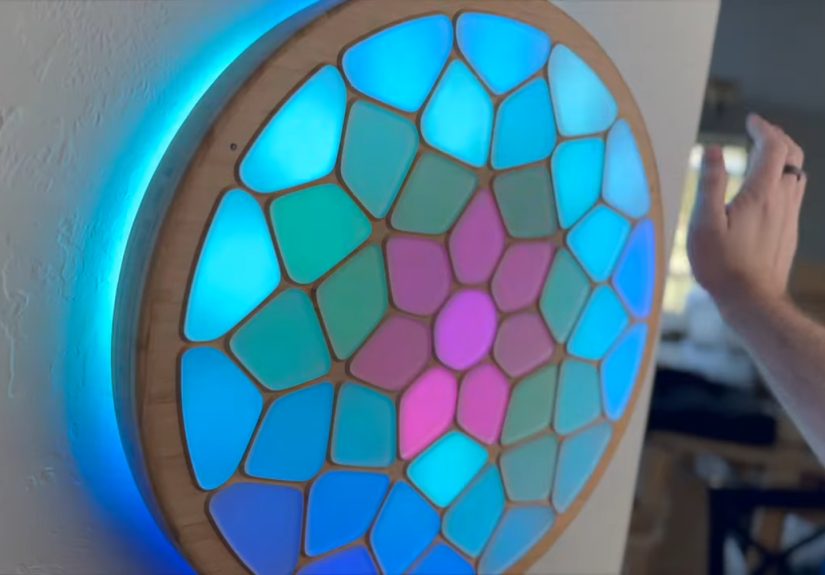
Create a wall-mounted sculpture divided into hexagons or organic cells. Place capacitive touch pads behind selected areas. When a viewer touches a cell, a color ripple spreads across neighboring LEDs. Use frosted acrylic or translucent 3D-printed covers for a soft glow.
2. Sound-Reactive Light Column
Build a vertical tube with LED strips inside and a diffuser around the outside. Use a microphone to detect volume or frequency. Bass can push light upward, while higher frequencies create sparkling highlights. Add a calm idle pattern so the column still looks elegant in silence.
3. Proximity Cloud
Make a hanging cloud from paper lanterns, fiberfill, or translucent fabric, then hide LED pixels inside. Use distance sensors to detect people below. As someone walks under the cloud, light follows them like a glowing weather system. The forecast: 100% chance of people saying, “Whoa.”
4. Interactive LED Table
Use infrared emitters and phototransistors, or other proximity sensing methods, under a translucent tabletop. When an object is placed above a sensing zone, nearby LEDs illuminate. This is a great example of interaction that feels physical and intuitive.
5. Tilt-Controlled Orb
Place LEDs inside a spherical diffuser and use an accelerometer or IMU to detect orientation. As the orb tilts, light can flow downward like liquid, sparkle upward like fireflies, or rotate in response to movement. This works beautifully as a handheld sculpture or suspended kinetic piece.
Common Mistakes and How to Avoid Them
Too Bright, Too Fast
Beginners often run LEDs at full brightness. Full brightness is useful for testing, but it can be visually harsh and power-hungry. Lower brightness usually looks better, improves comfort, reduces heat, and extends component life.
No Diffusion Plan
LEDs without diffusion can look unfinished. Design the diffuser and LED spacing together. The sculpture’s glow should feel like part of the form, not like electronics wearing a thin disguise.
Overcomplicated Interaction
A sculpture does not need twenty modes. One clear, satisfying interaction is better than ten confusing ones. If viewers need a manual, a password, and emotional support to understand the artwork, simplify it.
No Maintenance Access
LEDs, wires, connectors, and sensors may need adjustment. Build access panels or removable sections. Future you will be grateful, and future you has already been through enough.
Experience Notes: What Building Interactive Light Sculptures Teaches You
Working on interactive light sculptures teaches a lesson that is difficult to learn from ordinary screen-based design: people do not interact with objects the way you expect. They touch the wrong place, wave from the wrong angle, stand too close, stand too far, block the sensor, bring three friends, or ask whether it is voice controlled while clapping at it like a seal. This is not failure. This is valuable research wearing sneakers.
One of the most useful experiences is watching someone discover the interaction without instructions. If they immediately understand that their movement changes the light, the design is strong. If they stare at the piece like it owes them money, the relationship between action and response may be unclear. The fix is often simple: make the first response faster, brighter, closer to the person’s action, or more localized.
Another lesson is that subtlety works better than expected. It is tempting to make every interaction explode into rainbow fireworks, because LEDs are fun and self-control is hard. But long-term viewing favors restraint. A gentle ripple, a soft glow, or a slow color shift can feel more magical than constant visual shouting. Save dramatic effects for special moments, like multiple people interacting at once or a person holding touch for several seconds.
Prototyping also teaches humility. A sensor that works perfectly on your desk may behave differently in a gallery, classroom, store window, or living room. Ambient light can affect optical sensors. Loud rooms can confuse microphones. Reflective surfaces can bounce infrared signals. Long wires can introduce noise. Power supplies can sag. Connectors can loosen. The sculpture may be art, but the electrons still read the contract.
Good builders learn to test in realistic conditions. Try the sculpture in bright daylight and darkness. Test it with one person, several people, and nobody at all. Let it run for hours. Move it. Unplug it. Plug it back in. Watch whether it starts cleanly or enters a mysterious blinking state known technically as “uh-oh.” These tests reveal problems before the final installation.
Documentation becomes surprisingly important. Label wires, record LED counts, save code versions, photograph wiring, and write down power supply ratings. In the beginning, you may think, “I will remember this.” You will not. Three weeks later, every red wire will look like every other red wire, and your notebook will become a sacred artifact.
The most rewarding part is seeing the sculpture become social. Interactive light draws people together. One person touches it, another notices, then someone else tries a different gesture. Children often understand it fastest because they do not wait for permission from the invisible committee of adulthood. Adults eventually join in too, usually after saying, “Is it okay if I touch it?” while already touching it.
That shared discovery is the real magic. The LEDs are beautiful, the code is clever, and the sensors are useful, but the artwork comes alive when people feel that their presence matters. A great interactive light sculpture does not merely glow. It listens, responds, invites, and occasionally makes a room full of serious people grin at a blinking object. Honestly, that is a pretty good career goal for any sculpture.
Conclusion
Making interactive light sculptures is a rewarding blend of art, engineering, storytelling, and controlled chaos. Start with a clear experience, choose LEDs and sensors that support it, diffuse the light beautifully, and build the electronics with reliability in mind. Use tools like addressable LEDs, FastLED-style animation, WLED presets, capacitive touch, proximity sensing, sound input, and modular construction to create pieces that feel responsive rather than random.
The strongest projects are not always the most complicated. They are the ones where the interaction feels natural, the light feels intentional, and the physical form makes people want to explore. Build small, test often, respect power and safety, and let the sculpture develop its own personality. With the right techniques, a few glowing pixels can become an experience people remember long after the lights fade.