Table of Contents >> Show >> Hide
- What “Galaxy Edge” Actually Means
- The Edge Timeline: The Models That Defined the Era
- What the Curved Edge Was Supposed to Do
- Why People Loved the Edge Phones
- Why People Complained (And Why Edge Branding Faded)
- Edge Panels Today: The Edge Legacy That Actually Stuck
- Should You Buy an Edge Phone in the Used Market?
- Quick “Edge Series” Cheat Sheet
- Common Myths About the Edge Series
- Real-World Experiences: Living With the Galaxy Edge Concept (Extra )
- Conclusion
Once upon a time in smartphone land, everybody’s phone looked like everybody else’s phone: a glossy rectangle
that quietly judged your screen time. Then Samsung decided rectangles were too mainstream and basically said,
“What if the screen… went around the phone?” That idea became the Galaxy Edge seriesa short,
dramatic, and surprisingly influential chapter in modern phone design.
If you’ve ever used Edge Panels on a newer Galaxy (or seen a friend swipe a mysterious handle from the side
like they’re opening a secret door), you’ve touched the Edge legacy. This guide breaks down what the Edge series
actually was, which models mattered, what the curved display was supposed to do, what it did well (and… what it did
not), and what you should know if you’re buying, collecting, or just curious.
What “Galaxy Edge” Actually Means
“Edge” originally referred to hardware: a display that curves over the side of the phone. Samsung didn’t just
bend glass for looks (okay, it also did it for looks). The curve created extra space for quick-access features:
shortcuts, notifications, tools, and glanceable infooften without fully turning the screen on.
Over time, “Edge” also came to mean software: the sidebar experience that evolved into today’s Edge Panels.
That’s why you’ll see “Edge” features on phones that aren’t physically curved anymore. The hardware phase was the
headline act; the software became the long-running series.
The Edge Timeline: The Models That Defined the Era
1) Galaxy Note Edge (2014): The Bold Prototype That Shipped
The Galaxy Note Edge was Samsung’s first mainstream “edge” phone, and it was gloriously weirdin the best way.
The screen curved on one side, creating a narrow sidebar that acted like a secondary display. It could host panels
for app shortcuts, notifications, tools (think flashlight, timer), and even contextual controls like camera shutter options.
In hindsight, it’s a time capsule from an era when phone companies still took design risks like it was a sport.
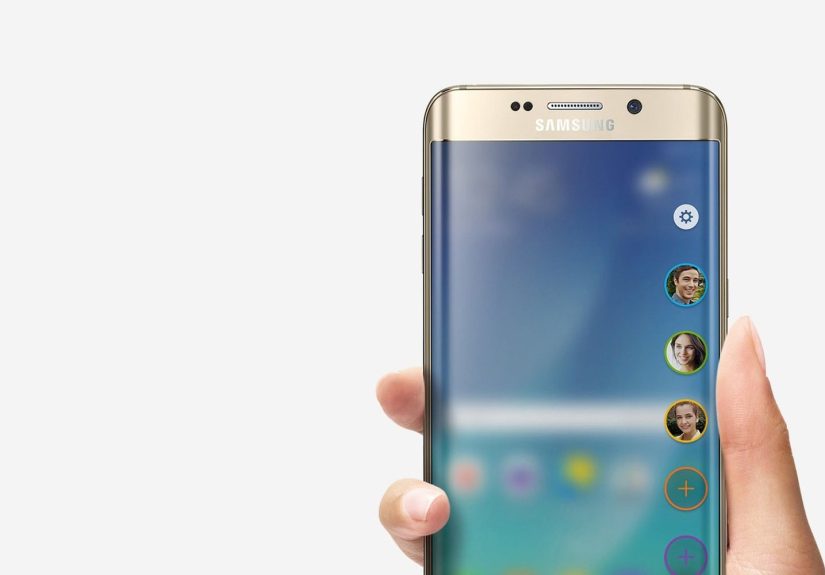
2) Galaxy S6 edge and S6 edge+ (2015): Edge Goes Fashion-Forward
The Galaxy S6 edge made Edge mainstream by putting curves on both sides. It looked premium, felt futuristic,
and made other phones suddenly seem like they were designed in a spreadsheet. Samsung paired the look with features
like People Edge (quick contact access) and edge lighting (notifications that could glow along the side in certain
situations).
The S6 edge+ took that design and supersized it for people who wanted more screen and didn’t mind their pockets
filing a complaint with HR.
3) Galaxy S7 edge (2016): The “Peak Edge” Phone
Many reviewers and long-term users point to the Galaxy S7 edge as the most refined expression of the Edge idea:
a bigger display, stronger battery reputation, water/dust resistance (IP68), and a more mature Edge interface. This is the
model where Edge felt less like a party trick and more like a coherent product decision.
What the Curved Edge Was Supposed to Do
Samsung’s Edge concept was built around a simple idea: your phone should have a “fast lane.”
Instead of returning to the home screen or hunting through apps, you could swipe the side and access what you need
instantlycontacts, tools, shortcuts, and tiny bits of info.
Signature Edge Features (Then and Now)
- People Edge / Contacts shortcuts: quick access to favorite people, with visual cues and fast actions (call, text).
- Information stream / tickers: glanceable updates that could appear without fully waking the phone.
- Night clock / always-on style glances: a low-power clock view leveraging AMOLED’s ability to keep parts of the screen dark.
- Tools panels: shortcuts for flashlight, timer, ruler, compass-style utilities (varied by model and software era).
- Apps Edge (the ancestor of modern Edge Panels): a swipe-out dock for frequently used apps.
The important takeaway: the curve wasn’t only aesthetic. It was a physical “home” for shortcut software.
Whether you loved it or ignored it, Samsung used Edge to experiment with how people move through their phones.
Why People Loved the Edge Phones
They looked differentimmediately
Edge phones stood out across a room. The curved glass caught light in a way flat screens didn’t. It made the display feel
borderless before “borderless” became a marketing default. For a while, owning an Edge phone was like owning a concept car
that somehow also ran your email.
They made one-handed use feel “closer” (sometimes)
The idea of a side shortcut strip is ergonomic: you’re already holding the phone at the edgeso why not put controls there?
When Edge Panels are tuned well, they can reduce the “app drawer scavenger hunt” feeling and speed up common tasks.
They helped define Samsung’s premium design era
The S6 generation marked a major shift into metal-and-glass craftsmanship and a more “luxury” approach. Edge wasn’t just a feature
it was part of Samsung’s push to feel as premium as the competition while still being unmistakably Samsung.
Why People Complained (And Why Edge Branding Faded)
Here’s the truth: a curved screen is a little bit like wearing white sneakers. It can look incredible, but it requires more care,
and it’s not always practical.
Accidental touches and grip problems
Curved edges can be more sensitive to how you hold the phone, especially in landscape mode (photos, videos, games).
Some users reported “phantom” touches or awkward interactions when their palm grazed the curve.
Durability and repair cost
Curved glass is harder (and often pricier) to replace than a flat panel. Add in the fact that Edge designs encouraged glass-forward aesthetics,
and you had a recipe for: “This is gorgeous” + “Please don’t let it fall.”
Useful for some, ignorable for others
A recurring critique in reviews: the curve looked amazing, but the software features didn’t always justify the price premium.
Plenty of owners enjoyed the design more than the Edge functions themselves.
Industry shifted toward flat displays again
As bezels shrank and screens expanded, phone makers could deliver “big display” experiences without relying on dramatic curves.
Flat panels also tend to play nicer with screen protectors, cases, and precise touch inputthings real humans care about
after the honeymoon period ends.
Edge Panels Today: The Edge Legacy That Actually Stuck
Even though Samsung largely moved away from the “Edge” name for a while, the best part of the idea survived:
Edge Panels. On many modern Galaxy devices, Edge Panels function like a customizable side drawer:
a swipe handle that can open apps, contacts, clipboard tools, smart select features, and multitasking shortcuts.
What’s changed is the intent. Early Edge features sometimes felt like “Look what we can do with a curved screen!”
Today, Edge Panels are more about productivity: quick app switching, faster split-screen workflows, and fewer trips to the home screen.
In other words, Samsung took the flashy concept and made it quietly useful.
Should You Buy an Edge Phone in the Used Market?
If you’re shopping in 2025 for an Edge-branded phone (Note Edge, S6 edge, S7 edge), you’re buying it for one of three reasons:
nostalgia, collecting, or a stylish backup device. Here’s what to consider.
1) Battery reality
These phones are older, which means battery health varies wildly. A “great deal” can become less great when the phone
drops from 40% to 3% like it just remembered it left the oven on.
2) Software and security support
Edge-era flagships launched many Android versions ago. For a daily driver, security updates matter.
If you’re buying for primary use, weigh modern midrange options instead. If you’re buying for fun, treat it like a classic car:
enjoy it, but don’t rely on it to commute across the country.
3) Screen condition is everything
Inspect for burn-in (common on AMOLED after heavy use), dead pixels, discoloration near curves, and touch issues.
A curved screen that’s even slightly compromised can turn the “wow” factor into “why is my keyboard haunted?”
4) Cases and screen protectors are pickier
Curved edges can be harder to protect. Some protectors lift at the sides, and some cases interfere with the curve.
If you plan to actually carry the phone, build the accessory hunt into your expectations.
Quick “Edge Series” Cheat Sheet
- Most historically important: Galaxy Note Edge (the original experiment)
- Most iconic design flex: Galaxy S6 edge
- Most refined Edge-era flagship: Galaxy S7 edge
- Most lasting idea: Edge Panels (the software, still alive on modern Galaxy phones)
Common Myths About the Edge Series
Myth: “Edge phones were only about looks.”
They were definitely about looksbut the Edge UI concept was real and directly influenced later Samsung software.
Myth: “If my phone has Edge Panels, it’s an Edge phone.”
Not necessarily. Many flat-screen Galaxy models support Edge Panels. “Edge” began as a curved-display product line,
but the best feature escaped the hardware and became a standard One UI tool.
Myth: “Curved screens always feel better.”
Some people love the feel and immersion. Others prefer the precision and practicality of flat glass.
The Edge era proved both camps have a point.
Real-World Experiences: Living With the Galaxy Edge Concept (Extra )
Let’s talk about what Edge feels like outside the spec sheetbecause nobody buys an Edge phone to admire a processor chart.
People buy it because the experience is different, sometimes in delightful ways and sometimes in “why is my palm doing that?” ways.
First, there’s the immediate tactile novelty. Users often describe the first week with an Edge phone as oddly satisfying:
your thumb naturally glides toward the curve, and the phone feels thinner than its measurements suggest because the edges taper away.
That subtle optical trick makes the device feel sleek, almost “carved” rather than assembled.
It’s the smartphone equivalent of a well-tailored jacket: you don’t need it, but you notice it.
Then comes the habit-building moment: do you actually use the Edge features? Many owners report one of two paths.
Path A: you discover Edge Panels (or the older People Edge / Apps Edge approach) and it becomes muscle memory.
You keep your most-used apps on the side, add a tools panel, maybe a clipboard panel, and suddenly you’re shaving seconds off
repetitive actions all day. It’s not dramatic, but it’s addictivelike rearranging your kitchen so the coffee mugs are finally where your hand expects them.
Path B: you admire the curve, show it to friends, enjoy the “ooh” reactions, and then… mostly forget the panels exist.
The phone still feels premium, but the Edge software becomes background decoration. This isn’t even a failure; it’s just human nature.
If a feature doesn’t save you time every day, your brain files it under “nice” instead of “necessary.”
The tricky part is accidental input. Some users have no problems; others find the curved edges change how they grip the phone,
especially when typing quickly or holding the device sideways for photos and video. You can feel like you’re constantly adjusting your grip
to avoid touches at the edge. This is where cases become both hero and villain: a good case can create a protective lip that reduces accidental touches,
but it can also cancel the tactile magic of the curve. Nothing stings like buying a slim, futuristic-looking phone and immediately putting it in a rubber suit.
Finally, there’s the longevity reality. People who revisit Edge phones today often comment on two things:
the design still looks modern, but the practical downsides are clearer nowespecially around battery aging and screen care.
Curved AMOLED panels can be gorgeous for years, but burn-in and edge wear are real concerns with heavy use.
If you treat an Edge phone as a fun secondary device, it’s often a joy. If you expect it to be your “forever phone,” you may end up missing
the boring conveniences of modern hardware: longer software support, simpler repairs, and accessories that fit without negotiation.
The best summary of the Edge experience is this: it’s a feature that rewards the kind of person who likes setting up their devicecurating shortcuts,
customizing panels, and building a workflow. If you love that, Edge becomes a productivity sidekick. If you don’t, it’s still a beautiful design statement
and honestly, sometimes that’s reason enough.
Conclusion
The Samsung Galaxy Edge series was a rare moment when a major phone brand bet big on design and shipped something genuinely distinct.
Not every Edge feature aged perfectly, and the industry’s shift back toward flatter screens tells you practicality eventually wins the long game.
But the Edge experiment mattered: it helped redefine premium Android design and left behind a software legacyEdge Panelsthat millions of people
still use without thinking about where it came from.
Whether you’re hunting down a classic S7 edge, admiring the Note Edge as a collector’s oddball, or simply using Edge Panels on a modern Galaxy,
you’re seeing the same idea in different forms: your phone’s edge isn’t wasted spaceit’s an opportunity.