Table of Contents >> Show >> Hide
- Why Google Maps links get so long (and what “short” really means)
- The fastest way: use Google Maps’ built-in Share link
- Already have a giant Google Maps URL? Shorten it the “clean” way
- Make a clean Google Maps link yourself (perfect for websites and templates)
- Business-friendly short links (g.page) and the “read this first” warning
- Need something even shorter (or trackable)? Use a URL shortener the smart way
- Troubleshooting: when your “short” Google Maps link won’t open
- Privacy and “don’t accidentally share the wrong thing” notes
- Which method should you use? Quick picks for common situations
- Wrap-up: the “no-drama” recipe for a shareable Google Maps link
- Real-world experiences and lessons learned (500-word add-on)
You know that moment when you paste a Google Maps link and it takes up half the screen, three lines,
and somehow includes what looks like your Wi-Fi password? Yeah. That’s not you. That’s Google Maps doing
what it does best: being helpful… and extremely wordy.
The good news: you can usually turn that spaghetti-link into a clean, click-friendly URL in under a minute.
And if you need something even shorter (or trackable for marketing), there are a few smarter options that
won’t make your link look like a science experiment.
Why Google Maps links get so long (and what “short” really means)
Google Maps URLs can be long for a few reasons:
- They store context (place details, coordinates, zoom level, map layer, language, device hints).
- They preserve accuracy so the link opens the right place even if multiple locations have similar names.
- They sometimes include tracking and routing data (especially for directions and multi-stop routes).
A “short” link usually means one of these:
- A Google-generated share link (best for everyday sharing).
- A clean “Maps URL” you build (great for websites, templates, and consistent formatting).
- A third-party short link (best when you need custom names, branding, or analytics).
The fastest way: use Google Maps’ built-in Share link
If your goal is an easy, shareable link (text, email, Slack, Instagram bio, you name it), this is the best
method for most people because Google does the shortening for you.
On a computer (desktop browser)
- Open Google Maps in your browser.
- Search for a place (or click a pin on the map).
- Click Share (or open the menu and choose Share or embed map).
- Choose Copy link.
That copied link is usually much shorter than the address bar URL and is designed to be shared.
On a phone (Google Maps app on iPhone/Android)
- Open the Google Maps app.
- Search for a place or drop a pin.
- Tap the place card at the bottom.
- Tap Share or Copy.
- Paste it wherever you need.
Sharing directions (a route), not just a place
If you want to share “how to get there” (not just “where it is”), create the route first:
- Click or tap Directions.
- Enter your start and end points (and any stops).
- Look for Share and choose Copy link.
This is the easiest way to avoid sending someone a pin when what they really need is the route.
Already have a giant Google Maps URL? Shorten it the “clean” way
Sometimes you already copied the address bar link (we’ve all done it). You don’t have to wrestle it into shape.
Just convert it using Google’s own Share tool:
- Paste the long URL into your browser and open it.
- Click Share.
- Click Copy link.
Why this works: the address bar URL often includes extra parameters that help Maps recreate your exact view.
The Share link is meant for humans, not time-traveling robots.
Make a clean Google Maps link yourself (perfect for websites and templates)
If you publish content online, build landing pages, run a directory, or just like tidy links, using the
official “Maps URLs” format can be a game-changer. You can create consistent links for:
search, place lookups, and directions.
These links are often shorter than the address bar version, and they’re easier to edit later.
Here are the most useful patterns (copy/paste friendly).
1) Search for a place or coordinates
Use this when you want Google Maps to open a search result for a business name, landmark, address, or latitude/longitude.
Tip: Replace spaces with + (or URL-encode them as %20) to keep the link valid.
2) Search + Place ID (more precise when names are common)
If you’re linking to a specific place that might be confused with others (think “Central Park,” “Starbucks,”
or “Main Street Pizza”), you can keep results consistent by including a Place ID.
This is especially helpful for businesses with multiple locations, franchise names, or places with similar spellings.
3) Directions (share a route with readable parameters)
Want a link you can reuse in emails, event pages, or “How to get here” sections? Directions URLs are built for that.
If you maintain a website, these URLs are easier to update than a random, ultra-long Maps link. Change the destination,
keep the rest. Done.
When should you build a Maps URL vs. use Share?
- Use Share for everyday texting and social sharing (fastest and usually shortest).
- Use Maps URLs for websites, templates, support docs, and consistent formatting.
- Use both when you want a stable “clean link” plus a super-short version for social.
Business-friendly short links (g.page) and the “read this first” warning
You may have seen ultra-clean links like g.page/yourbusinessname. These were tied to Google Business Profiles
via “short names.” They’re greatif you already have one.
Here’s the catch: Google no longer allows most businesses to create or edit these short names. Existing short names
still work, but new ones generally aren’t available to set up anymore. So if you have a g.page link,
keep it, use it, and treat it like a rare collectible.
If you don’t have one, don’t stress. The Share link (or a branded short link) can give you the same “easy to type and easy
to remember” benefit.
Need something even shorter (or trackable)? Use a URL shortener the smart way
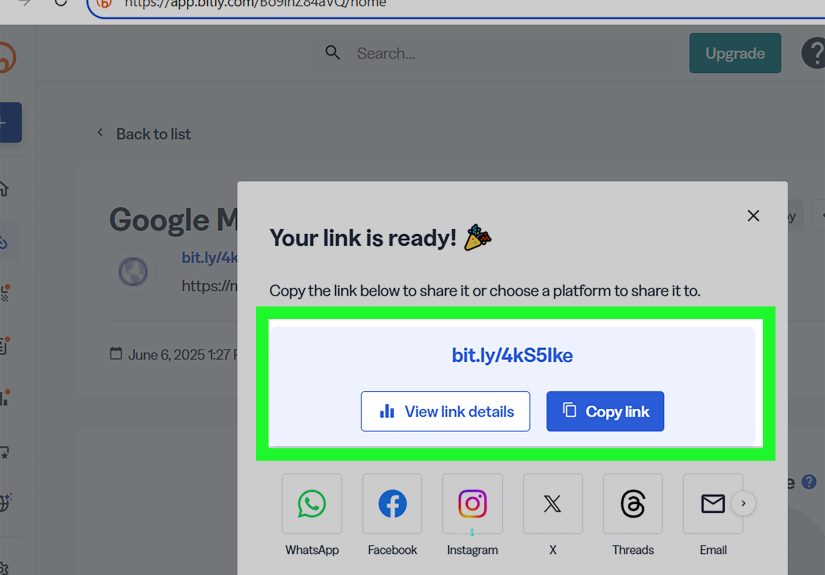
Google’s Share link is perfect for most situations. But if you’re running campaigns, printing flyers, creating QR codes,
or managing multiple locations, a URL shortener can help you:
- Create a custom back-half like
/grand-openinginstead of random characters. - Use a branded domain so people trust the link before clicking.
- Track clicks with analytics and compare channels (social vs email vs QR code).
- Add UTM parameters for marketing attribution without leaving a mile-long link on the page.
Best practices so your short link doesn’t look sketchy
- Keep it readable:
/downtown-officebeats/x7Q9p2. - Match the content: make the short link describe what people will see when they click.
- Avoid “click-here” in the URL (it feels spammy and tells people nothing).
- Use consistent naming (dashes, lowercase, a predictable structure across campaigns).
- Test on mobile and desktop before you publish or print it.
If you’re shortening a Google Maps directions link for marketing, consider adding UTMs to the destination URL first
(yes, it makes the long link longer), then shorten it. That way your analytics stay clean, and your audience never
sees the mess.
Troubleshooting: when your “short” Google Maps link won’t open
Most of the time, Google’s share links work everywhere. But if someone says “your link is broken,” here’s what to check:
1) Try a full browser link instead of the shortest one
If a recipient gets an error opening a super-short link, send a clean Maps URL instead (like the api=1 formats above).
These often open more reliably in locked-down browsers, work devices, or apps with strict link handling.
2) Copy a fresh Share link
If the link is old, re-open the place in Google Maps and copy a new Share link. This is especially useful if you originally copied
the address bar URL and it contained extra view-state parameters.
3) Watch out for older goo.gl links
Some older Google short links (like goo.gl) have been in the process of being retired or changed. Google began showing warnings
on some links and announced plans for deprecating unsupported ones, later updating those plans to preserve actively used links while retiring
others. If you have an old link that shows a warning page, replace it with a newer Share link or a clean Maps URL to avoid surprises.
Privacy and “don’t accidentally share the wrong thing” notes
Sharing a place link is usually safe. But a few situations deserve an extra second of attention:
- Live location sharing is different from sharing a place. Make sure you’re not sharing your real-time location unless you mean to.
- Saved lists can be shareable toodouble-check whether the list is private or public before sending it broadly.
- Home addresses: consider sending directions to a nearby landmark if you’re posting publicly (party invites, meetup announcements, etc.).
Which method should you use? Quick picks for common situations
| Scenario | Best link type | Why it works |
|---|---|---|
| Texting a friend a café location | Google Maps Share link | Fast, short, and opens nicely on phones |
| Posting “How to get here” on a website | Maps URL (api=1 directions) | Clean, editable, consistent formatting |
| Event invite with a specific route | Directions Share link | Preserves the route, not just the pin |
| Flyer/QR code for a storefront | Shortener + custom back-half | Readable, trackable, easy to scan |
| Multiple locations in marketing campaigns | Shortener + UTMs | Analytics + clean links for each location/channel |
Wrap-up: the “no-drama” recipe for a shareable Google Maps link
If you remember nothing else, remember this:
- Don’t copy the address bar link unless you have to.
- Use Share → Copy link for the shortest, easiest option.
- Use Maps URLs (api=1) when you want clean, reusable links for web content.
- Use a URL shortener when you need branding, tracking, or something print-friendly.
Your future self (and everyone in your group chat) will thank you for not sending a link that looks like it fell down a staircase.
Real-world experiences and lessons learned (500-word add-on)
In everyday life, people don’t think about map links until they fail at the worst possible momentusually when someone is already late
and blaming traffic, the weather, Mercury retrograde, and “that one turn Google always gets wrong.” The most common pattern is this:
someone copies the address bar URL because it’s right there, sends it into a group chat, and then at least one person can’t open it
cleanly. Maybe they’re on a work phone with strict security settings. Maybe their messaging app breaks long links across lines. Maybe the
link opens, but it shows a weird zoomed-in view that makes the place look like it’s in the middle of a lake. That’s when the simple Share
link becomes the hero of the story.
Another frequent “real world” issue comes up with directions. People often mean, “Here’s how to get to my place from the parking garage,”
but they send a place pin instead. The recipient taps it, sees the location, and then chooses a totally different starting pointlike their
current location on the opposite side of town. When the goal is to guide someone through a specific route (especially for tricky venues,
campuses, parks, wedding locations, or multi-entrance buildings), sharing the directions link is the difference between “See you soon” and
“I’m at the wrong entrance and I’m emotionally spiraling.”
If you do any kind of outreachclubs, volunteer groups, sports teams, small businesses, or local eventsyou’ll also notice how much trust
matters. A random-looking shortened link can make people hesitate. They might not click it at all, or they’ll ask, “Is this safe?” That’s
why readable links win: either Google’s own Share link (which people recognize), or a branded short link with a clear name. The same goes
for printed materials. A QR code is convenient, but people also like a backup they can type. A short, human-readable URL is perfect on flyers,
menus, and posters.
There’s also a surprisingly practical lesson about maintenance. Links are not “set it and forget it” if you reuse them across many places
(social bios, email signatures, business directories, PDFs, event pages). If you ever move locations, change entrances, or update a meetup
spot, a clean Maps URL is easier to update consistently. And if you use a URL shortener, you can sometimes update the destination without
changing the short linkhandy when your printed materials are already out in the world.
Finally, test links like you’re your most chaotic friend: tap it on iPhone, open it on Android, click it from a laptop, and try it inside
the apps people actually use (Messages, WhatsApp, Instagram, Slack). The few seconds you spend testing can prevent the classic “I’m here”
text… followed by a photo of the wrong building… followed by a debate about whether the pin is lying. A shareable link should reduce friction,
not create a scavenger hunt.