Table of Contents >> Show >> Hide
- Why the Palm Phone Makes Surprisingly Good Bike Tech
- Palm Phone Basics: What You’re Working With
- Step-by-Step: Turning the Palm Into a Bike Phone
- 1) Pick the right mount (this is not the moment to “save $7”)
- 2) Add grip and protection (case + lanyard = cheap insurance)
- 3) Make it readable: brightness, font size, and “big-button” layout
- 4) Configure “Ride Mode” (a.k.a. stop the phone from being needy)
- 5) Choose your “bike brain” apps
- 6) Battery strategy (because tiny phones are… tiny-battery phones)
- Safety and Durability: What Cyclists Should Know
- Real-World Bike Setups: Three Ways the Palm Fits In
- Is a Palm Bike Phone Better Than a Bike Computer?
- Common Mistakes (and How to Avoid Them)
- The Bottom Line
- Rider Experiences: What It’s Like Using a Palm as a Bike Phone ()
There are two kinds of cyclists: the “my bike computer has more satellites than NASA” crowd, and the “I’m just trying to not get lost” crowd.
Somewhere between them is a third speciesthe rider who wants a screen for navigation, stats, and safety… but doesn’t want their $1,000 flagship phone
doing the handlebar cha-cha over potholes.
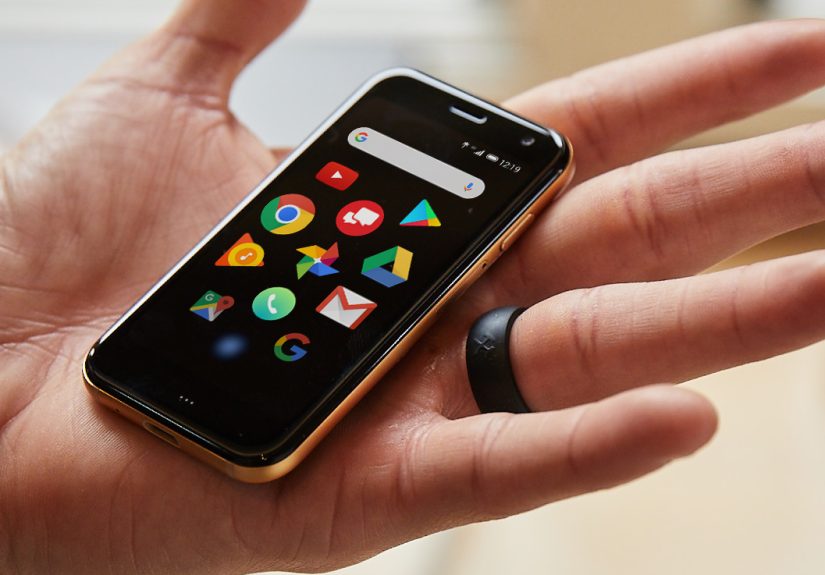
Enter the Palm Phone: a tiny “companion” smartphone that launched as a deliberate antidote to big-screen addictionsmall enough to forget in your pocket,
yet smart enough to run real apps. And in the cycling world, that weird little identity crisis becomes a superpower.
With the right setup, Palm’s mini-mobile phone becomes a legit “bike phone”: a compact, dedicated device you can mount, ride, and rely on.
Why the Palm Phone Makes Surprisingly Good Bike Tech
The Palm Phone (often just called “Palm”) showed up with a very specific vibe: “phone away from phone.” Reviews described it as a tiny Android handset,
credit-card-ish in footprint, designed to reduce distraction rather than replace your primary device.
That original pitch matters for cyclists, because riding is one of those moments when you want informationwithout the rabbit hole.
Small screen, big cycling advantage
A smaller display can be a feature, not a flaw, on a handlebar. Less screen means less temptation to doomscroll at a red light and less visual clutter
when you’re trying to, you know, avoid becoming part of the asphalt’s permanent collection. The Palm’s 3.3-inch display is large enough for turn prompts,
speed, distance, and a live mapyet compact enough to keep your cockpit clean.
Lightweight and easier to mount securely
Phones are basically tiny glass sandwiches, and big ones have more leverage to bounce, twist, and complain. A small phone is easier to hold firmly with
less mount bulk. The Palm’s mini size makes it a natural fit for stem and handlebar setups that feel overkill for larger devices.
It’s a “secondary device” by design
The Palm was sold as a companion on certain carriers, meaning it could share a number or be used as a lighter alternative for gym runs and errands.
That same philosophy maps cleanly onto biking: keep your main phone safe in a jersey pocket or bag, while the Palm handles navigation and ride tracking
up front.
Palm Phone Basics: What You’re Working With
You don’t need a spec sheet to enjoy the concept, but it helps to know the Palm’s strengths and limitations before you “promote” it to bike duty.
The Palm is a small Android-based smartphone with modest hardware compared to modern flagshipsbecause it was never trying to be a flagship.
The quick reality check
- Display: compact and readable for essentials (maps, metrics, prompts).
- Battery: smallgreat for minimalism, not great for all-day touring.
- Performance: fine for navigation and fitness apps; not trying to run your entire digital life.
- Camera: exists, but cycling use is more about stability than selfies.
Translation: it’s perfect for being a dedicated bike screenas long as you set it up like a bike tool, not like your main phone.
Step-by-Step: Turning the Palm Into a Bike Phone
1) Pick the right mount (this is not the moment to “save $7”)
The mount is the difference between “bike phone” and “phone launched into low Earth orbit.” Look for a secure locking mechanism, solid materials,
and a system that doesn’t rely on flimsy silicone bands unless you’re truly riding on butter-smooth paths.
Riders generally choose between:
- Twist-lock ecosystems (often paired with a special case or adapter): very secure, great for rougher riding.
- Magnetic-lock systems: fast on/off and sleek, but still needs a reputable design and proper installation.
- Clamp-style mounts: universal and convenient, but quality varies wildly.
If you’re riding on uneven surfaces, consider vibration-dampening features. It’s not just about comfort; vibrations can affect sensitive phone components
over time. (More on that in a second.)
2) Add grip and protection (case + lanyard = cheap insurance)
A slim protective case helps with drop protection and gives the mount a more consistent surface to hold. If your setup allows it, add a tether or lanyard.
It’s the cycling equivalent of wearing a helmet: you hope you never need it, but you’ll be thrilled it exists if physics gets dramatic.
3) Make it readable: brightness, font size, and “big-button” layout
Outdoor visibility is the difference between useful and useless. Set brightness high enough for daylight, then simplify the home screen:
put your riding apps front and center, remove clutter, and increase text size if you tend to squint at tiny turn arrows while bouncing over cracks.
4) Configure “Ride Mode” (a.k.a. stop the phone from being needy)
The best bike phone is quiet, focused, and respectfullike a good riding buddy who points at potholes but doesn’t tell you about their crypto portfolio.
Use these settings:
- Do Not Disturb: allow only priority calls or safety contacts.
- Disable nonessential notifications: you do not need a discount alert mid-climb.
- Auto-lock timing: set appropriately for your app’s display needs.
- Battery saver: enable when you’re tracking long rides.
5) Choose your “bike brain” apps
Your Palm-as-bike-phone can play a few roles. Pick one primary role first, then add extras only if you actually use them.
Option A: Ride tracking (simple, effective)
A GPS fitness app can record speed, distance, elevation, and route. Many cyclists use apps like Strava for tracking and sharing rides.
If your goal is “record the ride and get home,” this is the simplest path.
Option B: Navigation (turn-by-turn without the distraction)
For commuting or exploring, navigation matters more than leaderboards. Download offline maps when possible, set your route before you roll,
and use audio prompts (bone-conduction headphones or a small speakersafely and legally) so you’re not staring at the screen.
Option C: “Bike computer” dashboard
Want a dedicated, glanceable display? Keep it simple: speed, time, distance, and a clear map or cue sheet.
The Palm can feel more like a bike computer when you treat it like one: one screen, big numbers, minimal tapping.
6) Battery strategy (because tiny phones are… tiny-battery phones)
The Palm’s biggest cycling limitation is battery capacity. GPS + screen brightness can drain any phone quickly, and small phones have less battery to spare.
If you’re riding longer than a short commute, plan ahead:
- Lower screen-on time: use an app that allows screen-off recording if you don’t need constant visuals.
- Turn off radios you don’t need: Wi-Fi scanning, Bluetooth (unless using sensors), and background sync.
- Use offline maps: less data usage, smoother performance in weak-signal areas.
- Bring a small power bank: a lipstick-sized bank can be a ride-saver.
If you want “set it and forget it” battery life for all-day rides, a dedicated bike computer still wins. But for short to medium rides,
the Palm can absolutely carry its weightespecially if it’s not also handling every social app on Earth.
Safety and Durability: What Cyclists Should Know
Vibration is real (and it can be rude to cameras)
Phone mounts aren’t just about “will it fall?” They’re also about “will my device survive months of micro-shaking?”
Some manufacturers have warned that prolonged exposure to high-amplitude vibrationsespecially on motorized setupscan degrade camera stabilization systems.
Bicycles generally produce less intense vibration than motorcycles, but rough roads, gravel, and certain mounts can still transmit plenty of buzz.
Practical takeaway: choose a mount known for stability, consider vibration dampening if you ride rough surfaces, and don’t assume “tighten harder” is a
long-term engineering solution.
Weather, sweat, and surprise rain
Even if you’re not riding through storms on purpose, weather happens. If you commute, carry a simple waterproof pouch or choose a mount/cover solution
designed for wet conditions. Also, sweat is basically salty water with ambitionkeep charging ports protected and wipe the device down after hot rides.
Heat management
Direct sun plus a bright screen can warm any phone. If the Palm starts to dim or lag, it may be protecting itself from heat.
Angle the phone to reduce sun glare, use a darker map theme if available, and avoid leaving it baking on the bars while you take a long café break
(yes, coffee stops count as “ride science”).
Real-World Bike Setups: Three Ways the Palm Fits In
1) The commuter cockpit
For city riding, the Palm shines as a dedicated navigation and safety screen. Set a route, keep volume low for alerts, and let your main phone stay tucked
away. You get the “don’t get lost” benefits without the “I just smashed my primary phone on a curb” nightmares.
2) The fitness-focused rider
Want ride data without a full bike computer purchase? Use the Palm for GPS tracking and a clean dashboard. Pair it with a simple heart-rate strap if you
already own one, and you’ve got a lightweight training display for casual performance tracking.
3) The adventure backup
On longer routes, the Palm can serve as your “front screen” while your primary phone stays in reserve for emergencies.
Run navigation on the Palm, keep your main phone in low-power mode, and you’ll feel a lot more comfortable when you’re far from the nearest outlet.
Is a Palm Bike Phone Better Than a Bike Computer?
It depends on what you want:
- Choose a dedicated bike computer if you need long battery life, glove-friendly buttons, and a purpose-built device for training data.
-
Choose the Palm-as-bike-phone if you want a compact, app-powered display for navigation and basic statsespecially if you’d rather not
risk your primary phone on the bars.
The Palm occupies a sweet spot: more flexible than a basic bike computer, less precious than your main phone, and small enough to feel like it belongs on
a bike instead of looking like you strapped a mini TV to your handlebars.
Common Mistakes (and How to Avoid Them)
Mistake #1: Mounting it like you’re installing a kitchen cabinet
Overtightening can damage mounts, bars, or the device. Install carefully, follow the mount instructions, and re-check tightness after a few rides.
Mistake #2: Leaving all notifications on
Your bike phone should not be your group chat’s main character. Silence everything except what matters for safety.
Mistake #3: Expecting epic battery on full brightness + GPS + streaming
If you want live tracking, music streaming, full brightness, and constant screen-on time, bring external power or lower expectations.
(Or buy a bike computer and name it “Responsibility.”)
Mistake #4: Using the screen too much while moving
Keep interactions minimal. Set the route before you roll, use voice prompts where safe, and treat the screen like a quick glancenever a long stare.
The Bottom Line
The Palm Phone was born as an oddly charming sidekick: a tiny, intentionally limited companion designed to keep you connected without consuming your life.
On a bicycle, that identity finally makes perfect sense.
As a dedicated bike phone, the Palm offers a compact, mount-friendly way to get navigation, ride tracking, and quick visibility into your statswhile
keeping your primary phone safer and your attention more on the road. Accept the battery reality, choose a solid mount, set up a focused ride mode, and
this mini-mobile can become one of the most practical “weird gadgets” in your cycling kit.
500-word experience add-on
Rider Experiences: What It’s Like Using a Palm as a Bike Phone ()
The first thing you notice when you mount a Palm Phone on your handlebars is that your bike suddenly looks… cleaner. If you’ve ever tried using a big
modern smartphone as your on-bike screen, you know the vibe: it’s like bolting a small cutting board to your cockpit. The Palm doesn’t dominate the bars.
It sits there like it belongs, more “bike computer energy” than “fragile glass tablet begging for trouble.”
On a short commute, the Palm feels delightfully low-drama. You tap your navigation app, hit start, and it does the job without constantly pulling your
attention away. The screen is big enough to confirm your next turn and small enough that you’re not tempted to zoom, scroll, and fiddle. It encourages
quick glanceslike checking a road signrather than full-on staring contests with a map.
The size also changes how you think about risk. With your main phone tucked away, you ride a little freer. You’re not clutching the bars like you’re
carrying the crown jewels. That mental shift is real, especially on rough pavement or when you’re hopping curbs and dodging potholes. The Palm becomes a
sacrificial scout: if anything has to take the vibration, the sun, or the random sprinkle of road grime, it’s not the device that stores your entire life.
The Palm is at its best when you treat it like a single-purpose tool. If you load it up with every notification and app you own, it stops being charming
and starts being annoying. But if you curate itnavigation, ride tracking, maybe music controlsyou get a focused riding experience that feels oddly
modern in an age of “your phone wants to be your personality.”
Battery management is the one habit you have to learn. On a bright sunny day, with the screen on and GPS running, you can almost hear electrons sprinting
for the exits. The fix is simple: plan. For quick rides, it’s fine. For longer rides, you either lower screen-on time, use audio cues more, or bring a
small power bank. Once you accept that reality, it stops being a flaw and becomes part of the routinelike checking tire pressure.
Another underrated benefit is “social simplicity.” If you’re riding with friends and someone says, “Where are we going?” you can show the route without
pulling out your primary phone, unlocking it, and accidentally falling into a spiral of messages. The Palm gives you the info and then politely steps
aside. It’s the rare gadget that feels like it has manners.
In the end, the Palm-as-bike-phone experience is less about tech specs and more about behavior. It’s a tiny device that nudges you toward riding with
fewer distractionswhile still giving you the safety and convenience of modern navigation. That’s a pretty good trade for something that fits in the
smallest pocket you own.