Table of Contents >> Show >> Hide
- Why the Etch-A-Sketch Still Has Main-Character Energy
- Going Digital Without Losing the Vibe
- Meet the Modern Build: Digital Etch-A-Sketch That Also Plays Snake
- Why Snake Belongs on an Etch-A-Sketch
- Under the Hood: What Makes This Project Tick
- Why This Mashup Matters (Beyond Being Cool)
- Conclusion
- Experience Notes: What It Feels Like to Draw (and Play Snake) on a Digital Etch-A-Sketch
There are toys you “played,” and then there are toys you trained for. The Etch-A-Sketch sits proudly in the second category:
two knobs, one gray screen, and a personal vendetta against diagonal lines. It’s equal parts art tool, patience test, and tiny lesson in
cause-and-effect. Now imagine that same knobby, line-loving chaosexcept it’s digital, it can undo mistakes, and when you’re done drawing
your best attempt at a dog (that absolutely looks like a confused cloud), it can boot up a classic game of Snake.
That’s the charm of the modern “digital Etch-A-Sketch” idea: keep the original’s tactile feel and minimalist vibe, but swap the powder-and-stylus
guts for a microcontroller, a paper-like display, and just enough extra features to make your inner perfectionist stop yelling into a pillow.
Let’s break down why this mashup works so well, what makes it technically interesting, and why Snake is basically the most inevitable “bonus mode”
in the history of bonus modes.
Why the Etch-A-Sketch Still Has Main-Character Energy
A quick origin story (and why it became a legend)
The Etch-A-Sketch started in late-1950s France as a “magic screen” concept and made its way to the United States around 1960, where it became an
instant classic. Museums and toy historians still point to it as a rare example of a simple, durable design that stayed popular across generations
not because it had more features, but because it had the right ones. Two inputs. One output. Endless “Wait, let me try again.”
How the “magic screen” actually works
Inside a traditional Etch-A-Sketch, the screen is coated from behind with fine aluminum powder (often helped along by tiny beads so it spreads evenly).
The stylus scrapes that coating away as you move it, leaving darker lines where the powder has been displaced. Shake it, and the powder redistributes,
giving you a fresh blank screen. The brilliance is that it’s mechanical and immediate: your hands are literally driving a tiny plotter.
The limitations are also part of the personality. No true erase tool. No easy way to lift the stylus without drawing. No diagonal shortcut.
You don’t “draw a circle” so much as you “negotiate with geometry.” That’s why even messy sketches feel earnedand why a digital remake has a high bar:
it can’t just be a sketch app with fake knobs. It needs to feel like you’re steering a stubborn little cursor that only trusts right angles.
Going Digital Without Losing the Vibe
Why e-paper is the perfect screen choice
A big design question is the display. If you use a bright, glossy screen, you lose the Etch-A-Sketch mood instantly. That’s why many modern builds lean
toward e-paper (e-ink) displays: they look like ink on paper, stay readable under bright light, and don’t scream “smartphone.” E-ink works by shifting
charged black and white particles inside tiny microcapsules using an electric field. Once the particles are in place, the image can remain visible with
very little power until the next updatekind of like a drawing that just sits there, quietly judging you.
Even better: e-paper refresh behavior feels “toy-like.” Updates can be slower than LCD, and full refreshes can have a little flash or ghosting cleanup.
Normally that’s a downside. Here, it’s part of the charmlike the device is thoughtfully considering your next move instead of instantly obeying, which is
extremely on-brand for an Etch-A-Sketch.
The controls: keeping the iconic two-knob interface
The original toy’s identity is the two knobsleft for horizontal movement, right for vertical. In digital builds, rotary encoders (or potentiometers, depending
on the design) can replicate that feeling. Encoders are especially satisfying because they “click” through steps, which maps nicely to grid-based pixel movement.
Push-button encoders add a bonus: you can press the knob like a secret handshake to trigger actions (reset, undo, switch modes, start Snake, etc.).
And yes, you still get that classic moment where your hands forget which knob is which for half a second and your line takes an unexpected detour. Digital
technology can do amazing things, but it cannot protect us from ourselves.
Meet the Modern Build: Digital Etch-A-Sketch That Also Plays Snake
The core hardware recipe: ESP32 + e-paper + encoders
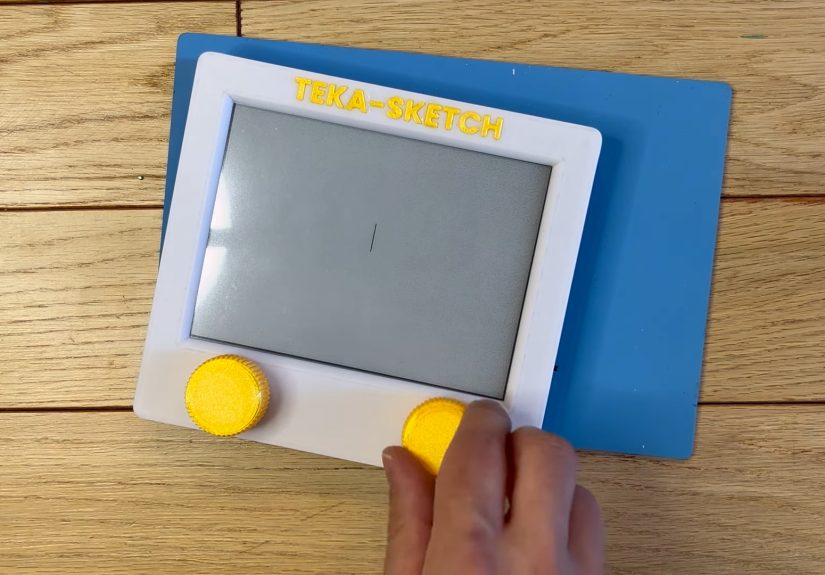
One standout approach (featured in maker circles) uses an ESP32 microcontroller paired with an Inkplate e-paper display and two rotary encoders. The ESP32 is
popular because it’s powerful for its size, widely supported, and comfortable running interactive projects with responsive input handling. The e-paper display
helps preserve the original Etch-A-Sketch lookgrayish background, crisp lines, low glarewhile giving the project the flexibility to add new behaviors.
In “draw mode,” the logic is intentionally straightforward: read the encoder changes, update the cursor position, and draw a line as you move. No fancy brushes,
no smoothing filters, no “AI-assisted artistry.” Just a cursor that moves like a tiny robot with a ruler. The simplicity is the point.
The feature the original never had: undo
Here’s where digital gets delicious: undo. On a classic Etch-A-Sketch, the only true undo is “shake everything and emotionally restart.” A digital version can
store movement steps and reverse them, effectively rewinding your last few decisions. Pressing a knob to undo feels almost magical because it breaks the original
rule without breaking the vibe. You still have to plan your lines, but now you can experiment without fear of a single twitch turning your masterpiece into
abstract despair.
Technically, undo is also interesting: you can treat each movement as a unit (direction + distance), store it in a stack, and pop steps off when undo is triggered.
Depending on how you draw (pixel-by-pixel trail vs. vector segments), you might either erase the last segment by re-rendering the whole frame buffer or selectively
remove the most recent path. E-paper constraints often encourage smart, minimal redraw strategiesso the “simple” feature becomes a fun engineering puzzle.
Why Snake Belongs on an Etch-A-Sketch
Snake is basically a moving line… which is basically Etch-A-Sketch
Snake works because it’s elegant: you guide a growing line through a grid, trying not to crash into walls or yourself. It’s one of the most famous mobile games
thanks to Nokia-era phones, but the “snake” idea existed earlier in computer and arcade forms. Either way, the mechanics fit the Etch-A-Sketch mindset perfectly:
movement is discrete, direction changes are sharp, and every turn is a commitment. You don’t need photorealistic graphics. You need timing, planning, and the ability
to accept responsibility for your own overconfidence.
Some builds even nod to classic “snake” inspirations from older PC demos (like QBasic-era variants), which is a deeply correct choice. If you’re building a retro device,
you might as well bring the retro vibes all the way home.
How Snake feels with knobs instead of buttons
Typical Snake uses buttons or swipes. With two knobs, you get something different: a more analog-feeling control loop. One common mapping is to use the knobs to select
direction (or to rotate through options), while a press starts/pauses or confirms. Another approach is “left knob = horizontal intent, right knob = vertical intent,”
where the game decides the direction based on which knob you moved most recently. Either way, the result feels like driving a tiny creature with a steering wheel made
of nostalgia.
The funniest part? Snake already punishes indecision. Knobs add a fresh flavor of panic because it’s easier to overshoot a choice or bump the wrong encoder when the
snake is moving fast. It’s like the game is saying, “Oh, you wanted challenge? Here’s some challenge. With extra crunch.”
Under the Hood: What Makes This Project Tick
Drawing mode = cursor + trail + memory
At a high level, draw mode is a state machine with a cursor. Every “tick,” you read the input (encoder deltas), update the cursor position, and draw a mark at the new
coordinate. The key design choice is whether the drawing is stored as:
- A pixel buffer (a grid of on/off values), easy to re-render but potentially memory-heavy depending on resolution.
- A list of segments (vector-ish), memory-light but needs careful rendering and undo handling.
- A hybrid (segments for undo/history + buffer for fast display updates).
The original Etch-A-Sketch doesn’t let you “move without drawing,” so many digital versions keep that rule. But you can add optional modeslike “lift pen”
for repositioningwithout ruining the core feel, as long as it’s clearly a bonus feature and not the default behavior.
E-paper realities: partial refresh, ghosting, and pacing
E-paper isn’t a high-speed gaming monitor, and that’s okay. For drawing, it’s great: you’re usually moving step-by-step, and the display can keep up with partial updates.
For Snake, you have to tune the refresh strategy. If you refresh too often, you may get visible artifacts or slower updates. If you refresh too rarely, the game feels laggy.
Good implementations use partial updates for small moving elements and occasional full refreshes to clean up ghosting.
This is where “toy design” meets “systems thinking.” You’re balancing responsiveness, clarity, power use, and the display’s physical behavior. It’s not just coding; it’s
choreography between hardware and human hands.
Input handling: debouncing and “don’t let the cursor teleport”
Rotaries can be noisy. If you read raw signals without debouncing or smoothing, the cursor can jitter, skip, or driftturning your elegant line into what looks like a
seismograph during a monster-truck rally. The fix is usually a combination of software debouncing, sensible step sizing, and timing rules (e.g., only accept changes at a
stable interval, clamp maximum delta per update, and treat a long fast twist as “repeat steps” rather than “panic jump”).
Snake has the same issue in a different costume: inputs must be reliable and predictable, because one missed direction change is instant tragedy. So the best builds treat
input as a first-class system, not an afterthought.
Why This Mashup Matters (Beyond Being Cool)
Projects like a digital Etch-A-Sketch that also plays Snake are secretly excellent teachers. They combine:
- User interface design (two knobs are a constraintwork with it, not against it).
- Embedded programming (real-time loops, state machines, and hardware quirks).
- Game logic (timing, collision detection, scoring, difficulty curves).
- Display engineering (refresh strategies and visual clarity).
And the emotional payoff is huge: you end up with a device that feels both familiar and new. It honors the original toy’s personality while giving you a playful reason
to explore modern hardware. In a world full of touchscreens, there’s something refreshing about controls you can grab, twist, and clicklike you’re steering the pixels
instead of just tapping them awake.
Conclusion
A digital Etch-A-Sketch that also plays Snake is the kind of idea that sounds like a joke until you see it workingand then it feels obvious, like the two concepts were
always meant to share the same little gray screen. The Etch-A-Sketch gives you constraint-driven creativity. Snake gives you constraint-driven survival. Put them together
on an e-paper display with real knobs, and you get a modern gadget that still feels delightfully old-school.
The best part is that it doesn’t try to be everything. It’s not a tablet. It’s not a console. It’s a purpose-built, tactile experience: draw, undo, laugh, shake your head,
and when you’re readyfeed a tiny pixel snake until it inevitably becomes too confident for its own good. Just like the rest of us.
Experience Notes: What It Feels Like to Draw (and Play Snake) on a Digital Etch-A-Sketch
The first thing you notice is that your hands remember more than your brain. Even if you haven’t touched an Etch-A-Sketch in years, the two-knob setup triggers a
weird muscle-memory mode: left hand wants to handle “side-to-side,” right hand wants “up-and-down.” Then, about eight seconds later, you forget that confidence was
granted too early, and you accidentally draw a line straight through the middle of your sketch like a villain in a mystery movie. That’s when you appreciate the digital
superpower: undo. It’s not just convenientit changes your whole attitude. You stop drawing like you’re defusing a bomb and start drawing like you’re exploring.
On e-paper, the experience has a calm, almost “paper notebook” vibe. There’s no glow fighting your eyes, and the contrast feels more like a real toy than a phone screen.
The cursor movement can feel slightly more deliberate than an LCD-based gadget, and that’s a good thing. A classic Etch-A-Sketch is never “instant” eitheryou’re always
making a decision and living with it. The slight pace of e-paper updates can make your drawing feel more intentional, like each step is a tiny commitment ceremony.
(Congratulations! You have moved one pixel to the left. May you grow old together.)
The weirdly satisfying part is the sound and feel of the controls. Rotary encoders (especially clicky ones) add a tactile rhythmturn, click, click, clickthat makes the
drawing process feel physical again. It’s the opposite of smearing your finger across glass. With knobs, you can draw without looking down at your hands, and the act of
steering becomes almost like playing an instrument: left hand sets a pattern, right hand answers. When you get in the zone, you start thinking in “routes” instead of
“shapes,” which is exactly how Etch-A-Sketch artists have always worked.
Snake, though? Snake is where your confidence gets audited. With buttons, Snake is quick and sharp. With knobs, Snake becomes a game of timing and intent. The funniest
moment is the first time you try to “flick” a decision like it’s a joystick, only to realize you’re holding two precise dials that will happily accept your panic-spin and
translate it into a questionable life choice. The learning curve is real: you start by overcorrecting, then you learn to make small, clean turns. Eventually, you stop
fighting the knobs and let them do what they’re good atsteady, controlled movement. The game feels more “mechanical,” like you’re piloting a tiny creature through a maze.
The combo of draw mode and Snake mode also changes how you think about both. After playing Snake, you go back to drawing and realize you’re better at planning paths and
avoiding self-intersections. After drawing, you play Snake and realize you’re better at seeing “safe corridors” and building loops. It’s the same mental skill wearing two
different outfits: one says “artist,” the other says “survivor,” and both are slightly stressed.
If you’re using (or building) one of these devices, the most fun “experience upgrade” is adding tiny quality-of-life touches that don’t wreck the retro feel: a subtle
cursor indicator, a quick reset gesture, an undo history limit that keeps things snappy, and a Snake speed curve that ramps up just enough to be exciting without turning
the game into a two-second tragedy. Done right, the whole thing feels like a love letter to simple interfacesproof that you can make something modern without sanding off
all the personality that made the original special.