Table of Contents >> Show >> Hide
- First, a Quick Reality Check: “Chromecast” Means Two Different Things Now
- What Roku Is (and Why It’s Still Everywhere)
- Chromecast vs. Roku: The Comparison That Actually Matters
- 1) Setup and Day-One Ease
- 2) Home Screen Style: “Simple Grid” vs. “Recommendations Everywhere”
- 3) Search: Who Helps You Find Something Faster?
- 4) Casting and Phone Control: A Big Chromecast Advantage… with One 2025 Twist
- 5) Performance and Picture Quality: More About the Model Than the Brand
- 6) Remote, Voice, and “Can My Parents Use This?”
- 7) Smart Home Integration: Google TV Has the Stronger “Hub” Personality
- 8) Ads, Data, and the “Why Is My Home Screen Selling Me Something?” Question
- Which One Should You Buy? Match the Device to the Person
- A Practical Shopping Checklist (So You Don’t Buy the Wrong Thing)
- Conclusion: So… Which Streaming Device Is Better?
- Bonus: Real-World Experiences (About ) What It’s Like Living With Roku vs. “Chromecast” Day to Day
Choosing a streaming device should be easy. You plug in a tiny gadget, open Netflix, and immediately begin your
very serious research into “just one more episode.” Yet somehow, you’re stuck comparing Chromecast vs. Roku like it’s a
heavyweight title fight.
Here’s the good news: both are excellent at turning any TV with an HDMI port into a modern streaming hub. The better
news: the “right” pick usually depends less on specs and more on how you actually watch TVphone-in-hand casting,
remote-first browsing, smart-home habits, and whether you want a simple grid or a recommendation engine that thinks it
knows you better than your best friend.
First, a Quick Reality Check: “Chromecast” Means Two Different Things Now
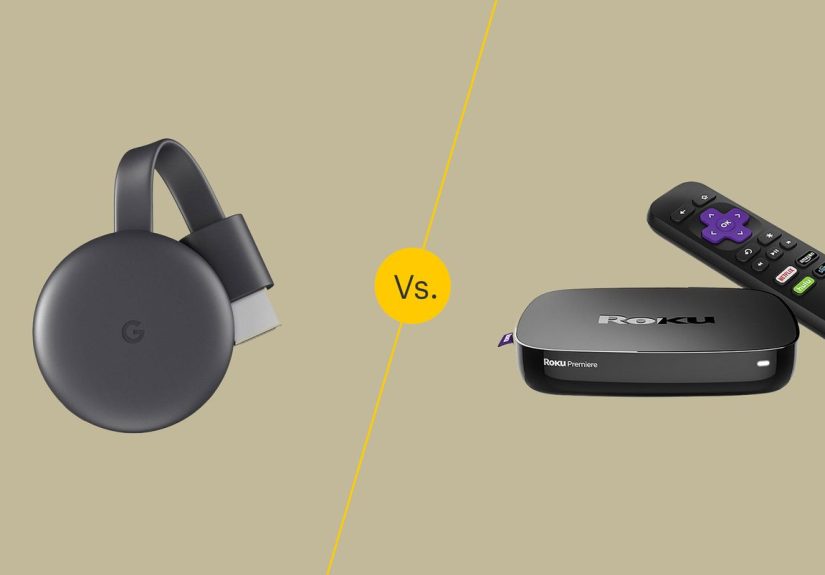
When people say “Chromecast,” they can mean:
-
Classic Chromecast casting: You tap a Cast button on your phone and the TV plays the show.
Your phone acts like a remote (and sometimes like a referee when the family fights over what to watch). -
A Google TV streaming device: A remote-driven streamer that runs apps directly on the device,
like Roku does.
In late 2024, Google announced it was ending production of Chromecast-branded devices, selling remaining stock while
supplies last, and shifting focus to its newer Google TV streaming hardware. So in 2025, you’ll still see “Chromecast”
in conversations, but Google’s current mainstream box-style offering is the Google TV Streamer (4K).
What Roku Is (and Why It’s Still Everywhere)
Roku is the “keep it simple” champion of streaming. Most Roku devices run the same familiar Roku interface:
a clean, app-first home screen, quick setup, broad app support, and a remote that doesn’t demand you memorize a new
operating system just to watch a cooking show.
Roku also makes streaming sticks and boxes across price tiersbudget-friendly models for basic HD/4K streaming and
higher-end models (like Roku Ultra) for faster performance, better networking, and premium video formats.
Chromecast vs. Roku: The Comparison That Actually Matters
1) Setup and Day-One Ease
Roku is usually the fastest “TV → Wi-Fi → apps → done” experience. It’s designed for people who want a
straightforward home screen and a remote that works like a remote (wild concept, I know).
Google TV devices can be equally easy, but they tend to feel more “ecosystem-y.” If you already use
Google services (Google account, YouTube, Google Home), setup feels natural. If you don’t, it can feel like the device
keeps gently suggesting you become a “Google household.”
2) Home Screen Style: “Simple Grid” vs. “Recommendations Everywhere”
This is the biggest day-to-day difference.
-
Roku: The home screen is basically your apps. It’s quick, predictable, and easy for guests, kids,
and anyone who just wants to find the thing they already decided to watch. -
Google TV: The home screen leans heavily into recommendations, watchlists, and curated rows. If you
like the idea of discovering new stuff without opening five apps, this can be great. If you prefer a “hands off my
screen, I came here for one show” vibe, it can feel noisy.
Think of it this way: Roku is a tidy drawer of tools; Google TV is a helpful friend who reorganizes your tools and
then hands you a new hobby you didn’t ask for.
3) Search: Who Helps You Find Something Faster?
Roku Search is built to help you find movies and shows without guessing which app has them. You can
search by title, actor, or more, then jump into the service that offers it (often showing multiple viewing options).
It’s practical, especially when your brain says “the one with that guy… you know… the one from the other thing.”
Google TV is also strong at discovery and cross-app browsing, especially if you use Google Assistant
voice search. It’s great for “show me action movies” or “find comedies we can watch with teens,” and it tends to blend
recommendations with search results in a more “content-first” way.
4) Casting and Phone Control: A Big Chromecast Advantage… with One 2025 Twist
Traditionally, Chromecast’s superpower is casting: you start playback from your phone, and the TV
becomes the screen while your phone stays usable for texts, doomscrolling, or pretending you’re looking up cast facts
when you’re really checking the group chat.
Roku can also be controlled by phone (the Roku app is genuinely useful), and it has a feature many people love:
Private Listening, which lets you listen through headphones connected to your phonehandy for late-night
watching when everyone else is asleep.
The twist: in late 2025, Netflix changed how casting works from mobile devices to many TVs and modern
streaming devices. That means the old “phone-as-Netflix-remote” casting routine may not work the way it used to on a
lot of newer setups. In practical terms, Netflix is pushing users toward using the Netflix app on the TV device and
navigating with the remote.
What does that mean for your decision?
-
If your household relies on casting Netflix from a phone as a daily habit (especially while traveling),
that convenience may be less reliable than it used to be on newer devices. -
If you mainly cast YouTube, Disney+, Prime Video, music, photos, and other apps that still support it well,
Chromecast-style casting can still be a major quality-of-life win. - If you’re remote-first anyway, Roku’s approach feels unaffected: open app → press play → argue about snacks.
5) Performance and Picture Quality: More About the Model Than the Brand
Both ecosystems can deliver excellent 4K streaming, HDR, and immersive audiobut you need to match your device tier to
your TV’s capabilities.
-
Roku Ultra is positioned as a premium player, with strong networking options (including Ethernet and
Wi-Fi upgrades) and support for high-end video formats like Dolby Vision and HDR standardsgreat for people with a nice
TV who don’t want buffering to ruin movie night. -
Roku sticks are popular for their portability and value. If you want a “throw it in a bag” streamer
for dorms, travel, or a guest room, a stick-style Roku is easy to live with. -
Google TV Streamer (4K) aims for a more powerful, modern Google TV experience with ample storage for
apps and a stronger smart-home angle.
A simple rule: if you own a premium TV that supports advanced formats, don’t pair it with the cheapest streamer you
can find and then blame “the internet” when playback stutters. Your Wi-Fi is innocent until proven guilty.
6) Remote, Voice, and “Can My Parents Use This?”
Roku tends to win for universal ease. The interface is consistent across models, and the remote does
what you expect. Plus, Roku’s mobile app features like Private Listening can be a lifesaver in shared spaces.
Google TV shines if you like voice search and Google Assistant integration. Asking for a genre, an actor,
or a specific show can be faster than typing with arrow keys like you’re playing a very boring video game.
If you’re buying for someone who wants a no-drama experience (kids, grandparents, guests, or that one friend who still
calls every streamer “the Netflix box”), Roku is often the safer bet.
7) Smart Home Integration: Google TV Has the Stronger “Hub” Personality
If your TV time overlaps with smart-home lifechecking cameras, turning off lights, controlling thermostatsGoogle TV’s
latest hardware leans into that. Newer Google TV streaming devices can integrate more deeply with Google Home and even
support modern smart-home standards like Matter/Thread functionality depending on model and region.
Roku isn’t “anti smart home” at all; it supports popular ecosystems and even has its own smart-home product line. But
Google TV’s identity is more tightly coupled to the Google Home experience, which can be a plus if you’re already there.
8) Ads, Data, and the “Why Is My Home Screen Selling Me Something?” Question
Both platforms promote content. Both have sponsored placements. Both want you to keep watching (because that’s their
entire job). The difference is how noticeable it feels.
Roku’s business includes a major advertising component, and Roku documents ad and measurement capabilities as part of
its ecosystem. That doesn’t automatically mean “bad,” but it does mean you should expect promotional tiles, featured
rows, and suggestions on the home screen.
Google TV’s recommendations can feel less like “ads” and more like “the algorithm is always on.” If you love discovery,
it’s fun. If you prefer minimalism, it can feel like your TV is trying to become a social media feed.
Either way, take five minutes to review privacy settings, ad personalization toggles, and any automatic content recognition
settings on your TV and streamer. It’s the streaming equivalent of locking your front doorlow effort, high payoff.
Which One Should You Buy? Match the Device to the Person
Pick Roku if you want…
- Simple, consistent navigation with an app-first home screen.
- Easy setup for the whole household (and fewer “where did it go?” moments).
- Great value options across budget and midrange devices.
- Useful mobile features like Private Listening for quiet watching.
- A streamer that feels the same whether it’s in the living room, a guest room, or a travel bag.
Pick Google TV / “Chromecast-style” if you want…
- Strong Google ecosystem integration (Assistant, YouTube, Google Home).
- Content discovery that pulls recommendations across services.
- Casting for many apps and the convenience of phone-based control (with the caveat that some services
may restrict casting behavior). - Smart-home features that can feel more “hub-like” on supported hardware.
A Practical Shopping Checklist (So You Don’t Buy the Wrong Thing)
- Your TV’s formats: If your TV supports Dolby Vision and you care about HDR, choose a model that supports it.
- Your network: If Wi-Fi is crowded or the router is far away, consider a device with Ethernet or stronger Wi-Fi.
- Your household style: Remote-first (Roku vibes) or recommendation-and-voice-first (Google TV vibes)?
-
Your travel habits: If you stream in hotels often, think about login friction, portability, and whether you
rely on phone casting for convenience. -
Your patience level: If you want “works the same every time,” Roku is a safe pick. If you like tinkering and
deep integration, Google TV is fun.
Conclusion: So… Which Streaming Device Is Better?
If you define “better” as simpler, faster to learn, and consistently easy, Roku is hard to beat. It’s the
streaming device you can hand to almost anyone and feel confident they’ll be watching something in five minutes.
If you define “better” as more integrated, more discoverable, and more connected to your phone and Google services,
Google TV devices (often still casually called “Chromecast” in everyday conversation) can be the better fitespecially for people
who like voice search, curated recommendations, and smart-home convenience.
The best choice isn’t about brand loyalty. It’s about the reality of your couch: who’s holding the remote, who’s holding the phone,
and whether you want your TV to be a simple menu or a personalized entertainment concierge.
Bonus: Real-World Experiences (About ) What It’s Like Living With Roku vs. “Chromecast” Day to Day
In real households, the Roku vs. Chromecast conversation usually stops being technical within about 48 hours. After that, it becomes
deeply emotionallike “Why does this device keep showing me recommendations for documentaries about shipwrecks?” or “Who changed the home
screen again?” That’s where the practical differences matter.
With Roku, the experience tends to be boring in the best possible way. You turn on the TV, you see your apps, you pick one,
and you’re watching. For families, that predictability is huge. It’s also great for guest rooms because visitors don’t need a tutorial.
People who dislike “busy” interfaces often describe Roku as calming: it feels like a simple launcher, not a feed. The surprise hero feature
is frequently Private Listeningthe moment someone discovers they can route audio through headphones via their phone,
late-night watching becomes less of a negotiation and more of a peaceful truce.
With Google TV / Chromecast-style setups, the experience feels more dynamicsometimes delightfully so. You can search with your voice,
build watchlists, and let recommendations surface shows you might not have found. If you’re the kind of person who opens three services,
forgets why, and then re-watches the same comfort sitcom anyway, Google TV’s discovery features can actually break that loop (or at least
give it better options). And when casting works smoothly, it’s still one of the most satisfying “modern TV” tricks: tap a button on your phone
and the big screen takes over while your phone stays free.
But the flip side of “smart” is that it can feel like the device has opinions. Some people love that; others just want a remote and a list of apps.
Another real-life detail: travel streaming. Many travelers used to rely on phone casting because logging into hotel TVs is annoying.
With some services changing how casting works on newer devices, travel habits may shift back toward “bring a stick, use the remote, sign in once,
sign out when you leave.”
The most telling pattern is this: Roku tends to disappear into the background (mission accomplished), while Google TV tends to feel like a
platform you interact with. If you want your streamer to be invisible, Roku is the peaceful choice. If you want it to feel like a connected part of your
broader digital life, Google TV is the more “alive” experience.