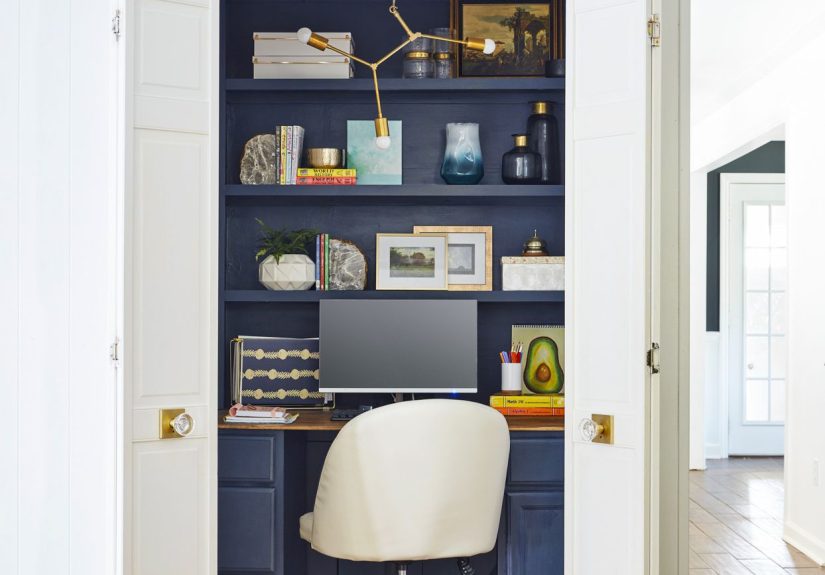
Table of Contents >> Show >> Hide
- Why a Cloffice Works So Well for Working From Home
- Step 1: Pick the Right Closet (and Measure Like You Mean It)
- Step 2: Declutter and Rehome What’s in the Closet
- Step 3: Plan the Layout for Comfort and Flow
- Step 4: Nail the Lighting (Because “Dim Cave” Is Not a Vibe)
- Step 5: Don’t Ignore Ventilation and Temperature
- Step 6: Power, Charging, and Cable Management (The Unsexy Secret to Calm)
- Step 7: Ergonomics in a Small Space (So Your Back Doesn’t File a Complaint)
- Step 8: Storage That Doesn’t Crowd Your Brain
- Step 9: Add Privacy and Sound Control (Without Going Full Recording Studio)
- Step 10: Style Your Cloffice So You Actually Want to Sit There
- Budget Planning: What a Cloffice Costs (and Where to Spend)
- Common Cloffice Mistakes (So You Can Skip the “Redo” Phase)
- Conclusion: Your Closet Can Be Your Best Office Yet
- Real-World Cloffice Experiences: What It’s Like After You Build One (500+ Words)
Not everyone has a spare bedroom waiting to become “The Office.” Some of us have… a closet. And honestly?
That closet might be the smartest employee in your whole house. A cloffice (closet + office)
is the work-from-home glow-up that turns an underused nook into a focused, shut-the-doors-and-pretend-you’re-not-home
productivity zone. It can be cozy. It can be chic. It can even hide your mess like a tiny magician’s cape.
This guide walks you through planning, building, and styling a closet office setup that feels good to work in
(not like you’re answering emails in a broom closetunless that’s your brand). We’ll cover measurements, lighting, ventilation,
ergonomics, storage, sound control, and design ideasplus real-world “here’s what actually happens” experiences at the end.
Why a Cloffice Works So Well for Working From Home
A cloffice solves three classic work-from-home problems: space, distractions, and visual clutter.
Instead of balancing a laptop on the couch (aka the world’s most tempting nap trap), you get a dedicated workstation.
And when the day is done, you can close the doors and instantly reclaim your homeno wandering past your to-do list at 9:47 p.m.
like it’s judging you.
Who a Cloffice Is Perfect For
- Remote workers who need a quiet zone for calls and deep focus
- Students who want a dedicated study nook (without taking over the dining table)
- Apartment dwellers or small-space homeowners who need a real desk area
- Anyone who wants a home office that can “disappear” after hours
Step 1: Pick the Right Closet (and Measure Like You Mean It)
Before you buy anythingeven a cute pencil cupchoose the closet that makes the most sense.
Reach-in bedroom closets, linen closets, and hallway closets can all work. The “best” one is usually the closet
with decent access, minimal household traffic, and enough depth to sit comfortably.
Take These Measurements First
- Width: wall-to-wall usable space for your desktop and storage
- Depth: how far the desk can extend while leaving knee room
- Height: for shelves, lighting, and whether you can mount a monitor
- Door swing: doors that bump your chair are the enemy of peace
- Outlet location: proximity to power affects everything
Quick reality check: you don’t need a massive walk-in. Many cloffices succeed because they go verticalshelves, pegboards,
wall-mounted lightingwhile keeping the footprint minimal.
Step 2: Declutter and Rehome What’s in the Closet
If your closet currently stores holiday decorations, mysterious cables from 2012, and a vacuum that screams like a banshee,
you’re not alone. But a cloffice works best when it’s purpose-driven: office stuff goes in; everything else gets relocated.
A Simple “Keep, Move, Donate” Sort
- Keep: items that support your cloffice (paper, supplies, reference books)
- Move: items that belong elsewhere (cleaning supplies, coats, random kitchen gadgets)
- Donate/Trash: the “why do we still have this?” category
If you’re creating a closet-office combo (still storing clothes), aim to separate zones:
work items on shelves above/around the desk, clothes consolidated to one side, and a strict “no sweaters on the keyboard” policy.
(Yes, people do that. Yes, it ends badly.)
Step 3: Plan the Layout for Comfort and Flow
A great cloffice layout is basically Tetris with better lighting. The goal is to fit your essentials without creating a cramped
posture trap. Start with the desktop and seating, then build storage around them.
Layout Options That Actually Work
- Built-in wall-to-wall desk: clean look, maximum surface area
- Floating desk: great for tight closets and easy floor cleaning
- Fold-out desk: ideal when you need the closet to do double duty
- Narrow console-style desk: a fast solution when built-ins aren’t happening
If you’ll be on video calls, position your desk so your face is lit from the front or side (not from a spooky ceiling bulb).
And if the closet is deep, consider keeping the desk slightly forward so you’re not sitting in a shadow cave.
Step 4: Nail the Lighting (Because “Dim Cave” Is Not a Vibe)
Lighting is where cloffices either become inspiring… or become the place where your motivation goes to quietly retire.
Most closets were designed for storage, not screen time, so plan lighting intentionally.
Best Lighting Layers for a Closet Office Setup
- Ambient light: a flush-mount fixture, puck lights, or bright LED ceiling light
- Task light: a desk lamp or wall-mounted adjustable light aimed at your workspace
- Accent light: LED strips under shelves for a polished, boutique-hotel feel
Choose bulbs in a neutral-to-bright range so colors don’t look weird on calls. Also: glare is real.
Angle lights so they don’t reflect on your monitor, and consider a matte desktop surface if reflections drive you bananas.
Step 5: Don’t Ignore Ventilation and Temperature
Closets can trap heat, especially with a laptop, monitor, and a human generating “deadline stress warmth.”
If you can, keep doors open between calls or install solutions that help air move.
Easy Ways to Keep a Cloffice Comfortable
- Use a small quiet fan (clip-on or desktop) to circulate air
- Swap heavy doors for curtains if privacy matters but airflow matters more
- Choose low-heat LED lighting instead of hot halogens
- If the space feels stuffy, take breaks outside the closet (yes, really)
If you’re planning electrical work, ventilation changes, or adding outlets, consider getting help from a qualified professional.
Comfort is importantbut safety is non-negotiable.
Step 6: Power, Charging, and Cable Management (The Unsexy Secret to Calm)
The fastest way to ruin a beautiful cloffice is a spaghetti tangle of cords.
You want power that’s convenient, protected, and tidy. At minimum, plan for your laptop, monitor, phone, and a task light.
Cable Management That Keeps You Sane
- Mount a power strip under the desk (or on the wall) so cords fall neatly
- Use adhesive cord channels to route cables along edges
- Label chargers if multiple people use the space
- Use Velcro ties (zip ties are forever, and forever is a long time)
Pro tip: If outlets are scarce, don’t overload a single plug with a daisy chain of power strips. Plan the load,
and use quality surge protection for electronics.
Step 7: Ergonomics in a Small Space (So Your Back Doesn’t File a Complaint)
A cloffice can be tiny and still ergonomic. The key is adjustability and smart positioning.
Your body should feel supportednot folded like a lawn chair at a backyard BBQ.
Ergonomic Essentials to Get Right
- Chair height: feet flat on the floor (or on a footrest), knees comfortably bent
- Keyboard position: elbows close to your body, shoulders relaxed, wrists neutral
- Monitor placement: directly in front of you, at a comfortable viewing distance
- Screen height: top of the screen around eye level (adjust for comfort and eyewear)
If your closet is shallow, consider a monitor arm or wall-mounted screen to free desk space.
If you’re using a laptop, a laptop stand plus an external keyboard and mouse can be a game-changer.
Step 8: Storage That Doesn’t Crowd Your Brain
The best cloffice storage is the kind that makes your work easier without making the space feel cluttered.
Think vertical, modular, and “everything has a home.”
Smart Cloffice Storage Ideas
- Floating shelves: for books, baskets, and décor (keep frequently used items within reach)
- Pegboard or rail system: for headphones, tools, chargers, scissors, and notes
- Drawer units: slim drawers under the desk for supplies
- Bins and baskets: labeled, stackable, and easy to grab
- Door storage: over-the-door organizers can hold light supplies and cables
A helpful rule: keep your desktop as clear as possible. The more visual noise, the harder it is to focus
especially in a small space where everything is in your face.
Step 9: Add Privacy and Sound Control (Without Going Full Recording Studio)
If your cloffice is your call center, concentration zone, or “please stop yelling about the Wi-Fi” headquarters,
you’ll appreciate some sound and privacy upgrades. You don’t need perfectionjust improvement.
Simple Noise-Reducing Upgrades
- Add a small rug or mat to reduce echo
- Use fabric elements (curtains, upholstered chair, felt bins) to soften sound
- Weatherstripping around doors can reduce sound leaks
- Use a headset with a decent mic for clearer calls
For background aesthetics on video calls, a simple shelf styling moment behind you (books, a plant, one framed print)
can look intentional and professionaleven if the rest of your life is powered by snacks and optimism.
Step 10: Style Your Cloffice So You Actually Want to Sit There
A cloffice should feel like a mini room, not a storage unit with Wi-Fi. The design goal is “tiny sanctuary,” not “temporary exile.”
Paint, wallpaper, and small décor choices go a long way in making the space feel finished.
Design Ideas That Make a Big Impact
- Paint or wallpaper: light colors can open up a small space; bold colors can feel cozy and intentional
- Artwork: one statement print beats five tiny random things
- Greenery: a low-maintenance plant (real or faux) adds life instantly
- Hardware upgrades: swap knobs/pulls if you’re adding drawers or cabinets
- Closet doors: remove them, replace with curtains, or upgrade to doors that don’t steal space
If your closet has a back wall that’s begging for personality, this is where peel-and-stick wallpaper shines.
It’s a commitment-phobe’s dream: big style, low regret.
Budget Planning: What a Cloffice Costs (and Where to Spend)
Cloffices can be surprisingly affordable because you’re working with a small footprint. Your budget depends on whether you’re doing
simple upgrades or full built-ins.
Where to Splurge vs. Save
- Splurge: chair (comfort matters), lighting (it affects everything), a good headset if you’re on calls
- Save: shelves (DIY-friendly), décor (thrift stores), organizers (baskets and bins are often cheap)
- Smart spend: cable management and a sturdy desktop surface (cheap wobbly desks are productivity thieves)
If you’re renting, focus on reversible changes: removable wallpaper, freestanding shelves, tension rods,
and stick-on lighting. You can still create an ultimate work-from-home setupwithout losing your deposit.
Common Cloffice Mistakes (So You Can Skip the “Redo” Phase)
1) Forgetting airflow
If it’s hot, stuffy, or smells like a closet, you won’t want to work there. Plan ventilation and breaks.
2) Choosing looks over comfort
A pretty stool is not an office chair. If you’re working more than an hour at a time, prioritize support.
3) Under-lighting the space
One dim bulb is a recipe for eye strain and crankiness. Layer your lighting.
4) Desk too shallow or too tall
If you’re constantly leaning forward or shrugging your shoulders, your setup needs adjusting.
5) No storage plan
Without storage, papers and supplies multiply like they’re training for a science fair.
Give everything a home.
Conclusion: Your Closet Can Be Your Best Office Yet
A cloffice isn’t just a trendit’s a smart, space-saving strategy for creating a dedicated work zone at home.
When you plan the layout, prioritize lighting and ergonomics, manage cables, and add storage that makes sense,
your closet office setup can feel surprisingly professional (and honestly, kind of delightful).
Start small: measure, clear the space, add a desk surface, fix the lighting, and get your chair situation right.
Then upgrade as you go. The ultimate work-from-home setup isn’t about having the biggest roomit’s about building a space
that helps you focus, feel comfortable, and shut the doors on work when the day is done.
Real-World Cloffice Experiences: What It’s Like After You Build One (500+ Words)
The funniest part of building a cloffice is that the “before” problem usually isn’t the closetit’s the whole house.
People start with a simple goal (“I just need a small home office”), and then realize their current setup is basically
a touring production: laptop in the kitchen, charger in the bedroom, notes on the coffee table, and a daily scavenger hunt
for the one pen that actually works. The first experience almost everyone reports after setting up a cloffice is
relief. Not because the closet is glamorous, but because the brain loves a clear “work happens here” boundary.
One common experience: the cloffice becomes a routine machine. You sit down, you flip on the light, you plug in, you start.
No rearranging pillows. No negotiating with the dining table. No apologizing to your family for turning the living room into a
spreadsheet battlefield. That tiny ritualopen doors, sit, begincreates momentum. People often describe it like the mental
equivalent of putting on shoes: a small signal that tells your brain, “Yep, we’re doing the thing now.”
Another experience: you’ll learn quickly what you truly need. The first week, most cloffices are either too bare
(nowhere to put anything) or too cluttered (everything is within arm’s reach, including chaos). After a few workdays,
the space naturally edits itself. You notice what annoys you: glare on the screen at 2 p.m., cables snagging your knee,
the chair that looked cute but feels like sitting on a polite rock. Then you start making small upgrades that have outsized impact:
a better task lamp, a footrest, a hook for headphones, a power strip mounted under the desk so cords stop acting feral.
Many people also experience an unexpected design win: a cloffice is small enough that you can be bold without overwhelming the house.
This is where you’ll see real-life experimentsdark paint, patterned wallpaper, a funky light fixturebecause it’s one tiny space
that can feel like a jewel box. And since the doors close, you can enjoy your maximalist moment without it taking over the whole room.
(Closet doors: the original “mute button” for décor.)
There are practical experiences, too. Video calls often improve because you can control your background and lighting.
People who struggled with distractions notice they’re interrupted lesspartly because the physical boundary communicates,
“I’m working,” and partly because you’re no longer in the middle of household traffic. If you share a home, a cloffice can reduce
friction because your work items stop spreading into shared spaces. No one misses stepping over your laptop bag like it’s a tiny
obstacle course.
And yes, there’s a learning curve. Some people find the space feels tight at first. That’s normal. The fix is usually not “bigger closet,”
but “better setup”: brighter lighting, improved airflow, a chair that fits, and a desk depth that keeps your posture upright.
Once comfort is handled, the coziness starts feeling intentionallike a personal work booth designed for focus.
The long-term experience most people report is simple: the cloffice makes working from home feel less like improvising and more like
showing up for a real job… just with better snacks and a shorter commute.