Table of Contents >> Show >> Hide
- Why TV Height Matters More Than People Admit
- The #1 Rule: Put the Center of the Screen at Eye Level
- Step-by-Step: Measure Your Perfect TV Height (No Trigonometry Required)
- Don’t Forget Furniture, Soundbars, and Real-World Obstacles
- When the TV Must Be Higher: Tilt Mounts and Smart Adjustments
- Height Isn’t Everything: Viewing Distance and Viewing Angle Matter Too
- Room-by-Room Recommendations (Practical Ranges)
- The 5-Minute Test Before You Drill Anything
- Mounting Safety and Setup Tips (Because Gravity Is Unforgiving)
- Conclusion: Your “Right Height” Is the One Your Body Likes
- Real-Life Experiences: What People Learn After Mounting a TV (So You Don’t Have To)
Mounting a TV looks deceptively simple: pick a wall, grab a drill, and try not to hit a water pipe.
But the height you choose can be the difference between “movie night” and “why does my neck feel like I
just head-butted a trampoline?”
The good news: finding the right TV height isn’t mysterious or expensive. It’s mostly about matching the
screen to your natural line of sight, then making smart adjustments for your room, your furniture, and your
real-life habits (like watching from a recliner that turns you into a human croissant).
This guide walks you through the most practical rules of thumb, simple measurements, and a few
“please learn from other people’s mistakes” examplesso you can mount or place your TV at a height that feels
effortless for everyday viewing.
Why TV Height Matters More Than People Admit
Your eyes and neck have a favorite position: looking straight ahead or slightly downward. When a screen sits too high,
you end up tilting your head back for long stretchesan awkward posture that can fatigue the muscles supporting your head.
(Your neck was not designed to be a permanent kickstand.)
TV height also affects picture quality. Even though modern TVs have wide viewing angles, the image generally looks best
when you’re viewing it close to head-onespecially for long movies or gaming sessions where small details matter.
Comfort and clarity tend to improve when the screen’s center aligns with where your eyes naturally rest.
The #1 Rule: Put the Center of the Screen at Eye Level
If you remember only one thing, make it this:
the center of your TV screen should be at (or slightly below) your eye level when you’re in your main viewing position.
Many guides use an average seated eye level around 42 inches from the floor as a starting point.
It’s not magicit’s just a common average for adults sitting on a standard couch. But your body, your sofa, and your
posture might not match the “average human” template. So treat 42 inches as a quick default, not a commandment.
Fast sanity check
- If you’re craning up to watch, the TV is probably too high.
- If you feel like you’re reading a phone on the wall, it might be too low.
- If you can watch for an hour and forget your neck exists, congratulationsyou nailed it.
Step-by-Step: Measure Your Perfect TV Height (No Trigonometry Required)
Here’s the simple method installers and home-theater folks use because it works in basically every room:
Step 1: Sit where you normally watch
Sit on your couch, chair, or bed in your typical “I’m settling in” posture. Not the posture you use when guests are over.
The real posture. The one where you become one with the cushions.
Step 2: Measure your seated eye height
Have someone measure from the floor to your eyes. If you’re alone, place a piece of painter’s tape on the wall at your eye level,
or measure to the top of your head and subtract a few inches. The goal is a practical number, not an anatomy textbook.
Step 3: Find your TV’s screen height
TV size is measured diagonally, but what you need is the screen’s vertical height (top to bottom of the visible picture).
You can look it up, measure it, or estimate it:
- Measure the visible screen (not the frame).
- Or look up approximate dimensions for your size (a 65″ TV is roughly about 32″ tall; a 55″ is roughly about 27″ tall).
Step 4: Do one easy calculation
Once you have your seated eye height and your screen height:
Ideal height to center of screen = your seated eye height
Then to find where the bottom of the screen should land:
Bottom-of-screen height = seated eye height − (screen height ÷ 2)
A quick example
Let’s say your seated eye height is 41 inches, and your TV’s screen is about 32 inches tall.
Half of 32 is 16. So your bottom-of-screen height is:
41 − 16 = 25 inches from the floor.
That means you’d aim to mount the TV so the bottom edge of the visible screen sits around 25 inches up,
and the center of the screen sits around 41 inches up.
Don’t Forget Furniture, Soundbars, and Real-World Obstacles
In a perfect world, the TV center would always land right at your seated eye level. In the real world, you might have:
a media console, a fireplace mantel, a soundbar, a center speaker, or a cat that believes warm electronics are furniture.
Leave clearance above your console
If you’re mounting above a TV stand or cabinet, a common guideline is to keep the TV about
4 to 6 inches above the furnituresimilar to how you’d hang a mirror above a dresser.
This prevents the setup from looking cramped and gives breathing room for devices and décor.
Plan for a soundbar (and your TV’s IR sensor)
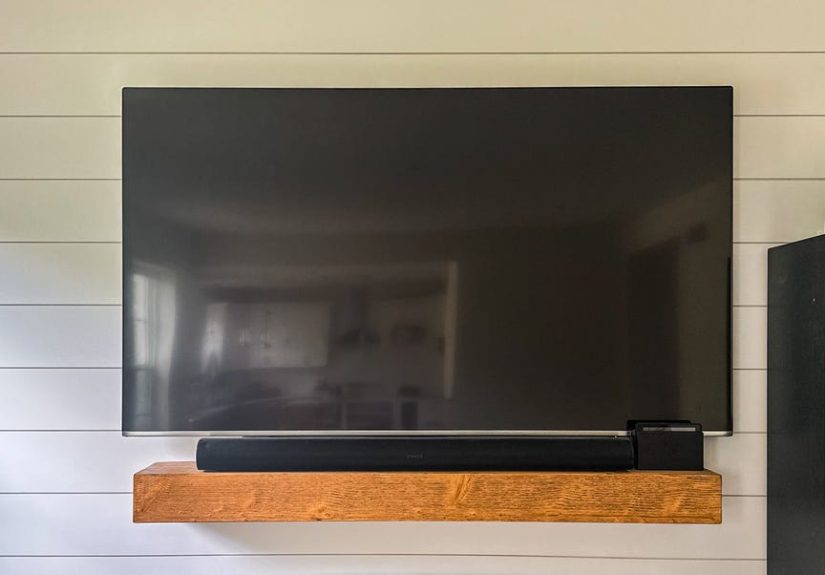
Soundbars often need a little space below the screen so they don’t block the pictureor your remote’s line of sight.
If you’re using a soundbar, mock it up before drilling. Even a cardboard “soundbar placeholder” can save you from
the classic tragedy: “Why is the bottom of the movie hidden behind my audio equipment?”
When the TV Must Be Higher: Tilt Mounts and Smart Adjustments
Sometimes the room layout forces your TV upwardlike mounting above a fireplace or above tall furniture.
If your TV ends up higher than your natural eye level, a tilting mount can help keep the picture comfortable by
pointing the screen toward your seating position.
The easy rule for “too high” TVs
If you find yourself looking up at the TV, a small downward tilt can reduce neck strain. You’re basically trying to bring
the screen’s “visual center” back toward your line of sight without moving the wall.
If you want the math (optional, but kind of fun)
Some calculators model ideal height using the idea that the extra height above your eye level depends on your viewing distance
and the tilt angle. In plain English: the farther you sit, the more a small tilt angle can shift the “comfortable center.”
Translation: if you sit far back, even a modest tilt can make a slightly higher TV feel okay. If you sit close,
a high-mounted TV becomes a neck workout fast.
Fireplace mounting: the “looks amazing, may feel awful” scenario
TVs above fireplaces are popular in home photos because they look clean and symmetrical. But they’re often too high for comfortable
everyday viewing, and the heat/smoke concerns (for wood-burning setups) can be a real issue. If the fireplace wall is your only option,
consider a mantel-mount style bracket that lets you pull the TV down for viewing.
Height Isn’t Everything: Viewing Distance and Viewing Angle Matter Too
Even at the perfect height, the experience can feel off if you’re sitting much too close or too far.
Home-theater guidelines often talk about your field of viewhow much of your vision the screen fills.
Two common angle guidelines
- About 30° field of view is often suggested for mixed TV usage (shows, sports, casual movies).
- Around 36° is sometimes used as a more immersive cinema-style target.
You don’t need to measure degrees like you’re launching a rocket. Just know this: if you move your seating closer for immersion,
you may prefer the TV slightly lower (because your gaze naturally angles down a bit). If you sit farther away (like in a large room),
a slightly higher mount can still feel comfortableespecially with a tilt mount.
Room-by-Room Recommendations (Practical Ranges)
Living room (couch viewing)
Start by aiming for the screen center at your seated eye level. For many homes, that lands near the familiar
“about 42 inches to center” guidelinebut your measurement is the real answer.
Bedroom (watching reclined)
If you watch while reclined, your eyes point a bit higher relative to your body position. It can make sense to mount the TV
higher than living-room height, ideally with an adjustable mount so you can tilt the screen toward you.
Home gym / bar / standing-heavy spaces
If most viewing happens while standing or on bar stools, don’t force a living-room height onto the room.
Measure eye level from the position you’ll use most. A height that’s “too high” for couch viewing can be perfect for a party
where everyone’s standing and watching the game.
Kids’ area or floor seating
If people often sit on the floor (game night, kids’ shows, beanbag chairs), consider a slightly lower placement or a setup that
works “good enough” for both couch and floor viewing. Painter’s tape testing helps here.
The 5-Minute Test Before You Drill Anything
Here’s the easiest way to avoid regret: mock the TV placement on the wall first.
- Use painter’s tape to outline the TV’s screen size on the wall (or tape up a large sheet of paper/cardboard).
- Mark the screen center at your measured seated eye level.
- Sit, watch a clip on your phone, and imagine that taped rectangle is the TV.
- Move the outline up or down a couple inches until it feels effortless.
Two inches might not sound like much, but your neck will absolutely notice.
Mounting Safety and Setup Tips (Because Gravity Is Unforgiving)
Pick the right wall location
Beyond height, think about glare from windows and lights, access to power, and cable routing. Also consider whether the TV’s ports will be reachable
after mountingfuture you will not enjoy removing a 75-inch TV just to plug in a new streaming device.
Find studs (or use the right anchors)
If you’re mounting on drywall, secure the mount into studs. For brick or concrete, use the correct masonry hardware.
TVs are lighter than they used to be, but they’re still heavy enough to ruin your day if mounted incorrectly.
Heat sources: be cautious
Avoid placing the TV where it’s exposed to excessive heat (like directly above some fireplaces). Besides comfort issues, heat can affect electronics
over time. If you must mount above a fireplace, research your specific setup and consider a pull-down mount designed for that situation.
Conclusion: Your “Right Height” Is the One Your Body Likes
The best TV height isn’t a single universal numberit’s a simple relationship between your seated (or standing) eye level and the center of the screen.
Start there, then adjust for furniture, soundbars, and the way you actually watch.
If you want a clean, confident plan:
measure eye level, center the screen there, test with tape, and only then commit with screws.
Your neck will thank you, your room will look intentional, and your next binge session won’t come with a bonus chiropractor visit.
Real-Life Experiences: What People Learn After Mounting a TV (So You Don’t Have To)
The internet is full of “perfect” living rooms where the TV floats above a fireplace like modern art. Real homes are messierand more honest.
Here are some common experiences people report after installing a TV, along with the lessons that usually follow. Consider this your
friendly neighborhood “I wish someone told me” section.
1) The “It Looked Great… Until Movie Night” surprise
A very common story goes like this: someone mounts the TV higher than eye level because it looks sleek, avoids a toddler’s reach, and
keeps the screen visible from the kitchen. Then they sit down to watch a two-hour movie and realize their head is tilted back the whole time.
At first, they don’t notice. By the credits, they’re doing slow neck circles like a confused turtle.
Lesson: if your TV is your main “sit and watch” screen, comfort beats symmetry. You can still create a clean look with cable management,
a centered wall layout, and a tidy consolewithout turning your neck into a coat hanger.
2) The soundbar “gotcha” (also known as: Where did the subtitles go?)
Another classic: the TV goes up, the mount is perfectly level, everyone celebrates… and then the soundbar arrives.
Suddenly the bottom inch of the picture is blocked, subtitles are clipped, or the remote stops working reliably because a sensor is covered.
This usually results in a dramatic pause and someone saying, “So… we’re not drilling new holes, right?”
Lesson: plan the whole stackTV, soundbar, console height, and clearancebefore drilling. Even if you don’t have the soundbar yet, measure
where it would go. A little mock-up prevents the “Swiss cheese wall” phase of home improvement.
3) The “We don’t sit like that” reality check
Many guides assume you sit upright, eyes forward, like you’re attentively watching a documentary about spreadsheets.
In real life, people sprawl. They slouch. They lean into a corner of the couch. They recline until only their socks are visible.
When the TV is mounted for a perfectly upright posture, the screen can feel slightly low or slightly high depending on how your family actually lounges.
Lesson: measure from your real viewing posture. If your household watches in “recliner mode” or “bed burrito mode,” you might choose a slightly
higher placement and a mount with tilt. If you mostly watch seated upright (sports, gaming), keep the screen center close to true eye level.
4) The fireplace debate: beauty vs. biomechanics
Some households truly love the TV-over-fireplace setupespecially when the room layout makes it the natural focal point. Others install it,
then spend months trying to ignore the fact they’re looking upward every evening. This is where you’ll hear phrases like “It’s fine” said in a tone that
strongly suggests it is not fine.
Lesson: if you mount above a fireplace, consider a pull-down or articulating mount that lets you lower the screen during viewing. That way you can keep the
design you want without sacrificing comfort. Also pay attention to heat; not every fireplace setup is TV-friendly.
5) The “two-inch miracle”
One of the most surprisingly consistent reports is how much difference a tiny adjustment makes. People will move the TV down two inches and suddenly the room
feels calmer. Or move it up two inches to clear a console and realize the viewing angle still feels fine. The lesson isn’t that one direction is always right
it’s that small tweaks matter.
Lesson: do the painter’s tape test and give yourself permission to shift the plan a bit. The “right height” is rarely a single magic number; it’s a sweet spot
where your eyes relax, your neck stays neutral, and the setup fits your room without awkward compromises.
6) The “future-proof” win
People who feel happiest with their setup often did one unglamorous thing: they planned for future changes. They left slack for cables, used a mount that can
tilt or articulate, and positioned the TV so ports remain accessible. When a new console, soundbar, or streaming box shows up later, the setup adapts instead of
forcing a full remount.
Lesson: a little flexibility (tilt, swivel, accessible wiring) keeps your TV height comfortable even as the rest of your gear evolves.