Table of Contents >> Show >> Hide
- IRC in plain English: how it works
- Step 1: Pick an IRC client (the easiest options)
- Step 2: Choose a network and find a channel
- Step 3: Connect securely (yes, even for “just chatting”)
- Step 4: Learn the “Big 10” IRC commands (you’ll use these constantly)
- Step 5: Register your nickname (so nobody steals your “brand”)
- Step 6: IRC etiquette (how to not be “that new person”)
- Step 7: Troubleshooting the most common beginner problems
- Step 8: Level up (optional, but very worth it)
- Beginner Experiences: What Your First Week on IRC Feels Like
- Conclusion
IRCshort for Internet Relay Chatis the internet’s original group chat. It’s lightweight, fast, and refreshingly un-fussy: you connect to a network, join a channel, and start talking. No “algorithmic discovery,” no “suggested follows,” no surprise video calls with your uncle’s forehead.
This guide walks you through how to get started with IRC from absolute zero: choosing an IRC client, connecting securely, joining channels, learning the essential commands, registering your nickname, and avoiding the classic beginner potholes (like accidentally shouting your message to 800 people when you meant to DM one).
IRC in plain English: how it works
IRC is a text-based chat protocol. That means your IRC app (the “client”) connects to an IRC server, and servers connect to other servers to form a “network.” The system is old-school in the best way: simple building blocks that still work decades later.
Key IRC terms you’ll see everywhere
- Network: A collection of IRC servers that share the same chat ecosystem (users/channels). Examples: Libera.Chat, OFTC, EFnet.
- Server: The specific machine you connect to (often you’ll choose from a list).
- Channel: A public group chat room. Most channels start with
#(like#linuxor#python). - Nick (nickname): Your handle. You can change it anytime, but popular nicks get taken fast.
- Query/PM: A private chat with one person.
- Modes: Settings for channels/users (like “invite-only,” “moderated,” “operator”).
- Services (NickServ/ChanServ): Helper bots for accounts, nicknames, and channel management on many networks.
If you remember only one mental model, make it this: Network → Server → Channel. You connect to a server on a network, then join channels on that network.
Step 1: Pick an IRC client (the easiest options)
An IRC client is just the app you use to connect and chat. The “best” client is the one you’ll actually open again tomorrow. Here are beginner-friendly picks, grouped by vibe.
Option A: Desktop apps (great for everyday use)
- HexChat (Windows/Linux): Friendly UI, network list, easy channel joining.
- mIRC (Windows): A classic with lots of documentation and power features.
- Textual (macOS): Popular on Mac, polished interface.
Option B: Web clients (fastest “just let me in” route)
- IRCCloud: Web + mobile, stays connected for you, keeps history (handy if you close tabs like it’s your hobby).
- Kiwi IRC: Often offered as a network’s “webchat” entry pointeasy for first-time testing.
- The Lounge: A modern web IRC client you can self-host if you want control and persistence.
Option C: Terminal clients (fun, fast, and slightly “I own a mechanical keyboard”)
- Irssi: Lightweight, widely used, and perfect if you live in a terminal.
- WeeChat: Powerful, scriptable, and great once you want to customize everything.
If you’re brand new, a GUI client like HexChat or a web client like IRCCloud is the smoothest start. You can always graduate to terminal clients laterthere’s no pop quiz.
Step 2: Choose a network and find a channel
IRC isn’t one single place; it’s more like “email.” You choose where to connect. Many open-source communities live on Libera.Chat or OFTC, while hobby communities may be elsewhere.
How to find the right channel without wandering into chaos
- Start with a community’s website or documentationmany projects list an IRC channel.
- Search for “ProjectName IRC channel” or “ProjectName Libera.Chat” (lots of open-source projects publish this).
- Once connected, you can use
/listto browse channels (some networks restrict this, and the list can be huge).
Pro tip: channels often have a topic line (shown when you join). Read it. It’s basically the channel’s “house rules + what we’re doing here” sign.
Step 3: Connect securely (yes, even for “just chatting”)
Many networks support encrypted connections via TLS. You’ll often see two common ports:
- 6697: commonly used for IRC over TLS (encrypted)
- 6667: commonly used for plain (unencrypted) IRC
If your client offers a checkbox like “Use SSL/TLS,” turn it on. TLS helps protect your connection in transit (for example, on public Wi-Fi). It does not magically turn IRC into end-to-end encrypted messagingIRC is still a server-based chat systemso treat public channels like a public room.
Example: connecting in HexChat (typical flow)
- Open HexChat → Network List.
- Select (or add) a network and a server address.
- Set your nickname(s) and connect.
- Join a channel like
#channelname.
HexChat makes this straightforward: you set your nick, pick a server, and connect; you can also save “favorite channels” to auto-join after connecting.
Example: connecting in Irssi (terminal)
Don’t worry if you don’t know a server name yetmany networks publish connection details. Your client may also ship with a prebuilt list.
Step 4: Learn the “Big 10” IRC commands (you’ll use these constantly)
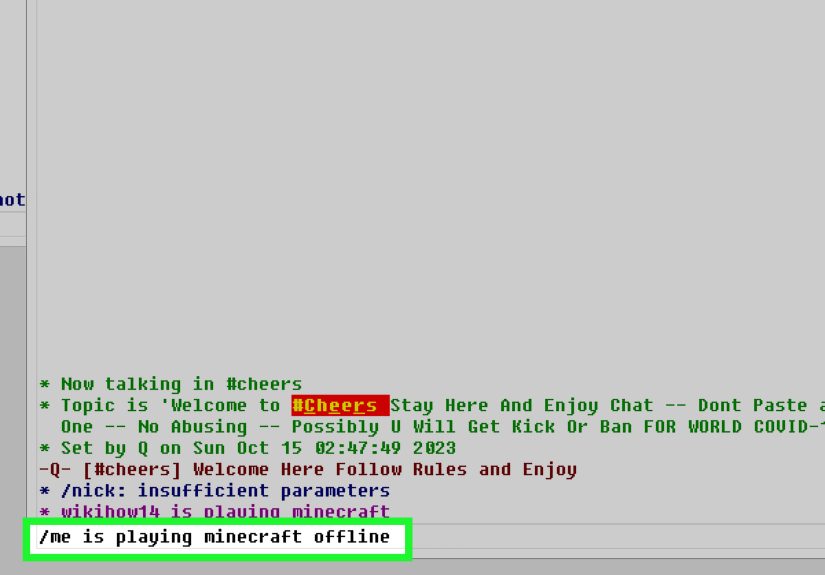
Most IRC clients use slash commands. If the line starts with /, it’s a command. If it doesn’t, it’s a message to the channel (or person) you’re currently focused on. This is the #1 way beginners accidentally perform “public speaking.”
Essential commands (with real examples)
- Change your nick:
/nick NewName - Join a channel:
/join #channel - Leave a channel:
/part #channel - List channels (if enabled):
/listor/list *python* - Private message (without opening a new window):
/msg Nick hello! - Open a private chat window:
/query Nick - Action message (the classic):
/me waves - See info about a user:
/whois Nick - Set away status:
/away Grabbing coffee(and/awayagain to return) - Disconnect:
/quit Heading out, bye!
Bonus command for sanity: copy-paste responsibly. If you need to share logs or long code, use a paste service (many channels prefer it) rather than dropping a 200-line wall into chat like a surprise novel.
Step 5: Register your nickname (so nobody steals your “brand”)
On many networks, you can chat without an account. But if you plan to stick aroundespecially in busy channelsyou should register your nickname. That prevents someone else from using it and reduces confusion.
NickServ: the usual way accounts work
Many networks use a service bot called NickServ for registration and login. The exact commands vary by network, but the pattern is consistent:
Some networks will also require an email verification step (you’ll receive instructions). Once you’re registered, you’ll want your client to authenticate automatically when you connectespecially on networks that require it.
SASL: automatic login (recommended)
SASL is a login mechanism many IRC clients support. Networks may recommend or require it, and some IP ranges may only allow connections that authenticate with SASL. In plain terms: SASL helps you prove you’re you, right as you connect.
Most clients let you store: Account name (NickServ account) + password, then select “SASL PLAIN” (or another supported mechanism). If you see an option to “Use TLS” and “Use SASL,” enable both.
If you can’t set up SASL immediately, some users authenticate after connecting by messaging NickServ (less ideal, but common):
Step 6: IRC etiquette (how to not be “that new person”)
IRC communities are often friendlybut they’re also allergic to avoidable chaos. Follow these and you’ll look like you’ve been here since dial-up (minus the emotional baggage).
Do this
- Lurk first: read the room, skim the topic, watch how questions are asked and answered.
- Be specific: “My HexChat says ‘Nickname is already in use’how do I fix it?” beats “help plz.”
- Use the right channel: some communities have
#help,#support, or “no off-topic” rules. - Assume public: channel logs may exist; don’t share sensitive personal info in public channels.
Avoid this
- Don’t DM-first for support unless someone invites youmany volunteers prefer helping in-channel so others benefit.
- Don’t paste giant blocks of code/logs into a channel without permission.
- Don’t fight the ops (channel operators). If you get moderated, ask politely what the rule is.
Step 7: Troubleshooting the most common beginner problems
“My nickname is already in use.”
- Try a slight variation:
YourNick_,YourNick|away, or a second-choice nick. - If it’s your nick, you likely need to identify with NickServ or enable SASL auto-login.
“I can’t connect” (or it disconnects instantly).
- Try the TLS port (commonly
6697) and enable “SSL/TLS.” - Some networks restrict certain VPN/proxy ranges unless you authenticate with SASLtry connecting without the VPN just to create/verify your account, then re-enable it.
- Corporate or campus networks sometimes block ports; try another network or a different connection.
“I joined a channel but can’t talk.”
- Check if the channel is moderated (+m), requires registration, or has newcomer restrictions.
- Read the topicmany channels tell you exactly what to do next.
“My client is confusingthere are too many windows.”
- That’s normal. IRC clients often use separate tabs/windows for each channel and private chat.
- Start with one network and 1–2 channels. You can expand later once your brain stops yelling.
Step 8: Level up (optional, but very worth it)
Use a bouncer if you want to stay connected
IRC is happiest when you stay connected. If you disconnect, you may miss messages (unless the channel is logged somewhere). A bouncer like ZNC stays connected on your behalf and lets you reconnect without losing the session. This is also useful for bots or clients that need SASL support in tricky network situations.
Try a “keeps history” client
Services like IRCCloud keep a connection alive for you and store chat history, which can feel more modern if you’re coming from Slack/Discord. It’s not the only waybut it’s an easy way to avoid “I went to lunch and missed everything.”
Customize (just a little)
- Set highlights/notifications for your nick and keywords (so you don’t stare at chat like it’s a campfire).
- Save favorite channels to auto-join.
- Enable automatic authentication (SASL) so you stop wrestling with NickServ every time you reconnect.
Beginner Experiences: What Your First Week on IRC Feels Like
Your first week on IRC usually has the same emotional arc as assembling furniture: confidence, confusion, mild regret, and thensuddenlyyou own a bookshelf and you feel unstoppable.
Day one often starts with a deceptively simple win: you install a client, pick a nickname, and connect. The chat window appears. The user list fills up. You think, “This is easy.” Then you type “hello” and… nothing happens. Or worse, it happens in the wrong place. (Congratulations, you just learned the difference between a channel tab and a private query window.)
A classic early moment is the nickname shuffle. Your dream nick is already taken, so you try a second one. Also taken. Third one? Taken. At this point you discover that IRC has been around long enough that every cool nickname has a 20-year history and possibly a dramatic backstory. You settle on something slightly longer, slightly weirder, and somehow more youlike DataPenguin or taco_wrangler. You tell yourself it’s temporary. Two days later, it becomes your identity.
Soon after comes the first channel join. You enter /join #something and land in a room where people are discussing a niche topic with the intensity of a courtroom drama. You scroll up, read the topic, and realize there are rules. No politics. No homework dumps. No paste floods. Possibly “no memes,” which is brave. You lurk for a bit, then ask a question. Someone answers. It’s helpful. You experience a tiny flash of “the internet can be good?”
Then you meet IRC’s charming quirks: someone “pings” you in a sentence, you learn what /whois does, and you realize many users have been here forever. You’ll notice a rhythm: quiet stretches, bursts of activity, and occasional jokes that make no sense unless you were present for the last three hours. That’s not a flawit’s the culture. IRC can feel like a neighborhood: you don’t need to be loud to belong; showing up consistently is the real superpower.
Around midweek, you’ll probably run into your first authentication hiccup. You connect, try to talk, and get a message that your nick is “registered” and you need to identify. This is when you learn about NickServ and SASL. You set up auto-login, reconnect, and it works. The satisfaction is wildly out of proportion to the effortlike fixing a squeaky door and suddenly feeling qualified to remodel a kitchen.
By the end of the week, you’re comfortable enough to multitask: one tab for a hobby channel, one for a project community, one private chat where a helpful person is walking you through something. You’ve learned to read the topic, to use /me sparingly (no one needs constant stage directions), and to treat public channels like public spaces. If you’re really hooked, you’ll start exploring upgradesmaybe a bouncer like ZNC, or a web client that keeps history so you don’t miss messages.
The surprising part? IRC doesn’t feel “old” once you’re in it. It feels direct. You came to talk to humans, and that’s what it gives you: people, channels, and conversationno extra frosting. (Unless you’re in a channel that argues about frosting. And yes, that channel probably exists.)
Conclusion
Getting started with IRC is mostly about building a simple routine: pick a client, connect to a network with TLS, join a channel, learn a handful of commands, and register your nick so you can keep it. Once the basics click, IRC becomes an easy, lightweight way to join real communitiesespecially in tech, open source, and long-running interest groups.