Table of Contents >> Show >> Hide
- Why Bother Organizing Power Cords?
- Step 1: Map Your Cord Chaos
- Step 2: Tame Cords in Use Around the House
- Step 3: Store Extra Cords the Smart Way
- Step 4: Label Like a Pro
- Step 5: Hide Cords Without Hurting Safety
- Maintenance: Keep Cord Organization from Slipping
- Common Mistakes to Avoid When Organizing Power Cords
- Real-Life Cord Management Ideas You Can Copy
- Extra: Experiences and Practical Lessons from Organizing Power Cords
- Conclusion
If you’ve ever tried to unplug your laptop charger and accidentally triggered a full-scale avalanche of wires, welcome to the club. Power cords snake behind the TV, pile up under the desk, and mysteriously multiply in that one “miscellaneous tech” drawer. The good news? Learning how to organize power cords is a lot easier (and cheaper) than buying all-new wireless everything.
Professional organizers and home improvement experts agree: smart cord management makes your home safer, easier to clean, and a lot less visually chaotic. It’s also one of those projects where a couple of hours on a weekend can genuinely change how your space feels every single day.
Why Bother Organizing Power Cords?
1. Safety First
Unruly cords aren’t just ugly; they can be a tripping hazard, a fire risk, and a magnet for dust bunnies. Home safety and decorating experts emphasize keeping power cords out of walkways, avoiding damaged cables, and not overloading power strips or extension cords.
2. Less Visual Clutter, More Calm
Even if you keep a reasonably tidy home, a tangle of cords under the TV or beside the nightstand can make the whole room feel messy. Hiding or neatly bundling cordsusing cord channels along the baseboard or cable boxes by the power stripinstantly simplifies the visual noise.
3. Easier Troubleshooting and Upgrading
Ever played “guess that cord” behind the TV? When everything is labeled and routed in a logical way, swapping a router, moving a console, or troubleshooting a dead charger becomes a 2-minute task instead of a 20-minute yoga stretch in a dust cloud. Cable management pros consistently recommend pairing basic organization with clear labels to save time later.
Step 1: Map Your Cord Chaos
Take Inventory
Before you buy fancy cord organizers, figure out what you’re dealing with. Tech and organizing writers suggest starting by unplugging and untangling everything in one zonelike your TV area or home officeand laying those cords out on the floor or table. Group them into:
- In-use cords: things that are plugged in daily (TV, modem, lamp, desktop, chargers).
- Occasional-use cords: seasonal items or specialty chargers.
- “Why do I still own this?” cords: old phone chargers, mystery adapters, dead cables.
Toss damaged or unknown cables, and recycle electronics where possible. There’s no point in organizing cords that should have retired during the flip-phone era.
Decide Where Each Cord Lives
Next, match cords to their “home base”:
- TV and entertainment cords stay in the living room.
- Computer and work cords live in the home office area.
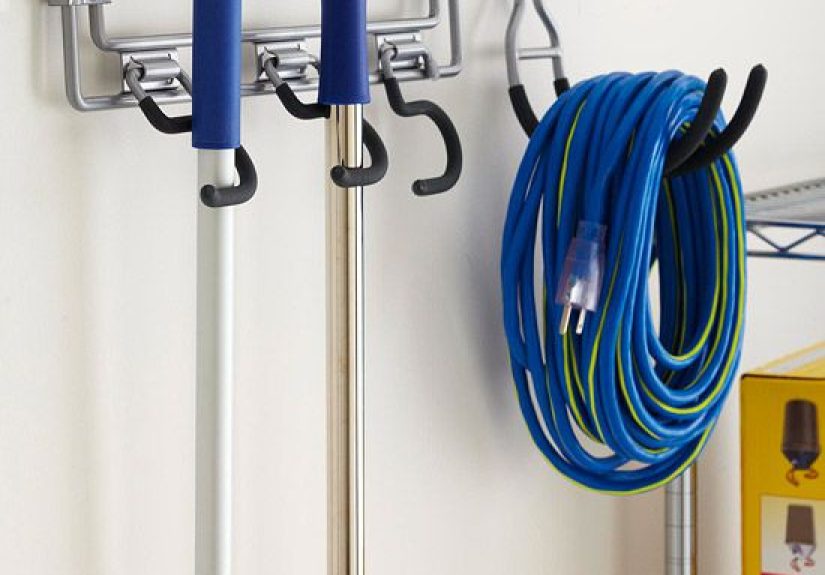
- Outdoor or heavy-duty extension cords belong in the garage or utility space.
This alone cuts down on clutter. Instead of one random box of 47 different cables, you’ll have smaller, clearly defined stashes by task and location.
Step 2: Tame Cords in Use Around the House
Living Room & TV Area
The entertainment center is cord chaos HQ: TV, streaming box, gaming console, soundbar, maybe a smart speaker or two. Home improvement guides recommend a few simple tactics:
- Use a surge-protected power strip: Plug everything into a single, high-quality surge protector instead of multiple outlets or daisy-chained extension cords.
- Add a cable management box: A simple box designed to hold your power strip and excess cord length keeps everything contained and kid/pet-safe.
- Run cords through channels: Self-adhesive cord channels along the baseboard or wall hide long cord runs and protect them from damage.
- Mount or hide behind furniture: Many media consoles have holes at the back to route cables. Run cords through these openings and down the back legs instead of draping them across the wall.
If you want to go extra stylish, some TV wall experts suggest adding decorative panels or art around your TV to visually blend or hide any remaining visible wires.
Home Office & Desk Setup
Your desk may look minimal from the toplaptop, monitor, maybe a plantbut underneath, it’s often a jungle. Cable management guides recommend treating the underside of your desk like a mini infrastructure project.
- Mount the power strip under the desk: Use screws or adhesive brackets to fasten a power strip under the desktop or along the back.
- Use a cable tray or J-channel: A metal or plastic tray attached underneath holds extra cord length so it doesn’t dangle.
- Add desk grommets: Grommetsthose round openings with coverslet cords drop neatly from the desktop to the underside instead of hanging off the edge.
- Secure runs with clips or adhesive mounts: Route cables along the back edge or desk legs using stick-on clips or Velcro wraps.
Positioning your desk near an outlet also helps keep cord runs short and easier to hide.
Bedroom and Bedside Area
The bedside zone is where good intentions go to die in a nest of phone chargers, smartwatch cables, lamp cords, and maybe a white noise machine. Organizing pros suggest:
- Use small cord clips on the nightstand edge so charging cables stay in reach and don’t fall behind the furniture.
- Bundle extra length using Velcro ties and tuck it into a small box or cable organizer under the table.
- Use a multi-port charger instead of a power strip on the nightstand to cut down on the number of cords.
The goal is simple: when you fumble for your charger in the dark, you find one nicely parked cableno fishing expedition.
Step 3: Store Extra Cords the Smart Way
Coil and Contain
Tech writers often recommend coiling cables into loose loops (about the size of your hand) and securing them with reusable ties instead of tight knots or aggressive twists. That prevents damage to the wires and keeps cords from tangling in storage.
Easy storage ideas include:
- Clear zip-top bags labeled by type (HDMI, USB-C, Lightning, etc.).
- Small bins or shoeboxes divided with cardboard and labeled by category.
- Repurposed round containerslike takeout soup tubsfor neatly coiled cords.
Sort by Function, Not Just by Shape
Instead of throwing everything into one “cables” bin, group cords by how you use them:
- Everyday tech: phone and laptop chargers, headphone cables.
- Entertainment: HDMI, audio cables, gaming console cords.
- Occasional or legacy: spare extension cords, specialty adapters.
Label each container clearly so you can grab what you need without rummaging through a spaghetti sampler every time.
Step 4: Label Like a Pro
If you only adopt one new cord management habit, make it labeling. Cable management and AV pros repeatedly stress that labeling both ends of every cable is the secret to painless maintenance.
What to Use for Labels
- Wrap-around cable labels: Designed specifically for cords, these wrap fully around the cable and often have a clear laminate section to protect the text.
- Writable cable ties: Some reusable ties have small tabs you can write on.
- Label printer tape: A handheld label maker works well and looks neat.
- Masking tape + marker (budget option): Not as durable, but acceptable for home use if you don’t mind replacing them periodically.
What to Put on the Label
Keep it simple and consistent:
- Device name: “TV,” “Modem,” “Soundbar,” “Desk Lamp.”
- Location: “Living Room,” “Office,” “Kids’ Room.”
- Port or function (optional): “HDMI 1,” “USB-C Dock,” “Printer.”
For more complex setups (home offices, gaming rooms), some pros also color-code cables or labelsfor example, yellow for power, blue for video, red for audio.
Step 5: Hide Cords Without Hurting Safety
It’s tempting to shove cords under rugs or into overstuffed boxes, but safety experts strongly advise against anything that pinches, overheats, or stresses cables.
Good Ways to Hide Cords
- Cord bundlers and hooks behind furniture to hold extra length out of sight.
- Baseboard cord channels that stick to the wall and hide cords along the floor.
- Cable boxes that cover your power strip and protect it from dust and curious pets.
- Furniture with built-in cord cutouts or holes in the back for routing cables.
Things to Avoid
- Running power cords under thick rugs or carpets.
- Daisy chaining power strips or extension cords.
- Overloading a single outlet with too many high-draw devices.
- Using damaged, cracked, or hot-to-the-touch cords.
If a cord or power strip ever feels warm or smells odd, unplug it immediately and replace it. No level of aesthetic minimalism is worth an electrical fire.
Maintenance: Keep Cord Organization from Slipping
Cord organization is not a one-and-done job. Labeling and low-effort habits keep things tidy long-term. Experts suggest reviewing your setup every few months to check for peeling labels, worn cords, or random new gadgets that snuck in without proper routing.
Try these small maintenance habits:
- Whenever you add a new device, label the cord immediately.
- When you remove a device, remove its cord and put it in the proper storage bin.
- Keep a small “cord kit” on hand with extra Velcro ties, labels, and a marker.
Common Mistakes to Avoid When Organizing Power Cords
- Hiding cords before planning: Shoving cords behind furniture before mapping and grouping them only delays the mess.
- Skipping labels: Yes, you think you’ll “remember which is which.” No, you will not.
- Using only disposable ties: Zip ties are fine for permanent setups, but reusable ties let you adapt as your tech changes.
- Ignoring outdoor and heavy-duty cords: Extension cords for yard equipment should also be coiled, labeled by length, and stored safely off the ground.
Real-Life Cord Management Ideas You Can Copy
Need some low-cost, realistic ideas you can actually implement in a weekend? Here are a few:
- Binder clip charging station: As some DIYers suggest, clip binder clips along the back edge of your desk, then thread charging cables through the metal loops. The connectors stay put and are always within reach.
- Magnetic cord organizers: Use small adhesive bases and magnetic cable heads that snap in place near your nightstand or desk. Great for frequently used charging cords.
- Baseboard channel “highway”: Run cords in neutral-colored channels along the baseboard from the outlet to your desk or media unit so there’s no trip hazard in the middle of the room.
- Dedicated “tech drawer” with dividers: Use small boxes or drawer inserts to keep each type of cable in its own section, with a label on each compartment’s front edge.
Extra: Experiences and Practical Lessons from Organizing Power Cords
Organizing power cords isn’t just a series of stepsit’s an experience most people go through at least once when they’re fed up enough with the mess. Here are some common patterns, “aha” moments, and lessons that come out of tackling cord chaos, based on how homeowners and tech users describe their own projects.
The “One Area at a Time” Breakthrough
A lot of people start by dumping every cable they own onto the floor. Halfway through, they regret all their life choices and abandon the project. A better approach is to focus on one area: the TV, the desk, or the bedside table. When you work zone by zone, you actually finishand that feeling of success makes you much more likely to tackle the next spot.
For example, someone might begin with the entertainment center. They unplug everything, wipe down the dust (and maybe discover that missing remote from 2019), then reinstall devices in a deliberate order. As they go, they label cords, use a few Velcro ties, drop extra length into a cable box, and route everything through a baseboard channel. When they step back, the difference is huge: same devices, same furniture, but the room looks calmer and easier to clean.
Realizing How Many Cords You Don’t Actually Need
Another big lesson: you probably own way more cords than you use. As people sort, they often find multiple identical HDMI cables, chargers for phones they don’t own anymore, and mystery power bricks that clearly belong to a device that moved out five apartments ago. Once you set a simple rule“if I can’t identify it and haven’t used it in a year, it goes”your storage needs shrink dramatically.
Many folks who’ve done this say the most satisfying part isn’t even the tidy drawer at the end; it’s the feeling of knowing that every cord left actually has a purpose. You go from “random cable graveyard” to “mini toolkit,” which is a mental shift as much as a physical one.
The Labeling Habit That Pays Off Later
The first time you label your power cords, it might feel a little extralike you’re pretending to run a tiny home data center. But months down the line, you unplug the “Modem – Living Room” cord in 2 seconds instead of crawling around unplugging everything in sight.
People often report that the second or third time they rearrange a room or upgrade equipment, they silently thank their past selves for labeling cables. Suddenly it’s easy to move just the monitor, just the soundbar, or just the printer without accidentally taking down the whole system.
Discovering That Aesthetics and Function Can Coexist
A lot of us assume cord management is either functional or pretty, but not both. In practice, the best setups strike a balance. You might run cords in simple white channels that match the baseboard, tuck power strips in a wooden box, and keep frequently used chargers parked neatly in clips on the bedside table.
Over time, you notice that you stop “seeing” the cords entirely. Rooms feel cleaner even when nothing else has changedno new couch, no fresh paint, just better cable routing. And because everything is labeled and routed logically, the space is not only nicer to look at but also easier to live and work in.
Accepting That Cord Management Is Ongoing
Finally, one of the most valuable mindset shifts is realizing that cord organization is an ongoing process. New devices appear (hello, smart home gadgets), old ones disappear, and furniture moves around. People who keep their cords under control long term don’t aim for a “perfect” setup; instead, they build small habits:
- Every new gadget gets a labeled cord on day one.
- Old cords leave with the device they belong tono orphans allowed.
- Once or twice a year, they pull out the main power strip, dust, and quickly recheck ties and labels.
In other words, organizing power cords isn’t about creating a magazine-worthy “after” photo once. It’s about making your everyday life with technology smoother, safer, and a little less chaoticone labeled, neatly routed cord at a time.
Conclusion
Mastering how to organize power cords is part home safety, part visual decluttering, and part self-care for your future sanity. By taking inventory, taming cords in use, storing extras intelligently, labeling both ends, and hiding cables safely instead of dangerously, you transform your home from cord jungle to calm, functional space.
You don’t need expensive systems or pro installers. A few basic toolsVelcro ties, cord channels, labels, and maybe a cable boxplus a couple of patient hours can completely change how your rooms look and how easily you can manage your tech. Your floors will be clearer, your outlets safer, and your future self will spend a lot less time crawling under furniture whispering, “Which one of you is the router?”