Table of Contents >> Show >> Hide
- Table of Contents
- Quick Checklist Before You Redeem
- Way 1: Redeem in the Steam Desktop App
- Way 2: Redeem in the Steam Mobile App
- Way 3: Redeem on the Steam Website
- After Redemption: Where Your Money Goes
- Troubleshooting: Fix the Most Common Problems
- Safety Tips: Avoid Steam Gift Card Scams
- FAQ
- Experiences: What People Actually Run Into
- Experience 1: The scratch-off went full “paper shredder”
- Experience 2: The O/0 meltdown
- Experience 3: The wrong-account gut punch
- Experience 4: “It says wait 30 minutes,” so they refresh 300 times
- Experience 5: The unactivated card mystery
- Experience 6: The “discount code” that wasn’t
- Experience 7: The dopamine hit
A Steam Wallet code is basically a tiny coupon for happiness: you type it in, your Steam Wallet balance goes up,
and suddenly that game you “definitely don’t need” looks extremely necessary. The only catch is finding the right
redemption screen (Steam has a few), and typing the code correctly (yes, the difference between O and 0
can ruin your whole afternoon).
Below are three easy ways to redeem a Steam Wallet codeon the desktop app, on the Steam mobile app, or on the Steam websiteplus
common fixes if Steam throws an error message at you like it’s casting a spell.
Quick Checklist Before You Redeem
1) Make sure it’s a Steam Wallet code (not a product key)
Steam has multiple “code” types. A Steam Wallet code (often sold as a gift card) adds funds to your Steam Wallet.
A product/activation code unlocks a specific game or DLC in your Library. They redeem in different spots, so knowing what you have
prevents the “Why is my money not showing up?!” panic.
2) Confirm you’re signed into the right account
Steam Wallet funds are applied to the account that redeems them. There’s no “undo” button that magically teleports the balance to your main account
after the fact. Double-check your username before you paste anything.
3) Read the code like you’re defusing a tiny bomb (calmly)
- Digital code: Copy/paste whenever possible to avoid typos.
- Physical card: Scratch gently and keep the receipt until the balance is safely in your account.
4) Expect currency conversion (and sometimes currency/region limits)
Steam Wallet codes typically convert into your account’s Steam Wallet currency at redemption. If the code was purchased in a different currency or region,
Steam may restrict redemption in some cases. If you bought the code from a major U.S. retailer, you’re usually fine; if it came from a reseller or another country,
be prepared for extra friction.
Way 1: Redeem in the Steam Desktop App
This is the most common method because it’s right where you already buy and play games. It works on Windows, macOS, and Linux.
Steps (desktop client)
- Open the Steam app and sign in.
- Click Games in the top menu.
- Select Redeem a Steam Gift Card or Wallet Code (wording may vary slightly).
- Type or paste your Steam Wallet code, then click Continue.
- Confirm if promptedyour Steam Wallet balance should update almost immediately.
If you don’t see the option under “Games”
Steam loves giving you multiple ways to do the same thing (helpful) and multiple menus that look similar (less helpful).
Try this alternate path:
- Click your username (top-right).
- Open Account details or View my wallet.
- Choose Redeem a Steam Gift Card or Wallet Code and enter the code.
Bonus clarity: If you’re trying to redeem a game code instead, you’ll usually use an “Activate a Product on Steam” option,
which adds the title to your Library rather than adding Wallet balance.
Way 2: Redeem in the Steam Mobile App
The Steam mobile app (iOS/Android) can redeem Wallet codes too. It’s convenientespecially if you’re away from your PC and the code is already in your email.
Steps (Steam app)
- Open the Steam app and sign in.
- Tap your profile icon.
- Tap Account Details.
- Select Add funds to your Steam Wallet.
- Tap Redeem a Steam Gift Card or Wallet Code.
- Enter the code and tap Continue.
Heads-up: App layouts change. If your menu names differ, look for keywords like Wallet, Account, and
Add funds. The redeem option is usually close to your current balance.
Way 3: Redeem on the Steam Website
No desktop client? No problem. The Steam website has an official redemption page. You just need a browser and your Steam login.
Steps (web)
- Sign into Steam in your browser.
- Open the Wallet code redemption page:
store.steampowered.com/account/redeemwalletcode - Enter the Steam Wallet code and click Continue.
- Once verified, the value is added to your Steam Wallet.
This is also a great “typo reduction” method because you can copy/paste easily and see your Wallet balance update right on the page.
After Redemption: Where Your Money Goes
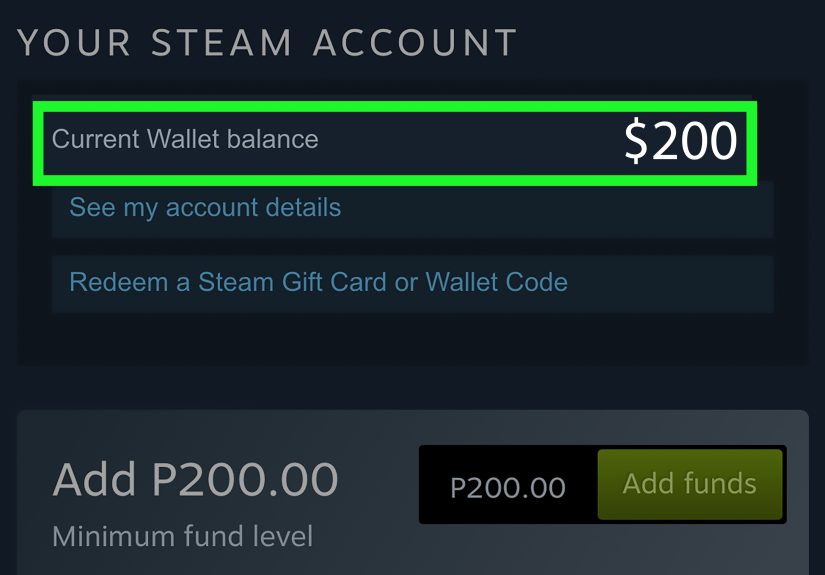
Successful redemption does one main thing: it increases your Steam Wallet balance. Steam Wallet funds can be used for games, DLC, software,
in-game items, and most things you can buy on Steam. At checkout, you’ll typically see Steam Wallet as a payment option (sometimes alongside a card or PayPal
if your purchase exceeds your balance).
Can you transfer or cash out Steam Wallet funds?
Steam Wallet is designed for purchases on Steam, not as a cash-out system. In practical terms, once the funds are in your Wallet,
they stay tied to that account.
Troubleshooting: Fix the Most Common Problems
If Steam refuses your code, don’t assume the worst. Most issues are boring (typos, activation delays, or temporary rate limits), not dramatic
(“a shadowy hacker stole my $20”).
Error: “The code you entered is invalid”
- Re-check look-alike characters: O vs 0, I vs 1, S vs 5.
- No extra spaces: Especially if you copied it from an email or chat.
- Try a different method: If desktop fails, try web or mobile.
- Physical card damage: If the scratch-off area is unreadable, keep the receipt and reach out to support.
Error: “Already redeemed”
This usually means the code was used on a Steam account already. If you purchased it yourself from a reputable retailer, keep your receipt and contact support.
If you got it from a marketplace or a random stranger… the odds are not in your favor.
Error: “Please wait 30 minutes and try again” or “An unexpected error occurred”
This can happen during busy server times, after too many attempts, or while a retailer’s activation is still syncing. Wait a bit, then retry.
If it persists for hours, switch redemption methods and verify your account connection is stable.
Issue: Currency or region restrictions
Steam Wallet codes are typically tied to currency rules and anti-fraud policies. If the code was purchased in a different currency than your account,
Steam may block redemption. If you bought it from a U.S. store for a U.S. account, you’re usually fine. If it was bought abroad or from a third-party reseller,
you may need to return it to the seller (if possible) or contact Steam Support for guidance.
Issue: The card wasn’t activated at checkout
Physical gift cards often require activation at the register. If the card wasn’t properly activated, Steam may reject the code.
Your best next step is returning to the retailer with the receipt to verify activation.
Issue: You redeemed on the wrong account
Steam Wallet funds go where you redeemed them. If you accidentally used the wrong account, check that account’s Wallet balance.
Steam generally treats redemption as final, so prevention beats repair: always verify your username before redeeming.
Safety Tips: Avoid Steam Gift Card Scams
Steam Wallet codes are basically “digital cash.” If someone pressures you to buy Steam gift cards to pay a bill, fix a computer, avoid arrest,
or “help a friend in an emergency,” that’s a scam. Real businesses and government agencies don’t demand payment by gift card.
Simple rules that save people every day
- Never share the full code with anyone who isn’t the intended recipient.
- Don’t pay anyone with Steam gift cards. Gift cards are for gifts, not payments.
- Inspect physical cards before buyingavoid cards that look tampered with.
- Keep your receipt and a photo of the card until redemption is complete.
If you think you’ve been targeted, report the scam and preserve evidence (messages, receipts, screenshots). Acting quickly can sometimes help.
FAQ
Do Steam Wallet codes expire?
Most legitimate codes are intended to work until redeemed, but retailer policies and local rules can vary.
If your packaging or email includes an expiration date, treat it as real.
Can I redeem multiple Steam Wallet codes?
Yes. If you’re redeeming a lot at once, go slowlytoo many failed attempts can trigger temporary security limits.
Can I redeem on Steam Deck?
Usually yes, since Steam Deck uses the Steam ecosystem. Many people still prefer the web page or mobile app for easier typing.
Why does Steam sometimes ask for address details?
Steam may request billing or address information for account verification, taxes, or regional settings. It’s usually an account setup step,
not a sign you’re doing something wrong.
Experiences: What People Actually Run Into
The instructions are easy. The moments around the instructions are where the stories live. Here are common real-world scenarios that make a simple
“redeem Steam gift card” task feel like a mini-quest.
Experience 1: The scratch-off went full “paper shredder”
Someone scratches a physical card like they’re trying to reveal an ancient prophecy. The code turns into confetti. Steam can’t redeem what Steam can’t read.
The lesson: scratch gently, take photos, and keep the receipt. If the code becomes unreadable, support will usually ask for proof of purchase.
Experience 2: The O/0 meltdown
Steam says “invalid.” The user assumes the worst. Then they realize they typed the letter O instead of zero (or added one sneaky space at the end).
This is the most common “I was about to start a lawsuit” mistake in gaming history. Good light, slow typing, and copy/paste solve it.
Experience 3: The wrong-account gut punch
Steam doesn’t know your “main account” from your “old account I made in 2014 and abandoned like a MySpace profile.”
If you’re signed into the wrong account, that’s where the balance goes. People often notice when the balance didn’t change where they expected.
The fix isn’t magicalit’s logging into the other account and finding the funds sitting there, smugly.
Experience 4: “It says wait 30 minutes,” so they refresh 300 times
Steam’s “please wait 30 minutes” message inspires the opposite of waiting. People retry repeatedly, which can extend the lockout.
The best approach is boring: stop, breathe, actually wait, then try againpreferably using a different method (web instead of app, or vice versa).
Experience 5: The unactivated card mystery
Physical cards are usually activated at the register. When a busy cashier or a glitchy system misses activation, Steam can’t redeem it.
People assume Steam is the problem, when the issue is the card’s status. The receipt is the hero here: go back to the retailer and ask them to verify activation.
Experience 6: The “discount code” that wasn’t
Buying cheap codes from sketchy marketplaces can lead to “already redeemed,” region/currency blocks, or flat-out fraud. When it works, it feels like winning.
When it fails, it feels like paying tuition to the School of Life. The practical takeaway: reputable sellers are cheaper in the long run.
Experience 7: The dopamine hit
Finally: Steam accepts the code, your Wallet balance updates instantly, and your brain goes, “Nice.” It’s a small win, but it’s realand it often ends with
you opening your wishlist and whispering, “Okay… just one game.”
Bottom line: Redeeming a Steam Wallet code is simple, but the best results come from doing the boring things well:
check your account, avoid typos, keep the receipt, and use the official Steam redemption tools.