Table of Contents >> Show >> Hide
In Minecraft, a single string of numbers or a tiny item called a seed can completely change your worldliterally.
Whether you want to spawn in a village surrounded by cherry blossoms or grow an enormous wheat farm, learning how to use seeds in Minecraft
is one of the easiest ways to level up your gameplay.
The only confusing part? Minecraft uses the word “seed” for two totally different things:
world seeds (codes that generate your world) and item seeds (the things you plant).
Don’t worrywe’ll walk through both, step by step, in a simple, beginner-friendly way.
What Are Seeds in Minecraft, Exactly?
World Seeds: The Code Behind Your World
A world seed is a number (or text that gets turned into a number) that tells Minecraft how to generate a specific world.
Use the same seed and version, and you get the same terrain, villages, structures, and biome layout every time.
That’s how websites and creators share “best Minecraft seeds” so you can play in the same worlds they showcase.
Since modern updates, Minecraft supports 64-bit seeds, which means the game can use huge numbers and still give
you predictable worlds across Java and Bedrock in many cases. Newer versions aim for seed parity, so the same numeric seed
often generates similar terrain on both editions, though some details can still differ between platforms and versions.
Item Seeds: Tiny Powerhouses for Farming
Then you’ve got item seedsthings like wheat seeds, beetroot seeds, melon seeds, pumpkin seeds, and nether wart.
These are the seeds you plant to grow crops, feed animals, and stock your automatic farms.
In short:
- World seeds = codes you type in when creating your world.
- Item seeds = physical items you use to grow crops in-game.
How to Use World Seeds in Minecraft (Step-by-Step)
Let’s start with the big stuff: world seeds. If you’ve ever seen a YouTuber say
“Here’s the seed for this amazing village world,” this is what they mean.
Step 1: Find a World Seed You Want to Try
You can either invent your own seed or copy one from the internet. Gaming sites, blogs, and forums share tons of cool
Minecraft seedsfor example, lists of the best survival seeds, village seeds, or biome seeds for versions like 1.20 and later.
Common types of world seeds include:
- Village seeds – Spawn near a village with instant food, beds, and trades.
- Survival challenge seeds – Tiny islands, harsh biomes, or dangerous structures right at spawn.
- Biome showcase seeds – Worlds with rare or beautiful biomes close together.
- Structure seeds – Seeds with woodland mansions, ancient cities, or strongholds near spawn.
You’ll usually see the seed written as a long number (like -6566502800787332445) or text (like
CherryVillage2025, which the game quietly turns into a number behind the scenes).
Step 2: Open “Create New World”
From the Minecraft main menu:
- Click or tap Singleplayer (Java) or Play (Bedrock).
- Select Create New World (or Create New on Bedrock).
- In newer versions, you’ll see a cleaner layout with more obvious settings like difficulty, game mode, and world options.
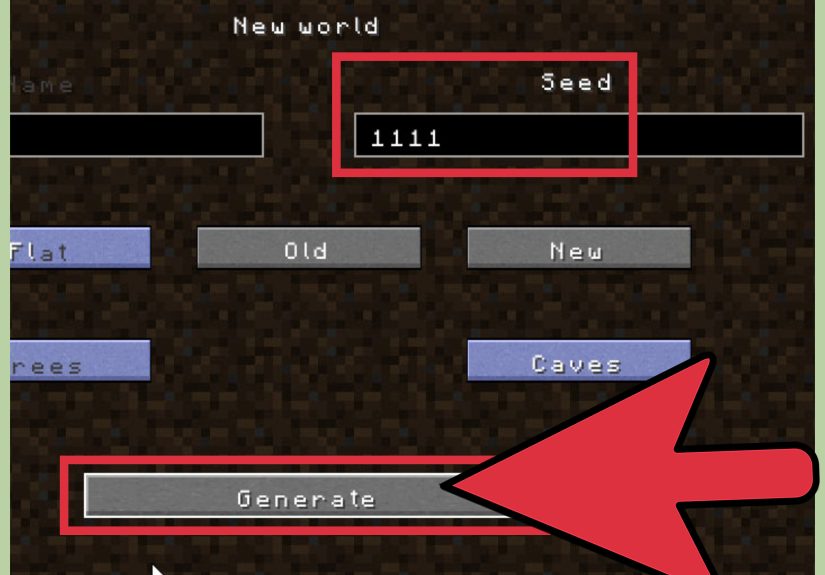
Step 3: Find the Seed Box
On the world creation screen, look for the field labeled something like:
- “Seed for the World Generator” (Java Edition)
- “Seed” or “World Seed” (Bedrock Edition)
By default, that box is empty. If you leave it that way, Minecraft will use a random seed.
But we’re not here for randomnesswe’re here to control destiny.
Step 4: Enter the Seed (Number or Text)
Now type or paste the seed you want:
- If it’s a number, enter it exactly as shown, including the minus sign if there is one.
- If it’s text, type it out exactlycapitalization doesn’t matter, but spelling does.
For modern Bedrock and Java versions, non-numeric seeds usually map consistently between editions,
and both support 64-bit numeric seeds (very large positive and negative values).
Step 5: Check Your Version and Edition
This part trips up a lot of players. A seed made for Minecraft Java 1.20 may not produce the same world in
1.16 because world generation rules change between updates. Many guides clearly label things like:
- “Works in Java 1.20+”
- “Bedrock only”
- “Java and Bedrock parity seed”
Before you hit Create, double-check:
- Your game version (like 1.20.4, 1.21, etc.).
- Your edition (Java vs. Bedrock).
Step 6: Create the World and Explore
Once you’ve entered the seed and set your options (difficulty, game mode, cheats, etc.), click:
- Create New World (Java), or
- Create (Bedrock).
Minecraft will generate your world based on that exact seed. When you spawn, you should be in roughly the same area shown in the guide
where you got the seedthough your exact facing direction may differ, and minor details can change between platforms and small updates.
Tips for Getting the Most Out of World Seeds
- Write down your favorite seeds. Keep a note or text file so you can recreate beloved worlds later.
- Use coordinates from guides. Many seed lists include coordinates for villages, mansions, ancient cities, and more.
- Try themed worlds. Want a desert-only challenge? A frozen survival island? Look for seeds specifically made for that vibe.
- Share with friends. Give your world seed to friends so you can explore the same world separately or on a server.
How to Use Item Seeds for Farming in Minecraft
Now let’s switch to the other kind of seeds: the ones you stick in dirt.
Farming with seeds in Minecraft is an easy way to get renewable food, trading materials, and animal feed.
Common Types of Seeds You Can Plant
- Wheat seeds – Drop from tall grass; used to grow wheat and breed cows, sheep, and goats.
- Beetroot seeds – Found in villages, chests, or as crop drops; grow beetroots and can be crafted into beetroot soup.
- Melon seeds – Found in jungle temples, mineshafts, or crafted from melon slices.
- Pumpkin seeds – Found in chests, or crafted from pumpkins; great for golems and trading.
- Nether wart – Technically not called a “seed,” but acts like one in the Nether; critical for brewing potions.
Step 1: Gather Your Seeds
Here’s how to get started:
- Wheat seeds – Punch tall grass in most overworld biomes. You’ll get lots of seeds quickly.
- Village farms – Villages often have wheat, carrots, potatoes, and beetroot crops. Harvest and replant to stock up.
- Dungeon and structure chests – Mineshafts, jungle temples, strongholds, and other structures often have melon or pumpkin seeds.
- Crafting – Put a melon slice or pumpkin in the crafting grid to convert them into seeds (you get multiple seeds from one item).
Step 2: Prepare the Soil
Crops won’t grow on just any block. You need:
- Dirt or grass that you turn into farmland with a hoe.
- Water nearby to keep the farmland hydrated.
Do this:
- Craft a hoe (wood, stone, iron, etc.).
- Right-click (or tap/use) on dirt or grass to turn it into farmland.
- Place water within four blocks of your farmland to keep it dark and moist (hydrated farmland looks darker).
Step 3: Plant the Seeds
With the farmland ready:
- Put your chosen seeds in your hotbar.
- Select them, then right-click or tap on the farmland to plant.
- Each farmland block holds one crop.
Melons and pumpkins work slightly differently: you plant the seed on farmland, but the mature fruit grows on an adjacent block of dirt/grass/farmland.
Leave some open space next to each stem so the fruit has somewhere to grow.
Step 4: Help Your Crops Grow Faster
Crops grow over time as long as they have light and hydrated soil, but you can speed things up:
- Bone meal – Craft from bones and use on crops to skip growth stages.
- Lighting – Place torches or lanterns so crops keep growing at night.
- Organization – Line up rows of crops with water canals for easy harvesting.
Step 5: Harvest and Replant
When your crops are fully grown:
- Wheat – Break the wheat; you’ll get wheat plus extra seeds.
- Beetroots – Break mature beetroots; they drop beetroots and seeds.
- Melons & pumpkins – Break the fruit blocks, not the stem. The stem stays and grows more fruit.
Always replant some of your seeds to keep your farm going. Use the extra crops for:
- Food (bread, beetroot soup, pumpkin pie, etc.).
- Animal breeding (wheat for cows and sheep, etc.).
- Trading with villagers for emeralds and gear.
Using Seeds for Smart Gameplay Strategies
Create a “Starter Pack” Seed World
One smart trick with world seeds is to pick a seed that always spawns you near:
- A village (for beds, trades, and food).
- Diverse biomes (for wood, animals, and building blocks).
- Structures like shipwrecks or temples (for early loot).
Save that seed as your personal “starter world” and use it whenever you want a reliable, friendly spawn to try new playstyles or mods.
Farm-Focused Seeds
If you’re obsessed with building mega farms (no judgment, same), look for seeds with:
- Large, flat plains or savannas for big crop fields.
- Plenty of rivers and ponds for irrigation and fishing.
- Villages nearby for easy seed and crop trading.
Challenge Seeds for Advanced Players
Already know how to use seeds in Minecraft and want a challenge? Try:
- Island seeds with almost no trees.
- Starts near dangerous structures like woodland mansions or pillager outposts.
- Seeds that spawn you in harsh biomes like badlands or frozen peaks.
These worlds force you to plan every move, protect your crops, and play carefully from day one.
500-Word Experience & Tips: Learning Seeds the Fun Way
Most players only truly “get” Minecraft seeds after a couple of memorable worlds. Maybe your first base was in a chaotic world where you spawned
on a cliff, got chased by zombies, and swore you’d never play on “Random Seed” again. That’s usually when curiosity kicks in and you start
searching “best Minecraft seed for beginners” or “village spawn seeds.”
Imagine this scenario: you and a friend decide to start a new co-op world. Instead of rolling the dice with a random spawn, you pick a
village seed you found online. You punch a couple of trees, walk thirty blocks, and suddenlythere it is. A cozy village with
crops already growing, a blacksmith chest with iron gear, and beds for both of you. That tiny choiceentering a world seedchanges the entire
vibe of your playthrough. Instead of scrambling to survive, you can immediately start exploring caves, decorating houses, or planning farms.
Over time, players tend to build a mental library of “favorite seeds.” Maybe you remember one where a cherry grove hugged the side of a mountain,
another with a ravine slicing right under spawn, and a third where there was an exposed lush cave near a peaceful lagoon. When you learn how to use seeds
in Minecraft the right way, you’re basically curating your own set of worlds, each with its own story and personality.
There’s also that magical moment when you realize you can use the same world seed on different devices.
You might start a world on your PC, then plug the same seed into your console or mobile version (as long as versions line up reasonably well).
Even if some details shift, the overall landscape feels familiar. It’s like visiting the same country in different seasonsrecognizable but slightly fresh.
On the farming side, a lot of players underestimate how powerful item seeds are until they commit to a real farm. Your first “field” is usually
a sad three-by-three grid outside a dirt hut, but once you understand how hydration, light, and space work, things scale fast. Before you know it,
you’re using water channels to harvest entire fields with a single bucket placement or setting up redstone-powered farms that auto-harvest with
pistons and observers.
A great learning exercise is to combine both kinds of seeds in a single playthrough. Pick a world seed known for a good plains
or meadow spawn. The moment you load in, commit to building an organized farm using whatever item seeds you can find: wheat from
grass, beetroot from a village, pumpkins or melons from structure chests. Challenge yourself to reach full food security early, then branch into
trading with farmers, brewing potions with nether wart, or decorating with pumpkin lanterns.
If you play with younger siblings, friends new to Minecraft, or just want a chill experience after a long day, world seeds are a secret weapon.
Instead of hoping you don’t spawn in the middle of a zombie-infested swamp, you can deliberately choose a gentle starter seed
with a safe environment and plenty of resources. Pair that with a small fenced-in farm, and you’ve basically created “Minecraft on easy mode”
without changing the difficulty slider.
On the flip side, when you want excitement, seeds let you dial up the chaos. Survival island, extreme cliffs, villages under raid threatpick your poison.
Whatever your style, once you understand how to use seeds in Minecraftboth as world codes and as in-game itemsyou stop being a random traveler and
start becoming the designer of your own adventures.
Conclusion
Seeds are one of the simplest tools for customizing your Minecraft experience. With world seeds, you can choose the kind of
world you want before you even spawn. With item seeds, you can turn any empty field into a thriving, automated food empire.
Whether you’re a brand-new player just trying not to starve, or a seasoned pro looking for your next perfect survival world, learning how to use
seeds in Minecraft gives you more control, more creativity, and way more fun.