Table of Contents >> Show >> Hide
- What Makes an Email “Professional”?
- The Professional Email Structure (A Simple Blueprint)
- How to Write a Professional Email: 13 Tips (With Examples)
- Tip 1) Decide the “one job” your email needs to do
- Tip 2) Use a professional email address (and check the display name)
- Tip 3) Write a subject line that’s specific and scannable
- Tip 4) Match your greeting to the relationship
- Tip 5) Open with context in the first sentence
- Tip 6) Put the ask (or the key point) near the top
- Tip 7) Keep it concisebut not cryptic
- Tip 8) Format for skimming (bullets beat walls of text)
- Tip 9) Choose a tone: confident, polite, and human
- Tip 10) Make the next step ridiculously clear
- Tip 11) Handle attachments like a pro
- Tip 12) Use CC and BCC thoughtfully
- Tip 13) Proofreadand do a 10-second “oops prevention” check
- Examples of Professional Emails (Copy-Friendly)
- Common Professional Email Mistakes (And How to Fix Them)
- Professional Email FAQs
- Real-World Email Experiences: What Actually Works (And What People Wish They’d Known)
- Conclusion
Professional emails are the working world’s version of showing up on time with your shoes tied: basic, expected,
and instantly noticeable when you don’t do it. The good news? You don’t need a communications degreeor a fancy
signature fontto write a polished email. You just need a clear purpose, a reader-friendly structure, and a tone
that says “competent human,” not “accidental chaos gremlin.”
This guide breaks down the essential parts of a professional email, then walks you through 13 practical tips
(with examples) you can use for job applications, client messages, coworker requests, professor emails, and everything
in between.
What Makes an Email “Professional”?
A professional email is less about sounding stiff and more about being clear, respectful, and easy to act on.
In practice, that usually means:
- A subject line that tells the truth (no clickbait, no riddles).
- A greeting that matches the relationship and context.
- An opening that states why you’re writingearly.
- A body that’s concise, organized, and action-oriented.
- A closing that’s polite and a signature that’s helpful.
- Proofreading so you don’t accidentally ask your boss to “pubicly” review your work. (It happens.)
The Professional Email Structure (A Simple Blueprint)
If professional emails had a skeleton, it would look like this:
1) Subject line
Short, specific, and relevant. Your reader should know what the email is about before they open it.
2) Greeting
Choose a greeting that fits the situation (formal, neutral, or friendly-professional).
3) Opening line
The purpose of the messageup front. Don’t make the reader dig for why you’re emailing.
4) Body
The key details, ideally in short paragraphs or bullets, with one clear ask or outcome.
5) Closing + signature
A polite wrap-up and a signature that makes it easy to reply or take the next step.
How to Write a Professional Email: 13 Tips (With Examples)
Tip 1) Decide the “one job” your email needs to do
Before you type anything, answer this: What do I want the reader to do after reading this?
Approve something? Confirm a meeting? Send a file? If your email has three goals, it often accomplishes none.
Example (goal clarity): “I’m writing to confirm our meeting time for Tuesday and share the agenda.”
Tip 2) Use a professional email address (and check the display name)
Your email address is your digital handshake. Ideally, it’s some variation of your name. Also check your display name
you’d be surprised how many people accidentally email a recruiter as “iPhone User” or “Big Tuna 99.”
Example: [email protected] (better) vs. [email protected] (save it for nostalgia)
Tip 3) Write a subject line that’s specific and scannable
A strong subject line helps your email get opened and acted on quickly. Aim for a short summary of the topic and, when useful,
include a date or next step.
- Good: “Meeting request: Project kickoff (Jan 12)”
- Good: “Invoice #1842 question about line item 3”
- Not great: “Quick question” (about what? taxes? turtles? time itself?)
Tip 4) Match your greeting to the relationship
When you’re not sure, neutral-professional wins. “Hi” and “Hello” are widely acceptable in modern business email. “Dear”
can be appropriate for formal situations, certain industries, or when emailing someone you don’t know.
- Formal: “Dear Dr. Thompson,”
- Neutral: “Hello Ms. Rivera,”
- Friendly-professional: “Hi Jordan,”
- Group: “Hi team,” or “Hello everyone,”
Tip 5) Open with context in the first sentence
Most readers skim. Help them immediately by stating the reason you’re writing, especially if they don’t know you well.
Mention the shared connection or prior conversation early.
Example: “It was great speaking with you at Thursday’s webinar. I’m following up to request a brief call about…”
Tip 6) Put the ask (or the key point) near the top
Don’t bury the lead. If you need a decision, a file, or a yes/no answer, state it earlythen provide details.
Example: “Could you please approve the attached Q1 budget by Friday, Jan 16?”
Tip 7) Keep it concisebut not cryptic
Professional emails respect time. Use short paragraphs (2–4 sentences) and cut filler. But don’t remove context so aggressively
that your reader has to email you back with “Waitwhat is this about?”
Example (concise + clear):
Hi Maya,
Could you share the latest deck for the client review? I’m finalizing the agenda and want to ensure we’re aligned on the version.
Thanks!
Alex
Tip 8) Format for skimming (bullets beat walls of text)
If your email includes multiple items, use bullets or numbered lists. It helps the reader respond point-by-point.
Example (organized request):
Hello Mr. Rivera,
To prepare the proposal, could you confirm the following:
1) Target launch date
2) Primary audience (B2B, B2C, or both)
3) Budget range
Thank youonce I have these, I can send a draft by Wednesday.
Best regards,
Jordan Lee
Tip 9) Choose a tone: confident, polite, and human
Professional doesn’t mean robotic. It means respectful and calm. Avoid slang, excessive exclamation points, or sarcasm
that can land badly in text-only communication.
- Less ideal: “Hey!!! Just checking in again 😅😅😅”
- Better: “Hi Casey, following up on my message belowdo you have an update on timing?”
Tip 10) Make the next step ridiculously clear
Your reader shouldn’t have to guess what you want. Add a clear call to action (CTA) and, when helpful, a deadline.
Examples:
- “Please reply with your availability for a 20-minute call next week.”
- “If you approve, I’ll move forward with the draft and send it by EOD Thursday.”
- “Can you confirm by 3 p.m. today so we can submit on time?”
Tip 11) Handle attachments like a pro
If you attach something, mention it in the email body (yes, people miss attachmentseven brilliant people). Name files clearly,
and keep formats accessible (PDF for final, editable docs when collaboration is expected).
Example: “I’ve attached the revised contract (PDF) and the editable draft (Word) for your review.”
Tip 12) Use CC and BCC thoughtfully
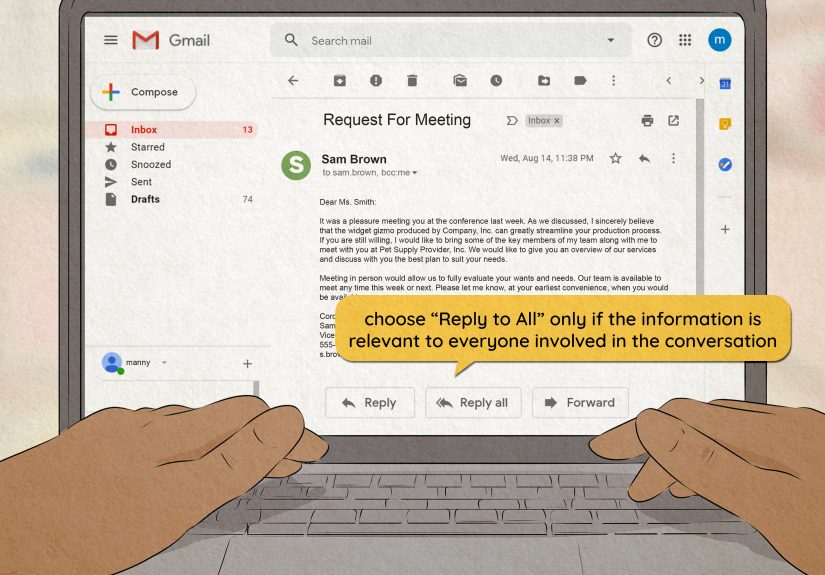
CC is for visibility; it’s not a public shaming tool. BCC is useful for protecting privacy in group emails or when you truly need
to keep recipients hidden (common in newsletters or large announcements). When in doubt, keep the distribution list small.
- Good CC use: loop in a project lead who needs awareness
- Risky CC use: escalating conflict by copying someone’s boss “for fun”
Tip 13) Proofreadand do a 10-second “oops prevention” check
Professional email mistakes usually fall into two buckets: typos and sending to the wrong person. Before you hit send:
- Read once for meaning (does it say what you think it says?).
- Check names and titles (and spelling).
- Confirm attachments are attached.
- Verify the To/CC fields (especially in long threads).
- Scan tone (“Would I be okay reading this out loud in a meeting?”).
Bonus move: write the email first, then add recipients last. It prevents the classic “sent too soon” accident.
Examples of Professional Emails (Copy-Friendly)
Example 1: Professional meeting request
Subject: Meeting request: Q1 planning (Jan 14 or Jan 15)
Hi Ms. Rivera,
I’m reaching out to schedule a 20-minute meeting to align on Q1 priorities for the customer onboarding project.
Would you be available Thursday, Jan 14 between 10:00–12:00, or Friday, Jan 15 between 2:00–4:00?
If those times don’t work, I’m happy to adjustjust share what’s best for your schedule.Best regards,
Jordan Lee
Customer Success | Northwind Co.
(555) 012-3456
Example 2: Follow-up email (polite, not pushy)
Subject: Follow-up: Proposal timeline
Hi Casey,
Following up on the proposal I sent Monday. Do you have an updated timeline for feedback or approval?
If it’s easier, I’m happy to jump on a quick call to walk through any questions.Thanks,
Alex Chen
Example 3: Apology email (own it, fix it, move forward)
Subject: Apology and corrected file attached
Hello Dr. Thompson,
I’m sorryI sent the wrong version of the document earlier today. I’ve attached the corrected file and confirmed it includes the updated references and formatting.
Thank you for your patience, and please let me know if you’d like me to resend anything in a different format.Sincerely,
Maya Patel
Example 4: Thank-you email after an interview
Subject: Thank you Marketing Coordinator interview
Hi Jordan,
Thank you for taking the time to speak with me today about the Marketing Coordinator role. I enjoyed learning more about the team’s approach to product launches, especially the focus on customer storytelling.
I’m very interested in the role and believe my experience coordinating cross-functional campaigns would help me contribute quickly.
Thanks again, and I look forward to the next steps.Best,
Alex Chen
Common Professional Email Mistakes (And How to Fix Them)
Being vague
Fix: add a specific subject line and a clear request. If your email can’t be summarized in one sentence, tighten it.
Over-explaining
Fix: move extra detail to bullets, an attachment, or a follow-up message. Your email is not a memoir (unless you’re emailing your editor).
Sounding harsh by accident
Fix: add a brief softener (“Thanks for your help,” “When you have a moment”) and avoid all-caps and abrupt one-liners that read like a slam.
Forgetting the action step
Fix: end with a clear CTA: what you need, by when, and what happens next.
Professional Email FAQs
Is “Hi” professional enough?
In many workplaces, yes. If you’re emailing someone in a more formal context (executives, professors, official requests),
“Hello” or “Dear” may be saferespecially in a first message.
How long should a professional email be?
As short as possible while still being clear. Many effective professional emails are 3–8 sentences, plus bullets if needed.
Should I use emojis?
Usually not in formal professional email. In internal team email where the culture supports it, one emoji can soften tonebut use sparingly,
and never when you’re delivering bad news or dealing with a complaint.
Real-World Email Experiences: What Actually Works (And What People Wish They’d Known)
People rarely struggle with email because they don’t know the “rules.” They struggle because real life is messy: you’re emailing when you’re rushed,
tired, annoyed, or juggling twelve tabs and a lukewarm coffee that’s been reheated twice. In those moments, the difference between a professional email
and an “oops” email comes down to a few practical habits that show up again and again in workplaces and schools.
One common experience: the “I sent it, but they didn’t respond” spiral. Most of the time, it’s not because the recipient is ignoring you.
It’s because your email didn’t make the next step obvious. If the reader has to decide what you’re asking, hunt for dates, or interpret your tone, your email
becomes “later” workand “later” often means “never.” That’s why short CTAs like “Could you approve by Friday?” or “Please confirm which option you prefer”
consistently get better responses than open-ended messages.
Another real-world pattern: email threads that grow teeth. What started as a simple question becomes a 19-reply saga featuring forwarded messages,
conflicting answers, and the occasional passive-aggressive “Per my last email…” (a phrase that can turn a calm Tuesday into a tiny workplace storm). When threads get
long, the most effective move is often to reset the conversation: summarize the key points, list what’s decided, and name what’s still needed. People love clarity.
Even the people who pretend they don’t.
Many professionals also learnsometimes the hard waythat email is read on phones more than we’d like to admit. That means your gorgeous, multi-paragraph explanation
can look like a wall of text on a small screen. The emails that work in real life are built for skimming: a purpose sentence, a couple short paragraphs, then bullets.
If you’re emailing about scheduling, putting your availability in a simple list (“Tue 10–12, Wed 2–4”) beats burying it in a paragraph every time.
There’s also the experience of emailing “up” (a manager, a client, a professor) versus “across” (a coworker). When people email someone with more authority, they often
overcompensate by becoming too formalor too apologetic. A professional sweet spot is polite confidence: show respect, keep it brief, and make it easy
to respond. “Hello Dr. Thompson, I’m writing to request…” is calm and effective. You don’t need to write like a Victorian novel. (Unless your professor is literally
a Victorian literature professor. In that case, maybe lean in a little.)
Finally, a surprisingly universal experience: the “sent to the wrong person” fear. It’s real. And it’s why many people adopt a simple safety habitwriting the message
first, then adding recipients last. This tiny workflow tweak prevents accidental early sends and helps you reread the email with fresh eyes before it becomes permanent
inbox history.
In the end, professional email writing isn’t about sounding fancy. It’s about being the kind of communicator who makes work easier: you respect time, you communicate
clearly, and you leave the reader thinking, “Greatthis is easy to respond to.” That’s professionalism in its most practical form.