Table of Contents >> Show >> Hide
- What Roku Actually Launched (and Why It Matters)
- The Projector in Plain English: Big Picture, Small Price
- Why a Roku-Powered Projector Is Different from a Regular Budget Projector
- Who This Projector Is For (and Who Should Probably Pass)
- The Reality Check: What “Affordable” Means in Projector Land
- How to Get the Best Experience: Setup Tips That Actually Work
- How It Stacks Up Against Other Options
- Pricing and Availability (and Why the Deals Get the Hype)
- What This Launch Signals: Roku Wants Your Next Screen to Be Anything
- Real-World Experiences: What It’s Like Living with a Roku Smart Projector (About )
- Conclusion: A Big-Screen Roku Moment for Budget Streamers
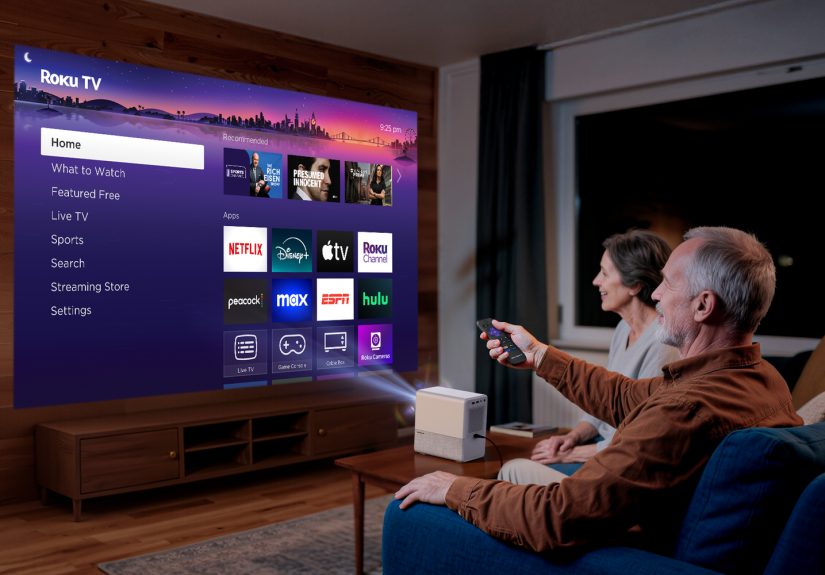
Roku finally did the thing streaming obsessives have been half-joking about for years: it put the Roku TV experience inside a projector. No dangling streaming stick. No “Which remote does what?” scavenger hunt. Just a compact box that can throw a big picture on the wall and fire up your favorite apps like it’s a regular TV only, you know, way more dramatic.
What Roku Actually Launched (and Why It Matters)
The headline sounds like Roku built a projector from scratchand while Roku’s brand is all over this move, the “first affordable Roku projector” moment is really about Roku expanding its platform into a new category. Roku announced that the Roku TV program would extend to projectors, and then followed through with the first Roku TV smart projector available in the U.S. via a partner device: the Aurzen Roku TV Smart Projector D1R Cube (also referenced as the EAZZE D1R Cube in some listings).
Translation: Roku’s TV-style interface, app ecosystem, recommendations, and familiar “it just works” vibe are now baked into a portable projector. For streaming fans, that’s a big dealbecause the projector world is full of “smart” systems that are either clunky, outdated, or basically a themed app drawer with trust issues.
Roku’s play here is straightforward: make big-screen streaming easier and cheaper, then let hardware partners compete on form factor. If you already live in Roku-landRoku TVs, Roku remotes, The Roku Channel, and maybe even Roku Smart Homethis launch is Roku saying, “Hey, your wall can be a TV now, too.”
The Projector in Plain English: Big Picture, Small Price
If you’ve ever shopped budget projectors online, you’ve probably seen some… optimistic marketing. (“4K Ultra Mega Cinema Laser HDR++!!!” for $89, shipping included, emotions not included.) Roku’s first Roku TV projector entry is positioned as the opposite: a reasonably priced, mainstream-friendly projector that’s honest about what it is.
Quick Specs (The Stuff You Actually Care About)
- Resolution: 1080p Full HD output (with support for 4K input)
- Brightness: about 330 ANSI lumens (best in dim/dark rooms)
- Image size: roughly 40 to 150 inches (depending on distance and surface)
- Audio: built-in Dolby Audio speakers (commonly listed as 10W total / dual speakers)
- Setup helpers: auto focus + auto keystone correction
- Connectivity: Wi-Fi, Bluetooth (including headphone/private listening modes), plus common ports like HDMI/USB
- Streaming OS: Roku TV built in (so the projector behaves like a Roku TV, not a “dumb” display)
- Extras: Apple AirPlay support and Roku ecosystem features (mobile app control, smart home alerts)
The “affordable” part is the hook. Pricing has been widely positioned below the cost of many big-name portable projectors, and the projector has launched with deals/coupons that can dip under the $200 mark depending on the retailer and timing. That’s not “cheap toy projector” territory; that’s “legitimate casual home theater starter” territory.
Why a Roku-Powered Projector Is Different from a Regular Budget Projector
1) No Dongle Life (and No Dongle Problems)
A lot of budget projectors technically “stream,” but what they mean is: “It has some kind of operating system inside that may or may not have the apps you want, and may or may not still be updated when you finish reading this sentence.”
With Roku TV built in, you don’t need to plug in a streaming stick to get a modern streaming experience. You power it on, connect Wi-Fi, sign in, and you’re essentially using a Roku TVjust projected.
2) Roku’s App Ecosystem and UI
Roku has spent years becoming the default streaming “front door” for a huge chunk of households. The benefit isn’t just app availabilityit’s the familiar layout, search, recommendations, and a streamlined interface that’s designed for normal humans (not just people who enjoy troubleshooting as a hobby).
3) The Ecosystem Stuff Adds Real Convenience
This projector is positioned as part of the wider Roku ecosystem: control via the Roku mobile app, compatibility with Roku audio options, and even on-screen notifications for Roku Smart Home devices. If you’ve already got a Roku setup, this projector aims to feel like an extension of what you ownnot a random gadget you babysit.
Who This Projector Is For (and Who Should Probably Pass)
Perfect for:
- Apartment renters who can’t (or don’t want to) mount a huge TV
- Dorm rooms where a 55-inch TV is basically a second roommate
- Backyard movie nights (especially after sunset, when brightness matters less)
- Casual sports gatherings where “big enough” beats “perfect calibration”
- Travel/portable setups where you want streaming without lugging extra hardware
Maybe not for:
- Bright living rooms in the middle of the day (330 ANSI lumens is not here to fight the sun)
- Hardcore home theater purists who want true 4K projection and high brightness
- Anyone who needs battery power (many reports note it must be plugged in)
In other words, this is a “streaming-first” projector for normal people who want a big screen on a budget, not a “replace your OLED and never look back” device.
The Reality Check: What “Affordable” Means in Projector Land
Brightness: The #1 Budget Projector Trade-Off
Brightness is the feature most budget projectors can’t magically cheat. At around 330 ANSI lumens, this projector will look best in a darker environment. If you plan to use it in a bright room, you’ll either need blackout curtains or a willingness to accept that your movie will look like it’s being screened through a polite fog.
For night viewingespecially outdoor viewing after duskthis is much less of a deal-breaker. But if your dream is “Sunday football at 1 p.m. with sunlight pouring in,” you’ll want to budget for a brighter projector (and probably a screen).
1080p Output (with 4K Input Support)
The projector can accept 4K content, but it displays at 1080p. That’s normal for this price class, and honestly, 1080p can look great at typical viewing distancesespecially for streaming content that’s often compressed anyway. The key is to set expectations: you’re getting a crisp Full HD image, not premium native 4K projection.
Audio: Fine for Casual Nights, Better with Help
Built-in speakers are convenient, and Dolby Audio branding suggests a tuned experience. Still, physics is physics: small speakers in small boxes won’t sound like a soundbar. The good news is that Roku’s ecosystem makes it easier to pair external audioBluetooth headphones for private listening, or external speakers if you want that “movie trailer bass” moment without apologizing to your neighbors afterward.
How to Get the Best Experience: Setup Tips That Actually Work
1) Treat Your Wall Like a Screen (Because It Kind of Is)
A smooth, matte white wall can look surprisingly good. But if your wall is textured, beige, or decorated with “inspirational” quotes in vinyl lettering… consider a basic projector screen. Even an inexpensive screen can make the image feel sharper and brighter.
2) Control the Light Before You Blame the Projector
For indoor use, dim the lights and close curtains. For outdoor use, wait until it’s properly dark. Brightness limitations aren’t a flaw so much as a budget realityand you can often “fix” them by changing the environment.
3) Let Auto Focus and Keystone Do Their ThingThen Fine-Tune Placement
Auto focus and auto keystone are here to make setup painless, and they do help. But the best image quality usually comes from good physical placement first: projector level, centered, and at an appropriate distance. Use the smart corrections as assistance, not a license to point the projector at your wall from a 37-degree angle like you’re trying to signal Batman.
4) Upgrade Sound the Lazy Way
Want an instant quality boost? Pair Bluetooth headphones for private listening, or connect a compact speaker for a louder, fuller sound. If you already own Roku audio gear, the ecosystem angle can be especially handy.
5) Don’t Cheap Out on Wi-Fi
Streaming quality is only as good as your connection. If you’re using the projector outdoors, make sure your Wi-Fi actually reaches the yard. Otherwise you’ll have a 150-inch buffering icon, which is a bold creative choice but not the vibe.
How It Stacks Up Against Other Options
Option A: A “Smart” Budget Projector with a Generic OS
These are everywhere. Some are fine; many are frustrating. App support can be inconsistent, and updates can be rare. Roku TV built-in is a clear advantage if you value a stable streaming experience and recognizable interface.
Option B: A Better Projector + External Streaming Stick
This is the classic “do it yourself” path: buy a brighter projector, then plug in a Roku Streaming Stick (or similar). It can be a great setup, especially if you prioritize image quality. But it adds complexity: more cables, more power management, more remote juggling (unless you set up HDMI-CEC flawlessly and the planets align).
Option C: Premium Portable Projectors
Premium models can offer higher brightness, better optics, and sometimes battery powerbut prices climb fast. Roku’s affordable projector push is aimed at people who want the fun of projection without the premium price tag.
Pricing and Availability (and Why the Deals Get the Hype)
The projector has been sold as a mainstream retail product with launch pricing that can look especially attractive with coupons and introductory discounts. Depending on where you shop and when, the effective price has been seen in the “under $200” range, even if the list price is higher.
Practical advice: if “affordable” is the main reason you’re interested, watch for official retailer promos. This category lives and dies by discounts, and timing can easily save you enough money to pay for a basic screen or a decent Bluetooth speakerboth of which noticeably improve the experience.
What This Launch Signals: Roku Wants Your Next Screen to Be Anything
Roku’s core strength has always been making streaming simple. Bringing Roku TV into projectors isn’t just a cute gadget momentit’s a platform expansion. Projectors are a growing “big screen without a big TV” category, and Roku wants to be the operating system people trust there, too.
If this first wave is successful, it’s easy to imagine what comes next: brighter models, different form factors, improved audio, maybe even more integrated smart home features. The key takeaway is that Roku isn’t trying to win projector engineering Olympics; it’s trying to win the “streaming experience” race on any device that can show a picture.
Real-World Experiences: What It’s Like Living with a Roku Smart Projector (About )
The first time you use a Roku-powered projector feels a little like cheatingbecause the hardest part of “projector life” is usually the awkward tech routine. You know the drill: find the HDMI port, plug in a streaming stick, hunt for a power outlet that isn’t already hosting a lamp, then perform the ancient ritual of “Which remote controls volume?” With Roku TV built in, that whole circus gets replaced by something refreshingly normal: you turn it on, connect Wi-Fi, sign in, and it behaves like the Roku TV interface you already understand.
In day-to-day use, the convenience shows up in small moments. You sit down intending to watch one episode, but Roku serves you a “continue watching” row that’s actually accurate (rude, but accurate). You jump between apps without the laggy “budget device panic” where everything pauses and you wonder if you just bricked the system by pressing Down too confidently. The UI consistency is a comfort featurelike muscle memory for streaming.
The biggest “aha” moment usually comes during setup. Auto focus and auto keystone mean you can move the projector around without turning the evening into a geometry exam. In practice, you’ll still get the best picture by placing it reasonably centered and level, but it’s forgiving enough that you can set it on a coffee table, adjust a little, and be watching in minutes. For casual users, that matters more than you’d think; the difference between “movie night happens” and “movie night becomes a troubleshooting documentary” is often five minutes of friction.
Brightness is where reality keeps you honest. At night, the image can look surprisingly satisfyingespecially on a decent wall or an inexpensive screen. For a backyard night, the vibe is perfect: snacks, blankets, and a picture that feels huge even if you’re not pixel-peeping. But try the same setup at 4 p.m. with sunlight spilling in, and you’ll quickly learn that “affordable projector” means “make friends with curtains.” The best experience is when you treat it like a night-time device, not a daytime TV replacement.
Audio is similarly “good enough” until you remember what better sounds like. Built-in speakers work fine for sitcoms, YouTube, or a casual movie night. But if you’re watching an action movie, you’ll probably want help: Bluetooth headphones for private listening (great if you live with light sleepers), or an external speaker if you want fuller sound. The nice part is that the upgrade path is simpleyou don’t need a complicated receiver setup to get a noticeable improvement.
Overall, the lived experience is less about perfect cinema specs and more about effortless streaming on a giant screen. It’s the projector you pull out because it makes entertainment feel fun and easylike a TV that can travel. And honestly? That’s what most streaming fans actually want.