Table of Contents >> Show >> Hide
- 1. Focus Mode & Smarter Notifications: Your Sanity, Upgraded
- 2. FaceTime Levels Up: SharePlay, Spatial Audio & Beyond
- 3. Live Text & Visual Look Up: Your Camera Becomes a Scanner & Smart Lens
- 4. Safari, Maps & Everyday Apps Got Subtle but Serious Upgrades
- 5. Privacy & Intelligence: Quiet Protections That Matter
- 6. iPadOS 15: Multitasking That Finally Makes Sense
- 7. Widgets, App Library & Quick Note on iPad
- 8. Health, Shared With You & Quality-of-Life Touches
- Real-World Experiences with iOS 15 & iPadOS 15
- Conclusion
When Apple rolled out iOS 15 and iPadOS 15, it didn’t blow up the interface or rename everything again (we’ve all had enough UI whiplash for one lifetime).
Instead, these updates quietly rewired how your iPhone and iPad handle attention, collaboration, privacy, and productivity.
Many of the features first introduced here became the foundation for later versions of iOS and iPadOS which means understanding them still matters if you’re using an older device, managing a family of mixed-generation gadgets, or just wondering why your iPhone suddenly thinks it’s your life coach.
Let’s walk through the smartest, most practical, and genuinely useful new features in iOS 15 and iPadOS 15, how they work in real life, and why they still hold up in an Apple ecosystem that keeps moving forward.
1. Focus Mode & Smarter Notifications: Your Sanity, Upgraded
Focus is Apple’s grown-up version of Do Not Disturb: instead of one blunt switch, you get tailored modes like Work, Personal, Sleep, Driving plus fully custom profiles you can tune to your routines.
It syncs across iPhone, iPad, and Mac, filters who and what can reach you, and can even reshape your Home Screen so only relevant apps stare back at you when you’re “supposed” to be productive.
Why it matters
- Granular control: Allow notifications only from specific people and apps per Focus.
- Status sharing: Let others see you’re in Focus instead of ghosting them accidentally.
- Notification Summary: Low-priority alerts auto-bundle into neat digests so your lock screen stops screaming all day.
Used well, Focus is less about muting life and more about telling your devices, “Yes, I love technology but not more than my sleep schedule.”
2. FaceTime Levels Up: SharePlay, Spatial Audio & Beyond
FaceTime in iOS 15 and iPadOS 15 finally decided to compete in the modern video chat world.
You get spatial audio to make voices sound like they’re coming from their tiles, Portrait mode to blur your messy background, grid view for big calls, and FaceTime links so even Android and Windows friends can join through a browser.
SharePlay: Streaming Together Without Sharing a Couch
SharePlay lets you watch movies, shows, or listen to music in sync while on a FaceTime call, complete with shared controls.
It’s built for long-distance date nights, remote watch parties, or pretending you’re “collaborating” while really just streaming the same playlist.
Practically, this turned FaceTime from a simple call app into a shared-experience hub that plugs into Apple TV+, Apple Music, and compatible third-party apps without needing five separate extensions and a calibration ritual.
3. Live Text & Visual Look Up: Your Camera Becomes a Scanner & Smart Lens
Live Text is one of those features that feels small on paper and huge in real life.
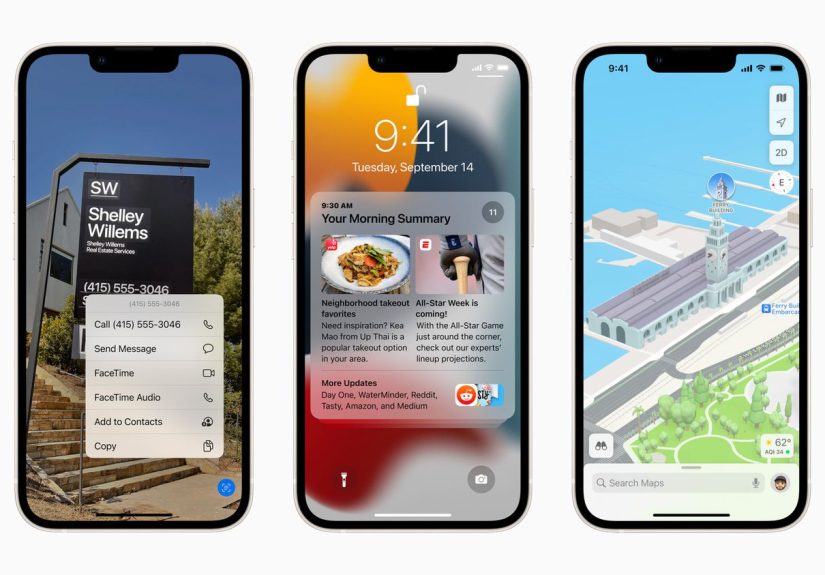
Point your camera at a Wi-Fi password, phone number, recipe card, or street sign and you can copy, call, translate, or search that text instantly.
It also works on existing photos and screenshots.
Real-world wins
- Grab a phone number off a billboard in a photo and call it without retyping.
- Copy notes from a whiteboard at the office (or classroom) in seconds.
- Search your photo library using words inside the images, not just dates and faces.
Paired with Visual Look Up for identifying plants, landmarks, books, art, and pets, iOS 15 and iPadOS 15 quietly turned your photo library into a searchable, semi-intelligent database all processed heavily on-device for privacy.
4. Safari, Maps & Everyday Apps Got Subtle but Serious Upgrades
Safari with Tab Groups & a Fresh Layout
Safari’s redesign brought a compact tab bar and Tab Groups, letting you organize sets of tabs (work, travel, research, “things I’ll totally read later”) and sync them across devices.
Love it or hate it, the bottom URL bar on iPhone made one-handed use easier, and Apple wisely gave users the option to switch back.
Smarter Maps & Weather
iOS 15 Maps introduced richer city detail, improved transit directions, and AR walking guidance in select areas making navigation more intuitive, especially in dense urban zones.
The Weather app got full-screen maps, cleaner layouts, and more precise precipitation alerts, moving it from “default filler app” to “actually useful dashboard.”
5. Privacy & Intelligence: Quiet Protections That Matter
Apple doubled down on privacy with features that arrived first in the iOS 15 era and influenced later releases:
- Mail Privacy Protection: Blocks tracking pixels and hides your IP so newsletters can’t spy on opens and locations.
- App Privacy Report: Shows how often apps access your camera, mic, location, and contacts.
- On-device Siri processing (for many requests): Faster responses and less data leaving your device.
These controls turned “privacy” from a vague marketing term into a set of dashboards normal users could actually open and understand.
6. iPadOS 15: Multitasking That Finally Makes Sense
iPadOS 15 didn’t reinvent the iPad, but it did make it far less confusing to use like a real computer.
A new multitasking menu at the top of apps lets you choose full screen, Split View, or Slide Over with a simple tap instead of an arcane gesture dance.
The Shelf & App Management
The new Shelf shows all open windows for an app along the bottom, making it easier to juggle notes, emails, or documents.
Combined with improved App Switcher behavior, iPadOS 15 finally treated multi-window workflows as a first-class experience instead of a hidden power-user trick.
7. Widgets, App Library & Quick Note on iPad
iPadOS 15 brought the iPhone’s best organizational tricks to the bigger screen:
- Widgets anywhere: Drop rich, resizable widgets directly on the Home Screen for calendars, tasks, smart stacks, and more.
- App Library: An auto-organized view of all your apps, finally ending “16 pages of icons” chaos.
- Quick Note: Swipe from the corner (especially with Apple Pencil) to capture notes instantly, including links back to the app or page you were viewing.
For students, creators, and professionals, these features made the iPad far better at being a knowledge hub not just a giant phone pretending to be a laptop.
8. Health, Shared With You & Quality-of-Life Touches
Other iOS 15 additions rounded out the experience:
- Shared With You: Automatically surfaces links, photos, and content friends send you in Messages inside the relevant apps (Safari, Photos, Podcasts, TV).
- Health sharing & trends: Lets you share selected health data with family or caregivers and track long-term patterns.
- Small but mighty tweaks: Better Memories in Photos, smarter Spotlight search, improved Notes with tags and mentions all the “little” things that make daily use smoother.
None of these are flashy alone, but together they make the ecosystem feel more connected, helpful, and human.
Real-World Experiences with iOS 15 & iPadOS 15
The true test of any software update isn’t the keynote applause; it’s what happens on a random Tuesday when you’re late, tired, overloaded, and holding coffee in one hand.
iOS 15 and iPadOS 15 quietly proved their worth in those unglamorous moments.
Take Focus. Early on, many users brushed it off as “Do Not Disturb with extra steps.”
But once you set up a Work Focus that hides Instagram, TikTok, and game alerts between 9 and 5, or a Sleep Focus that silences everything except family and emergency contacts, the difference is obvious:
fewer useless interruptions, less doomscrolling, and a lock screen that doesn’t look like a slot machine.
Over time, people discovered that simple automations like triggering a Driving Focus when connecting to CarPlay or a Personal Focus after work actually reduced stress instead of adding complexity.
Live Text turned into an everyday utility tool.
Students use it to grab equations off a whiteboard into their notes.
Office workers capture conference call dial-in info from a slide without retyping.
Travelers scan menus, signs, and addresses to translate or navigate faster.
Instead of digging for a scanner app, your camera quietly does the job in one step and because much of the processing is on-device, it feels fast and private.
SharePlay, while niche for some, became a lifeline for long-distance couples, remote families, and friend groups scattered across states.
Watching the same show in sync while joking over FaceTime isn’t the same as a shared couch, but it’s infinitely better than spamming “3…2…1…play” in a group chat.
For parents, SharePlay also became a clever way to co-watch with kids while traveling or away for work.
On the iPad side, multitasking improvements and Quick Note had a disproportionately big impact.
Before iPadOS 15, many users simply gave up on advanced multitasking because it felt like solving a puzzle every time.
The new menu and Shelf made Split View discoverable: tap, choose layout, done.
Writers, designers, and students could keep a reference document on one side, a note or canvas on the other, and summon Quick Note for links and snippets that stayed tied to what they were viewing.
It nudged the iPad closer to being a serious work device without alienating casual users.
Finally, privacy features subtly shifted behavior.
App Privacy Report exposed which apps pinged your location or accessed your mic a little too often, nudging users to trim permissions.
Mail Privacy Protection blunted creepy tracking without any effort.
None of this screamed for attention, but week after week it made people more comfortable trusting their devices with real, personal data.
And that’s the quiet power of iOS 15 and iPadOS 15: not loud revolutions, but smart defaults that make everyday digital life calmer, safer, and more under your control.
Conclusion
iOS 15 and iPadOS 15 won’t go down as the flashiest releases in Apple history, but they delivered something more durable:
a smarter notification system, richer communication tools, powerful on-device intelligence, practical multitasking on iPad, and stronger privacy guardrails.
These features became the baseline for how modern Apple devices behave.
If you’re still running these versions, or supporting users who are, mastering these tools means squeezing far more value from hardware you already own.
SEO Summary
sapo:
iOS 15 and iPadOS 15 didn’t just add shiny tricks they rewired how your iPhone and iPad handle focus, privacy, multitasking, and everyday tasks.
This in-depth guide breaks down the most important new features, shows how Focus, Live Text, SharePlay, widgets, Quick Note, and enhanced privacy tools work in real life, and explains why these upgrades still matter for users, creators, and professionals across the Apple ecosystem.
Read on to turn “just another update” into a serious boost for productivity, entertainment, and digital well-being.