Table of Contents >> Show >> Hide
- Start Here: Two Minutes of “Symbol Detective Work”
- How to Draw a “Search-Friendly” Version of the Symbol
- Use the Right Tool for the Right Symbol Family
- Turn a Drawing into a Searchable Image (When “Draw-to-Search” Isn’t Available)
- Category Shortcuts: When the Symbol Comes from a Standard System
- Troubleshooting: Why Your Drawing Isn’t Matching Anything
- Verification: How to Confirm You Found the Right Symbol
- Field Notes: of Real-World “Symbol Hunt” Experiences
- Conclusion: From Mystery Squiggle to Confirmed Meaning
You’ve got a mystery symbol. It’s on a clothing tag, a road sign, a chemistry label, a math worksheet, or (most terrifying of all) a tiny button in an app that clearly does something and you’re one accidental click away from launching it into the sun.
The good news: you don’t have to guess. In 2026, you can often identify an unknown symbol by doing the most delightfully low-tech thing possibledrawing it. The trick is knowing where to draw it, how to draw it so computers don’t get offended, and which databases actually contain the kind of symbol you’re looking at.
This guide walks you through a practical, repeatable workflow: sketch → narrow the category → run the right kind of “draw-to-search” tool → verify → confirm meaning with a reliable reference. Along the way you’ll get specific examples, troubleshooting tips, and a bonus field-notes section (because yes, symbol-hunting has lore).
Start Here: Two Minutes of “Symbol Detective Work”
Before you draw, grab a bit of context. The same shape can mean wildly different things depending on where it appears. A triangle might mean “bleach allowed,” “yield,” “warning,” “play,” or “summon a portal.” Context keeps your search from spiraling.
Ask these five questions
- Where did you see it? (clothing tag, chemical label, keyboard, app icon, street sign, manual)
- Is it part of a set? Symbols in groups usually follow a standard (laundry care, hazards, traffic).
- Are there letters, numbers, or a border? Even one character nearby can anchor your search.
- What’s the “vibe”? Safety symbols are bold and standardized; Unicode glyphs are typographic; app icons are stylized.
- Is it high-stakes? If it’s related to safety (chemicals, electricity, medical devices), verify with official sources.
How to Draw a “Search-Friendly” Version of the Symbol
Most people fail at draw-to-search for one simple reason: they draw what they feel, not what the symbol is. Your goal is a clean, boring, accurate sketchlike you’re filing paperwork for the symbol.
Make your sketch easier to recognize
- Draw it big and centered. Tiny drawings create wobbly lines and bad matches.
- Use as few strokes as possible, unless the symbol clearly has separate parts.
- Keep proportions honest: long stems, short arms, dot placement, angles.
- Try two versions: a neat “type-like” version and a quick “as seen” version.
- Rotate if needed. A sideways symbol might be interpreted as a completely different one.
Pro tip: if the symbol is printed, you can also redraw it in a notes app and export a high-contrast image. That lets you use visual search engines that don’t accept raw “drawing input,” but do accept images.
Use the Right Tool for the Right Symbol Family
“Unknown symbol” is like saying “unknown animal.” Could be a whale, could be a mosquito, could be your neighbor’s cat judging you. The fastest path is choosing a tool that specializes in the symbol’s ecosystem.
1) If it looks like a keyboard character or typographic glyph: Unicode drawing search
If the symbol resembles something you’d type (arrows, stars, geometric shapes, math operators, currency marks), you’re probably looking for a Unicode character.
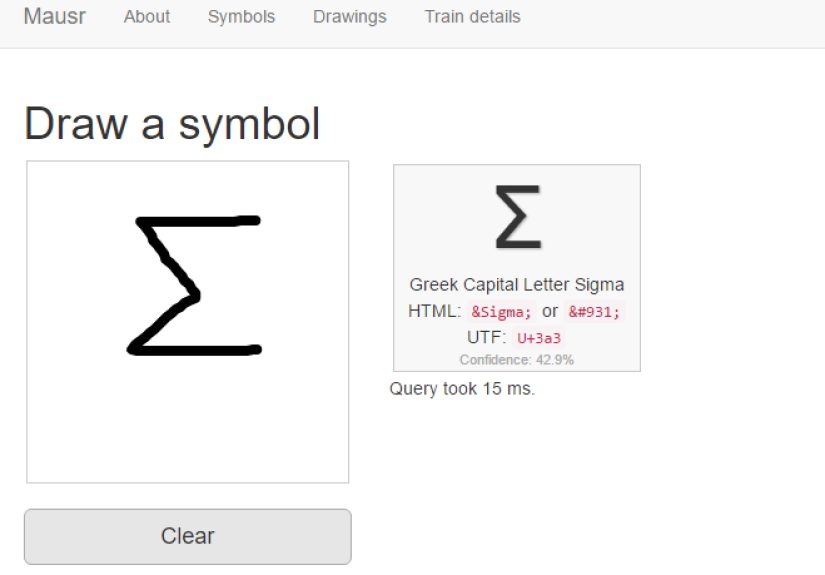
Try a Unicode shape-matching tool where you draw the glyph and it returns the closest characters. Once you have a candidate, confirm the character name and code point using official Unicode charts. This “draw → shortlist → confirm” pattern is much faster than scrolling through thousands of characters hoping your eyeballs catch the right squiggle.
Example: You see a symbol that looks like a slashed O, or a weird empty circle. A Unicode draw tool might suggest ∅ (empty set) or similar-looking variants. Then you confirm the official name and whether the context matches (math vs. Scandinavian letter vs. design icon).
2) If it’s a math symbol: draw-to-LaTeX and handwriting math recognition
Math symbols are a special kind of chaos because many look almost identical until you notice one microscopic detail (dot position, serif direction, double-struck vs. bold, etc.). Two strong approaches help here:
- Draw-to-LaTeX lookup: sketch the symbol and get likely LaTeX commands. Great for finding that “what even is this arrow?” notation.
- Handwritten math recognition: write the expression as you see it, and let the recognizer convert it into clean math, which you can then search or interpret.
Example: You draw something like a fancy “therefore” (three dots forming a triangle). A draw-to-LaTeX tool might point you to therefore. Or you write the whole expression in a handwriting math feature and confirm the symbol’s role in the equation.
3) If it’s from another language or script: handwriting input (translate/keyboard tools)
Sometimes the “symbol” is actually a letter from another script (Japanese kana, Chinese characters, Arabic letters, etc.). In that case, handwriting input is your friend:
- Use handwriting in translation tools to draw the character and get text output.
- Use handwriting keyboards to input it directly, then copy/paste it into a normal search.
- Try a handwriting panel that suggests candidates as you draw; pick the closest match.
Example: You see a character on packaging and can’t type it. Draw it with handwriting input, select the best candidate, then search that character plus the product category (e.g., “symbol meaning” or the brand name).
Turn a Drawing into a Searchable Image (When “Draw-to-Search” Isn’t Available)
Some popular search engines don’t offer a “draw directly in the search bar” feature for general symbols. But they do offer visual search. So you can use a simple hack: draw the symbol → save it as an image → run visual search.
Google Lens workflow (great for real-world symbols)
- Draw the symbol neatly in a notes/drawing app (black on white).
- Save or screenshot it.
- Use a visual search tool to upload the image and look for visually similar results.
- Add a context keyword to refine: “laundry symbol,” “electrical symbol,” “math symbol,” “hazard pictogram,” etc.
This is especially useful for symbols found in the wildicons on appliances, labels, manuals, and signagebecause visual search can match the style and the domain, not just the abstract shape.
Bing Visual Search workflow (especially handy on Windows)
If you’re on a desktop, you can upload your sketch or drag-and-drop it into visual search. If you’re on Windows, you can even run visual search from common image tools (like screenshot workflows), then compare matches and open results that look like your symbol’s “home territory.”
Category Shortcuts: When the Symbol Comes from a Standard System
The fastest symbol searches happen when you recognize the category immediately. Standards-based symbols are deliberately consistentmeaning once you know the system, you can identify symbols with high confidence.
Chemical and safety pictograms (don’t guess these)
If you see a symbol inside a diamond or with strong hazard styling (skull, flame, corrosion graphic), treat it as a safety pictogram and verify it using an official reference. These pictograms are designed to communicate hazards quickly, and the exact icon matters.
Quick example: A flame icon generally signals flammability hazards; a skull-and-crossbones relates to acute toxicity. If you’re looking at a workplace label, verify the pictogram meaning before handling the substance.
Traffic and road symbols
Road signs and traffic symbols in the U.S. follow standardized manuals. If your unknown symbol appears on a road sign, bike trail sign, or public roadway notice, the right source is typically a traffic control device standard. Visual search works well here, but category keywords (“MUTCD symbol sign”) can drastically speed up results.
Laundry care symbols (tiny icons, huge consequences)
Clothing tags are a symbol jungle, but they’re a standardized jungle. Once you know the core shapes, you can decode most tags quickly:
- Wash tub = washing instructions (temperature, cycle, do-not-wash).
- Triangle = bleach guidance.
- Square (often with a circle) = drying guidance (tumble dry vs air dry, heat level).
- Iron = ironing rules.
- Circle = dry cleaning instructions.
Quick example: A square with a circle inside typically points to tumble drying, while dots indicate heat level. An “X” through a symbol means “do not.”
Troubleshooting: Why Your Drawing Isn’t Matching Anything
If your tool returns nonsense results (or insists your symbol is the letter “S” no matter what you do), try these fixes.
Common failure points (and quick fixes)
- You drew a stylistic icon, not the underlying shape. Simplify it into basic geometry: lines, dots, circles, arrows.
- Stroke order matters. If you’re using handwriting recognition, try writing in a natural order and keep strokes connected where they appear connected.
- It’s actually two symbols together. Draw the base symbol alone, then add modifiers (dots, bars, circles) in a second attempt.
- Orientation is tricking you. Rotate 90°/180° and try again. Some symbols are near-mirrors of each other.
- You’re in the wrong database. A chemical pictogram won’t show up as a Unicode character; a laundry symbol won’t behave like a math operator.
If you’re truly stuck, do a hybrid search: draw it, then search “[your best guess description] symbol meaning” (for example, “circle with x symbol meaning,” “triangle with lines laundry symbol,” “lightning bolt in triangle warning symbol”). Text descriptions are messy, but paired with a sketch they often land you on the right page.
Verification: How to Confirm You Found the Right Symbol
A match is not the same as a meaning. Your last step is verifying that the symbol’s definition fits your context.
Use this quick confirmation checklist
- Compare shape details (dots, line thickness, angles, border shape).
- Check the symbol’s official name (Unicode name, standard label, or glossary entry).
- Confirm the domain (math vs laundry vs hazard vs traffic vs UI).
- Look for the symbol in a set (does it appear alongside other related icons?)
- For safety-critical symbols, rely on official or authoritative references, not random image boards.
Think of it like identifying mushrooms: sure, it resembles something edible… but do you want to bet your afternoon on “resembles”?
Field Notes: of Real-World “Symbol Hunt” Experiences
Symbol identification sounds simple until you’re in the momentstaring at a tiny icon that looks like a toaster, a medieval shield, and a minimalist house all at once. Here are a few common “in the wild” experiences people run into (and how the drawing approach saves the day).
1) The Laundry Tag Trap. You spot a wash tub with one line under it and dots that seem to be playing hide-and-seek. You draw the symbol, but instead of treating it like art, you reduce it to features: tub + underline + two dots. Once you realize the underline indicates a gentler cycle and the dots indicate temperature, suddenly the tag stops being cryptic and starts being helpful. The experience usually ends with the quiet satisfaction of not shrinking your favorite shirt into a crop top you didn’t ask for.
2) The Math Worksheet Mystery. A student sees a symbol that looks like an equals sign, but with one extra line, or an arrow with a tiny bar. Drawing it into a math symbol recognizer produces a shortlist of close matches. The “aha” moment isn’t just finding the symbol’s nameit’s realizing the symbol changes the meaning of the whole problem (equivalence vs approximation, implication vs mapping, therefore vs because). Drawing forces you to notice what your eyes gloss over.
3) The App Icon That Nobody Named. Modern UI icons are notorious for being “vibes-based.” You’re staring at something that might mean “archive,” “compress,” “sync,” or “start a small rebellion.” Here, drawing a simplified version and using visual search works surprisingly well, especially if the icon is associated with a well-known design system. The best part is when you discover the icon is, in fact, “filter,” and you’ve spent three days using it as “sort.” Congratulationsyou’ve been living in the wrong timeline.
4) The Safety Symbol Scare. Someone finds a diamond-shaped pictogram on a bottle, and the first instinct is to shrug. Drawing it and matching it to an official pictogram reference flips the experience from guessing to knowing. That shift matters: safety symbols aren’t trivia. They’re instructions, warnings, and sometimes the only thing standing between you and a very memorable trip to rinse-your-eyes-for-15-minutes land.
5) The “It’s Not a Symbol, It’s a Character” Plot Twist. This one is common with imported products or older documents. You see a mark that looks decorative, but handwriting input reveals it’s a character in another writing system. Once it becomes text, everything opens up: you can translate it, search it, and figure out whether it’s a brand name, a place, a material, or a simple instruction like “fragile” or “up.”
The shared theme in all these experiences is that drawing slows you down just enough to be accurate. You stop guessing and start observing: where the dot sits, how many strokes there are, whether the border is part of the symbol, whether the symbol belongs to a standardized “family.” And once you have that, the internet becomes less of a haystack and more of a well-labeled toolbox.
Conclusion: From Mystery Squiggle to Confirmed Meaning
Identifying an unknown symbol by drawing it isn’t magicit’s pattern matching plus the right database. Sketch it cleanly, choose the correct symbol family (Unicode, math/LaTeX, handwriting input, standards like hazards/traffic/ laundry), and verify the meaning with authoritative references when it matters.
Next time a symbol tries to intimidate you, remember: it’s just a tiny picture with a job. Draw it, search it, confirm it, and get back to your lifenow with fewer mysterious buttons and fewer accidental “dry clean only” disasters.