Table of Contents >> Show >> Hide
- The 60-Second Verdict
- What Is MobileHelp (and Who Is It For?)
- How MobileHelp Works
- MobileHelp Plans and Pricing (2026 Snapshot)
- Features That Matter When Life Gets Messy
- MobileHelp Connect: The Caregiver Side (Without the Helicopter)
- Setup, Wearability, and Everyday Life
- Reputation, Customer Service, and Trust Signals
- Pros and Cons (No Sugarcoating)
- MobileHelp vs. Alternatives (Quick Reality Check)
- So… Is MobileHelp the Best Alert System?
- of Real-World Style Experiences (What It Feels Like Day to Day)
- Conclusion
If you’ve ever watched someone try to “walk it off” after a near-fall, you already know the problem: pride is strong, gravity is stronger.
A medical alert system (also called a personal emergency response system, or PERS) is basically a shortcut around the “I’m fine!” phaseso help can show up
before a small emergency turns into a long, expensive story no one wants to tell at Thanksgiving.
MobileHelp is one of the best-known names in medical alert systems, especially for people who want coverage at home and on the go without paying
luxury-car prices. But “popular” isn’t the same as “best.” So let’s do the only reasonable thing: take MobileHelp apart, look at the plans, test the logic,
and see who should actually buy itand who should keep shopping.
The 60-Second Verdict
MobileHelp is a strong contender if you want reliable professional monitoring, fair monthly pricing, and the flexibility to protect one person
at home, out of the house, or two people with a bundle. Its lineup is straightforward, the “home range” on its cellular base is genuinely roomy, and the
brand shows up often in reputable “best medical alert systems” roundups.
It’s not automatically “the best” for everyone because “best” depends on your priorities. If you want the slickest app ecosystem, advanced
health metrics, or a smartwatch-first experience with modern messaging, you may prefer competitorsor you might decide a smartwatch like an Apple Watch fits
better (with tradeoffs).
Think of MobileHelp as: practical protection with good value, especially when bundles and fall detection are part of your plan.
What Is MobileHelp (and Who Is It For?)
MobileHelp is a U.S.-based medical alert company that focuses on monitored emergency response for older adults, people aging in place, and anyone who wants a
“press-for-help” safety net. In plain English: you press a button (or a fall detection sensor triggers), you get connected to a monitoring center, and the
operator helps coordinate family notifications and emergency services.
MobileHelp tends to work best for:
- Active seniors who want GPS-enabled help outside the home.
- People living alone who want 24/7 monitoring without complicated tech.
- Couples/roommates who want two-user options without doubling the bill.
- Adult children/caregivers who want visibility (alerts, status, basic tools) without becoming full-time dispatchers.
It’s less ideal for folks who need highly customized wearables, ultra-long mobile battery life, or a premium app experience that rivals consumer tech brands.
How MobileHelp Works
Professional monitoring (the part you’re really paying for)
With MobileHelp, your device connects you to a trained operator at a 24/7 monitoring center. When you trigger an alert, the operator attempts two-way
communication (through the base unit or mobile device), checks your account details, and follows your instructionstypically contacting emergency services
and/or your listed contacts.
Connectivity: home systems vs. mobile systems
MobileHelp generally splits into two usage modes:
-
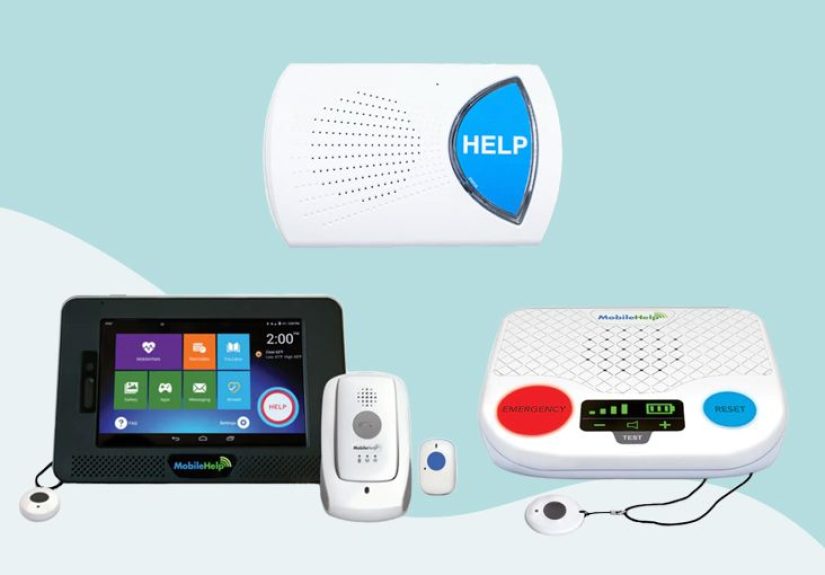
At-home systems (base station + wearable button): designed for coverage around the house, yard, garage, and “I’m just going to grab the mail”
moments. - On-the-go systems (GPS-enabled mobile device): designed for errands, walks, travel, and the “I’m independent, thank you very much” lifestyle.
Range: the unsung hero of “home coverage”
Range matters because emergencies rarely happen directly beside the base station like a movie scene. MobileHelp’s cellular home base is known for offering a
long at-home coverage radius, which can make it easier to keep protection on while moving around the property.
MobileHelp Plans and Pricing (2026 Snapshot)
Pricing is one of MobileHelp’s biggest selling points: plans typically start in the mid-$20s per month for at-home coverage and move upward based on mobile
GPS devices and bundles. Promotions and payment cadence (monthly vs. quarterly/annual) can shift the real-world total, but here’s the general shape.
Common plan lineup
| Plan Type | Best For | Typical Monthly Starting Price |
|---|---|---|
| Classic (Home) | Home-focused protection with wearable button | ~$24.95/month |
| Solo / Micro (Mobile GPS) | On-the-go protection with GPS and two-way audio | ~$34.95/month |
| Home Duo Bundle | Home base + mobile device in one package | ~$44.95/month |
| Mobile Duo Bundle | Two users who want mobile coverage | ~$44.95–$49.95/month (varies by offer/source) |
Add-ons you’ll actually care about
-
Automatic fall detection: commonly an added monthly fee (often around $11/month, sometimes discounted via promos or annual plans).
Important reality check: fall detection is helpful, but not perfectnobody should treat it like a magical anti-gravity shield. - Lockbox: useful if you want EMS to enter without turning your front door into modern art.
- Wall button / extra buttons: handy for bathrooms, bedrooms, or the stairwell that everyone pretends isn’t a stairwell.
Good value clue: if you want both home and mobile coverage, bundles are where MobileHelp can look unusually cost-effective compared with buying
two separate systems. If you only want home coverage and you’re price-sensitive, compare carefully with other budget-friendly brands.
Features That Matter When Life Gets Messy
Response speed: every second feels longer in an emergency
Mobile alert companies love to promise “fast response.” The more useful question is: what do independent tests and reviewers observe? Third-party testing
often places MobileHelp response times within typical industry norms, with some tests showing averages in the teens of seconds depending on conditions.
Real-life response also depends on cellular coverage, device placement, and whether you can communicate clearly.
Two-way communication: can you talk without yelling?
Two-way voice matters because an operator can triage quickly if they can actually hear you. Mobile devices with built-in speaker/mic can work well outdoors,
while the at-home base is designed to be audible across a room. If hearing is a concern, pay extra attention to speaker volume and placement.
GPS location: “I’m outside” is not a street address
A GPS-enabled medical alert device can be a game-changer for active users. When an emergency happens away from home, location data helps monitoring staff and
first responders find you fasterespecially if you’re disoriented, in pain, or simply can’t explain where you are without turning it into a scavenger hunt.
Fall detection: great tool, flawed superhero
Automatic fall detection is one of the most requested features in a MobileHelp reviewbecause falls are common, and not everyone can press a button after one.
The best way to think about fall detection is as an extra layer, not a replacement for wearing the device consistently and using the button
when you can.
If fall detection is non-negotiable, confirm it’s compatible with the exact device you choose and ask about current pricing and promo discounts.
MobileHelp Connect: The Caregiver Side (Without the Helicopter)
MobileHelp also leans into caregiver-friendly tooling via MobileHelp Connect and its app ecosystem. In practice, this is less “Big Brother” and more “I’d like
to know if Mom’s device is working and whether an alert happened.”
What it’s good for
- Status and alert notifications (so caregivers aren’t guessing).
- Non-emergency and emergency alerts delivered to approved contacts.
- Location requests for mobile devices (often with a monthly included allotment, with extra packages available).
- Care coordination basics like reminders and shared info (features vary by app version and plan).
If your family is coordinating care among siblings (or among one sibling and three cousins who “are totally helping”), a shared app experience can reduce
confusionespecially when everyone wants updates but no one wants to be on call 24/7.
Setup, Wearability, and Everyday Life
The best medical alert system is the one that actually gets worn. MobileHelp’s wearables are generally designed to be lightweight and simple: a pendant, a
wrist option, or a compact mobile device you can wear as a lanyard.
Setup: usually DIY-friendly
Most users can set up MobileHelp equipment without a technician. The practical checklist:
- Place the base station (home plan) where you’ll hear it and where cellular/landline signal is stable.
- Charge the mobile device fully before relying on it for outings.
- Run a test call and confirm your address, contact list, and lockbox details.
- Practice: press the button and speak clearly. Confidence matters.
Bathrooms: the boss level
Bathrooms are a common risk zone because wet floors + hard surfaces are a terrible combination. Many MobileHelp help buttons are designed to be water-resistant
or waterproof so they can be worn in the shower. That’s not glamorous, but neither is explaining a preventable ER visit.
Reputation, Customer Service, and Trust Signals
When you’re choosing a safety service, reputation isn’t just vibesit’s how the company handles complaints, billing questions, and the occasional “my device did
something weird at 2 a.m.” moment. MobileHelp is commonly listed as BBB accredited with an A+ rating, and it’s frequently reviewed by major health and senior
publications.
Consumer survey-style reporting from well-known organizations has also placed MobileHelp among top-performing brands. As with any button-based system, accidental
activations can happenusually because people bump the device or forget they’re wearing it. That’s annoying, but it’s also part of the tradeoff of wearing
something designed to be easy to press.
Pros and Cons (No Sugarcoating)
Pros
- Strong value for monitored protection, especially bundles.
- Flexible lineup: home, mobile GPS, and hybrid coverage options.
- Long at-home range on cellular base systems (helps with yards and larger homes).
- No long-term contract positioning is common across reviews and plan descriptions.
- Caregiver tools add convenience for families coordinating care.
Cons
- App experience may feel basic compared with some competitors’ more modern platforms.
- Fall detection costs extra, and performance varies like all fall detection tech.
- Cellular coverage matters: if your area has weak signal, you may need extra diligence (or a different solution).
- Not every “cool device” stays available forever (some watch-style options are treated as special/limited or change over time).
MobileHelp vs. Alternatives (Quick Reality Check)
“Best” is relative. Here’s how MobileHelp typically stacks up against common alternatives people cross-shop:
MobileHelp vs. Medical Guardian
Medical Guardian often competes on device variety and a more polished tech ecosystem, while MobileHelp frequently wins on straightforward valueespecially for
bundles and budget-friendly monitored plans. If you want more device styles and a more “modern” experience, Medical Guardian may appeal. If you want simpler
pricing and practical bundles, MobileHelp stays competitive.
MobileHelp vs. Bay Alarm Medical
Bay Alarm Medical often shows up as a top overall pick in broader comparisons. If you’re optimizing for the best blend of equipment options and performance
across categories, Bay Alarm is worth a look. If you’re optimizing for home+mobile bundle value or a two-user mobile setup, MobileHelp can be hard to ignore.
MobileHelp vs. Apple Watch (or other smartwatches)
A smartwatch can offer fall detection and emergency calling, plus health tracking. The tradeoffs: battery discipline (charging is non-optional), and the support
model is different (you’re not always getting a dedicated monitoring center the same way). For tech-comfortable users who already wear a watch daily, it can be
a fit. For people who want a dedicated, simple emergency device with professional monitoring, MobileHelp’s approach is often easier.
So… Is MobileHelp the Best Alert System?
MobileHelp is one of the best medical alert systems for value-focused shoppersespecially if you want coverage in and out of the home, or if
two people in the same household need protection without paying two full-price subscriptions.
Choose MobileHelp if you want:
- Affordable monitored protection with clear plan tiers
- Strong at-home range and an easy-to-use base station
- GPS-enabled mobile coverage for errands, walks, and travel
- Bundle pricing that can reduce overall monthly cost
- Optional fall detection as an added layer
Consider other options if you need:
- A premium, feature-rich app experience that feels like consumer tech
- A smartwatch-first lifestyle with modern messaging and broad app integrations
- Specific wearable styles or highly customized accessory ecosystems
Bottom line: MobileHelp can absolutely be “the best”for the right person. Your job is to match the device and plan to the real lifestyle:
where the user spends time, how comfortable they are with charging devices, whether falls are a top risk, and how involved caregivers want to be.
of Real-World Style Experiences (What It Feels Like Day to Day)
Let’s make this practical. Not “marketing practical,” but “Tuesday morning when the dog is judging your balance” practical. Here are a few realistic scenarios
that show how a MobileHelp-style system tends to fit into everyday life. These examples are illustrativebecause no two households are identical, and neither
are their emergency stories.
Scenario 1: The “I’m Fine” Fall (Until You’re Not)
Imagine your dad steps off the porch, misses the last step, and sits down hard in the yard. He’s conscious, he’s embarrassed, and his first instinct is to
wave you off like he’s landing an airplane. The difference-maker is the wearable button: it’s already on him. He doesn’t have to crawl to a phone, and he
doesn’t have to unlock anything with shaky hands. He presses the button. A monitoring operator answers. Dad insists he’s fine (of course), but the operator
can still stay on the line, ask key questions, and contact you. Even if no ambulance is needed, that “someone is listening right now” moment can keep a minor
fall from turning into a long time on the ground.
Scenario 2: The Shower Is a Villain
The shower is where confidence goes to get humbled. Slippery surfaces, soap, a little dizzinesssuddenly you’re negotiating with gravity. A water-resistant
pendant doesn’t make showers safe, but it makes them less risky. The “experience” is mostly psychological: once the wearer trusts the device, they’re
less likely to rush, panic, or avoid bathing independently. Caregivers often notice the side benefit: fewer “just in case” calls, because the user has their
own safety net.
Scenario 3: Errands, GPS, and the Unexpected Detour
A common fear isn’t just “a fall,” it’s “a fall somewhere inconvenient.” A grocery store aisle. A parking lot. A sidewalk two blocks from home. Mobile GPS
devices exist for exactly this reason. In this scenario, the user feels chest tightness while walking back to the car. They sit down, press the device, and
can speak directly through it. The monitoring center can dispatch help and use location data if the user can’t explain precisely where they are. The caregiver
experience is also different: instead of frantic guessing“Which store? Which lot? Which entrance?”there’s a clearer path to finding the person.
Scenario 4: Two Users, One Household, Many Opinions
Couples shopping for medical alert systems tend to have… spirited debates. One spouse wants the simplest pendant possible. The other is convinced they’ll
remember to carry a phone forever (spoiler: phones get left on kitchen counters). Two-user bundles can reduce the “whose plan is better” drama by keeping both
people covered. The day-to-day win isn’t flashyit’s that neither person feels singled out. It becomes “our household safety plan,” not “your emergency button.”
Scenario 5: The Caregiver Who Can’t Be Everywhere
The caregiver experience is often a tug-of-war between love and logistics. You can’t be everywhere, and you shouldn’t have to be. A system with basic caregiver
tools (status, alerts, and a consistent monitoring center) can reduce the mental load. The best feedback caregivers report is rarely “the app is gorgeous.”
It’s “I can sleep,” “I’m less anxious at work,” and “I don’t have to call five times a day just to check in.” That emotional relief is hard to pricebut it’s
usually the reason families renew service year after year.
If you want the most accurate “experience,” don’t just read specssimulate the routines: wear the button for a full week, take the device on errands, test
calls at different times, and confirm where signal is strong or weak around the home. The best system is the one that fades into the background until it’s
neededthen shows up like a pro.