Table of Contents >> Show >> Hide
- What ASUS Is Actually Announcing
- Why the Vivobook 13 Slate OLED Matters
- How It Stacks Up Against Surface-Style Rivals
- Where the Vivobook 13 Slate OLED Looks Strongest
- Where Buyers Should Keep Their Expectations Grounded
- Who Should Actually Buy This ASUS 2-in-1 Laptop?
- Final Thoughts
- Extended Experience: What Using the Vivobook 13 Slate OLED Is Really Like
ASUS has officially thrown its hat into the detachable Windows ring with the Vivobook 13 Slate OLED, and it is not arriving quietly. This is not one of those painfully beige product launches where a company announces a laptop that looks exactly like every other laptop, just with a shinier sticker and a slightly more ambitious price. Instead, ASUS is making a clear pitch: what if a 2-in-1 laptop could be a work device, a streaming machine, a sketch pad, and a couch companion without charging you premium-tablet money for every accessory separately?
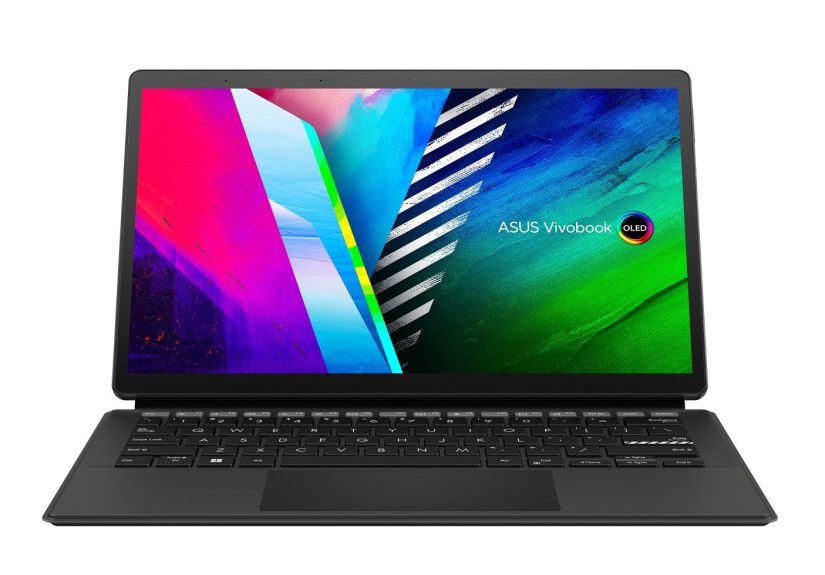
That is the big hook behind the ASUS Vivobook 13 Slate OLED. It combines a 13.3-inch OLED touchscreen with a detachable keyboard, stylus support, a built-in kickstand, and Windows 11 in a design that feels aimed at everyone who has ever looked at a Surface-style device and thought, “Nice, but why does the keyboard cost extra and why is my wallet now crying?” ASUS is clearly chasing buyers who want flexibility and flair more than raw horsepower. And honestly, that makes this launch more interesting than it first appears.
On paper, the Vivobook 13 Slate OLED looks like a device with a split personality in the best possible way. It wants to be productive enough for writing, browsing, emailing, and video calls, but it also wants to be your tiny OLED TV for movies, YouTube rabbit holes, and late-night streaming sessions you definitely planned to stop after one episode. ASUS is leaning hard into that entertainment angle, and once you see the display specs, it is easy to understand why.
What ASUS Is Actually Announcing
The Vivobook 13 Slate OLED is a detachable Windows laptop built around a 13.3-inch full HD OLED touchscreen. ASUS positioned it as a device that blends portability and entertainment with light everyday productivity. The keyboard detaches, the rear cover doubles as a kickstand, and the machine can be used in several ways: as a laptop, a tablet, a display propped up for movies, or a notepad-style slate for drawing and handwriting.
Unlike some hybrid devices that treat accessories like luxury add-ons, ASUS built the package around inclusion. The standard edition comes bundled with a detachable full-size keyboard, a cover stand, and ASUS Pen support. That matters because it changes the value conversation immediately. Instead of asking buyers to mentally add another chunk of money for the keyboard and pen, ASUS is telling shoppers, “No tricks here, the box is supposed to be useful.” In tech, that alone deserves a tiny round of applause.
The OLED Display Is the Main Event
If the Vivobook 13 Slate OLED were a movie cast, the screen would get top billing, its own trailer, and probably a better dressing room than the processor. ASUS made the display the star of the show, and for good reason. This 13.3-inch OLED panel features a 16:9 aspect ratio, full HD resolution, Dolby Vision support, a 100% DCI-P3 color gamut, PANTONE validation, and DisplayHDR True Black 500 certification. That is a very serious list of visual credentials for a device starting in budget-premium territory.
In practical terms, that means blacks should look properly black instead of dark gray pretending to be confident. Colors should pop without looking cartoonish. Movies and shows should feel more cinematic than they do on the average entry-level Windows machine. ASUS also emphasizes eye-care benefits and fast response times, which adds to the feeling that this machine was designed not just to run apps, but to make content look great while doing it.
That focus also helps the Vivobook 13 Slate OLED stand out in a crowded market. Many detachable machines are designed around productivity first and visual delight second. ASUS flipped that order. It built a detachable OLED laptop that says entertainment is not a side quest. It is part of the mission.
A Detachable Design That Tries to Be Useful, Not Just Clever
Plenty of 2-in-1 devices brag about flexibility, but the ones people actually love are the ones that make switching modes feel natural rather than annoying. ASUS seems to understand that. The kickstand cover opens up to 170 degrees, giving the Vivobook 13 Slate OLED a wide range of viewing positions. Clip on the keyboard, and it behaves like a compact laptop. Remove it, and you get a slim Windows tablet. Turn it sideways for shows, prop it up for a recipe, or hold it like a digital notebook during a meeting.
This flexibility makes the device appealing to students, travelers, casual creatives, and anyone whose desk is sometimes a kitchen table and sometimes a café. The included stylus support is especially important here. If you like to sketch, annotate PDFs, mark up screenshots, or jot notes by hand, the Vivobook 13 Slate OLED is clearly designed to accommodate that without making you feel like you are forcing a traditional laptop to cosplay as a tablet.
Specs That Reveal the Device’s True Purpose
Now for the reality check. Underneath that lovely OLED screen, ASUS is using an Intel Pentium Silver N6000 processor, paired with up to 8GB of RAM and up to 256GB of SSD storage. In other words, the Vivobook 13 Slate OLED is not trying to be a content-creation monster or a coding workstation that laughs at 40 browser tabs. It is targeting lighter workloads: web browsing, Microsoft Office, note-taking, streaming, email, cloud apps, and everyday mobile computing.
That does not make it a bad device. It just makes it an honest one, if you read the spec sheet carefully. A lot of laptop disappointment begins when buyers see a beautiful design and assume it can do everything. The Vivobook 13 Slate OLED looks cooler than its processor suggests, but that is not necessarily a flaw. It is more like showing up to brunch in a stylish jacket instead of a construction helmet. Different gear, different job.
ASUS also includes features that make sense for an on-the-go machine: dual USB-C ports, a microSD card reader, a 3.5mm audio jack, Wi-Fi 6, a 5MP front camera, a 13MP rear camera, Dolby Atmos audio, and a 50Wh battery. The charging story is sensible too, with USB-C charging that fits modern mobile life better than a proprietary brick that vanishes the first time you travel.
Why the Vivobook 13 Slate OLED Matters
This launch matters because ASUS is attacking a very specific gap in the market. Premium detachable laptops often look fantastic but become expensive once you add the keyboard, stylus, and upgraded storage. Cheaper Windows tablets, meanwhile, often cut corners where it hurts most: the screen, the audio, the keyboard experience, or all three at once in a sort of budget-device triple threat.
The ASUS Vivobook 13 Slate OLED 2-in-1 laptop tries to break that pattern. It says, “Let’s give people a display they will actually enjoy, a detachable form factor they can actually use, and a box that includes the accessories they actually need.” That is a smart positioning move. Instead of trying to out-muscle high-end convertibles, ASUS is trying to out-charm them.
It also arrives with a clearer identity than many competitors. Some hybrids feel like laptops that can reluctantly become tablets. Others feel like tablets pretending they are ready for real work. The Vivobook 13 Slate OLED leans into being a media-friendly Windows companion first, then adds enough productivity features to justify being taken seriously as an everyday device. That may not satisfy power users, but it makes the product easier to understand.
How It Stacks Up Against Surface-Style Rivals
It is impossible to look at this device and not think of Microsoft’s Surface lineup. The form factor invites the comparison, and ASUS clearly knows it. The difference is that the Vivobook 13 Slate OLED chooses value and display quality as its weapons rather than pure performance or premium-brand prestige.
Compared with a Surface-style rival, ASUS offers a strong headline advantage: an OLED screen at a much more approachable starting price. It also softens the blow by including the keyboard in the experience instead of treating it like downloadable content for your hardware. That makes the Vivobook feel generous in a market that often feels annoyingly transactional.
But the tradeoff is equally obvious. A Pentium processor is not built for heavy lifting. If your daily routine includes demanding multitasking, large Photoshop files, 4K video editing, serious coding workflows, or virtual machines, the Vivobook 13 Slate OLED is not your hero. It is the charming side character with impeccable screen quality and a very firm refusal to sprint.
Where the Vivobook 13 Slate OLED Looks Strongest
- Display quality: This is the standout feature and the reason the device gets immediate attention.
- Detachable versatility: Laptop mode, tablet mode, streaming mode, and note-taking mode all make sense here.
- Bundled accessories: Including the keyboard changes the value proposition in a big way.
- Entertainment focus: OLED, Dolby Vision, and Dolby Atmos make it more fun than the average budget Windows machine.
- Portability: Thin, light, and easy to toss into a bag without feeling like you packed a brick with trust issues.
Where Buyers Should Keep Their Expectations Grounded
- Processor limits: The Intel Pentium chip is fine for light tasks, but it is not built for demanding creative or professional work.
- Not a workstation: The OLED screen may whisper “creator,” but the internals politely say “let’s keep this simple.”
- Niche appeal: This is a great fit for some users, but not an all-purpose recommendation for everyone shopping for a Windows laptop.
- Keyboard tradeoff: Detachable keyboards are convenient, but they rarely feel as sturdy as a traditional clamshell laptop on every surface.
Who Should Actually Buy This ASUS 2-in-1 Laptop?
The ideal buyer is someone who values screen quality, flexibility, and portability more than benchmark bragging rights. Students who stream, take notes, and work in web apps make sense here. So do frequent travelers, casual artists, digital journal keepers, couch workers, and people who want a secondary Windows device that feels more relaxed and fun than a standard budget notebook.
It also makes sense for entertainment-first buyers who still need a real desktop operating system. If you want something more capable than a pure media tablet but less expensive than a premium detachable, the Vivobook 13 Slate OLED lands in a surprisingly appealing middle ground.
On the other hand, if your workday is full of heavy spreadsheets, creative suites, local gaming, software development, or advanced multitasking, you should probably admire this machine from a respectful distance and keep shopping.
Final Thoughts
The ASUS Vivobook 13 Slate OLED is one of those rare gadgets that knows exactly what it wants to be. It is not trying to demolish premium productivity machines in a performance contest. It is trying to make the detachable Windows category more approachable, more colorful, and frankly more enjoyable. That is a smart move.
ASUS took a form factor people already understand and improved the part most users interact with every second: the screen. Then it wrapped that screen in a portable design, included the right accessories, and priced it aggressively enough to make people pause mid-scroll. Yes, the processor is modest. Yes, power users will hit its ceiling quickly. But not every laptop needs to be a digital bulldozer. Some just need to be practical, flexible, and fun to use.
And that is really the story here. The Vivobook 13 Slate OLED is not the fastest hybrid on the shelf. It might not even be the most productive. But it is one of the more interesting, consumer-friendly, and visually appealing detachable Windows laptops announced in its class. In a market crowded with machines that feel designed by spreadsheet, ASUS made one that at least feels designed by humans who occasionally watch movies and enjoy nice things.
Extended Experience: What Using the Vivobook 13 Slate OLED Is Really Like
The experience this laptop is built to deliver is easy to imagine, because its strengths are so clearly tied to everyday habits. Picture opening the Vivobook 13 Slate OLED on a train, a couch, or a coffee shop table. The screen lights up with the kind of contrast that instantly makes cheaper displays feel a little washed out and sad. You start with email, jump into a few browser tabs, open a document, and then drift into a YouTube break that somehow turns into a 20-minute review of mechanical keyboards you were never planning to buy. That kind of casual multitasking is exactly where this device makes sense.
For note-taking, the detachable design feels especially appropriate. Instead of wrestling with a full laptop hinge, you can pull off the keyboard and use the slate more naturally. If you are reviewing a PDF, annotating class notes, sketching a rough idea, or signing a document, the format feels lighter and more inviting than a standard notebook PC. It does not scream “corporate hardware.” It feels more like a flexible digital pad that happens to run Windows, which is a very different vibe.
Then there is the entertainment angle, which ASUS did not exactly hide. A lot of laptops can play movies, of course, but not all of them make movies look like something you want to keep watching. OLED changes the mood. Dark scenes have more depth, colors feel richer, and the whole machine seems happier doing visual work than dry office chores. Add in the quad-speaker setup and Dolby Atmos support, and the Vivobook starts to feel like a tiny personal theater that occasionally helps with spreadsheets.
That said, the experience only stays smooth if you use the device the way it wants to be used. The Pentium chip is perfectly serviceable for light computing, but it is not the processor equivalent of an espresso shot. Push too hard with demanding apps or too many heavy tasks at once, and the illusion of premium performance can fade. That does not ruin the experience; it just defines it. This is a device for measured, practical computing, not chaos-mode productivity.
There is also something nice about the overall philosophy. The Vivobook 13 Slate OLED feels like a machine for people who do not want to overbuy. Not everyone needs a costly performance laptop just to answer emails, take notes, browse the web, watch Netflix, and occasionally sketch something that begins as “concept art” and ends as “well, at least I tried.” For those users, ASUS is offering a more enjoyable version of everyday computing rather than a more extreme one.
In that sense, the experience is less about raw power and more about lowering friction. You do not have to carry separate devices for light work and casual entertainment. You do not have to pay extra for the keyboard just to make the product feel complete. And you do not have to stare at a dull screen while telling yourself the internals matter more. Sometimes the most meaningful upgrade is the thing you actually look at all day, and ASUS seems to understand that better than many laptop makers do.