Table of Contents >> Show >> Hide
Meal planning can be one of the most challenging tasks for busy families, but having a system in place can help simplify your daily routine. One of the best ways to stay organized and ensure everyone is well-fed is by creating a family meal plan binder. Not only does it save time and reduce stress, but it also helps you keep track of your family’s favorite meals, grocery lists, and budget. In this article, we will guide you through how to make a family meal plan binder that works for you and your loved ones.
Why You Need a Family Meal Plan Binder
Before diving into the process of creating your binder, it’s important to understand the benefits it brings. A meal plan binder will help you:
- Save time: No more scrambling for dinner ideas every night.
- Save money: By planning your meals in advance, you can create a grocery list and avoid buying unnecessary items.
- Reduce food waste: Proper meal planning ensures you’re using ingredients before they expire.
- Stay healthy: Having a plan makes it easier to incorporate balanced, nutritious meals into your week.
Step 1: Gather Your Materials
To create your family meal plan binder, you’ll need some basic materials. Here’s a list of what you’ll need:
- A three-ring binder (preferably 2-3 inches wide for plenty of space).
- Sheet protectors to keep meal plans, recipes, and grocery lists safe from spills.
- Dividers to organize different sections (e.g., meal plans, recipes, shopping lists, etc.).
- Printed meal planning templates or blank paper for creating your own layout.
- Pens, markers, or labels for personalizing sections and making it visually appealing.
- A calculator or budgeting sheets if you want to track your grocery spending.
Step 2: Set Up Your Sections
Your binder should have different sections to keep everything organized. The sections you include can vary based on your preferences, but the following are essential:
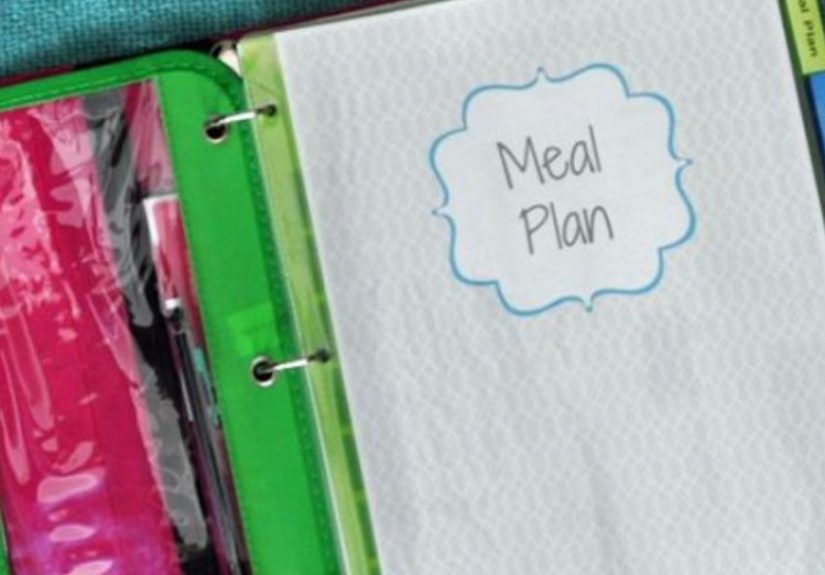
- Meal Planning Section: This is where you will write out your weekly or monthly meal plans. Include breakfast, lunch, dinner, and snacks for each day.
- Recipe Section: Keep your favorite family recipes or ones you plan to try in this section. You can categorize them by type (e.g., quick meals, healthy meals, slow cooker recipes) or by cuisine (e.g., Italian, Mexican, vegetarian).
- Shopping List Section: Having a dedicated place for grocery lists will help you stay on track while shopping. Include a blank shopping list template or a pre-made one with sections for different store aisles (produce, dairy, meats, etc.).
- Budget Section: If you’re tracking your grocery budget, this section can help you stay within your limits. Use a simple sheet to tally up your weekly spending or set goals for each month.
- Leftovers Section: Keep track of what leftovers are available each week. This will prevent you from buying too much food or forgetting about leftovers in the fridge.
Step 3: Plan Your Meals
Once you have your binder set up, it’s time to start planning your meals. Here are some tips for making meal planning easier:
- Start with what you already have: Look through your pantry, fridge, and freezer to see what ingredients you already have on hand. This will help you plan meals around what you don’t need to buy.
- Include a variety of meals: Don’t forget to mix it up with different types of meals (e.g., pasta, stir-fries, casseroles, salads). This will keep the family excited about mealtime.
- Involve the family: Ask your kids or spouse for input on the meal plan. This can make them more excited about eating the meals and can help reduce complaints.
- Prep meals in advance: For busy nights, plan to make meals that can be prepped ahead of time, such as slow cooker meals or casseroles. Having a few freezer-friendly meals in rotation can be a lifesaver.
Step 4: Add Recipes
Having a collection of recipes on hand is a must when making a meal plan binder. You can organize your recipes by type or cuisine, but make sure to include key details such as:
- Ingredients
- Preparation time
- Cooking time
- Instructions
- Serving size and nutritional info (if applicable)
If you find a new recipe you want to try, simply print it out and add it to your recipe section. Over time, this section will grow and become a useful resource.
Step 5: Create a Grocery List Template
A meal plan is only as good as your grocery list! When you sit down to write your shopping list, take stock of everything you’ll need for your planned meals. Use a list template to ensure you don’t miss anything.
Organize your shopping list by categories such as:
- Produce
- Meat/Protein
- Pantry staples
- Frozen foods
- Dairy
- Snacks
Step 6: Stay Flexible
While it’s important to stick to your meal plan, life happens! It’s okay to swap meals around if something unexpected comes up. Having a flexible system will reduce stress and help you avoid last-minute take-out orders.
Step 7: Review and Update Your Binder Regularly
As with any organizational system, your meal plan binder will only work if you keep it updated. Take a few minutes each week to review your meal plan, adjust it based on your family’s preferences, and make sure you have everything you need on hand. Regular updates will keep the system fresh and relevant.
Conclusion: Make Meal Planning Fun!
Creating a family meal plan binder may seem like a lot of work upfront, but once it’s set up, you’ll find it’s a time-saver in the long run. Meal planning is a great way to stay organized, save money, and reduce stress. Plus, it’s an opportunity to get the whole family involved in planning and preparing meals together. So, grab a binder, start planning, and watch how a little organization transforms your family’s mealtime!
And don’t forgetmeal planning should be fun! Take some time to decorate your binder, personalize it, and make it a project the whole family can enjoy.
Personal Experience: How I Created My Own Meal Plan Binder
When I first decided to create a meal plan binder, I had no idea how much of a game-changer it would be. I was constantly scrambling to figure out what to make for dinner, and grocery shopping was a mess. I spent more money than I needed to, and I often ended up with too much food, resulting in waste.
After putting together my binder, I started to feel more in control of my meals. The meal planning section allowed me to try new recipes and be more adventurous with my cooking. The grocery list section kept me focused, and I wasn’t buying things I didn’t need. I also started using the budget section to track my spending, which helped me stay within my limits.
Perhaps the best part is the time I save. Instead of stressing out each day about what to cook, I simply refer to my meal plan binder and know exactly what to make. It’s been a huge relief, and I highly recommend it to anyone looking for an easy way to get organized in the kitchen!
Now that you have all the steps and tips you need, it’s time to make your own family meal plan binder. Happy meal planning!
SEO Tags