Table of Contents >> Show >> Hide
- What “Canva support” actually means
- Why this is a bigger deal than it first appears
- How the workflow could look in practice
- What IT and admins should pay attention to
- What this support does not mean
- How this fits Microsoft’s larger Copilot strategy
- Why Canva benefits too
- Potential limitations and realistic expectations
- Experiences from the field: what this could feel like in real work
- Final thoughts
Microsoft’s Copilot just got a little more stylish. With new Canva support arriving through Microsoft’s expanding Copilot connector ecosystem, the AI assistant is getting closer to something workers have wanted for ages: fewer tabs, fewer copy-paste acrobatics, and far fewer moments of staring at a blank design canvas like it personally insulted you.
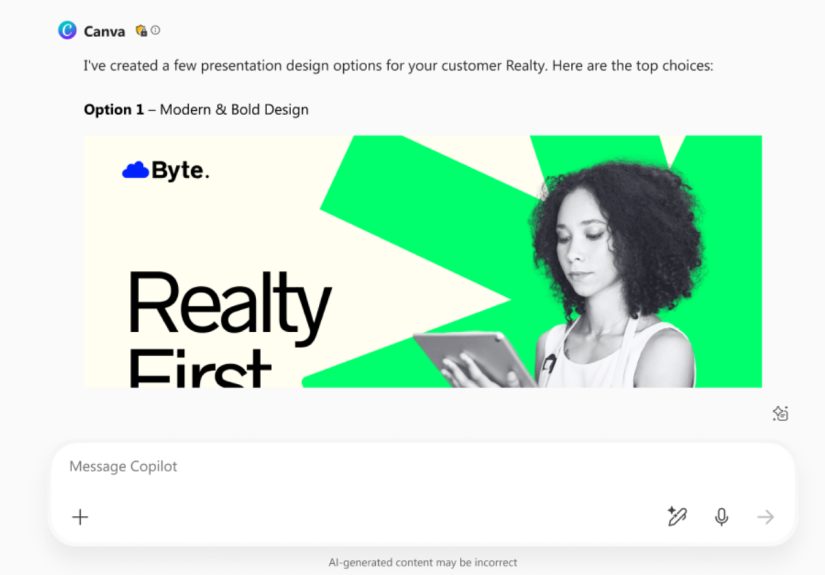
At a high level, this update means Copilot can now tap into Canva as part of Microsoft’s broader push to connect work AI with external apps and live business data. That matters because modern work rarely happens in one app. Your draft may begin in Word, your numbers may live in Excel, your conversation may happen in Teams, and your final visual may need to exist in Canva. For years, that handoff has been clunky. Now Microsoft is trying to make it conversational.
In other words, instead of asking an AI tool for an idea and then rebuilding the result somewhere else, users are inching toward a workflow where ideation and creation happen in the same stream. It is less “talk to assistant, then do all the real work yourself” and more “talk, refine, generate, and keep moving.” That is a meaningful shift, especially for teams that produce presentations, marketing assets, internal comms, sales materials, and social content at high speed.
What “Canva support” actually means
The phrase sounds simple, but it deserves translation from tech-company dialect into normal human English. Microsoft has been adding federated Copilot connectors, which let Microsoft 365 Copilot reach into supported external services without pulling all that data into Microsoft 365 first. Canva is now one of those supported services.
That means Copilot can work with live Canva information in supported experiences, rather than relying on stale copies or manual uploads. The goal is not just to “open Canva from Copilot.” The bigger idea is to let Copilot understand the existence of Canva content as part of a larger workflow. Think searching for a design, pulling context from it, creating something new from a prompt, or using existing brand assets and templates more naturally in conversation.
Canva’s own AI connector messaging points in the same direction. The company frames the experience as designing right inside an AI chat, with the ability to search, create, edit, manage, and repurpose content without bouncing between tools every thirty seconds like a caffeinated squirrel.
Why this is a bigger deal than it first appears
At first glance, “Copilot can talk to Canva now” sounds like one more AI integration in an already crowded tech parade. But this update matters because design is one of the most common bottlenecks in business communication.
Most people do not need Adobe-level precision every day. They need a presentation that looks polished, a campaign graphic that matches brand colors, a training handout that does not look like it was made in a panic five minutes before the meeting, or a social post that can be resized without wrecking the layout. Canva built a business on solving exactly that problem. Copilot built its business case on reducing friction inside work. Put those together, and you have a pretty obvious marriage of convenience.
The real opportunity is speed with context. Copilot already has access to emails, meetings, documents, and workplace intent inside Microsoft 365. Canva brings the visual layer. That combination could help users go from “We need a launch deck and three social variations” to a workable first draft much faster than before.
Less context switching
One of the biggest productivity drains in knowledge work is not the task itself. It is the constant movement between tools. A marketer starts with a campaign brief in Word, grabs numbers from Excel, checks feedback in Teams, and then rebuilds the whole thing visually in Canva. Even if each individual step is easy, the switching cost adds up.
Copilot’s new Canva support reduces that friction by making the conversation the control surface. That matters because conversation is universal. Not everyone knows keyboard shortcuts, design ratios, or which folder holds the final-final-actually-final presentation. But almost everyone can say, “Use last month’s promo deck, keep the same branding, make a version for LinkedIn, and shorten the headline.”
Creative work becomes more accessible
This is also part of a larger trend in AI product design: creativity tools are moving closer to everyday users. You no longer have to be “the design person” to get something visually competent started. That does not erase the need for real designers. It simply lowers the barrier to producing a decent first draft.
And that, frankly, is where a lot of work lives. Businesses do not always need a masterpiece. Often they need clean, on-brand, timely communication that does not embarrass the brand on sight. Canva is good at that. Copilot is good at helping non-experts express intent. Together, they can make content creation feel less like a handoff and more like a conversation.
How the workflow could look in practice
Imagine a small marketing team preparing a spring sale campaign. The campaign manager asks Copilot to summarize last quarter’s best-performing promotions from internal reports and meeting notes. Then they ask for a social-ready concept using the company’s existing visual tone. With Canva support in the mix, Copilot can potentially help surface or generate relevant design assets faster, instead of forcing the user to manually hunt for every template and prior design.
A sales team could use the same idea differently. Say a rep needs a lightweight one-pager before a client call. Copilot already knows the meeting context, the account history, and the relevant documents. Canva support could help bridge the last mile by turning that context into a visually organized draft that can be polished quickly instead of assembled from scratch.
Internal communications teams may be among the biggest winners. They constantly build repeatable visual content: announcements, policy explainers, event slides, hiring graphics, onboarding materials, and leadership updates. These projects often rely on templates, brand rules, and fast turnaround. In other words, they are practically begging for a conversational workflow.
What IT and admins should pay attention to
Here is where the grown-up part of the story kicks in. AI integrations are exciting right up until someone asks, “Wait, what data can it see?” Microsoft appears to be designing this Canva support with governance in mind, which is critical if Copilot is going to be trusted beyond demos and keynote applause.
Federated connectors are designed to use the user’s own identity and permissions. That means Copilot should only be able to access Canva content the connected user is already allowed to view. Microsoft also positions these connectors as real-time rather than indexed, meaning the external data is fetched live instead of being copied wholesale into Microsoft 365 search infrastructure.
Admins can govern connector availability in the Microsoft 365 admin center, enable or disable connectors, and even stage rollout to specific groups. That is important because not every organization wants every shiny new integration turned on for everybody on day one. Some teams need to test compliance, data handling, or business value before expanding access.
Security matters more than hype
Canva also emphasizes existing permissions and privacy controls on its side. That is the right message. The most useful AI integrations are not the ones that casually vacuum up everything in sight. They are the ones that respect role-based access, shared folder boundaries, and organizational rules.
That still does not mean companies should connect tools without thinking. Teams will need to define what content belongs in Canva, what can be referenced by AI, and how brand assets are governed. If your organization treats every shared folder like an attic full of mystery boxes, Copilot will not magically clean it up for you. It will simply discover the chaos faster.
What this support does not mean
Whenever a new AI integration lands, marketing language tends to sprint ahead of reality. So let’s slow it down.
Copilot gaining Canva support does not mean Microsoft has turned Copilot into a full-blown design studio. It does not mean every Copilot surface instantly becomes Canva with better small talk. And it does not mean human review is optional. Brand-sensitive work, regulated communications, and customer-facing visuals still need judgment.
It also does not mean the same experience will look identical across every Microsoft product or license tier. Some connector features are rolling out gradually, some are preview-only, and some capabilities may depend on both Microsoft-side access and the user’s Canva plan. Translation: yes, it is real, but no, it is not magic dust.
How this fits Microsoft’s larger Copilot strategy
This update makes the most sense when viewed as part of Microsoft’s broader plan. Copilot is no longer just a writing helper inside Office apps. Microsoft has been turning it into a more connected work layer that can search, reason, retrieve, collaborate, and increasingly act across systems.
That is why connectors matter. They extend Copilot beyond Microsoft’s own ecosystem and make it more relevant to how companies actually work. Most businesses are not Microsoft-only shops. They use a patchwork of tools for design, CRM, support, planning, analytics, and content. A useful AI assistant has to meet work where it already happens, not demand that work move into one giant software kingdom.
Canva support also complements Microsoft’s continuing push around Copilot Pages and collaborative AI canvases. Microsoft clearly wants users to move from chat into durable, shareable artifacts. Canva fits that ambition nicely because it specializes in turning rough intent into polished visuals that people can actually use.
Why Canva benefits too
This is not a one-way win. Canva also gets something valuable: distribution inside the flow of AI work.
AI assistants are becoming the new front door for software. Instead of opening an app first and then deciding what to do, people increasingly start with intent: “make a deck,” “summarize the brief,” “create a poster,” “reuse last quarter’s campaign graphics.” The tools that show up naturally inside that flow gain a huge usability advantage.
For Canva, appearing inside Copilot gives the company a chance to stay central in a world where users may not begin inside the Canva app itself. That matters because conversational interfaces are changing how software is discovered and used. If the future of work starts with a prompt, Canva wants to be the design engine behind that prompt, not the app people remember to open later.
Potential limitations and realistic expectations
The smartest way to view this update is as a meaningful first step, not the final form. Early integrations are rarely perfect. Users may hit permission issues, inconsistent results, preview restrictions, or moments when the AI understands the assignment but not the visual taste level. Anyone who has ever seen AI generate a “professional modern slide” that looked suspiciously like a haunted brochure will understand.
There is also the usual quality-control challenge. Fast content is not automatically good content. Teams still need editorial standards, brand governance, and a human with enough taste to say, “Absolutely not, that font pairing is a crime.” The best use case is not blind automation. It is accelerated drafting, better discovery, and smoother collaboration.
Experiences from the field: what this could feel like in real work
Picture a solo founder on a Tuesday that already feels like three Thursdays stacked on top of each other. They need investor slides, a hiring post, and a customer update before lunch. In the old workflow, each task lives in its own tool, and every shift costs time. With Copilot and Canva working together more closely, the founder can stay in a single conversational thread longer. They can ask for a short narrative from their latest notes, request a clean visual structure for the deck, then spin out a social teaser from the same launch theme. The work still needs review, but the blank-page panic shrinks.
Now imagine a marketing manager at a midsize retail brand. They already have brand kits, templates, folders, and a mountain of old campaign assets in Canva. The hard part is not making content from scratch. The hard part is finding the right version, reusing the strongest format, and adapting it quickly for a new promotion. That is where connected AI starts to feel practical instead of futuristic. Rather than digging through folders manually, the manager can describe what they need in plain English, reuse prior visual logic, and move straight to refinement.
For an internal communications lead, the experience is a little different. Their job is less about flashy design and more about clarity, consistency, and speed. One week they need a town hall slide, the next week an onboarding visual, then a policy explainer for employees who will absolutely not read a six-page memo. Copilot can help translate dense internal content into plain-language summaries, while Canva support can help turn that summary into something employees might actually look at voluntarily. That is not a tiny upgrade. That is the difference between communication that lands and communication that gets spiritually archived on arrival.
Teachers, trainers, and enablement teams could see similar benefits. They often build repeatable learning materials under time pressure. A conversational workflow makes it easier to transform a lesson outline into a presentation, handout, or poster-style summary without rebuilding the same information in multiple formats. The ability to resize, repurpose, or pull from existing designs is especially valuable here because educational and training content tends to multiply quickly across formats.
Even designers may find selective value in the integration, which is saying something because designers usually greet “AI for design” headlines with the same enthusiasm people reserve for surprise software migrations. But many professional designers spend a chunk of time doing repetitive adaptation work: resizing, brand-safe first drafts, locating prior assets, or cleaning up requests from non-design teammates. If Copilot can absorb more of the messy intake and Canva can make the output editable and structured, design teams may get fewer chaotic requests and more usable starting points.
The best experience, then, is not AI replacing the craft. It is AI reducing the friction around the craft. That is a big difference. People do not need another bot that talks confidently and works sloppily. They need a workflow that helps them get from intent to artifact with less drag, fewer handoffs, and more control. If Copilot’s new Canva support keeps moving in that direction, it will feel less like a novelty and more like a genuinely useful layer in everyday work.
Final thoughts
Copilot gaining new Canva support is not just another checkbox in an AI feature list. It is a sign of where workplace software is heading: toward conversation-driven creation, live access to external tools, and workflows that blend writing, analysis, and design instead of trapping them in separate silos.
The smartest takeaway is simple. This update will not replace strategy, taste, or human judgment. But it can remove a lot of the annoying glue work that slows teams down. And in a world where everyone is expected to create faster, communicate better, and somehow still attend meetings, that is no small thing.
If Microsoft keeps improving how Copilot connects to real work systems, and if Canva keeps making those outputs genuinely editable and useful, this partnership could become one of the more practical AI integrations in business software. Not the flashiest. Not the loudest. Just the sort that quietly saves time and makes people wonder why work used to require so many tabs in the first place.