Table of Contents >> Show >> Hide
- Why Is My PS4 So Loud? The Easy Explanation
- The Most Common Reasons Your PS4 Is Loud
- 1. Dust buildup is choking the airflow
- 2. The console does not have enough breathing room
- 3. You are playing a demanding game
- 4. The heatsink is dirty, not just the fan
- 5. The thermal paste may be old or poorly performing
- 6. The fan itself may be wearing out
- 7. It might be the disc drive, not the fan
- 8. Some PS4 models are simply noisier than others
- When PS4 Noise Is Normal vs. When It Is a Problem
- Easy Maintenance Tips to Make Your PS4 Quieter
- Should You Replace the Thermal Paste?
- Should You Buy an External Cooling Fan for Your PS4?
- When to Repair or Replace Something
- How to Keep Your PS4 From Getting Loud Again
- Real-World Experiences: What Loud PS4 Owners Usually Go Through
- Conclusion
- SEO Tags
If your PS4 sounds less like a game console and more like a tiny leaf blower with a personal vendetta, you are not alone. One of the most common complaints from long-time PlayStation 4 owners is fan noise. Sometimes it is a steady whoosh. Sometimes it is a dramatic jet-engine roar that makes you wonder whether your console is about to taxi down the living-room rug.
The good news is that a loud PS4 does not always mean disaster. In many cases, it simply means the cooling system is working harder because the console is getting hot. The less good news is that heat usually has a reason. Dust, poor airflow, demanding games, old thermal material, and plain old wear can all push your console from “slightly noisy” to “why is my entertainment center preparing for takeoff?”
In this guide, we will break down why your PS4 gets loud, when the noise is normal, when it is a red flag, and what maintenance steps can help calm things down. We will also cover what not to do, when to stop messing around and get repairs, and how to keep your console happier for the long haul.
Why Is My PS4 So Loud? The Easy Explanation
Here is the simplest answer: your PS4 gets loud because heat builds up inside the system, and the fan spins faster to remove that heat. That is the whole story in one sentence. The rest is just figuring out why the console is getting hotter than usual or why the fan has to work so hard to keep up.
Every PS4 has a cooling system designed to move hot air out and pull cooler air in. When temperatures rise, the fan ramps up. That part is normal. What changes from console to console is how often it needs to ramp up and how dramatic the noise becomes while it is doing it.
Some PS4 units, especially older ones and some PS4 Pro models, are simply louder than others under load. But even then, there is a big difference between “I can hear the fan during a demanding game” and “my console sounds like it is trying to achieve flight.”
The Most Common Reasons Your PS4 Is Loud
1. Dust buildup is choking the airflow
This is the number-one culprit, and honestly, it is almost rude how often dust is the answer. Over time, dust collects in the vents, around the fan, and on the heatsink. When that happens, your PS4 cannot move air efficiently. Less airflow means more trapped heat. More trapped heat means the fan panics and starts auditioning for the role of “small but angry turbine.”
Dust is especially likely if your console lives near the floor, inside a cabinet, close to carpet, or in a room with pets. If your PS4 has been running for years with zero cleaning, the inside may look less like a game console and more like an attic with HDMI.
2. The console does not have enough breathing room
Your PS4 needs space around it. If it is shoved against a wall, packed inside a tight media cabinet, or buried under other electronics, hot air has nowhere to go. Then the heat gets trapped, cycles back around the console, and forces the fan to work even harder.
This is why a PS4 can suddenly get louder after a room rearrangement. Nothing is broken. It is just trying to survive in a bad apartment.
3. You are playing a demanding game
Not all games stress the hardware equally. A lightweight indie title and a big, graphically intense blockbuster do not ask the same things from the console. When the CPU and GPU work harder, they produce more heat. More heat leads to more fan speed. That means your PS4 may stay fairly quiet in one game, then sound much louder in another.
That does not automatically mean there is a problem. It may just mean the game is making the hardware earn its paycheck.
4. The heatsink is dirty, not just the fan
Many people clean the visible fan and assume the job is done. Sometimes that helps. Sometimes it barely changes anything. Why? Because the real traffic jam may be the heatsink. If the heatsink fins are clogged with dust, heat cannot escape properly even if the fan itself looks cleaner.
This is one reason some PS4 owners say, “I cleaned it and it is still loud.” The fan may not be the whole story. The path the heat is supposed to travel through can also be blocked.
5. The thermal paste may be old or poorly performing
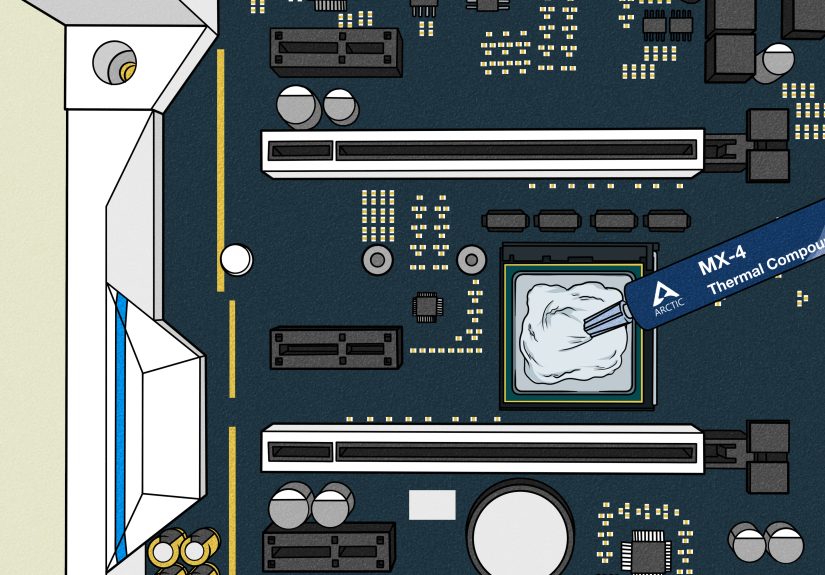
Thermal paste sits between the processor and the heatsink to help transfer heat efficiently. As a console ages, that material can dry out or stop performing as well. When heat transfer gets worse, temperatures rise faster, and the fan compensates by spinning harder.
This is not always the first fix to try, and it is definitely not the most beginner-friendly one. But on an older PS4 that is still loud after a proper internal cleaning, aging thermal paste can be part of the problem.
6. The fan itself may be wearing out
Sometimes the noise is not just airflow. Sometimes it is mechanical. A worn fan can rattle, grind, wobble, or sound uneven. If your PS4 makes a strange buzzing, scraping, or clicking noise instead of a smooth rushing sound, the fan may be damaged or off-balance.
In that case, cleaning may not solve it. A replacement part or professional repair may be the better move.
7. It might be the disc drive, not the fan
Not every loud noise is fan noise. If the sound spikes when you insert a disc or start installing a game, the optical drive may be the one making all the drama. That noise often settles down after the install or initial verification phase.
If your PS4 is loud only for short bursts while reading a disc, that points to a different issue than constant fan roar during gameplay.
8. Some PS4 models are simply noisier than others
This one matters because it saves a lot of unnecessary panic. Certain PS4 Pro revisions became known for being louder, while later revisions improved noise levels. So yes, your friend’s PS4 Pro might hum politely while yours sounds like it is upset about taxes. Model differences are real.
That said, even a naturally louder model should not overheat, shut down, or pulse red just because you launched a game.
When PS4 Noise Is Normal vs. When It Is a Problem
Usually normal
A louder fan is often normal when you first boot up a demanding game, play for a long session, or use the console in a warm room. A little extra fan noise during heavy use is just the cooling system doing its job.
Not normal
You should take the noise more seriously if your PS4:
- Gets extremely loud even at the home screen or in simple apps
- Shows overheating warnings
- Pulses red
- Shuts itself off
- Feels much hotter than usual
- Makes rattling, grinding, or clicking noises
- Has little or no airflow coming out the back
Those signs suggest the console is not just noisy. It may be struggling to cool itself properly.
Easy Maintenance Tips to Make Your PS4 Quieter
Give it more space
Start with the easiest fix first. Move your PS4 into a well-ventilated spot with open space around it. Do not sandwich it between other hot electronics. Do not press it flat against the wall. Do not trap it in a cabinet with no airflow. Think of it as less interior decorating and more witness protection for heat.
Clean the outside regularly
Use a dry microfiber cloth to wipe away dust from the console exterior. Pay attention to the vents, edges, and the area where dust tends to gather. This will not solve deep internal buildup, but it helps prevent the outside from becoming a dust launchpad for the inside.
Use compressed air carefully
Compressed air can help remove dust from vents and accessible internal areas. Use short bursts, and do not get reckless. If you open the console enough to reach the fan directly, keep the fan from spinning while you spray. Free-spinning the blades with compressed air may do more harm than good.
Also, aim to push dust out of the system rather than deeper into it. This is less “blast everything dramatically” and more “clean like you value your electronics.”
Keep the area around the console clean
A dusty TV stand means a dusty console. Cleaning the shelf, cabinet, or entertainment center around your PS4 can slow future buildup. It is not glamorous, but neither is listening to your console scream through every cutscene.
Take breaks during marathon sessions
If you have been gaming for hours in a warm room, let the system cool down. Heat stacks up over time, especially with heavier titles. A short break can help the fan settle and reduce long-term stress on the hardware.
Keep system software and games updated
Software issues are not the top reason for PS4 fan noise, but staying updated is still smart. Updates can improve performance, fix bugs, and reduce situations where the console works harder than it needs to.
Consider a deeper clean only if you are comfortable
If basic cleaning does not help and your warranty is long gone, a deeper internal cleaning may be worth it. But be honest about your skill level. Opening a PS4 is not impossible, but it is not the same as dusting a coffee table. If you are not confident, professional repair is often cheaper than accidentally turning your console into a very expensive paperweight.
Should You Replace the Thermal Paste?
Maybe, but not as your first move.
If your PS4 is several years old, remains loud after a proper internal cleaning, and runs especially hot under normal gaming, thermal paste replacement may help. This is more common in older systems that have seen plenty of use. A fresh application can improve heat transfer and reduce how aggressively the fan ramps up.
However, this is advanced maintenance. If you remove the motherboard or heatsink, the job needs to be done properly. Sloppy reassembly can make the problem worse, not better. So unless you know what you are doing, this is a good moment to call in a repair tech rather than your most overconfident screwdriver.
Should You Buy an External Cooling Fan for Your PS4?
Usually, no. The PS4 already has a built-in cooling system designed to manage normal heat. Extra clip-on cooling accessories are often more hype than help. The better investment is proper airflow, regular cleaning, and fixing the actual cause of the heat problem.
If your console is boxed in, dusty, or overdue for maintenance, an add-on fan is basically putting sunglasses on a headache.
When to Repair or Replace Something
It is time to stop troubleshooting at home and consider repair if:
- The fan noise suddenly gets much worse
- The console overheats repeatedly
- The system shuts down during gameplay
- You hear grinding, clicking, or rattling
- Cleaning and better placement do not improve anything
- The console is loud even when idle
At that point, you may be dealing with a bad fan, serious heatsink blockage, failing thermal material, or another hardware issue. A repair shop can diagnose it faster than a week of guesswork and internet rabbit holes.
How to Keep Your PS4 From Getting Loud Again
- Dust the outside every week or two
- Clean vents routinely
- Keep the console on a hard, flat surface
- Do not trap it in a tight cabinet
- Keep the room reasonably cool during long sessions
- Inspect the area around the console for dust buildup
- Address unusual noise early instead of waiting for shutdowns
In other words, regular maintenance beats emergency maintenance every time.
Real-World Experiences: What Loud PS4 Owners Usually Go Through
A lot of PS4 owners do not notice the problem all at once. It usually starts small. Maybe the console gets a little louder during one specific game. Maybe it is only noticeable at night when the room is quiet and the soundtrack is not busy covering it up. At first, most people ignore it. After all, the PS4 still works, the game still loads, and nothing seems broken. Then one day the fan kicks into overdrive during the menu screen, and suddenly it sounds like the console is furious about being asked to render a shadow.
One very common experience is that the noise shows up during a favorite high-demand title. A player launches a big open-world game, the intro scene rolls, and within minutes the console becomes the loudest thing in the room. It is especially frustrating because the rest of the setup may be perfectly quiet. The TV is fine. The controller is fine. The room is calm. Then the PS4 starts roaring like it just remembered every poor life decision made since launch day.
Another common story involves moving the console. Someone rearranges the entertainment center, slides the PS4 into a tighter shelf to “clean things up,” and then wonders why it suddenly runs hotter and louder. The system has not changed, but the environment has. A little less space around the vents can make a surprising difference, especially during long gaming sessions.
There are also plenty of owners who finally open the console after years and discover what can only be described as an archaeological dust event. In those cases, the improvement after cleaning can be dramatic. People often report that the PS4 goes from jet-engine mode to a far more normal whoosh. That kind of result is a good reminder that basic maintenance really does matter, even if it is not nearly as exciting as buying a new headset.
Then there are the more stubborn cases. These are the people who clean the outside, improve ventilation, and still hear too much noise. Their experience often points to a deeper issue, such as heatsink blockage, aging thermal paste, or a worn fan. It can be annoying because the console looks fine from the outside, but performance and sound say otherwise. In those cases, the lesson is simple: if easy fixes do not help, the problem may be internal and mechanical, not just cosmetic.
What most owners learn from the experience is that loudness is a symptom, not a personality trait. A PS4 may be a little noisier than newer consoles, sure, but excessive noise is usually the machine asking for better airflow, cleaning, repair, or a little mercy after years of service. The smart move is to listen before the console starts adding overheating warnings to the conversation.
Conclusion
If you have been wondering, “Why is my PS4 so loud?” the answer is usually pretty straightforward: heat and airflow. Your console is getting warm, the fan is trying to compensate, and something is making that job harder than it should be. Most often, the culprit is dust, cramped placement, or the extra heat generated by demanding games. In older systems, worn thermal paste or a tired fan can also play a role.
The best place to start is with simple maintenance. Give the console room to breathe, clear the dust, keep vents open, and watch for signs of overheating. If the noise continues after that, especially if you hear strange mechanical sounds or get shutdowns, deeper cleaning or repair may be the next step.
Your PS4 does not need magic. It usually just needs airflow, a little attention, and perhaps a long-overdue break from living in a dusty cave behind the TV.