Table of Contents >> Show >> Hide
- What “unsend a text” really means
- How to unsend a text on iPhone iOS 16 or later
- When iPhone unsend does not work
- How to unsend a text on Android
- Can you unsend SMS on Android?
- iPhone vs. Android: which one handles unsend better?
- What to do if you cannot unsend the message
- Best tips to avoid needing “unsend” in the first place
- Final thoughts
- Real-life experiences with unsending texts on iPhone and Android
We have all done it. You send a text, stare at it for half a second, and suddenly your soul leaves your body. Maybe it was a typo. Maybe it was meant for your best friend, not your boss. Maybe autocorrect turned a polite message into a tiny social disaster. The good news is that unsending a text is now possible in some cases. The less cheerful news is that it depends heavily on whether you are using iMessage, RCS, plain old SMS, and what app the other person is using.
If you want the quick answer, here it is: on iPhone with iOS 16 or later, you can unsend an iMessage for a short window after sending it. On Android, you may be able to unsend a message in Google Messages if you and the recipient are both using RCS and a compatible version of the app. If the message went out as traditional SMS or MMS, your phone is not a time machine. At that point, you are no longer unsending a text. You are managing the fallout like a grown-up with trembling thumbs.
This guide breaks down exactly how to unsend a text on iPhone iOS 16 or Android, what actually works, what absolutely does not, and what to do when the texting universe refuses to give you a second chance.
What “unsend a text” really means
Before jumping into the steps, it helps to know that not all text messages are created equal. When people say “text,” they usually mean any message sent from the phone’s messaging app. But behind the scenes, there are a few different systems doing the work.
- iMessage: Apple’s messaging service for Apple devices. These messages usually appear in blue bubbles.
- SMS/MMS: Traditional carrier texting. These usually appear in green bubbles on iPhone.
- RCS: A newer standard used mainly through Google Messages on Android, with features like typing indicators, read receipts, and richer media.
Why does this matter? Because the ability to unsend a message is tied to the messaging system, not just the phone brand. An iPhone can unsend an iMessage, but not a normal SMS. An Android phone may let you delete a message for everyone in Google Messages with RCS, but not in every messaging app and not in every conversation.
In other words, your phone is only as magical as the message protocol allows.
How to unsend a text on iPhone iOS 16 or later
If you are using an iPhone running iOS 16 or later, the Messages app includes a built-in Undo Send feature. This is the cleanest and most reliable “unsend” option in mainstream texting.
Step-by-step: Undo Send in Messages
- Open the Messages app.
- Open the conversation that contains the message you want to pull back.
- Press and hold the message bubble.
- Tap Undo Send.
Once you do that, the message disappears from the conversation and is replaced with a small notice that a message was unsent. So yes, the message can vanish, but no, you do not become a stealth wizard. The other person will usually know that something was there and is now gone.
Important limits on iPhone unsend
This feature is useful, but it is not a free pass to text recklessly like you are starring in a sitcom. There are a few major rules:
- You only get a short time window to unsend it.
- It works for iMessage, not standard SMS.
- The conversation will still show that you unsent something.
- If the recipient saw it already, the emotional damage may still be done.
That last point matters. Unsend is not mind eraser technology. It removes the message from the chat when supported, but it cannot un-read a message someone already glanced at from a lock screen, Apple Watch, or very fast eyeballs.
Can you edit instead of unsend on iPhone?
Sometimes editing is the smarter move. If the issue is a typo, autocorrect failure, or one missing word that changes everything, you can edit a recently sent iMessage instead of deleting it. That keeps the conversation flowing without creating the suspicious little “this person unsent something” marker that can make people even more curious.
Editing is great for fixing “See you at 8” when you meant “See you at 6,” or correcting “Love you” that was intended for your spouse but somehow landed in the family group chat with Aunt Linda. Aunt Linda would probably be thrilled, but still.
When iPhone unsend does not work
If you do not see Undo Send, one of these things is probably happening:
1. The message was not an iMessage
If the message bubble is green, you are likely dealing with SMS, MMS, or possibly RCS inside Apple’s Messages app. Those messages do not behave like iMessage and cannot be unsent the same way.
2. You waited too long
Unsend on iPhone has a strict time limit. Miss that window, and the option disappears. At that point, your choices are edit the message if that option still exists, send a correction, or accept that the send button has won this round.
3. Compatibility gets messy
Apple’s system works best when both people are inside the modern Apple ecosystem. If the recipient is using older software, or the message is not an iMessage at all, the result may not be as tidy as you hoped. In mixed-device conversations, texting gets weird fast.
How to unsend a text on Android
Now for Android, where the answer is slightly more complicated because Android phones use different apps and setups. There is no single, universal Android “unsend” button for all text messages across all devices. That is the first thing to understand.
What matters most is which messaging app you are using. Today, the most important one is Google Messages.
If you use Google Messages with RCS
Google Messages has become the closest Android equivalent to iMessage-style messaging. If RCS chats are turned on, you get modern features like typing indicators, higher-quality media, message reactions, and in supported cases, the ability to remove a sent message from the conversation for everyone.
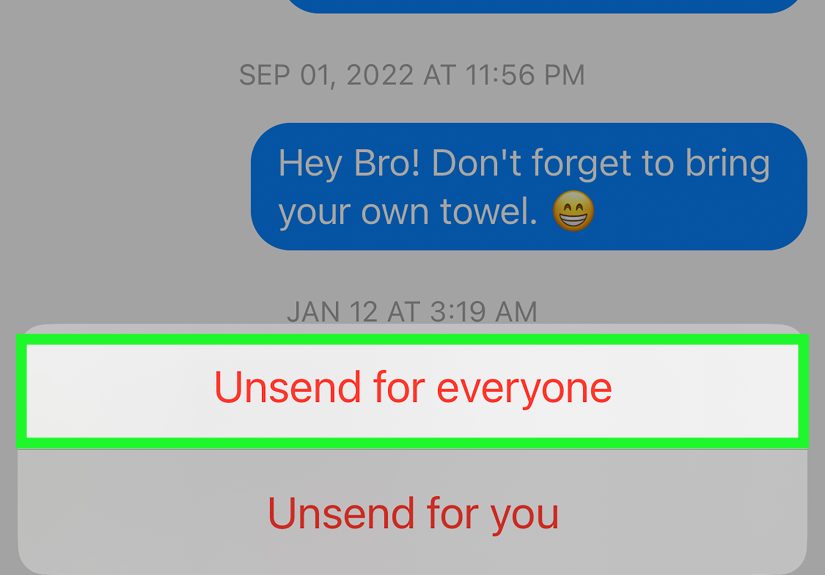
Step-by-step: Delete for everyone in Google Messages
- Open Google Messages.
- Open the RCS conversation.
- Press and hold the sent message.
- Tap the trash icon or delete option.
- If available, choose Delete for everyone.
If you only see Delete for me, that means the app or conversation does not support a full recall in that moment. In that case, deleting the message removes it from your phone, not the recipient’s. That is less “unsend” and more “I do not wish to look at my own mistake anymore.” Understandable, but not the same thing.
What Android users need for unsend to work
For the Android unsend feature to work well, a few things usually need to line up:
- Both people need to be using Google Messages or a compatible RCS experience.
- RCS chats need to be enabled.
- Both apps need to be updated enough to support the feature.
- The message cannot be a plain SMS or MMS.
This is why Android unsend can feel a bit more like a “maybe” than an “absolutely.” It is improving, but it is still not as universal or as predictable as people wish it were.
Can you unsend SMS on Android?
Usually, no. Standard SMS is like mailing a postcard and then sprinting after the mail truck in flip-flops. Once it is sent through the carrier system, your power to recall it is basically gone.
If your message was sent as SMS or MMS instead of RCS, deleting it from your phone does not remove it from the other person’s device. This is one of the biggest reasons people get confused. They delete the message and assume it is gone everywhere. It is not. The other person still has it unless they choose to delete it too.
iPhone vs. Android: which one handles unsend better?
If we are comparing built-in texting tools, iPhone currently gives a cleaner answer. Apple’s Undo Send is simple, easy to find, and consistently tied to iMessage. You long-press, tap Undo Send, and move on with your life, or at least with your dignity partially intact.
Android can absolutely do similar things, especially through Google Messages and RCS, but the experience is more dependent on app support, rollout timing, and what device and version the other person is using. In short:
- iPhone: more straightforward, but limited to iMessage.
- Android: more flexible in theory, but more variable in real life.
What to do if you cannot unsend the message
Sometimes the unsend option is gone, unsupported, or never existed in the first place. When that happens, do not panic-text yourself into a sequel.
1. Edit the message if possible
If you are on iPhone using iMessage, or on Google Messages with supported RCS editing, editing can solve a surprising number of problems. A typo is less embarrassing when fixed quickly.
2. Follow up immediately
A fast correction often works better than silence. Something as simple as “Sorry, wrong person” or “That was autocorrect being chaotic again” can defuse the moment.
3. Own the mistake
Not every text disaster requires a federal investigation. If the message was awkward but harmless, a quick laugh may be all it takes.
4. Use better texting habits going forward
Read before sending. Check the recipient. Pause for two seconds if you are emotional, tired, or trying to text while walking through a grocery store comparing avocados like your life depends on it. The send button respects no one.
Best tips to avoid needing “unsend” in the first place
Because let us be honest, the best recall feature is still not sending a chaotic message to begin with.
- Double-check the contact name before sending.
- Read your message once before tapping send.
- Avoid sending serious texts when angry.
- Use scheduled messages when appropriate.
- Turn on RCS or keep your messaging app updated.
- Know whether your bubble is blue, green, or living a secret third life.
Final thoughts
So, how do you unsend a text on iPhone iOS 16 or Android? On iPhone, it is easiest when you are using iMessage: press and hold the message, then tap Undo Send. On Android, it depends more on the app, but Google Messages with RCS may offer a Delete for everyone option in supported conversations.
The big takeaway is simple: not all texts can be unsent. iMessage gives you a clear built-in path. Android is catching up through RCS. Traditional SMS, however, remains stubbornly old-school. Once that message leaves, it leaves with confidence.
Still, modern messaging is getting kinder to human error. Between unsend, edit, and richer chat controls, both iPhone and Android now offer better ways to recover from small disasters. That said, no feature is faster than a careful thumb and a one-second pause before you hit send. Technology evolves. Regret is still incredibly fast.
Real-life experiences with unsending texts on iPhone and Android
One reason this topic keeps getting searched is because texting mistakes are deeply, spectacularly human. People do not usually search “how to unsend a text” because life is going smoothly. They search it because they just sent “Love you too” to a plumber, a meme to their manager, or a rant about a group chat directly into the group chat itself. This is the digital equivalent of slipping on a banana peel in front of everyone, except the banana peel has read receipts.
For iPhone users, the experience is often a mix of relief and mild suspicion. The first time someone discovers Undo Send in iMessage, it feels like magic. You tap, the message disappears, and you briefly believe Apple has saved your social life. Then you notice the “You unsent a message” note left behind, and suddenly it feels less like a cover-up and more like a public record. The message may be gone, but the mystery remains, which can sometimes be even more powerful than the original typo.
Android users tend to have a different experience. Many people assume “delete” means “delete everywhere,” only to learn the hard way that deleting from your own phone is not the same as recalling a message from the other person’s device. When Google Messages and RCS line up properly, the unsend-style experience feels modern and genuinely useful. But when they do not, users can end up staring at a missing message on their own phone while the recipient still has the full embarrassing original. That is not unsend. That is self-care with side effects.
There is also the timing issue. Text regret usually shows up in one of two ways: instantly or about seven hours later at 2:14 a.m. while staring at the ceiling. The first kind is sometimes fixable. The second kind is mostly a lesson in accountability. Features like iPhone’s Undo Send are built for immediate mistakes, not for next-day emotional archaeology.
In practice, the people who get the most value out of these tools are not reckless texters. They are normal people moving quickly through normal life. Parents juggling ten things at once. Professionals replying between meetings. Friends sending directions, plans, jokes, and photos in rapid-fire bursts. The more texting becomes part of everyday multitasking, the more valuable a small safety net becomes.
That is really why unsend matters. It is not about hiding villainous behavior or erasing every awkward moment from history. It is about correcting normal human error in a world where tiny mistakes travel instantly. Used well, the feature feels less like cheating and more like spell-check arriving a few seconds late but still trying its best.