Table of Contents >> Show >> Hide
- What a Raspberry Pi Mandelbrot Cluster Really Is
- Why the Mandelbrot Set Is Such a Good Teaching Tool
- Building the Cluster Without Losing Your Sanity
- How the Software Side Usually Works
- What You Learn Faster Than Expected
- Where a Raspberry Pi Mandelbrot Cluster Shines
- Where It Does Not Shine Quite So Brightly
- A Practical Example of the Learning Curve
- Experiences From the Fractal Trenches
- Conclusion
- SEO Tags
There are easier ways to learn parallel computing. You could read a stack of textbooks, stare at diagrams full of arrows, and nod politely while someone says “distributed workload” like it is supposed to be comforting. Or you could build a Raspberry Pi Mandelbrot cluster and learn the messy, glorious truth the fun way: by making a tiny fleet of computers argue over a fractal until the picture appears.
That, in a nutshell, is why this project has such a strange charm. A Raspberry Pi cluster is small enough to fit on a desk, cheap enough to feel approachable, and just complicated enough to teach you humility. Meanwhile, the Mandelbrot set is the perfect computational drama queen. It looks beautiful, behaves wildly, and turns a simple mathematical rule into a serious lesson in performance, load balancing, networking, and patience.
If you want to understand what a cluster actually does instead of just saying “cloud” with confidence, this is a fantastic place to start. You are not merely making pretty fractal art. You are learning how compute nodes cooperate, why communication overhead matters, and why the line between “clever design” and “tiny overheating octopus” is thinner than most people think.
What a Raspberry Pi Mandelbrot Cluster Really Is
At its simplest, a Raspberry Pi Mandelbrot cluster is a group of Raspberry Pi boards connected over a network and asked to work together on one job: generating an image of the Mandelbrot set. One Pi often acts as the head node, coordinator, or manager, while the others do the heavy lifting as worker nodes.
The Mandelbrot set itself comes from repeatedly applying a formula to points on the complex plane. That sentence sounds like it should come with a pocket protector, but the basic idea is surprisingly friendly: each pixel in the final image represents a math test. Some points “escape” quickly, some take longer, and some stay bounded. Color those outcomes carefully and suddenly your screen fills with spirals, tendrils, bulbous islands, and enough recursive weirdness to make your GPU feel personally attacked.
The trick is that each pixel or row can often be computed independently, which makes Mandelbrot rendering a classic parallel computing exercise. It is almost embarrassingly parallel, which is a technical term that sounds rude but is actually a compliment. It means the task can be broken into many independent pieces with minimal coordination. That is exactly the kind of work a cluster likes.
Why the Mandelbrot Set Is Such a Good Teaching Tool
It looks dramatic but starts simple
The best classroom problems begin with a simple rule and then punish shortcuts. Mandelbrot rendering does exactly that. You can explain the core idea in a few minutes, yet still spend days improving the implementation. That makes it ideal for learning the ropes with a Raspberry Pi cluster because the math does not bury the systems lesson.
It reveals load-balancing problems fast
Here is where the project gets interesting. Not all parts of the Mandelbrot image take the same amount of time to compute. Large regions outside the set escape quickly, while the boundary areas can demand many more iterations. So if you divide the image badly, one Pi breezes through its portion while another Pi wheezes like it just ran a marathon carrying your bad design decisions.
This is why static scheduling can disappoint. Give each worker a fixed block of rows and you might create an uneven workload. A better approach is often dynamic scheduling, where the manager hands out new chunks as workers finish old ones. Suddenly the cluster becomes more efficient, and you learn one of the oldest lessons in parallel programming: equal-sized chunks are not always equal work.
It exposes the cost of communication
A cluster is not magic. The nodes need to exchange instructions, status, and results. On a small Raspberry Pi setup, that communication usually happens over Ethernet, not some sci-fi interconnect from a supercomputer brochure. So the project teaches a valuable rule: the more often your nodes need to talk, the more your beautiful theoretical speedup starts leaking away into overhead.
That makes Mandelbrot especially useful because it lets you compare useful compute time against coordination time. The goal is not simply “use more boards.” The goal is to structure the work so the boards spend more time calculating pixels and less time chatting about pixels like nervous office coworkers in a group thread.
Building the Cluster Without Losing Your Sanity
Pick practical hardware, not bragging hardware
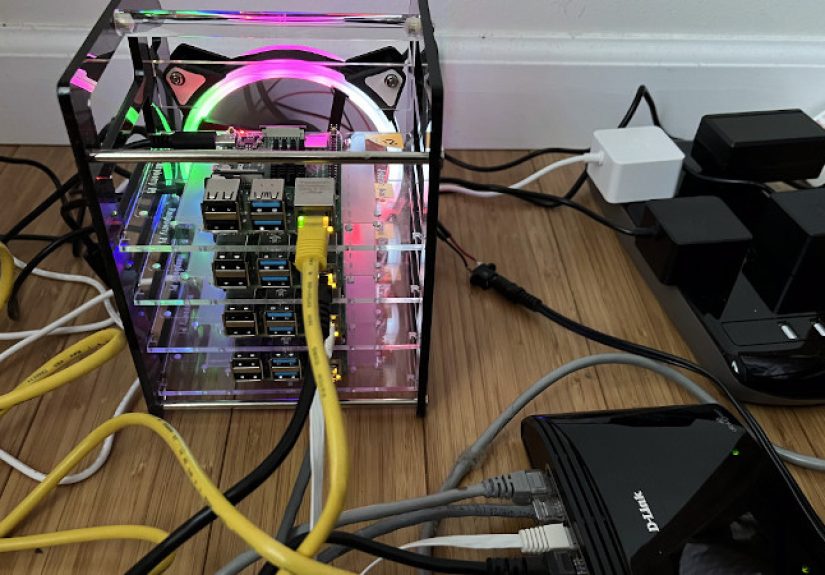
A Raspberry Pi 4 is a common sweet spot for projects like this because it offers better CPU performance, Gigabit Ethernet, USB 3.0, and enough memory headroom to make experimentation pleasant. You do not need a laboratory full of boards, either. A four-node cluster is already enough to teach you how distributed computing works, where bottlenecks hide, and why cable management deserves either respect or a support group.
The most useful build is rarely the fanciest. A compact stack with one head node, three worker nodes, a small switch, stable power, and clean networking is more educational than an overgrown pile of boards assembled purely so you can say “behold, my bramble” like a villain in a very affordable sci-fi film.
Power is not a side quest
Nothing ruins a cluster demo faster than flaky power. Each Pi needs stable current, and a cluster multiplies that requirement. Cheap adapters and mystery cables are how you earn random crashes and a new respect for electrical basics. A tidy power plan matters just as much as a tidy software stack.
That is part of the real lesson here: distributed systems are never only about code. The physical layer matters. Your beautiful MPI program does not care how elegant it is if the power rail says, “Today seems like a nice day for chaos.”
Cooling matters more than your optimism
Raspberry Pi boards can get warm under sustained load, and Mandelbrot rendering on multiple nodes is exactly the kind of long-running compute task that exposes thermal limits. Without proper airflow, heatsinks, or a fan strategy, performance can dip as boards throttle to protect themselves. That means your cluster can become slower precisely when you are trying hardest to prove how smart your cluster is.
A little cooling goes a long way. The difference between a warm board and a throttled board is often the difference between a satisfying benchmark and a confused hour spent muttering at temperature readouts.
Storage should be boring, and that is a compliment
MicroSD cards are fine for learning, but cluster projects teach you quickly that storage reliability matters. If a worker node dies because its boot media is having a dramatic episode, you are not learning distributed computing anymore. You are learning emergency troubleshooting. Educational, yes. Efficient, no.
How the Software Side Usually Works
The standard software approach is straightforward. The head node starts the program, splits the image into tasks, and distributes those tasks to workers using a message-passing framework such as MPI. Each worker calculates escape counts for its assigned rows or tiles, sends the results back, and asks for more work until the image is complete.
This setup teaches several core distributed-computing ideas in one go:
Manager-worker design
One node coordinates; the others compute. This pattern is easy to understand, which makes it great for beginners. It also reveals the limits of centralized coordination when the manager becomes too chatty or too busy.
Task granularity
Make tasks too large and some workers sit idle at the end. Make them too small and the cluster wastes time passing messages back and forth. Finding the right chunk size is part engineering, part experimentation, and part accepting that the first draft usually isn’t the winner.
Data collection and image assembly
Once workers finish, the output has to be reassembled into a final image. That sounds minor until you realize it is one more place where coordination overhead can nibble at performance. The cluster does not just compute; it also has to agree on what has been computed.
What You Learn Faster Than Expected
Speedup is real, but not magical
Yes, adding nodes can reduce render times. No, performance does not scale in a neat fairy-tale line forever. The CPU speed of each Pi, the network, task scheduling, message overhead, and thermal behavior all shape the outcome. That is the beauty of the project. It teaches that real-world performance is a systems problem, not a wish.
Benchmarking becomes a habit
Once you see one run finish faster than another, you start asking better questions. Should you divide the image by rows or tiles? Is cyclic distribution better than block distribution? Does dynamic scheduling beat static assignment on this zoom level? How much time is spent computing versus communicating? Congratulations. You are no longer just “running code.” You are doing performance engineering.
The network is part of the computer
People often imagine a cluster as several computers plus a wire. A Mandelbrot cluster teaches the healthier view: the wire is part of the machine. The slower or noisier the inter-node communication, the more it affects how well the cluster behaves. That lesson scales far beyond Raspberry Pi projects.
Where a Raspberry Pi Mandelbrot Cluster Shines
This setup shines as a teaching lab, experimentation platform, and low-risk introduction to cluster design. It is excellent for students, makers, developers, and curious tinkerers who want hands-on exposure to parallel programming, scheduling, and distributed systems without renting time on a serious HPC platform.
It also shines as motivation. Fractals are visual, immediate, and deeply rewarding. When your software design improves, the proof is not hidden in a log file. It stares back at you as a finished image. That makes the feedback loop much more satisfying than many beginner HPC exercises, which often feel like benchmarking a spreadsheet inside a locked closet.
Where It Does Not Shine Quite So Brightly
A Raspberry Pi cluster is not a replacement for high-end servers or GPU-heavy compute platforms. If your goal is raw performance per watt, per dollar, or per cubic inch, a Pi cluster is more educational than optimal. The network is modest, the CPUs are limited, and the management overhead becomes obvious quickly.
But that does not make the project less valuable. Quite the opposite. Its limitations are what make the lessons visible. On giant industrial systems, abstractions can hide the pain. On a Raspberry Pi cluster, the pain introduces itself immediately and often by first name.
A Practical Example of the Learning Curve
Imagine your first version assigns one quarter of the image to each of four worker nodes. It seems fair. Then the render finishes and one node spent much longer chewing through the boundary region while the others wrapped up early and idled. So you switch to smaller chunks. Better. Then you try dynamic scheduling. Better again. Then you discover the manager is sending tiny jobs too often, so communication overhead rises. You increase the chunk size slightly. Better still.
That cycle is the project. Not just building the image, but improving the decisions that build the image. You start with “Can this work?” and end with “Why does this version work better?” That is exactly the transition that matters when learning parallel systems.
Experiences From the Fractal Trenches
One of the most memorable things about learning with a Raspberry Pi Mandelbrot cluster is how quickly the project stops being theoretical. At first, it sounds delightfully clean: take a famous fractal, divide the work, send tasks to several small computers, and collect the results. In your head, the cluster behaves like a disciplined pit crew. In real life, it behaves more like a group project where three members are productive, one is confused, and somebody forgot the charger.
The first successful render tends to feel absurdly rewarding. Not because the Mandelbrot image is rare, but because your miniature cluster produced it. You can practically hear the boards puffing out their tiny electronic chests. A picture that would look ordinary on a laptop becomes a trophy when it comes back assembled from multiple nodes over a network you configured yourself.
Then the second stage begins: the humbling. You notice one worker constantly finishing later than the others. You check your code. You check the task division. You rerun the benchmark. You realize the issue is not a bug in the usual sense. It is imbalance. Some parts of the image are computationally meaner than others. Suddenly, the Mandelbrot set stops being just pretty math and starts acting like a very effective teacher with a slightly sarcastic streak.
There is also a distinct emotional arc to the hardware side. You begin with optimism, maybe even elegance. Then the cables multiply. The switch needs power. The fans need room. One microSD card decides today is an excellent day to be mysterious. A board boots slower than the others. Another gets warmer than expected. You learn that “small cluster” does not mean “small troubleshooting surface.” It just means the headaches are adorable.
Oddly enough, that is part of the appeal. Every fix feels earned. When you improve airflow and your sustained performance stabilizes, you remember it. When you replace static row assignment with dynamic chunking and watch the workers stay busy more evenly, you remember that too. The project creates a string of concrete little victories, each one tied to a concept that might otherwise feel abstract in a lecture or a white paper.
Another common experience is developing a new respect for measurement. You start by wanting the image. You end up wanting timing data, per-node workload comparisons, chunk-size experiments, and cleaner logs. The cluster quietly turns you into the kind of person who says things like “Let’s test that assumption” before changing code. That may not sound glamorous, but it is one of the most valuable habits in computing.
Most of all, the experience is memorable because it blends wonder with engineering. Fractals give you the wonder. Clustering gives you the engineering. Put them together and the project has personality. It is visual enough to stay exciting, technical enough to stay meaningful, and stubborn enough to make progress feel real. For a learning platform, that is a powerful combination. You do not just read about distributed computing. You build it, watch it struggle, improve it, and finally make it sing in full recursive color.
Conclusion
Learning the ropes with a Raspberry Pi Mandelbrot cluster is a brilliant way to understand parallel computing without jumping straight into intimidating infrastructure. It combines approachable hardware, visual results, and genuinely useful systems lessons. You learn about workload distribution, MPI, network overhead, thermals, coordination, and performance tuning in one compact project that fits on a desk and occasionally tries to impersonate a space heater.
That is what makes the project special. It is not the fastest cluster. It is not the cheapest path to raw compute. It is one of the clearest ways to see how distributed work really behaves. And once you watch a tiny cluster of Raspberry Pi boards cooperate to draw a notoriously intricate fractal, you stop thinking of clusters as abstract machines. You start thinking of them as understandable systems. Complicated, yes. Magical, no. Which is even better.