Table of Contents >> Show >> Hide
- What Makes the M4 Mac Mini Feel Portable?
- Portable Does Not Mean Laptop
- The Best Portable M4 Mac Mini Setup
- Performance: Small Box, Serious Muscle
- Display Support for a Portable Workstation
- Who Should Build a Portable M4 Mac Mini Setup?
- Where the Portable M4 Mac Mini Gets Awkward
- Portable M4 Mac Mini vs. MacBook: Which Is Better?
- Buying Advice: Which M4 Mac Mini Configuration Makes Sense?
- Real-World Experience: Living With a Portable M4 Mac Mini Setup
- Final Verdict: Is a Portable M4 Mac Mini Worth It?
The phrase “portable M4 Mac mini” sounds a little like “travel-size refrigerator” or “pocket grand piano.” Technically, the Mac mini is a desktop computer. It has no built-in screen, no keyboard, no trackpad, and no battery. Yet Apple’s M4 Mac mini is so small, so light, and so efficient that it has encouraged a wonderfully nerdy question: what if your desktop could travel like a lunchbox?
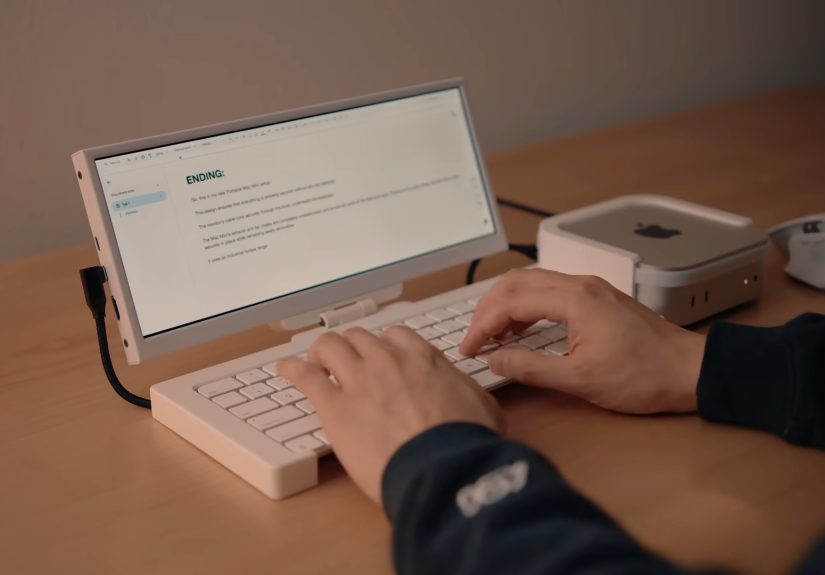
The answer is surprisingly practical. The M4 Mac mini is not a laptop replacement for everyone, but it can become a highly portable workstation for developers, video editors, musicians, photographers, students, office workers, and anyone who wants full macOS performance without hauling a MacBook Pro. With a compact monitor, a keyboard, a mouse or trackpad, and a sensible power plan, the little aluminum cube can turn hotel desks, classrooms, studio corners, and shared workspaces into temporary Mac command centers.
This guide explores what makes the M4 Mac mini portable, what gear you need to make it work, where it shines, where it gets awkward, and whether building a portable Mac mini setup is genius, ridiculous, ormost likelya little bit of both.
What Makes the M4 Mac Mini Feel Portable?
The redesigned M4 Mac mini is dramatically smaller than earlier models. Its body measures about 5 inches wide, 5 inches deep, and 2 inches tall. The base M4 version weighs roughly 1.5 pounds, while the M4 Pro version is only slightly heavier. That means the computer itself is smaller than many hardcover books and light enough to slip into a padded tech pouch.
Apple redesigned the Mac mini around Apple silicon, and that matters. Older compact desktops often felt portable in size but not in behavior. They needed bulky power bricks, ran hot, or sounded like a tiny leaf blower when pushed. The M4 Mac mini has an internal power supply, a quiet thermal design, and a chip architecture built for strong performance per watt. In plain English: it does a lot without needing a lot of electricity or a suitcase full of cooling fans.
The Core Specs That Matter
The base M4 Mac mini includes a 10-core CPU, 10-core GPU, 16-core Neural Engine, and 16GB of unified memory as standard. That last detail is important because previous entry-level Macs often shipped with 8GB of memory, which could feel tight for modern multitasking. The M4 Pro model raises the ceiling with more CPU and GPU power, higher memory bandwidth, and Thunderbolt 5 support, making it more attractive for heavy creative and professional workflows.
For most portable setups, the regular M4 model is the sweet spot. It can handle writing, coding, web design, photo editing, office apps, light video work, local development environments, and everyday creative tasks with ease. The M4 Pro is the better pick if your “portable” setup includes 4K video editing, larger Logic Pro sessions, software builds, complex design files, or multiple high-resolution displays.
Portable Does Not Mean Laptop
Before anyone throws a Mac mini into a backpack and heads to the airport with heroic confidence, let’s clear up the big limitation: the M4 Mac mini still needs AC power. It does not charge over USB-C like a MacBook. It does not run from a built-in battery. It does not wake up on a café table and magically become a clamshell computer. You must plug it into a wall outlet or a portable power station with an AC outlet.
That distinction matters. A MacBook is mobile. A portable M4 Mac mini is transportable. A laptop works on your lap. A portable Mac mini works wherever you can create a small desk. Think hotel room, classroom podium, client office, studio table, camper van, trade show booth, or a coworking desk. It is less “type on the train” and more “bring your desktop to the destination.”
The Best Portable M4 Mac Mini Setup
A good portable Mac mini setup should be compact, reliable, and quick to assemble. If it takes 30 minutes and a prayer to connect everything, the charm fades quickly. The goal is a kit you can unpack, plug in, and use within a few minutes.
1. A Portable Monitor
A 15.6-inch or 16-inch USB-C portable monitor is the most common companion. Many portable displays can receive video over USB-C and may need separate power depending on brightness and model. Since the Mac mini has front USB-C ports and rear Thunderbolt ports, cable routing is easier than on older Mac mini designs.
If you want a cleaner desk, consider a portable monitor with its own stand, a magnetic cover, or VESA compatibility. Creative users may prefer a brighter 4K display, while writers and coders can do perfectly well with a lightweight 1080p or 1440p panel. The monitor choice determines whether your setup feels elegant or like a spaghetti-themed escape room.
2. Keyboard and Mouse or Trackpad
Bluetooth accessories keep the setup tidy. Apple’s Magic Keyboard and Magic Trackpad are obvious choices, but compact mechanical keyboards and travel mice work well too. If you travel often, choose input devices that can pair with multiple machines. That way, your keyboard can jump between your Mac mini, iPad, and backup laptop without requiring a ritual dance in Bluetooth settings.
3. A Compact Carrying Case
The Mac mini’s aluminum shell is sturdy, but it is not immune to scratches, dents, or mysterious backpack crumbs. A padded camera insert, tech organizer, or hard-shell case is a smart investment. Ideally, your case should hold the Mac mini, power cord, Thunderbolt or USB-C cable, HDMI cable, keyboard, mouse, and a small hub.
4. A Power Strategy
For most users, the best power source is still a wall outlet. The M4 Mac mini supports 100–240V AC, so it is travel-friendly internationally when paired with the right plug adapter. For outdoor use, mobile studios, or emergency workstations, a portable power station can run the Mac mini and monitor. However, you need an AC outlet, not just a USB-C power bank. Always check the wattage capacity, inverter quality, and expected runtime before relying on battery power for a serious project.
5. A Hub or Dock
The M4 Mac mini has two USB-C ports and a headphone jack on the front. On the back, the M4 version includes Ethernet, HDMI, and three Thunderbolt 4 ports. The M4 Pro version upgrades the rear Thunderbolt ports to Thunderbolt 5. That is generous for such a small machine, but some users will still miss USB-A and an SD card slot. A compact hub solves that problem, especially for photographers, podcasters, and anyone with older accessories.
Performance: Small Box, Serious Muscle
The M4 Mac mini is fast enough to make its size feel slightly suspicious. For everyday work, it behaves like a much larger desktop. Browser tabs, spreadsheets, video calls, writing apps, coding tools, and media playback feel smooth. Because the base model starts with 16GB unified memory, it is much more comfortable for multitasking than older entry-level Macs.
For creators, the media engine is a major advantage. The M4 chip includes hardware acceleration for formats such as H.264, HEVC, ProRes, ProRes RAW, and AV1 decode. That makes the Mac mini a practical little editing station, especially for YouTubers, social media editors, educators, and small business owners who work with video but do not need a tower-class workstation.
The M4 Pro model is where the tiny desktop becomes a pocket-sized monster. It is better suited for multi-stream video projects, heavier effects, large photo libraries, music production, 3D work, software development, and demanding multitasking. It also supports Thunderbolt 5, which can matter for high-speed storage, advanced docks, and professional display workflows.
Display Support for a Portable Workstation
One reason the M4 Mac mini makes sense as a portable desktop is its display flexibility. The base M4 model can support up to three displays, depending on resolution and connection type. That is overkill for a coffee table but excellent for a temporary office. You could use one portable monitor on the road, then return home and connect the same Mac mini to a dual- or triple-display desk setup.
This is where the Mac mini becomes more flexible than a laptop for some people. A MacBook gives you one built-in display and portability. A Mac mini gives you a modular setup. You choose the screen size, keyboard style, mouse, dock, speakers, and storage. It is not as convenient, but it is more customizable. For people who dislike laptop ergonomics, that trade-off can be worth it.
Who Should Build a Portable M4 Mac Mini Setup?
Developers
Developers may love the M4 Mac mini because it is small, quiet, and powerful enough for local development, containers, editors, browsers, and testing tools. It can live on a main desk most of the time, then travel to a hackathon, client site, or temporary workspace. The 16GB base memory is usable, but developers running heavier local services should consider 24GB or 32GB.
Video Editors and Content Creators
Creators who already own a good monitor and accessories can get desktop-class editing performance at a lower cost than many high-end laptops. A portable setup is especially useful for creators who work between a home studio and an office. Bring the Mac mini, plug into the destination’s monitor, and keep working.
Students and Teachers
For students in dorms, shared apartments, or labs, the Mac mini is easy to move and easy to secure. Teachers can use it as a compact classroom computer for presentations, media editing, lesson planning, or app demonstrations. It is not ideal for note-taking in a lecture hall, but it is excellent for turning any available desk into a Mac workspace.
Musicians and Podcasters
The M4 Mac mini is quiet at idle and compact enough for a music desk. Add an audio interface, MIDI keyboard, external SSD, and portable display, and it can become a mobile recording or editing station. Just remember: audio people collect cables the way dragons collect gold, so a good carrying case is not optional.
Where the Portable M4 Mac Mini Gets Awkward
The power button is on the bottom. This has become one of the most discussed design choices because it is not easy to press without lifting the unit. In daily use, many people simply let the Mac mini sleep instead of shutting it down. For a portable setup, that means you should think about access. If the Mac mini sits in a tight stand or dock, make sure you can still reach the button when needed.
Storage is another consideration. The base model’s 256GB SSD may feel small quickly if you edit video, manage large photo libraries, or install many development tools. Apple’s internal storage upgrades are expensive, so many users pair the Mac mini with a fast external SSD. A Thunderbolt or USB4 drive can be fast enough for demanding work and much cheaper per terabyte.
There is also no built-in SD card reader and no USB-A port. That is not a deal-breaker, but it means photographers and people with older peripherals should budget for a hub. The good news is that the accessory market has already responded with Mac mini stands, docks, SSD enclosures, and compact expansion hubs designed around the new shape.
Portable M4 Mac Mini vs. MacBook: Which Is Better?
Choose a MacBook if you need true mobility. If you work from airplanes, trains, cafés, park benches, or your couch, the laptop wins. It includes the screen, battery, keyboard, trackpad, speakers, webcam, and portability in one machine. Simple.
Choose a portable M4 Mac mini setup if you want better modularity, a lower entry price, desktop ergonomics, and the freedom to choose your own display and accessories. It is especially appealing if you already own a monitor, keyboard, and mouse. The Mac mini can also be a shared family computer, a home server, a media machine, a development box, and a travel workstation in one tiny package.
The MacBook is the smarter all-in-one tool. The portable Mac mini is the more interesting system. One is a Swiss Army knife. The other is a tiny toolbox with surprisingly sharp tools inside.
Buying Advice: Which M4 Mac Mini Configuration Makes Sense?
The base M4 Mac mini is the best value for general users, writers, students, office workers, and light creators. However, consider upgrading memory before storage if you plan to keep the machine for years. Unified memory cannot be upgraded later, while external storage is easy to add. A configuration with 24GB memory and 512GB storage is a strong middle ground for many serious users.
The M4 Pro Mac mini is best for people who already know why they need it. If your work involves large creative files, heavy rendering, serious software builds, professional audio sessions, multiple high-resolution displays, or very fast external storage, the M4 Pro model earns its price. If your main tasks are writing, browsing, email, light photo editing, and streaming, the base M4 model is already more than enough.
Real-World Experience: Living With a Portable M4 Mac Mini Setup
Using a portable M4 Mac mini setup feels different from carrying a laptop. The first time you pack it, you may feel clever. The second time, you may realize you forgot the HDMI cable. The third time, you become a cable-labeling philosopher. The experience rewards people who enjoy systems, routines, and tidy gear.
A practical travel kit begins with a checklist. Mac mini, power cord, portable monitor, monitor power cable, USB-C cable, HDMI cable, keyboard, pointing device, earbuds, hub, external SSD, and plug adapter if traveling internationally. That sounds like a lot, but it can fit into a small tech pouch and a slim monitor sleeve. The Mac mini itself is the easiest part to carry. The accessories are where discipline matters.
At a hotel desk, the setup can feel fantastic. Place the Mac mini near the back, connect the monitor, pair the keyboard and mouse, plug into AC power, and suddenly the room has a real workstation. Compared with hunching over a laptop, the ergonomics can be much better. You can raise the monitor, angle the keyboard, use a proper mouse, and work for hours without feeling like a shrimp in a hoodie.
In a coworking space, the Mac mini is less spontaneous but more comfortable once assembled. It is not something you pull out for a 20-minute email session. It is something you set up for a half-day of focused work. That makes it ideal for editing, coding, writing, accounting, design, and administrative tasks that benefit from a stable desktop environment.
The power situation shapes the whole experience. If there is a wall outlet, everything is easy. If you are trying to run from a portable power station, planning becomes more important. The Mac mini itself can be efficient, but the monitor, external drives, and accessories also consume power. Bright screens shorten battery runtime. Heavy workloads use more energy. For outdoor shoots or mobile studios, a larger power station is safer than a tiny inverter.
Noise and heat are usually pleasant surprises. For normal work, the M4 Mac mini stays quiet and unobtrusive. It does not dominate the desk. It does not roast your legs because, thankfully, it is not on your legs. Under heavier tasks, the fan can become more noticeable, especially on the M4 Pro, but the machine remains impressively calm for its size.
The best part of the experience is continuity. You can use the same Mac at home, at work, and on the road. Your files, apps, browser sessions, development tools, presets, fonts, and preferences come with you. There is no “I left that file on the other computer” panic. The Mac mini becomes a portable brain, and every desk becomes a temporary body.
The worst part is friction. A laptop opens. A Mac mini assembles. That difference matters. If your work style involves constant movement, meetings, and quick bursts of activity, the portable Mac mini will annoy you. But if you move between fixed locations and stay there for hours, it can feel brilliant. It is not a laptop killer. It is a desktop that learned how to travel.
Final Verdict: Is a Portable M4 Mac Mini Worth It?
A portable M4 Mac mini is worth it if you understand what it is: a compact desktop workstation, not a battery-powered laptop. It is powerful, efficient, quiet, customizable, and small enough to travel. It is also dependent on external gear, AC power, and a little setup patience.
For the right person, that trade-off is wonderful. Developers can carry a serious macOS machine between locations. Creators can edit on a familiar desktop environment. Students can build a dorm-friendly workstation. Musicians can create a compact production rig. Office workers can enjoy full desktop comfort without a bulky tower.
The M4 Mac mini proves that portability is not only about folding a screen onto a keyboard. Sometimes portability means putting a powerful little square in your bag, bringing your favorite tools with you, and building a proper workstation wherever the day takes you. It may not fit in your pocket, but it fits beautifully into the modern idea of flexible work. And yes, it still looks cute enough to make your router feel insecure.
Note: The M4 Mac mini can be made portable, but it still requires external power, a display, and input devices. For true unplugged mobility, a MacBook remains the better choice.