Table of Contents >> Show >> Hide
- What Does “This Story is Unavailable” Mean on Instagram?
- The Most Common Reasons Instagram Says a Story is Unavailable
- 1. The Story Expired After 24 Hours
- 2. The Creator Deleted the Story
- 3. The Story Was Shared With Close Friends Only
- 4. The User Hid Their Story From You
- 5. You Were Blocked by the Account
- 6. The Account Became Private
- 7. Instagram Removed the Story
- 8. The Story Was From a Deactivated or Deleted Account
- 9. The Story Link Was Broken or Outdated
- 10. Instagram Has a Glitch, Cache Problem, or Connection Issue
- Does “This Story is Unavailable” Mean You Are Blocked?
- How to Tell Why a Story is Unavailable
- How to Fix “This Story is Unavailable” on Instagram
- What Creators Should Know About Story Availability
- Can You View an Unavailable Instagram Story?
- Common Examples of “This Story is Unavailable”
- Experiences Related to “This Story is Unavailable” on Instagram
- Conclusion
You tap an Instagram Story, expecting brunch photos, a gym selfie, a cryptic quote, or someone’s dog acting like a tiny landlord. Instead, Instagram gives you the digital equivalent of a locked door: “This Story is Unavailable.” Rude? Maybe. Mysterious? Absolutely. Personal? Not always.
The message “This Story is Unavailable” on Instagram usually means the Story you tried to view cannot be accessed anymore. That could happen because the Story expired, the creator deleted it, Instagram removed it, your access changed, the account became private, you were blocked, the Story was shared with Close Friends only, or the app is simply having a dramatic little moment.
In other words, this error does not automatically mean someone blocked you. Instagram is a fast-moving platform where Stories vanish, privacy settings shift, accounts change, and app bugs occasionally tap dance across your screen. Let’s break down what the message really means, how to tell the difference between normal Instagram behavior and a possible privacy change, and what you can do to fix it.
What Does “This Story is Unavailable” Mean on Instagram?
When Instagram says “This Story is Unavailable,” it means the Story cannot currently be shown to your account. The app recognizes that a Story link, preview, notification, or profile ring exists or existed, but it cannot load the actual content for you.
That lack of access can happen for two broad reasons: the Story itself is gone, or your account no longer has permission to view it. Sometimes the cause is technical. A weak connection, outdated app version, cache issue, or temporary Instagram outage can also make a perfectly normal Story look unavailable.
Think of Instagram Stories like pop-up shops. They appear quickly, attract attention, disappear after a short time, and sometimes close early because the owner changed their mind. If you arrive late, the door may still be on the map, but the shop is already empty.
The Most Common Reasons Instagram Says a Story is Unavailable
1. The Story Expired After 24 Hours
The most common reason is also the least dramatic: the Story expired. Instagram Stories are designed to disappear from Feed, profile, and Direct after 24 hours unless the creator adds them to Highlights. If someone sent you a Story in a message yesterday and you opened it today, the content may simply be gone.
This is especially common with shared Stories in Direct Messages. A friend may send you a Story with “LOL look at this,” and by the time you check it, Instagram shrugs and says, “This Story is Unavailable.” Not because your friend betrayed you. Because you lost a race against the 24-hour clock.
2. The Creator Deleted the Story
People delete Stories all the time. Maybe they posted the wrong photo, forgot to crop out personal information, regretted the caption, or realized their “quick rant” sounded less poetic and more like a customer-service complaint written during a full moon.
If the creator deletes the Story before you view it, Instagram may still show a notification, preview, or Story ring for a short while. When you tap, the content is no longer available. This can also happen if someone deletes a Story from their archive or removes it from Highlights.
3. The Story Was Shared With Close Friends Only
Instagram’s Close Friends feature allows users to share Stories with a smaller audience. If a Story was originally visible to you and later the creator changes their Close Friends list, or if the Story was shared by someone else and you are not included in that private audience, you may see an unavailable message.
This does not necessarily mean anything negative. Close Friends lists are often used for family updates, inside jokes, private travel photos, business testing, or content that is not meant for everyone. Instagram does not let people request to be added to someone’s Close Friends list, so there is no magic “please let me see the chaos” button.
4. The User Hid Their Story From You
Instagram allows users to hide their Story from specific people without blocking them. This is important because hiding a Story is different from blocking an account. Someone may still appear in search, still follow you, and still interact with posts, while their Stories are no longer visible to you.
If you can see someone’s profile and posts but their Stories suddenly disappear or show as unavailable, Story hiding is one possible explanation. However, do not jump to conclusions. The Story may have expired, been deleted, or failed to load because Instagram was being Instagram.
5. You Were Blocked by the Account
Blocking is another possible reason, but it is not the only one. When someone blocks you on Instagram, you generally cannot find their profile, posts, or Story from the blocked account. If you tap an old Story link or message after being blocked, the content may appear unavailable.
A possible sign of being blocked is that you cannot find the account through search, cannot view the profile from your own account, and old links no longer load. Still, be careful. The account may have been deactivated, changed its username, removed followers, switched to private, or been temporarily restricted. Instagram does not send a friendly postcard saying, “Congratulations, you have been blocked.”
6. The Account Became Private
If someone switches from a public account to a private account, only approved followers can see their Stories and posts. If you are not an approved follower, old Story links may stop working. The same can happen if someone removes you as a follower from a private account.
This is common with creators, small businesses, students, or users who suddenly decide they do not want the entire internet watching their life like a reality show with worse lighting.
7. Instagram Removed the Story
Instagram may remove content that violates its Community Guidelines or other platform rules. If a Story is removed after being posted, viewers may see that it is unavailable. The creator may be able to check Account Status or Support Inbox for details, depending on the situation.
Removed content can include material involving harassment, nudity, dangerous misinformation, intellectual property issues, scams, or other policy violations. For the viewer, the experience is simple: the Story was there, and now it is not. For the creator, Instagram may provide a notice, review option, or account status update.
8. The Story Was From a Deactivated or Deleted Account
If a user temporarily deactivates or permanently deletes their Instagram account, their Stories become unavailable. You may still see traces of the account in old messages, mentions, tags, or notifications, but the content itself may no longer open.
This can feel confusing because Instagram sometimes keeps old conversation previews or usernames visible. The app may remember that something happened, but it cannot serve the actual Story anymore.
9. The Story Link Was Broken or Outdated
Stories are often shared through Direct Messages, group chats, screenshots, notifications, and links. If the link points to content that has expired, moved, been deleted, or become restricted, Instagram may show “This Story is Unavailable.”
This is why you may see the error after tapping a Story shared by a friend. The friend may still be able to see it because they follow the creator or belong to the Close Friends audience, while your account does not have permission.
10. Instagram Has a Glitch, Cache Problem, or Connection Issue
Sometimes the Story is perfectly fine, but your app is not. Instagram Stories depend on real-time loading, media delivery, account permissions, and app performance. If your internet connection is weak, the Instagram app is outdated, or cached data is corrupted, Stories may fail to open.
In this case, the message is less “you are not allowed” and more “your phone and Instagram are currently arguing in the kitchen.”
Does “This Story is Unavailable” Mean You Are Blocked?
Not automatically. This is one of the biggest misunderstandings about the Instagram Story unavailable message. Being blocked is possible, but it is only one item on a long menu of explanations.
You are more likely dealing with expiration, deletion, privacy settings, or a technical issue if you can still see the person’s profile, posts, Reels, comments, or other activity. If the entire account disappears from your view and old content stops loading, blocking becomes more likelybut even then, deactivation, username changes, or private account settings can look similar.
A simple way to think about it: if only one Story is unavailable, it is probably the Story. If the entire account becomes invisible, it may be an account-level change.
How to Tell Why a Story is Unavailable
Instagram does not always tell you the exact reason. That would be too easy, and apparently we must all become part-time detectives now. But you can look for clues.
Check the Timing
If the Story was posted close to 24 hours ago, expiration is the likely answer. Stories are temporary by design. A Story shared in a late-night group chat may be gone by lunch the next day.
Visit the Person’s Profile
If you can still see the profile and posts, you probably were not fully blocked. If the profile is gone, blank, or says no posts are available, there may be blocking, deactivation, or privacy changes involved.
Try Another Story
If only one Story fails but other Stories load normally, the problem is likely with that specific Story. If all Stories fail, the issue may be your app, internet connection, or Instagram itself.
Open Instagram on Another Device or Browser
If the Story works on Instagram Web or another device, your app may be the problem. If it fails everywhere, the content may be expired, deleted, hidden, or restricted.
Ask the Sender
If a friend sent you the Story, ask them whether it still opens for them. If they can see it and you cannot, the creator’s privacy settings may exclude your account. If neither of you can see it, the Story is probably gone.
How to Fix “This Story is Unavailable” on Instagram
If the Story expired, was deleted, or was hidden from you, there is no technical fix. You cannot force Instagram to show content you no longer have permission to view. However, if the problem is caused by your app, device, or connection, these steps can help.
1. Refresh Instagram
Close the Story, return to your feed, and refresh the app. Sometimes Instagram briefly shows outdated Story rings or notifications. A refresh may remove the unavailable Story or reload it correctly.
2. Check Your Internet Connection
Switch between Wi-Fi and mobile data. Stories are media-heavy, and a weak connection can make them fail. If Reels, photos, and messages are also slow, your connection is probably the villain wearing sunglasses.
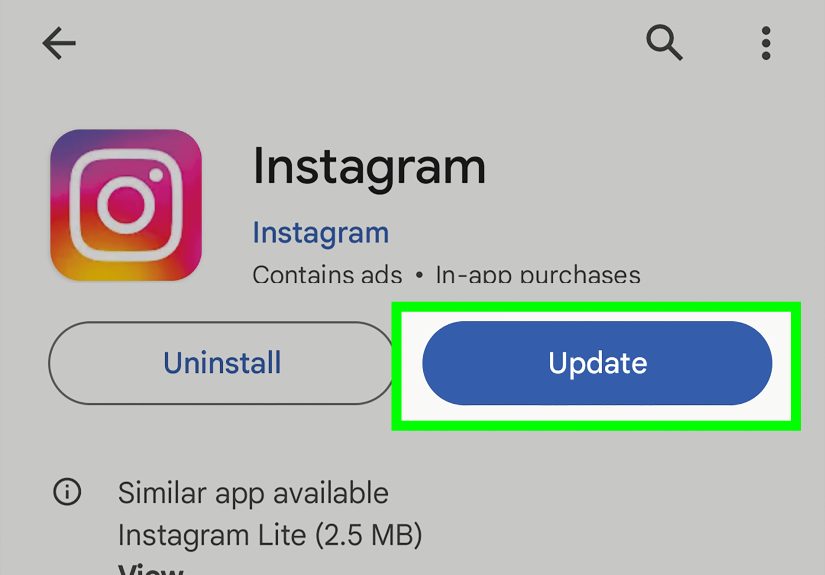
3. Update the Instagram App
Instagram recommends using the latest version of the app when something is not working. App updates often include bug fixes and performance improvements, so updating can solve Story-loading problems.
4. Clear the App Cache
On Android, you can usually clear Instagram’s cache through your device settings. On iPhone, there is no simple “clear cache” button for most apps, so offloading or reinstalling the app may help. Cached data can occasionally conflict with fresh Story content.
5. Restart Your Phone
It sounds basic because it is basic. It also works more often than anyone wants to admit. Restarting your phone can reset temporary app and network issues.
6. Try Instagram Web
Open Instagram in a browser and check whether the Story loads there. If it works on the web but not in the app, the issue is likely app-specific.
7. Check Whether Instagram Is Down
If many users are having trouble loading Stories, posting, refreshing feeds, or sending messages, Instagram may be experiencing a broader service problem. In that case, the best fix is patience, which is annoying but free.
8. Report the Problem to Instagram
If the issue keeps happening, use Instagram’s “Report a problem” option. Instagram allows users to report technical problems from inside the app, including through the shake-to-report feature on supported devices.
What Creators Should Know About Story Availability
If you are the person posting Stories, unavailable messages can affect your audience experience. A follower may message you saying they cannot see your Story, but the reason may be one of your own settings.
Check whether the Story was shared with Close Friends, whether you hid your Story from certain users, whether your account is private, whether the Story was removed, or whether you deleted it from your archive or Highlight. If you run a brand, creator account, or local business page, be careful when using Close Friends or privacy restrictions for promotional content. You do not want your “big announcement” visible only to five cousins and your college roommate.
Creators should also remember that Stories added to Highlights can remain visible beyond 24 hours, but only as long as the Highlight is still available and the viewer has permission to see the content. If you remove a Story from a Highlight or delete the original from your archive, viewers may lose access.
Can You View an Unavailable Instagram Story?
Usually, no. If a Story is unavailable because it expired, was deleted, was removed, or is restricted by privacy settings, you cannot view it through normal Instagram tools. Be cautious with third-party sites or apps that claim they can unlock private or unavailable Stories. Many are unreliable, invasive, or unsafe.
The safest options are simple: ask the creator to repost it, ask the person who shared it what it showed, or accept that the Story has joined the great digital compost pile in the sky.
Common Examples of “This Story is Unavailable”
Example 1: A Friend Sends You a Story Too Late
Your friend sends a Story at 10 p.m. You open it the next evening. Instagram says it is unavailable. Most likely, the Story expired after 24 hours.
Example 2: You Tap a Notification, But Nothing Opens
You get a notification that someone posted a Story. By the time you tap it, they deleted the Story. Instagram may still show the notification, but the content is gone.
Example 3: A Story Works for Your Friend But Not for You
If someone else can see the Story and you cannot, the Story may be limited by privacy settings, Close Friends, follower approval, or Story hiding.
Example 4: Every Story Fails to Load
If all Stories show errors, fail to load, or appear as black screens, your app, device, connection, or Instagram’s servers may be the issue.
Experiences Related to “This Story is Unavailable” on Instagram
Anyone who uses Instagram long enough eventually meets the “This Story is Unavailable” message. It usually appears at the worst possible time: when you are curious, slightly nosy, emotionally invested, or trying to understand why five people reacted with laughing emojis to something you missed. The message is short, cold, and completely uninterested in your need for context.
One common experience happens in group chats. Someone drops a Story into the conversation with a message like, “I can’t believe they posted this.” Naturally, everyone rushes to open it. But if you arrive late, the Story may have expired or been deleted. Now everyone else knows the joke, and you are standing outside the comedy club with a broken ticket. This is the classic expired-Story situation, and it is probably the most harmless version of the error.
Another familiar experience is the “Did they block me?” spiral. You tap a Story, see the unavailable message, and suddenly your brain opens a courtroom. Evidence appears. Memories are reviewed. A harmless app error becomes a full emotional investigation. In many cases, nothing personal happened at all. The Story may have been removed, shared with Close Friends, hidden from certain people, or affected by a loading issue. Instagram’s vague wording makes the situation feel more suspicious than it really is.
Creators and small business owners experience this problem from the other side. A boutique might post a flash sale, then accidentally share it with Close Friends instead of the public. A restaurant may add a menu Story to Highlights, then delete the archived Story later and wonder why customers cannot see it. A coach, artist, or influencer might change privacy settings and unintentionally reduce Story visibility. In those cases, “This Story is Unavailable” is not just a viewer annoyance. It can become a missed sale, missed booking, or missed engagement opportunity.
There is also the technical version of the experience. You know the Story exists because everyone is reacting to it, but your app refuses to load it. You refresh. Nothing. You switch Wi-Fi. Nothing. You close Instagram and reopen it with the determination of someone restarting a printer in 2007. Suddenly, it works. This kind of issue is usually caused by connection problems, outdated app versions, cached data, or temporary Instagram bugs.
The best personal rule is not to assume the worst from one unavailable Story. If the person’s profile is still visible, other content loads, and only one Story is missing, it is probably not a major social disaster. If multiple clues point to a privacy or account-level change, then yes, access may have changed. But most of the time, the message is just Instagram’s awkward way of saying, “That content is no longer available to you right now.” Not elegant. Not comforting. But usually not worth losing sleep over.
Conclusion
The message “This Story is Unavailable” on Instagram means the Story cannot be viewed by your account at that moment. The reason may be simple, such as expiration after 24 hours or deletion by the creator. It may involve privacy settings, Close Friends, Story hiding, private accounts, blocking, removed content, or account deactivation. It may also be caused by a temporary app glitch, bad connection, outdated Instagram version, or cache problem.
The key is not to panic. One unavailable Story does not automatically mean you were blocked. Start with the obvious explanations: timing, deletion, privacy, and app performance. Refresh Instagram, check your connection, update the app, try another device, or report the problem if it continues. And if the Story is truly gone, consider it part of the Instagram ecosystem: here for a moment, gone the next, leaving only confusion, curiosity, and maybe a group chat full of people who saw it before you did.