Table of Contents >> Show >> Hide
- Quick Answer: The Best Way to Spawn the Ender Dragon
- Spawn vs. Respawn vs. Summon: What Is the Difference?
- What You Need to Respawn the Ender Dragon
- How to Craft End Crystals
- How to Respawn the Ender Dragon in Java Edition
- How to Respawn the Ender Dragon in Bedrock Edition
- How to Spawn an Ender Dragon Using Commands in Java Edition
- How to Spawn an Ender Dragon Using Commands in Bedrock Edition
- Can You Spawn the Ender Dragon Outside the End?
- Why Is the Ender Dragon Not Respawning?
- Best Gear for Fighting the Ender Dragon Again
- Why Respawn the Ender Dragon?
- Common Mistakes to Avoid
- Personal Experience: What It Feels Like to Respawn the Ender Dragon
- Final Thoughts
So, you defeated the Ender Dragon, watched the credits roll, proudly claimed your “I beat Minecraft” moment, and then thought: “Wait… can I do that again?” Good news: yes, you can. Bad news: the Ender Dragon did not appreciate your first visit and will return with the same dramatic energy as a final boss who just found out you looted her island.
This guide explains exactly how to spawn an Ender Dragon in Minecraft, including the proper Survival method using End Crystals, the Java Edition command method, and the Bedrock Edition command method. We will also cover the difference between spawning, respawning, and summoning, because Minecraft terminology can sometimes feel like it was written by an Enderman holding a dictionary upside down.
Whether you play Minecraft Java Edition on PC or Minecraft Bedrock Edition on console, mobile, or Windows, the core idea is simple: if you want the real boss fight again, use four End Crystals around the End exit portal. If you want to create a dragon instantly for creative testing, use commands. The trick is knowing which method does what.
Quick Answer: The Best Way to Spawn the Ender Dragon
The most reliable way to respawn the Ender Dragon in both Java and Bedrock is to place four End Crystals on the sides of the End exit portal after the dragon has already been defeated. This restarts the boss fight, rebuilds the obsidian pillar crystals, disables the exit portal temporarily, and brings the dragon back.
Basic Survival Method
- Defeat the Ender Dragon once.
- Craft four End Crystals.
- Return to the End dimension.
- Find the bedrock exit portal in the center island.
- Place one End Crystal on each flat side of the portal frame.
- Wait for the dramatic beam show and the dragon’s return.
That is the official, intended, no-cheats method. It works in both Java Edition and Bedrock Edition, and it is the method you want if your goal is a legitimate rematch, more End gateways, more dragon’s breath, or a fresh round of panic with wings.
Spawn vs. Respawn vs. Summon: What Is the Difference?
Before you start throwing crystals around like magical confetti, it helps to understand the difference between three common phrases: spawn, respawn, and summon.
Spawning the Ender Dragon
The Ender Dragon naturally spawns the first time a player enters the End in a normal Minecraft world. You do not need to place anything. The game handles it automatically, along with the central exit portal structure and the obsidian towers.
Respawning the Ender Dragon
Respawning means bringing the dragon back after it has already been defeated. This is done with four End Crystals placed around the End exit portal. This is the main method used in Survival mode and the one most players mean when they search for how to spawn an Ender Dragon in Minecraft.
Summoning the Ender Dragon
Summoning means using commands, usually in Creative mode or with cheats enabled. Commands can create an Ender Dragon entity instantly, but they may not always recreate the full boss fight exactly the same way as the End Crystal method. In Java Edition especially, a simple summoned dragon can behave differently unless extra data is used.
What You Need to Respawn the Ender Dragon
To respawn the Ender Dragon properly, you need four End Crystals. Each End Crystal requires the following materials:
- 7 Glass
- 1 Eye of Ender
- 1 Ghast Tear
Since you need four End Crystals total, gather these materials:
- 28 Glass
- 4 Eyes of Ender
- 4 Ghast Tears
The glass is easy. Smelt sand and pretend you are a respectable builder instead of someone preparing to resurrect a giant flying disaster. Eyes of Ender require Ender Pearls and Blaze Powder. Ghast Tears are the tricky part, because they come from Ghasts in the Nether, and Ghasts have the emotional stability of a balloon in a thunderstorm.
How to Craft End Crystals
Open a crafting table and arrange the End Crystal recipe like this:
- Place the Eye of Ender in the center slot.
- Place the Ghast Tear in the bottom-middle slot.
- Fill the remaining seven slots with Glass.
Repeat this recipe four times. Once you have four End Crystals, you are ready to bring the Ender Dragon back. Try not to place or hit the crystals casually, because End Crystals explode when damaged. They are basically beautiful floating landmines with a flair for interior destruction.
How to Respawn the Ender Dragon in Java Edition
The Java Edition method is straightforward and works beautifully when the exit portal is intact. Here is the step-by-step process.
Step 1: Defeat the Dragon First
You cannot use the normal End Crystal respawn sequence until the first dragon has been defeated. The central exit portal must exist in the End. If this is your first visit, fight the dragon normally, destroy or avoid the tower crystals, and finish the battle.
Step 2: Collect the Dragon Egg Before Respawning
Before you respawn the dragon, collect the dragon egg if you want it. A new dragon fight can create chaos around the portal, and you do not want to lose the rare trophy because you were too excited to press the “boss fight again” button.
Step 3: Place Four End Crystals Around the Exit Portal
Stand near the bedrock exit portal in the center of the End island. The portal frame has four flat sides. Place one End Crystal on each side, centered on the bedrock frame. The crystals should form a plus-shaped arrangement around the portal.
Once the fourth crystal is placed correctly, the respawn sequence begins. The portal deactivates, beams shoot outward, the obsidian towers regenerate their crystals, and then the Ender Dragon returns. It is dramatic, loud, and very Minecraft.
Step 4: Fight the Dragon Again
After the respawn animation finishes, the dragon fight begins again. The revived dragon behaves like the main Ender Dragon fight, but rewards are not identical to the first victory. The first dragon is the big milestone. Later dragon kills are useful for additional End gateways, dragon’s breath, and the pure satisfaction of saying, “Yes, I scheduled this problem myself.”
How to Respawn the Ender Dragon in Bedrock Edition
The Survival method in Minecraft Bedrock Edition is very similar to Java Edition. If you are playing on Xbox, PlayStation, Nintendo Switch, mobile, or Windows Bedrock, follow the same End Crystal process.
Step 1: Prepare Four End Crystals
Craft four End Crystals using Glass, Eyes of Ender, and Ghast Tears. Bedrock players should be especially careful when placing crystals because console or mobile controls can make accidental placement feel like a prank designed by a creeper.
Step 2: Return to the End
Use the stronghold End portal to return to the End dimension. Bring armor, food, arrows, blocks, water buckets, slow falling potions, or whatever your personal survival style requires. Some players arrive with enchanted Netherite gear. Others arrive with bread, hope, and a questionable sense of timing.
Step 3: Place the Crystals on the Exit Portal
Place one End Crystal on each of the four flat sides of the bedrock exit portal. Once all four are placed correctly, the sequence starts. If nothing happens, double-check the placement. The crystals must be on the correct bedrock blocks around the portal, not randomly scattered nearby like decorative boss-fight candles.
Step 4: Prepare for the Fight
The towers will be restored with End Crystals, and the dragon will return. Move away from the portal during the animation, watch for explosions, and get ready. In Bedrock Edition, the dragon can still punish careless players quickly, especially if you get knocked into the air or launched near the void.
How to Spawn an Ender Dragon Using Commands in Java Edition
If cheats are enabled, Java Edition players can use the /summon command. This is useful for Creative worlds, map testing, server experiments, or moments when you want your peaceful village to experience an unscheduled aviation crisis.
Basic Java command:
This summons an Ender Dragon at your current location. However, there is an important detail: a dragon created with a basic summon command may not behave exactly like the natural End boss fight. In Java Edition, dragon fight behavior is connected to the End’s boss fight system, not just the dragon entity itself.
For a more active dragon behavior in Java, players often use a DragonPhase tag, such as:
This can make the dragon begin normal circling behavior instead of simply hovering. Still, if your goal is the authentic Ender Dragon rematch with portal sequence, towers, crystals, and progression rewards, use the four End Crystal method instead of commands.
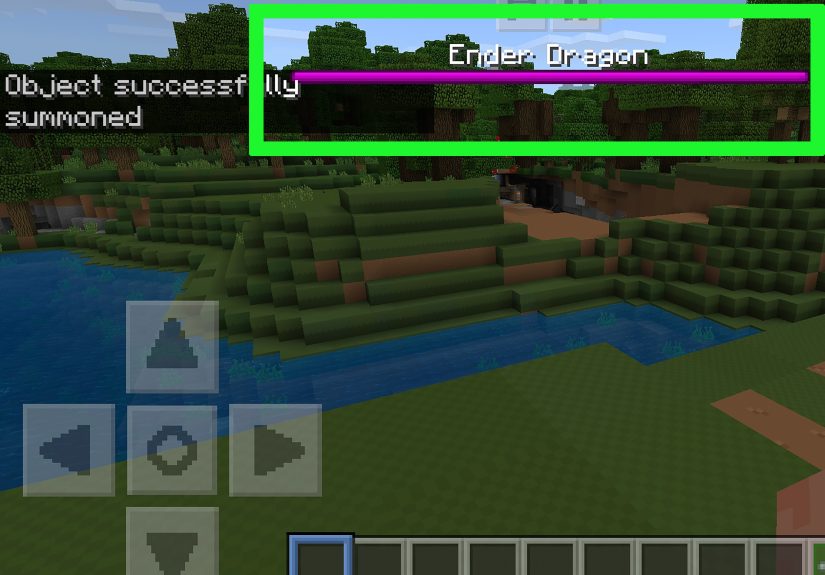
How to Spawn an Ender Dragon Using Commands in Bedrock Edition
In Bedrock Edition, commands use a different format. The basic command is:
This summons an Ender Dragon near your current position. Bedrock command syntax does not use Java-style NBT data in the same way, so do not copy advanced Java commands into Bedrock and expect them to work. Minecraft will stare at you politely, reject the command, and leave you wondering what went wrong.
For Creative testing, the Bedrock command is simple and direct. For a real Survival rematch, use four End Crystals at the End exit portal. That method is cleaner, more consistent, and designed for the actual boss fight.
Can You Spawn the Ender Dragon Outside the End?
Yes, commands can summon the Ender Dragon outside the End, such as in the Overworld or Nether. But should you? That depends on how attached you are to your buildings.
The Ender Dragon can destroy many blocks it passes through. It is not a pet, not a mount, and not a decorative sky noodle. If you summon one in your base, your base may become “open concept” architecture very quickly. Always test dragon commands in a separate Creative world before using them in a world you care about.
Why Is the Ender Dragon Not Respawning?
If your Ender Dragon is not respawning, one of these problems is usually responsible.
The End Crystals Are in the Wrong Spot
The crystals must be placed on the correct flat sides of the bedrock exit portal. One crystal goes on each side. If they are too far away, too close to the wrong block, or placed unevenly, the sequence may not begin.
The Exit Portal Is Damaged or Altered
In normal gameplay, the exit portal structure should be present after the first dragon fight. If commands, mods, server plugins, or manual edits have changed the central portal area, the respawn sequence may fail or behave strangely.
You Are Using Commands Instead of the Crystal Method
Summoning a dragon with commands does not always trigger the full End boss fight system. If you want the proper rematch, use End Crystals.
You Are Playing on a Modified Server
Plugins, datapacks, behavior packs, or server settings can change how the Ender Dragon works. If the normal method fails on a server, check whether custom world rules or plugins are interfering.
Best Gear for Fighting the Ender Dragon Again
Respawning the Ender Dragon is easy. Surviving the rematch with dignity is a different project.
- Armor: Diamond or Netherite armor with Protection is strongly recommended.
- Weapon: A strong sword or axe works well when the dragon perches.
- Bow: Bring a bow with Power, Infinity, or plenty of arrows.
- Blocks: Use blocks to climb, bridge, or escape awkward terrain.
- Water bucket: Useful for Enderman control and fall protection.
- Slow Falling potions: Excellent insurance against dragon launches.
- Glass bottles: Bring bottles if you want to collect dragon’s breath.
The Ender Dragon fight is not only about damage. It is about positioning, patience, and not making direct eye contact with every Enderman within render distance. That last part is harder than it sounds.
Why Respawn the Ender Dragon?
Respawning the Ender Dragon is not just for bragging rights. There are several useful reasons to do it.
More End Gateways
Defeating additional dragons can generate more End gateways, making it easier to reach outer End islands. That means better access to End cities, Elytra, shulker shells, and loot.
More Dragon’s Breath
Dragon’s breath is used for lingering potions. If you forgot to collect it during the first fight, respawning the dragon gives you another opportunity.
Replay the Boss Fight
Sometimes the reason is simple: the fight is fun. Maybe you want to challenge yourself with different gear. Maybe you want to host a server event. Maybe you just miss the sound of a giant dragon making your friends scream in voice chat.
Common Mistakes to Avoid
Do Not Stand Too Close to End Crystals
End Crystals explode when damaged. If you place one and then accidentally hit it, the result is not a gentle sparkle. Keep your distance and avoid swinging tools near them.
Do Not Forget the Dragon Egg
Collect the dragon egg before starting another fight. It is one of the most iconic trophies in Minecraft, and losing it because you rushed the rematch is the kind of mistake that haunts a world forever.
Do Not Summon the Dragon in Your Base
Command-spawning a dragon in the Overworld may sound funny for five seconds. Then the dragon flies through your storage room, and suddenly all your organized chests become an archaeology project.
Do Not Assume Java and Bedrock Commands Are Identical
Java and Bedrock have different command systems. Basic commands may look similar, but Java supports NBT-style data that Bedrock does not handle the same way. Always use the correct syntax for your edition.
Personal Experience: What It Feels Like to Respawn the Ender Dragon
The first time you respawn the Ender Dragon, it feels a little strange. The first fight usually comes with big adventure energy: find the stronghold, activate the portal, jump into the End, panic, shoot crystals, dodge dragon breath, and somehow survive. The second fight is different. You are not accidentally stumbling into the finale anymore. You are scheduling an appointment with chaos.
In my experience, the biggest mistake players make is treating the second dragon fight like it will be easier simply because they have done it once. Yes, you know the mechanics. Yes, you probably have better gear. But the End is still the End. The void is still one bad knockback away. Endermen still have the social patience of angry librarians. And the dragon still has a habit of launching players at the worst possible angle.
One of the smartest things you can do before placing the End Crystals is clean up the battlefield. Remove random blocks, mark safe paths, and make sure you have a quick route away from the portal. The respawn animation looks amazing, but it is not the time to stand in the middle taking screenshots like a tourist at a fireworks show. Step back, let the sequence finish, and then start the fight properly.
Another useful habit is bringing more supplies than you think you need. Extra arrows, extra food, spare blocks, and a backup water bucket can save a run. Slow Falling potions are especially valuable because they turn one of the dragon’s most annoying attacks into a slow, floaty inconvenience. Without Slow Falling, a dragon launch can feel like Minecraft briefly became a space program.
If you are playing with friends, assign roles. One player focuses on towers. Another watches Endermen. Someone collects dragon’s breath. Someone else inevitably forgets the plan and starts yelling. That is normal. Multiplayer dragon fights are part strategy, part comedy show, and part emergency meeting. The fight becomes much smoother when everyone knows what they are supposed to do before the fourth crystal is placed.
For Creative players and map makers, command-spawning the Ender Dragon is useful but should be handled carefully. A summoned dragon is great for testing, screenshots, custom arenas, or cinematic builds. However, it is not the same as pressing the official boss fight reset button. If you want the full experience, the End Crystal method is still the king. Commands are a shortcut; End Crystals are the real ritual.
The best part of respawning the Ender Dragon is that it gives the End dimension a reason to feel alive again. After the first victory, many players treat the central island like an old museum exhibit: “Here is where I almost died; here is where I screamed; here is where I lost my water bucket.” Respawning the dragon turns that quiet trophy room back into an arena. It is dangerous, messy, loud, and absolutely worth doing at least once.
Final Thoughts
Learning how to spawn an Ender Dragon in Minecraft is really about choosing the right method for your goal. If you want a true Survival rematch in Java or Bedrock, craft four End Crystals and place them around the End exit portal. If you want a quick Creative test, use the /summon command for your edition. Both methods create a dragon, but only the End Crystal method recreates the intended boss fight sequence.
So gather your glass, hunt those Ghasts, craft your crystals, and return to the End prepared. The dragon may be the final boss, but in Minecraft, “final” is more of a suggestion than a rule.