Table of Contents >> Show >> Hide
- What Is Amazon KDP?
- Step 1: Finish and Polish Your Manuscript
- Step 2: Choose Your Publishing Format
- Step 3: Create Your Amazon KDP Account
- Step 4: Format Your Book Interior
- Step 5: Design a Professional Book Cover
- Step 6: Enter Your Book Details in KDP
- Step 7: Decide Whether You Need an ISBN
- Step 8: Upload Your Manuscript and Cover
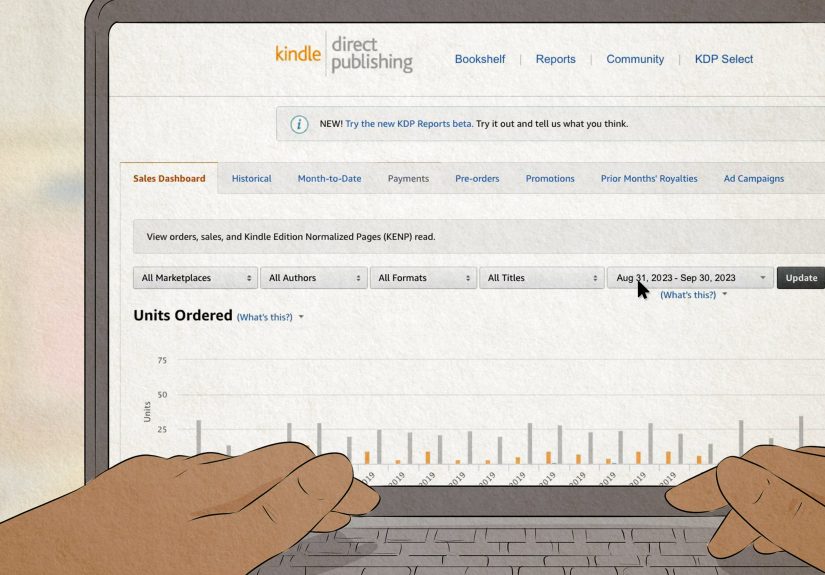
- Step 9: Set Your Price and Royalty Options
- Step 10: Review, Publish, and Wait for Approval
- Step 11: Build Your Amazon Author Central Page
- Step 12: Plan Your Book Launch
- Common Mistakes to Avoid When Publishing on Amazon
- Experience Notes: What Publishing on Amazon Really Feels Like
- Final Checklist Before You Publish
- Conclusion
Publishing a book on Amazon used to sound like something only people with tweed jackets, literary agents, and mysterious “industry connections” could do. Today, thanks to Amazon Kindle Direct Publishing, better known as KDP, you can upload your manuscript, choose your formats, set your price, and make your book available to readers without begging a traditional publisher to notice your brilliance.
That does not mean you should sprint into KDP with a half-edited manuscript, a blurry cover, and the confidence of a raccoon opening a trash can. Amazon makes publishing accessible, but successful self-publishing still requires planning, quality control, and smart marketing. This guide walks you through how to publish a book on Amazon step by step, from preparing your manuscript to launching your book like a professional author instead of someone who clicked “Publish” during a caffeine storm.
What Is Amazon KDP?
Amazon Kindle Direct Publishing is Amazon’s self-publishing platform. It allows authors and publishers to release eBooks, paperbacks, and hardcovers directly on Amazon. You keep control of your rights, choose where your book is sold, and update your book details when needed.
The biggest advantage is simplicity. You do not need to print hundreds of books in your garage or explain to your family why the guest room is now “the warehouse.” For print books, Amazon uses print-on-demand, meaning a copy is printed when a customer orders it. For Kindle eBooks, readers can purchase and download instantly.
Step 1: Finish and Polish Your Manuscript
Before you think about book categories, royalties, or launch strategies, make sure the book itself is ready. Your manuscript is the cake. Everything else is frosting. Delicious frosting matters, but nobody thanks you for beautiful frosting on a pancake-shaped disaster.
Edit Before You Upload
At minimum, your manuscript should go through several rounds of revision. Start with a big-picture edit: structure, pacing, clarity, missing sections, weak arguments, confusing scenes, or chapters that wander off like they forgot their own job. Then move to line editing and proofreading for grammar, spelling, punctuation, formatting consistency, and awkward wording.
For fiction, pay close attention to character motivation, plot logic, dialogue, and scene transitions. For nonfiction, focus on organization, examples, practical takeaways, and whether your reader can actually use the advice. A book called How to Organize Your Kitchen should not make readers feel like they need a second book called How to Survive This First Book.
Use Beta Readers or Professional Editors
Beta readers can help you spot confusion, slow sections, and emotional weak points. Professional editors can improve flow, eliminate repeated ideas, and catch errors you have become blind to after reading your own manuscript 47 times. If your budget is tight, invest at least in proofreading. Typos are small, but too many of them make readers question the entire book.
Step 2: Choose Your Publishing Format
Amazon KDP lets you publish in multiple formats. Most authors start with a Kindle eBook and a paperback. Some also add a hardcover if the book suits gift buyers, libraries, collectors, or readers who enjoy books that could survive a mild earthquake.
Kindle eBook
A Kindle eBook is the fastest format to publish and usually the easiest to update. It works well for novels, nonfiction guides, memoirs, short reads, workbooks with minimal graphics, and digital-first content. KDP does not require an ISBN for Kindle eBooks; Amazon assigns its own identifier.
Paperback
A paperback gives your book a physical presence and can help with credibility. Many readers still prefer paper, especially for nonfiction, journals, poetry, devotionals, workbooks, and giftable books. Paperbacks require more formatting care because trim size, margins, page count, and cover spine width all matter.
Hardcover
Hardcover is useful for premium books, children’s books, keepsake editions, illustrated books, and titles with strong gifting potential. It is usually more expensive to produce, so pricing must be handled carefully.
Step 3: Create Your Amazon KDP Account
To publish a book on Amazon, go to Kindle Direct Publishing and sign in with an Amazon account. If you are serious about publishing, use a professional email address and keep your login details secure.
Inside your KDP account, you will need to complete basic account information, tax details, and payment information. Do this before launch day. Nothing ruins a publishing mood faster than realizing your book is ready but your account setup is still standing at the front door asking for paperwork.
Step 4: Format Your Book Interior
Formatting is where your manuscript becomes a real book file. A clean interior helps readers enjoy the book without noticing the machinery behind the scenes.
Formatting for Kindle
Kindle books are reflowable, which means text adjusts to different screen sizes and reader settings. Avoid fancy formatting that breaks on small devices. Use clean heading styles, consistent paragraph spacing, clickable table of contents, and properly inserted images if needed.
Popular tools for Kindle formatting include Kindle Create, Atticus, Vellum, Scrivener, and professional book designers. You can also format in Microsoft Word, but use styles carefully. Random manual spacing is the glitter of formatting: once it gets everywhere, good luck cleaning it up.
Formatting for Paperback and Hardcover
Print books need fixed layouts. Choose a trim size such as 5 x 8, 5.5 x 8.5, or 6 x 9 inches, depending on your genre and reader expectations. Nonfiction business books often use 6 x 9. Novels commonly use 5 x 8 or 5.5 x 8.5. Workbooks and illustrated books may need larger sizes.
Pay attention to margins, page numbers, headers, chapter starts, blank pages, image resolution, and widows or orphans. KDP offers manuscript templates, which can be helpful for authors formatting in Word.
Step 5: Design a Professional Book Cover
Your cover is not decoration. It is a sales tool. Readers may say they do not judge books by covers, but online shoppers absolutely do. Your cover has to communicate genre, tone, and quality in a thumbnail-sized battlefield.
For Kindle eBooks, upload a front cover image. For paperbacks and hardcovers, you need a full wrap cover that includes the back cover, spine, and front cover as one file. The spine width depends on page count, paper type, and trim size, so finalize your interior before designing the print cover.
What Makes a Strong Amazon Book Cover?
A strong cover usually has readable typography, clear genre signals, professional image quality, and good contrast. A romance novel, a cybersecurity guide, and a children’s dinosaur book should not look like they wandered out of the same template folder.
If you are not a designer, hire one or use a reputable book cover design service. DIY covers can work, but only if you understand genre expectations. A cover that looks “unique” but confuses readers may win artistic bravery points while losing sales.
Step 6: Enter Your Book Details in KDP
Once your files are ready, go to your KDP Bookshelf and start a new title. You will enter the book title, subtitle, author name, contributors, description, publishing rights, keywords, categories, age range if applicable, and other metadata.
Write a Search-Friendly Book Title and Subtitle
Your title should be memorable, accurate, and appropriate for the genre. A subtitle can clarify the benefit or audience. For example, Budget Cooking for Busy Families could use a subtitle like Simple Weekly Meal Plans, Affordable Grocery Lists, and Fast Recipes for Real Life.
Do not stuff keywords into the title like a suitcase before a discount airline flight. Amazon metadata should be helpful and natural, not desperate.
Create a Book Description That Sells
Your description should hook readers quickly. Start with the main promise or emotional appeal. Then explain what readers will learn, experience, or gain. Use short paragraphs and scannable formatting.
For nonfiction, focus on benefits, problems solved, and specific takeaways. For fiction, emphasize character, conflict, stakes, mood, and genre appeal. Do not summarize every plot twist. A book description should invite readers inside, not hand them the architectural blueprint.
Choose Smart Keywords
KDP allows you to add backend keywords to help readers discover your book. Use phrases your ideal reader might type into Amazon. Think in terms of genre, problem, audience, theme, setting, trope, or result.
For example, a book about decluttering might use phrases such as “small home organization,” “minimalist cleaning routine,” or “declutter your house.” Avoid repeating words already in your title and avoid irrelevant trending terms. If your book is not about dragons, do not try to borrow dragon traffic. The dragons will know.
Select Accurate Categories
Categories help Amazon understand where your book belongs. Choose categories that match your content and reader expectations. Narrow, relevant categories are usually better than broad categories where your book disappears into the digital fog.
A cookbook for diabetic-friendly dinners should not sit vaguely under general cooking if more precise options are available. A cozy mystery should not pretend to be a thriller just because thrillers sell. Misalignment leads to confused readers, weak conversions, and reviews that begin with “I expected…” which is rarely followed by good news.
Step 7: Decide Whether You Need an ISBN
Kindle eBooks on KDP do not need an ISBN. For paperbacks and hardcovers, you can use a free KDP ISBN or purchase your own. A free KDP ISBN is convenient, but it can only be used with KDP. If you plan to publish the same print edition through other platforms, bookstores, libraries, or distributors, buying your own ISBN may be the better long-term choice.
In the United States, Bowker is the official ISBN agency. When using your own ISBN, make sure the title, author name, imprint, and format details match exactly. Metadata mismatches can delay publishing or cause headaches that feel wildly unnecessary for a number printed near a barcode.
Step 8: Upload Your Manuscript and Cover
After entering your book details, upload your manuscript and cover files. KDP will process the files and show potential errors. Do not ignore warnings. They are not decorative. They are Amazon’s way of saying, “Please fix this before readers see it.”
Use the online previewer to review your book carefully. Check chapter headings, page breaks, image placement, table of contents, margins, cover alignment, and text readability. For print books, order a proof copy if possible. A proof copy lets you catch issues that are easy to miss on screen, such as awkward spacing, blurry images, thin margins, or a cover that prints darker than expected.
Step 9: Set Your Price and Royalty Options
Pricing is part math, part market research, and part emotional discipline. You want a price readers accept while still leaving you a reasonable royalty.
Kindle eBook Royalties
KDP offers 35% and 70% royalty options for eligible eBooks. The 70% option generally requires pricing within Amazon’s eligible range and may include delivery costs based on file size. The 35% option can apply more broadly but pays a lower percentage.
For many standard text-based eBooks, pricing between $2.99 and $9.99 is common because it may qualify for the 70% royalty option in eligible territories. However, do not price only by royalty percentage. Look at comparable books in your niche, reader expectations, length, brand authority, and launch goals.
Paperback and Hardcover Royalties
Print book royalties are calculated differently. Amazon takes the list price, applies the royalty rate, and subtracts printing costs. Printing costs depend on page count, ink type, trim size category, and marketplace. A 500-page color paperback may look impressive, but its printing cost can quietly eat your royalty like a hungry little spreadsheet goblin.
Before publishing, use KDP’s pricing tools to preview royalties in each marketplace. Make sure your print price leaves enough margin for profit while still making sense to readers.
Should You Enroll in KDP Select?
KDP Select is optional and applies to Kindle eBooks. It can make your eBook available through Kindle Unlimited and certain Amazon promotional tools, but it requires digital exclusivity during the enrollment period. That means you cannot sell that eBook edition on other platforms while enrolled.
KDP Select can work well for genre fiction, series, and authors focusing heavily on Amazon. Wide publishing may work better if you want your eBook available through Apple Books, Barnes & Noble, Kobo, libraries, and other retailers. There is no universal best answer; choose based on your audience and strategy.
Step 10: Review, Publish, and Wait for Approval
When everything looks correct, click publish. Your book will go into review. Amazon checks formatting, metadata, content, rights, and policy compliance. Many standard books go live within a few business days, while some formats or low-content books may take longer.
During review, some details may be locked. Resist the urge to panic-refresh your dashboard every four minutes. It will not make the process faster, though it may help you develop a close emotional relationship with your browser.
Step 11: Build Your Amazon Author Central Page
After your book is live, claim your book through Amazon Author Central. This lets you create or update your author profile, add a bio, upload a photo, and connect your books in one place. A complete author page builds trust and gives readers an easy way to discover your other titles.
Your author bio does not need to sound like a museum plaque. Keep it professional, relevant, and human. Mention your expertise, writing focus, or personal connection to your topic. If you write cozy mysteries and own three cats, this may be brand information. If you write tax guides and own three cats, it is charming but optional.
Step 12: Plan Your Book Launch
Publishing is not the finish line. It is the starting whistle. A strong launch plan helps your book gain early visibility, reviews, and sales momentum.
Create a Pre-Launch Checklist
Before launch, prepare your book description, author bio, email announcement, social posts, review team, website page, and promotional graphics. If you have an email list, warm it up before release. Do not appear after six silent months shouting, “Buy my book!” like a literary jack-in-the-box.
Ask for Honest Reviews
Reviews matter because they help readers feel more confident. Ask advance readers, newsletter subscribers, or launch team members to leave honest reviews after release. Do not pay for fake reviews, review your own book, or pressure people to write only positive feedback. Amazon has review policies, and violating them can cause serious account trouble.
Use Amazon Ads Carefully
Amazon Ads can help, but they are not magic. Start with a small budget, test keywords, track results, and improve your book page before spending aggressively. Ads work best when your cover, description, categories, reviews, and sample pages are already strong.
Common Mistakes to Avoid When Publishing on Amazon
Publishing Too Soon
The most common mistake is rushing. Authors get excited, upload the book, and only later notice typos, formatting errors, a weak description, or a cover that looks like it was assembled during a power outage. Take the extra time.
Ignoring the Book Sample
Amazon shoppers can preview your book. Make sure the opening pages are polished. Your first chapter or introduction should confirm that the reader made a good decision by clicking.
Choosing Vague Keywords
Keywords like “book,” “fiction,” “life,” or “guide” are usually too broad to help. Use specific phrases connected to buyer intent.
Pricing Without Checking Competitors
Your price should make sense in your niche. Study similar books by format, length, quality, author authority, and review count. A debut 40-page eBook priced higher than a bestselling 300-page guide may need a very persuasive reason.
Forgetting About Updates
One benefit of KDP is that you can update your book after publication. Fix typos, improve descriptions, refresh keywords, and adjust pricing when needed. Treat your book page like a living sales page, not a stone tablet.
Experience Notes: What Publishing on Amazon Really Feels Like
The first time you publish a book on Amazon, the process can feel both empowering and mildly terrifying. One minute you are adjusting margins like a calm professional. The next minute you are staring at the “Publish” button as if it might launch a rocket. That feeling is normal. A book is personal, even when it is nonfiction. You are putting your ideas into the world and inviting strangers to judge them with stars.
A practical lesson many first-time authors learn quickly is this: small details become big details when printed. A chapter title that looked fine on a laptop may sit awkwardly on a paperback page. A cover that seemed bright online may print darker. A table may stretch in a strange way. This is why proof copies are worth the wait. Holding the book in your hands changes how you see it. You notice rhythm, spacing, and readability differently. It becomes less of a file and more of a product.
Another experience is discovering that metadata is not boring after all. At first, keywords and categories may feel like tiny administrative chores. Later, you realize they are the road signs that help readers find your book. The right category can place your book near similar titles. The right keyword phrase can match what a reader is already searching for. Metadata will not save a weak book, but it can help a good book avoid hiding in the basement of Amazon search results.
Pricing also teaches humility. Authors often want to price based on effort. “This book took me two years, three breakdowns, and enough coffee to power a tractor.” Fair. But readers compare value in seconds. They look at the cover, description, reviews, length, and competing titles. A smart price respects both the work and the market.
Marketing may be the biggest surprise. Many authors assume publishing equals visibility. It does not. Amazon gives you a shelf, not a marching band. You still need to tell people the book exists. That can mean building an email list, writing helpful blog posts, appearing on podcasts, using Amazon Ads, posting useful social content, contacting reviewers, or creating a launch team. The good news is that marketing gets easier when you think of it as service. Instead of yelling “Buy my book,” show readers why the book helps, entertains, solves, explains, comforts, or delights.
Finally, the most useful experience is learning not to treat one book as your entire career. Your first Amazon book may sell slowly at first. That does not mean failure. It means you are gathering data. You learn what readers respond to, which keywords work, which cover styles attract clicks, and what your next book should do better. Self-publishing rewards patience, improvement, and consistency. The authors who last are usually not the ones who publish perfectly. They are the ones who publish thoughtfully, listen carefully, and keep going.
Final Checklist Before You Publish
- Your manuscript has been edited and proofread.
- Your Kindle and print files are formatted correctly.
- Your cover looks professional at full size and thumbnail size.
- Your title, subtitle, description, keywords, and categories match reader intent.
- Your ISBN choice fits your long-term publishing plan.
- Your price is competitive and profitable.
- You have previewed every format carefully.
- You have a launch plan ready before clicking publish.
- You have prepared your Author Central profile.
- You are ready to promote, test, update, and improve.
Conclusion
Publishing a book on Amazon is easier than ever, but easy access does not replace good preparation. The best results come from treating your book like both a creative work and a professional product. Write something valuable, edit it carefully, package it beautifully, choose accurate metadata, price it wisely, and launch it with intention.
Amazon KDP gives independent authors a powerful path to reach readers around the world. You do not need permission from a traditional publisher to begin. You do need patience, quality standards, and a willingness to learn the business side of authorship. Do that, and your book has a much better chance of standing out in a crowded marketplace.
So polish the manuscript, double-check the cover, breathe deeply, and click publish when you are truly ready. Your future readers are out there, probably browsing with coffee in hand and too many tabs open. Make it easy for them to find you.