Table of Contents >> Show >> Hide
- Why TV Sound Falls Short in the First Place
- The Smart Order of TV Audio Connections
- HDMI eARC: The Best Choice for Most Serious Setups
- HDMI ARC: Still Excellent for Everyday TV Audio
- Optical Audio: The Dependable Backup Plan
- RCA: The Legacy Connection That Refuses to Die
- What “& More” Means: Bluetooth, 3.5mm, and Direct Connections
- How to Choose the Right Connection for Your Setup
- TV Settings That Matter More Than People Realize
- Common Mistakes That Wreck Great Sound
- Troubleshooting When the Audio Gods Are Unimpressed
- Real-World Experiences: What Actually Changes When You Get This Right
- Final Thoughts
Modern TVs are brilliant at looking expensive and suspiciously bad at sounding expensive. They give you dazzling picture quality, razor-thin profiles, and speakers so tiny they seem to have been borrowed from a polite calculator. If your movies sound flat, dialogue gets swallowed by explosions, or your streaming nights feel more “airport terminal” than “home theater,” the fix usually is not a new TV. It is a better audio connection.
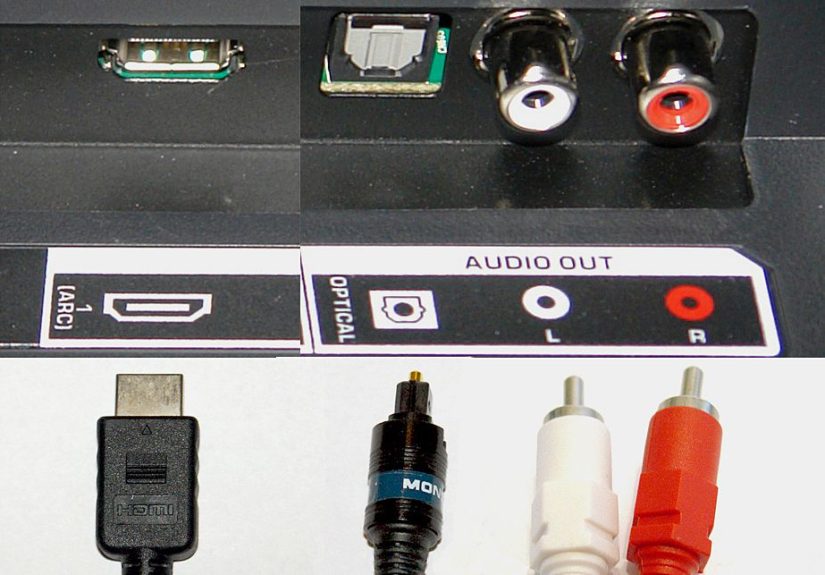
The good news is that connecting your TV for superior sound is not wizardry. It is mostly a matter of choosing the right path: HDMI eARC if you want the best format support and the fewest compromises, HDMI ARC if you want a clean, simple setup, optical if your gear is a little older but still respectable, and RCA if your equipment belongs to the era when DVDs felt futuristic.
This guide breaks down what each connection does, when it makes sense, and how to avoid the classic mistakes that turn a five-minute upgrade into a two-hour argument with your remote control.
Why TV Sound Falls Short in the First Place
There is nothing wrong with wanting your TV to sound better than a smartphone trapped in a shoebox. Flat-panel TVs have very limited space for speaker drivers, acoustic chambers, and forward-facing design. Manufacturers have spent years making screens thinner, but physics still refuses to cooperate. Small speakers in shallow cabinets cannot move much air, which means weaker bass, thinner mids, and dialogue that often sounds like it is arriving through a hallway.
That is why even a modest soundbar, powered speaker setup, or AV receiver can make such a dramatic difference. The leap is not just about volume. It is about clarity, stereo separation, fuller low end, and better control over how your system handles everything from whispered dialogue to action-scene chaos.
The Smart Order of TV Audio Connections
If you want the fast answer, here it is: not all TV audio connections are equal. Some are clean, modern, and powerful. Others are basically the audio equivalent of using a fax machine because it is still technically in the building.
| Connection Type | Best For | Main Advantage | Main Limitation |
|---|---|---|---|
| HDMI eARC | Newer TVs, premium soundbars, AV receivers | Highest-quality audio support, one-cable setup | Both devices need eARC support for full benefit |
| HDMI ARC | Most modern TVs and soundbars | Simple setup, remote control integration, solid audio | Less bandwidth than eARC |
| Optical | Older TVs or soundbars without ARC | Reliable digital connection | More limited format support than HDMI |
| RCA Analog | Legacy TVs, stereo receivers, older speakers | Works with older gear | Stereo only, least advanced option |
| Bluetooth | Casual, cable-free listening | No wire required | Potential lag and weaker TV integration |
That ranking is not snobbery. It is practicality. The more modern the connection, the better your odds of getting strong audio quality, easier device control, and fewer setup headaches.
HDMI eARC: The Best Choice for Most Serious Setups
What eARC Actually Does
eARC, or Enhanced Audio Return Channel, is the top-tier option for connecting a TV to a soundbar or AV receiver. It uses a single HDMI connection to send audio from your TV back to your audio system while also supporting more demanding audio formats than standard ARC. That means it is the best fit for people who want the simplest cable setup without giving up premium sound.
In practical terms, eARC is the connection to chase if you have a newer TV and a newer soundbar or receiver, especially if you care about immersive formats like Dolby Atmos or other higher-bitrate audio. It is also cleaner from a day-to-day usability standpoint. One cable. One main connection. Fewer opportunities for your living room to resemble a spaghetti accident.
Who Should Use It
eARC makes the most sense if you stream movies in premium formats, use a 4K Blu-ray player, own a current soundbar with advanced surround processing, or want the highest ceiling for audio performance. If your TV acts as the hub for multiple devices, eARC usually gives you the best chance of sending better-quality sound from the TV to your audio gear.
That said, eARC is only as strong as the devices on both ends. If your TV supports eARC but your soundbar supports only ARC, the system will behave like ARC. Technology is generous, but not that generous.
HDMI ARC: Still Excellent for Everyday TV Audio
ARC, or Audio Return Channel, is the more common version found on many TVs and soundbars. It is still one of the best ways to connect your TV to better speakers because it reduces cable clutter and often lets your TV remote control volume and power behavior through HDMI-CEC features.
For many households, ARC is the sweet spot. If most of your viewing is cable, streaming apps, sports, sitcoms, and general TV watching, ARC can sound great and feel wonderfully simple. It is also the setup most people should try first if their TV and soundbar both have ports clearly labeled ARC.
The catch is that ARC does not offer the same bandwidth and format support as eARC. So if your dream is full-fat immersive audio from every premium source, ARC may feel like a solid sedan parked next to a sports car. Very useful. Very capable. Not the absolute ceiling.
Optical Audio: The Dependable Backup Plan
If your TV or soundbar does not support ARC, optical audio is usually the next-best choice. Optical is digital, easy to connect, and far better than relying on weak built-in TV speakers. It has been around long enough to earn the comforting reputation of “not glamorous, but often works on the first try.”
Optical is a strong option for older TVs, budget soundbars, and situations where HDMI-ARC is unavailable or behaving like a diva. It can handle surround audio in many setups, but it is more limited than HDMI when it comes to higher-bandwidth formats. That means it is great for a lot of real-world TV watching, but not the most future-proof route if you are chasing the best audio your gear can deliver.
If ARC is supposed to work but keeps failing, optical is often the “fine, we are doing this the sensible way” solution.
RCA: The Legacy Connection That Refuses to Die
Ah yes, RCA. The red-and-white connectors that have survived more generations of electronics than some family recipes. RCA analog audio is still useful when you are dealing with an older TV, a classic stereo receiver, powered speakers, or legacy home audio gear that predates HDMI and modern digital audio connections.
RCA can absolutely improve your sound over built-in TV speakers. But it is a simpler, more limited path. In most cases, you are getting basic stereo sound, not advanced surround formats, not clever control features, and certainly not one-touch home theater magic. RCA is functional, familiar, and a little nostalgic. Think of it as the pickup truck of TV audio connections: not flashy, but it still gets the job done.
If your TV has only RCA outputs and your audio device accepts RCA, great. If your TV has only optical and your receiver accepts only RCA, you may need a digital-to-analog converter. In other words, before buying random cables online at midnight, check what both devices actually support.
What “& More” Means: Bluetooth, 3.5mm, and Direct Connections
Sometimes the best TV audio setup does not end with ARC, optical, or RCA. You may also run into Bluetooth, 3.5mm headphone outputs, or a setup where your streaming box, game console, or Blu-ray player connects directly to a soundbar or receiver first.
Bluetooth is convenient, but convenience has a price. Audio lag can creep in, which is especially annoying when lips move before voices arrive. It is fine for casual listening or temporary setups, but it is usually not the first choice for the main TV in your living room.
A 3.5mm headphone jack works much like RCA in spirit: basic, analog, and useful mostly for older or simpler systems. It is handy, but it is not where “superior sound” usually begins.
Direct-to-soundbar or direct-to-receiver connections, on the other hand, can be smart if your source device supports advanced audio and your TV is the weak link. For example, if you have a Blu-ray player or console and want the best possible sound, running that source into the receiver or soundbar first can sometimes produce better results than routing everything through the TV.
How to Choose the Right Connection for Your Setup
If Your TV and Soundbar Both Have eARC
Use eARC. This is the easiest recommendation in the room. Connect the TV’s HDMI port labeled eARC or ARC/eARC to the matching HDMI port on the soundbar or receiver. Then enable external audio and HDMI-CEC in your TV settings if needed.
If Both Devices Have ARC but Not eARC
Use ARC. You still get a clean one-cable connection, solid audio quality, and often remote-friendly control. For most viewers, this is already a huge upgrade.
If There Is No ARC, but There Is Optical
Use optical. It is the best fallback and often the most reliable choice for older gear. You may need to change the TV’s sound output setting to optical or external speaker.
If You Only Have RCA
Use RCA if both devices support it. Keep expectations realistic. You can get fuller stereo sound, but you are not building an immersive-format dream theater through red-and-white cables from 2004.
If You Have Premium Sources Like a 4K Blu-ray Player or Console
Consider connecting the source directly to your soundbar or receiver first, especially if you are trying to preserve the highest audio quality and your TV has limited passthrough support.
TV Settings That Matter More Than People Realize
A proper cable connection is only half the job. TV audio settings are where many “it is connected but sounds wrong” problems are born.
1. Turn On HDMI-CEC
This lets devices talk to each other for basic control tasks like power and volume. Different brands rename CEC, because of course they do, but the idea is the same.
2. Select the Correct Audio Output
Many TVs let you choose between TV speakers, ARC/eARC, optical, headphones, or external audio. Choose the one that matches your cable. Revolutionary, I know.
3. Try Bitstream or Pass-Through First
If you want the best shot at advanced audio formats, bitstream or pass-through settings are often the right move. But if you run into compatibility problems, static, or missing sound, PCM is a common fallback that solves a surprising number of headaches.
4. Turn Off the TV Speakers
Some TVs do this automatically. Some do not. If both the TV and soundbar are talking at once, your room will sound like two people trying to tell the same story badly.
Common Mistakes That Wreck Great Sound
The most common setup mistake is using the wrong HDMI port. Not every HDMI port on a TV supports ARC or eARC. If the label does not say ARC or eARC, it is probably not the one you want.
Another classic problem is assuming the cable is enough and skipping settings. ARC often needs CEC enabled. Some TVs also need you to choose the right sound output manually. Others will default to internal speakers until you nudge them in the right direction.
Then there is the “I used Bluetooth because it was faster” trap. Yes, Bluetooth is faster at the beginning. It is often slower where it counts: syncing sound to the picture.
And finally, many people expect RCA to perform like HDMI. It cannot. That does not make RCA useless. It just means you should judge it by what it is: a practical legacy option, not a premium digital pathway.
Troubleshooting When the Audio Gods Are Unimpressed
If there is no sound, first confirm you are on the correct HDMI ARC/eARC port, or that the optical or RCA cable is fully seated. Then check the TV’s audio output settings and make sure the soundbar or receiver is on the correct input. This alone fixes a shocking number of “broken” systems.
If the sound cuts in and out over ARC, CEC may be misbehaving. Power-cycle both devices, reconnect the cable, and restart the TV first before the audio device. That old-school reset routine still earns its paycheck.
If lip-sync feels off, try the TV’s audio delay setting or your soundbar’s sync adjustment. If advanced settings are causing chaos, switch from pass-through or bitstream to PCM and test again. It may not be the most glamorous solution, but “working” is a very attractive feature.
Real-World Experiences: What Actually Changes When You Get This Right
The funny thing about better TV sound is that most people do not notice what they are missing until they fix it. Then suddenly they become the person explaining dialogue clarity at family gatherings like they discovered fire. The change is not subtle in normal life.
Take the classic living room setup: a slim TV mounted on the wall, a couch about eight feet back, and a household that watches a little bit of everything. Before the upgrade, the volume creeps up every time characters whisper and then drops during commercials because nobody enjoys being personally attacked by toothpaste ads. After connecting a soundbar with HDMI ARC or eARC, dialogue becomes clearer, volume swings feel less chaotic, and voices seem anchored to the screen instead of floating around like confused ghosts.
In smaller apartments, the improvement often feels even bigger. You may not have space for a full receiver-and-speaker setup, but a compact soundbar connected properly can add body and direction to the sound without filling the room with equipment. People often say the first thing they notice is not explosive bass. It is simply that everything sounds more “finished.” News anchors sound human. Sports broadcasts sound open and lively. Movies stop feeling like they are trapped inside the TV cabinet.
Then there is the old-TV scenario, which deserves respect. Plenty of people have a perfectly good older television with no ARC, no eARC, and maybe one port that looks like it was designed during a recession. In those cases, optical or RCA can still make a huge difference. A simple stereo receiver connected by RCA will not produce modern surround magic, but it can turn thin, irritating TV sound into something warm and listenable. It is the difference between background noise and actual audio enjoyment.
Gamers notice the stakes quickly too. When audio is routed properly, positional cues, menu sounds, and character dialogue feel tighter and more immediate. When the setup is wrong, even a slight delay can make the whole system feel weird, like the game is reacting half a beat late. Once people experience a cleaner HDMI-based setup with low latency, they become extremely difficult to impress with sloppy Bluetooth audio.
Families also discover that proper connections reduce friction. The TV remote controls the soundbar. The system powers on more predictably. Fewer people ask, “Why is there no sound?” at precisely the moment snacks have been served. In home theater terms, that is what experts call a major victory.
And perhaps the most relatable experience of all is this: you stop thinking about the connection entirely. That is the real goal. The best TV audio setup is not the one with the most jargon. It is the one that disappears, leaving behind fuller sound, cleaner dialogue, and a room that finally feels like it is doing justice to what is on screen.
Final Thoughts
If your goal is superior TV sound, the path is clear. Start with HDMI eARC if your gear supports it. Use HDMI ARC if that is what you have. Choose optical when HDMI audio return is not available. Reach for RCA when you are working with older equipment and need a dependable stereo solution. And keep Bluetooth in the “convenient, but not ideal” bucket for most main-TV setups.
The right connection does more than make things louder. It makes your entire system easier to use and far more satisfying to live with. Once your TV is paired with the right audio path, everything from late-night streaming to Sunday sports feels richer, clearer, and more intentional. Which is exactly what your expensive screen deserved all along.