Table of Contents >> Show >> Hide
- What Is a Rogue Access Point?
- Why Use the ESP8266 for Rogue Access Point Hunting?
- How ESP8266 Wi-Fi Scanning Works
- Building a Defensive ESP8266 Rogue AP Scanner
- What to Look For During a Rogue AP Hunt
- ESP8266 Limits You Should Understand
- Best Practices for a Responsible Rogue AP Hunt
- A Practical Example: The Mystery of “Office-Guest-Free”
- Turning Scan Data Into Useful Alerts
- Where the ESP8266 Fits in a Larger Security Program
- Experience Notes: Lessons From Hunting Rogue Access Points With the ESP8266
- Conclusion
Some cybersecurity threats arrive with dramatic soundtracks, blinking red dashboards, and enough acronyms to make a compliance auditor reach for chamomile tea. Others quietly sit in a break room, plugged into an unused Ethernet port, broadcasting “Company-WiFi-Guest” with the confidence of a raccoon wearing a security badge. That, dear reader, is the charm and danger of a rogue access point.
A rogue access point is an unauthorized Wi-Fi device operating where it should not be. It might be a forgotten travel router, a phone hotspot, a misconfigured extender, or a malicious “evil twin” pretending to be a trusted network. In homes, schools, labs, offices, warehouses, cafés, and small businesses, these devices can create privacy risks, performance headaches, and security gaps big enough to drive a delivery van through.
This is where the ESP8266 becomes surprisingly useful. The ESP8266 is a low-cost Wi-Fi microcontroller commonly used in Internet of Things projects. It is small, inexpensive, portable, and capable of scanning nearby 2.4 GHz Wi-Fi networks. That makes it a practical tool for defensive wireless visibility: not a magic wand, not an enterprise-grade wireless intrusion prevention system, but a pocket-sized scout that can help identify suspicious SSIDs, duplicate network names, odd signal patterns, and unexpected devices.
In this guide, we will explore how hunting rogue access points with the ESP8266 works, what it can and cannot do, and how to use it responsibly as part of a broader wireless security strategy. No trench coat required. A hoodie is optional.
What Is a Rogue Access Point?
A rogue access point is any access point that appears on or near a network environment without approval from the network owner or administrator. The key word is “unauthorized.” Not every unfamiliar Wi-Fi signal is a security incident. Your neighbor’s router is not automatically a villain. It may simply be trying to stream cartoons through three walls and a refrigerator.
The real problem begins when an access point connects to your internal network, imitates your legitimate Wi-Fi name, tricks users into connecting, or creates an unmanaged path around normal security controls. In business environments, this can bypass firewall policies, network segmentation, monitoring tools, and authentication rules. In personal environments, it can expose devices to risky connections or confusing lookalike networks.
Common Types of Rogue Wi-Fi Threats
Rogue access points usually fall into a few practical categories:
- Unauthorized internal APs: A device plugged into a wired network without approval.
- Evil twin networks: Fake access points that imitate a trusted SSID to lure users.
- Misconfigured extenders: Repeaters or mesh nodes that broadcast insecure settings.
- Personal hotspots: Phones or portable routers that create shadow networks.
- Forgotten lab gear: Old test equipment still broadcasting like it missed the memo.
The risk depends on context. A guest hotspot in a café may be normal. The same hotspot inside a locked corporate office, using a company-like name, is worth investigating. Wireless security is part science, part pattern recognition, and part asking, “Who plugged this thing in?” with the calm voice of someone who already knows the answer.
Why Use the ESP8266 for Rogue Access Point Hunting?
The ESP8266 is popular because it gives makers and defenders Wi-Fi capability at a low price. Boards such as the NodeMCU ESP8266 and Adafruit Feather HUZZAH ESP8266 are commonly used for sensors, automation projects, dashboards, and lightweight network tools. For rogue AP hunting, the ESP8266 has several strengths.
1. It Is Affordable
Enterprise wireless security platforms are powerful, but they are not always realistic for a tiny office, a classroom lab, a hobbyist workshop, or a small nonprofit. An ESP8266 board costs a fraction of professional survey hardware. That makes it ideal for learning, prototyping, and adding lightweight Wi-Fi visibility where budget is tighter than a USB cable behind a desk.
2. It Can Scan Nearby Wi-Fi Networks
The ESP8266 Arduino core includes Wi-Fi scanning functions that can list nearby networks. A typical scan can reveal the SSID, signal strength, encryption type, channel, and BSSID depending on implementation. These details are useful because rogue AP detection often starts with inventory: What networks are visible here, and which ones belong?
3. It Is Small and Portable
A rogue AP hunt often involves walking through physical space. Signal strength changes as you move. A battery-powered ESP8266 scanner can help map where a signal gets stronger or weaker. You are not “hacking the air”; you are observing radio beacons that access points already broadcast.
4. It Encourages Repeatable Checks
One scan is a snapshot. Repeated scans become a pattern. A device that logs Wi-Fi observations every few minutes can help you notice when a new SSID appears, when a known SSID changes BSSID, or when a strange access point only shows up after hours. The ESP8266 is good at boring repetition, which is convenient because computers love chores and humans love coffee.
How ESP8266 Wi-Fi Scanning Works
Most Wi-Fi access points regularly broadcast management frames that advertise their presence. These include information such as the network name, channel, and supported security mode. The ESP8266 can scan the 2.4 GHz band and report nearby networks. This does not require joining those networks or attempting to break encryption.
For defensive rogue access point detection, the most useful fields are:
- SSID: The network name users see.
- BSSID: The radio MAC address of the access point.
- RSSI: Signal strength, usually shown as a negative dBm value.
- Channel: The 2.4 GHz Wi-Fi channel being used.
- Encryption type: Whether the network appears open, WPA/WPA2, or another supported mode.
SSID alone is not enough. A rogue device can copy the name of a real network. BSSID and signal behavior provide better clues. For example, if your approved office network has known BSSIDs but a new access point appears with the same SSID and a different BSSID, that deserves attention. It might be a new legitimate AP, or it might be the Wi-Fi equivalent of a fake mustache.
Building a Defensive ESP8266 Rogue AP Scanner
A basic defensive scanner does not need to attack anything. Its job is to observe, compare, and alert. The workflow is simple:
- Create a baseline of authorized SSIDs and BSSIDs.
- Scan the surrounding Wi-Fi environment at regular intervals.
- Compare scan results against the baseline.
- Flag suspicious changes for human review.
- Record time, location, RSSI, channel, and security mode.
This approach is safe, legal when used on networks and spaces you are authorized to assess, and useful for troubleshooting as well as security. It will not prove every rogue device is connected to your wired network, but it can help you find candidates for deeper investigation.
Hardware Ideas
A practical ESP8266 hunting kit may include:
- A NodeMCU ESP8266 or similar development board.
- A USB power bank or small battery module.
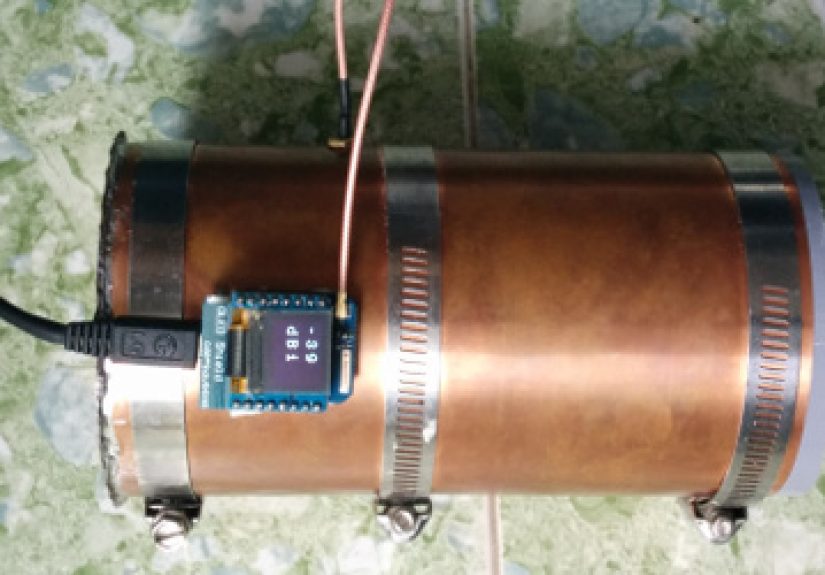
- An OLED display for live scan results.
- A microSD module or simple serial logging setup.
- A small enclosure so the project does not look like it was assembled by a caffeinated octopus.
You can also send scan data to a dashboard if the device has permission to connect to a trusted network. For sensitive environments, offline logging may be safer because it avoids adding yet another wireless client during an assessment.
Baseline First, Panic Later
The biggest mistake in rogue AP hunting is assuming every unfamiliar signal is dangerous. Wi-Fi is noisy. Apartment buildings, shopping centers, schools, and office towers can have dozens or hundreds of nearby networks. Before alerts are useful, you need a baseline.
Start by documenting your approved wireless environment. Record the official SSID names, expected BSSIDs, physical locations, channels, and security modes. If your router, mesh system, or enterprise controller has a management dashboard, compare that inventory with what the ESP8266 sees. The goal is not to create fear; the goal is to create a known-good reference.
What to Look For During a Rogue AP Hunt
Once you have a baseline, the ESP8266 becomes more useful. Here are signs that deserve investigation.
Duplicate SSIDs With Unknown BSSIDs
If your approved network is called “Acme-Staff” and a second “Acme-Staff” appears with an unknown BSSID, do not immediately sprint through the office waving a clipboard. First, check whether IT recently installed a new AP or replaced hardware. If not, the duplicate could be a misconfigured extender, a lab device, or an evil twin attempt.
Open Networks With Company-Like Names
An open network named after your company, school, or event can confuse users. If your real guest network uses a captive portal and WPA settings, but a new open network appears with a similar name, that is worth checking quickly. Attackers often rely on human convenience. People connect to the strongest or easiest-looking signal, especially when their video call is buffering and patience has left the building.
Sudden Channel or Signal Changes
Signal strength can help locate a device. If a suspicious SSID grows stronger near a conference room, closet, lobby, or parking area, you have a search path. RSSI is not GPS, but it is a useful “warmer or colder” game. Bring comfortable shoes and a healthy suspicion of ceiling tiles.
Unexpected After-Hours Networks
Some rogue devices only appear during certain times. A personal hotspot might show up during lunch. A temporary event router might appear on weekends. A malicious device could be activated briefly to avoid detection. Time-based logging helps reveal these patterns.
ESP8266 Limits You Should Understand
The ESP8266 is useful, but it is not a full wireless security platform. Understanding its limits prevents false confidence.
It Primarily Works on 2.4 GHz Wi-Fi
The ESP8266 is designed for 2.4 GHz Wi-Fi. It will not give you full visibility into 5 GHz or 6 GHz networks. Modern environments often use dual-band or tri-band systems, so an ESP8266 scanner is only one lens. A very affordable lens, yes, but still not the whole telescope.
It Cannot Prove Wired-Network Attachment Alone
Seeing an unauthorized SSID does not prove it is connected to your internal wired network. It may be a neighbor, a phone, or a nearby business. Enterprise tools often correlate wireless observations with wired MAC address tables, ARP data, switch information, and controller telemetry. The ESP8266 can help you notice and locate candidates, but verification requires network-side evidence.
RSSI Is Messy
Walls, people, metal shelves, elevators, microwaves, and office furniture all affect Wi-Fi signal strength. RSSI can guide you, but it will not politely draw an arrow on the floor. Take multiple readings from different locations and watch trends rather than single values.
It Should Not Be Used for Unauthorized Testing
Only scan and assess networks where you have permission. Passive Wi-Fi scanning is commonly used for troubleshooting and inventory, but laws, policies, and expectations vary by location. For schools, companies, and shared buildings, get written approval and define the scope. Defensive curiosity is excellent; wandering into other people’s networks is not.
Best Practices for a Responsible Rogue AP Hunt
A good rogue AP hunt is organized. A chaotic hunt creates confusion, false alarms, and at least one person asking why a microcontroller is taped to a broom handle. Keep the process professional.
Create an Authorized AP List
Your baseline should include SSID, BSSID, device owner, location, channel, encryption mode, and notes. Update it whenever hardware changes. A stale inventory is like a treasure map drawn by someone who moved the treasure last Tuesday.
Use Naming Standards
Consistent SSID names reduce confusion. Avoid having “CompanyWiFi,” “Company_WiFi,” “Company-Guest,” “Company Guest,” and “CompanyGuest2-Real-New” all floating around. Clear naming helps users and makes rogue detection easier.
Segment Guest and IoT Networks
Rogue AP defense is not only about finding unauthorized radios. It is also about limiting damage. Guest Wi-Fi, smart devices, lab gear, and staff systems should not all live in one big digital soup bowl. Segmentation reduces risk when something unexpected appears.
Prefer Strong Authentication
Use modern Wi-Fi security settings supported by your devices. WPA2 or WPA3 with strong credentials is far better than open or outdated configurations. For organizations, enterprise authentication and certificate-based trust can reduce the chance that users connect to impostor networks.
Document Findings Calmly
When you find a suspicious AP, record evidence: time, location, SSID, BSSID, RSSI, channel, and nearby observations. Do not accuse first and investigate later. Many rogue APs are born from convenience, not villainy. “I just wanted better Wi-Fi in the storage room” may be a policy violation, but it is not the same as a targeted attack.
A Practical Example: The Mystery of “Office-Guest-Free”
Imagine a small office with two approved SSIDs: “Office-Staff” and “Office-Guest.” The network administrator builds a baseline using an ESP8266 scanner and records the known BSSIDs for each access point. For several weeks, nothing unusual appears.
One Monday morning, the scanner logs a new SSID: “Office-Guest-Free.” It is open, appears on channel 6, and has a strong signal near the back hallway. The name is close enough to confuse visitors. The administrator checks the official wireless controller and finds no matching device. A quick walkthrough shows the signal peaking near a storage closet.
Inside the closet is a small consumer router plugged into an Ethernet jack. It turns out a contractor installed it to connect a temporary device and forgot to remove it. No dramatic movie villain. No thunder. Just a little plastic box quietly bypassing policy.
The fix is straightforward: unplug the device, review switch logs, document the event, remind staff and contractors about network rules, and consider disabling unused Ethernet ports. The ESP8266 did not solve the entire security puzzle, but it spotted the puzzle piece that did not belong.
Turning Scan Data Into Useful Alerts
Raw scan results are helpful, but alerts make the system easier to use. A simple ESP8266-based monitoring project can categorize findings into levels.
- Normal: Known SSID and known BSSID.
- Review: Unknown SSID nearby, but not using your naming pattern.
- Suspicious: Known SSID with unknown BSSID.
- High priority: Company-like open SSID or strong unknown AP in a sensitive area.
Keep alerts conservative. Too many false alarms train people to ignore the system. The goal is signal, not siren opera.
Where the ESP8266 Fits in a Larger Security Program
The ESP8266 is best used as a visibility helper, educational tool, or supplemental sensor. In larger environments, it should complementnot replaceprofessional wireless monitoring, switch-port security, endpoint controls, asset inventory, and policy enforcement.
For small environments, it can be an excellent first step. It teaches the basics of SSID monitoring, BSSID baselines, signal analysis, and physical investigation. For students and hobbyists, it is a safe way to learn defensive wireless concepts without crossing into harmful activity. For IT teams, it can provide quick spot checks in places where enterprise sensors are not installed.
Experience Notes: Lessons From Hunting Rogue Access Points With the ESP8266
After working with ESP8266-style Wi-Fi scanners in real-world-style environments, one lesson becomes obvious quickly: the radio environment is never as tidy as the network diagram. A diagram may show three access points, two SSIDs, and a neat coverage plan. The air, meanwhile, looks like a family reunion where everyone brought a router. You will see printers broadcasting setup networks, phones creating hotspots, smart TVs announcing themselves, neighboring apartments leaking signal, and mysterious devices with names like “DIRECT-7A-HP-LaserJet” that sound less like hardware and more like a robot applying for a passport.
The ESP8266 is helpful because it makes that invisible mess visible. Walking through a space with a portable scanner gives you a practical feel for signal behavior. A suspicious AP may be weak at the front desk, stronger near the hallway, and strongest near a storage room. That kind of pattern is difficult to understand from a single scan at your desk. Wireless security has geography. The ESP8266 helps you put feet on the map.
Another useful experience is learning how important naming discipline is. In small organizations, SSID naming often evolves casually. Someone creates “Guest,” someone else creates “Guest-New,” then a vendor adds “Guest-Temp,” and soon the Wi-Fi list looks like a group chat after three people forgot the topic. When legitimate names are messy, rogue detection becomes harder. A clean naming policy makes suspicious lookalikes stand out immediately.
False positives are part of the job. During one kind of scan scenario, a “new” access point may turn out to be a mesh node that changed after a firmware update. In another, a duplicate SSID may be a legitimate replacement AP installed without updating the inventory. These moments are not failures. They are reminders that wireless monitoring is only as good as the records behind it. The ESP8266 can tell you what it sees; your documentation tells you whether that matters.
Battery life and logging also matter more than beginners expect. A handheld scanner with a display is great for walkthroughs, but scheduled logging is better for catching temporary networks. Personal hotspots and unauthorized test routers often appear only during certain hours. If the ESP8266 records scans throughout the day, you can spot patterns that a five-minute inspection would miss. Time is a sensor too.
Placement matters as well. A scanner sitting beside a router will mostly tell you about that router. A scanner near an entrance may detect parking-lot signals. A scanner near conference rooms may catch visitor hotspots. For useful coverage, think like a facilities person and a network admin at the same time. Where do people gather? Where are Ethernet ports exposed? Where might someone plug in a device “just for a minute” and then forget it for six months? Those are good places to inspect.
The most important experience, however, is cultural. Rogue AP hunting is not about playing Wi-Fi detective for bragging rights. It is about reducing risk without creating fear. When an unauthorized AP is found, the best response is usually calm documentation, verification, removal, and education. Many incidents are caused by convenience, not malice. The goal is to make the secure path easier than the risky shortcut.
Used responsibly, the ESP8266 turns rogue access point hunting into an approachable, repeatable process. It helps beginners understand wireless security, gives small teams a low-cost visibility tool, and reminds everyone that the air around us is full of clues. Some clues are harmless. Some are important. And some are hiding in the storage closet, blinking innocently like they definitely did not cause the compliance meeting.
Conclusion
Hunting rogue access points with the ESP8266 is a practical way to improve wireless awareness without needing a massive budget. The ESP8266 can scan nearby 2.4 GHz networks, collect useful details, and help identify suspicious patterns such as duplicate SSIDs, unknown BSSIDs, open lookalike networks, and unusual signal changes.
It is not a replacement for enterprise wireless intrusion detection, strong authentication, proper segmentation, or good network inventory. But as a defensive tool, it is affordable, educational, and surprisingly capable. The secret is to use it properly: build a baseline, scan regularly, verify findings, document evidence, and investigate only networks and spaces where you have permission.
Rogue access points thrive in confusion. The ESP8266 helps replace confusion with visibility. And in cybersecurity, visibility is often the difference between “everything is fine” and “why is there a router behind the vending machine?”
Note: This article is written for defensive education and authorized wireless security monitoring only. Always get permission before assessing any network environment.