Table of Contents >> Show >> Hide
- What Makes Skee-Ball Scoring Different?
- Why Use Coin Slot Switches for Scoring?
- Basic Scoring Design
- How the Wiring Works
- The Importance of Debouncing
- Mounting Coin Slot Switches in the Scoring Chutes
- Controller Options for a DIY Skee-Ball Scoreboard
- Game Logic: Balls, Frames, and Resets
- Common Problems and Fixes
- Design Tips for a More Reliable Machine
- Safety and Durability Considerations
- Hands-On Experience: What Building One Teaches You
- Conclusion
Skee-Ball looks simple from the player side: roll the ball, cheer dramatically, pretend that 20-point shot was “just a warm-up,” and try again. Behind the cabinet, however, a good scoring system is a small engineering circus. Balls need to be detected quickly, points need to be added accurately, and the machine must survive thousands of enthusiastic throws from people who believe velocity is a substitute for aim.
One practical way to build or repair a homemade Skee-Ball scoring system is to use coin slot switches, also known as coin door microswitches or arcade coin switches. These are the small snap-action switches commonly used in coin mechanisms to register a credit when a coin passes through the slot. Because they are durable, inexpensive, easy to wire, and designed for arcade environments, they can also be adapted to detect balls passing through scoring holes.
This guide explains how Skee-Ball scoring with coin slot switches works, how to design the wiring, how to avoid false scores, and how to make the system feel satisfyingly arcade-like without turning your garage into a haunted electronics lab.
What Makes Skee-Ball Scoring Different?
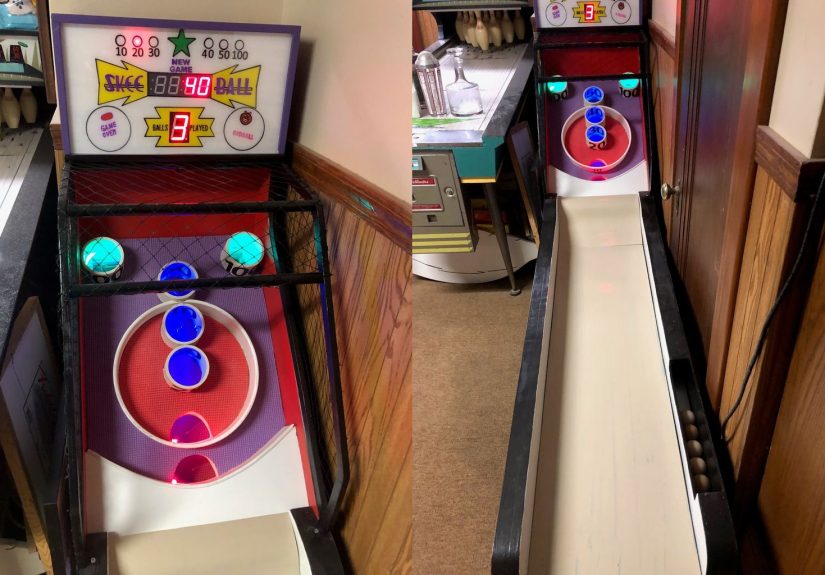
Skee-Ball is one of the classic alley games: a player rolls a ball up an inclined lane, the ball launches over a ramped “hop,” and then drops into scoring pockets. Traditional scoring zones often include 10, 20, 30, 40, 50, and 100-point values, with the highest-value holes being smaller and harder to hit.
In a modern electronic build, each scoring pocket needs a sensor. When the ball enters a pocket, the sensor sends a signal to a controller. The controller adds the correct value to the player’s score, updates the display, and counts the ball as used. In a simple game, the player may roll nine balls per frame. In more advanced setups, you can add multiple players, bonus scoring, ticket output, sound effects, or a “game over” animation that makes missing the 100 pocket feel slightly more official.
Why Use Coin Slot Switches for Scoring?
Coin slot switches are a clever choice because they are already built for short, repeatable mechanical triggers. In a coin door, a coin drops through a mechanism and presses a small lever or wire arm. That movement briefly closes or opens the switch, sending a pulse to the arcade board. A Skee-Ball scoring hole can work in a similar way: the ball drops through a chute, taps the switch lever, and creates a scoring pulse.
Benefits of Coin Slot Switches
First, they are easy to understand. Most arcade-style microswitches have three terminals: common, normally open, and normally closed. For scoring, many builders use common and normally open, so the circuit closes only when the ball presses the switch. Second, they are affordable and widely available. Third, they provide a crisp mechanical click, which is oddly comforting when debugging. If a switch clicks, at least something in the universe is making sense.
Coin slot switches also tolerate the kind of dusty, vibrating, mildly chaotic environment that arcade cabinets create. A Skee-Ball machine has rolling balls, cabinet movement, and repeated impacts. A delicate sensor may complain. A coin switch usually just clicks and gets on with life.
Basic Scoring Design
The simplest Skee-Ball scoring system uses one switch per scoring chute. Each scoring pocket funnels the ball into a short exit path. At the bottom or side of that path, a coin slot switch is mounted so the ball brushes the actuator lever as it passes.
A typical scoring map might look like this:
- Bottom catch area: 10 points
- Lower pocket: 20 points
- Middle pocket: 30 points
- Center pocket: 40 points
- Upper pocket: 50 points
- Top corner pockets: 100 points
The controller does not need to “see” the ball visually. It only needs to know which switch was activated. If the 40-point switch closes, the program adds 40. If the 100-point switch closes, the program adds 100 and the player immediately becomes a professional, at least emotionally.
How the Wiring Works
A coin slot switch is a momentary mechanical switch. In most DIY scoring systems, one terminal connects to ground and the other connects to a digital input pin on a microcontroller such as an Arduino. The controller watches the input pin. When the switch changes state, the program records a score.
Using Normally Open Wiring
With normally open wiring, the switch does not complete the circuit until the ball presses the lever. This makes the logic easy: no press means no score; press means score. When using internal pull-up resistors, the input usually reads HIGH when idle and LOW when triggered. That may feel backwards at first, but it is reliable and common in microcontroller projects.
Example Logic
The code can follow a simple structure:
In a real build, you also need debounce timing, state tracking, and protection against double-counting. Without those details, one ball can become three balls very quickly, which is exciting only if you enjoy lying to your scoreboard.
The Importance of Debouncing
Mechanical switches do not always create one perfectly clean signal. When the metal contacts inside a switch touch, they can bounce for a few milliseconds. To a human, this is invisible. To a microcontroller reading thousands of times per second, that tiny bounce may look like several presses.
Debouncing solves the problem by ignoring rapid repeated changes after the first valid trigger. For Skee-Ball scoring, a debounce window of about 30 to 100 milliseconds is often enough, depending on the switch, mounting angle, and ball speed. The goal is to count one ball once, even if the lever wiggles like it just heard bad news.
Software Debounce
Software debounce is usually the easiest method. The controller stores the time of the last accepted switch event. If the same switch activates again too soon, the program ignores it. This prevents accidental double scores caused by contact bounce or by the ball dragging across the lever.
Mechanical Placement Helps Too
Debounce is not only a coding problem. Physical layout matters. Mount the switch so the ball presses the lever once and then moves away cleanly. Avoid placing the switch where a ball can rest on it, bounce backward, or rattle against it in the chute. A small guide rail or angled deflector can make scoring much more consistent.
Mounting Coin Slot Switches in the Scoring Chutes
The best switch location is usually just below each scoring hole, where the ball is committed to a single chute. If the switch sits too high, a ricochet may trigger the wrong score. If it sits too low, the ball may be moving too fast or may not contact the lever consistently.
For wooden DIY builds, switches can be mounted with small machine screws, brackets, or 3D-printed holders. The switch should be adjustable because your first placement will probably be “almost right,” which is the official slogan of homemade arcade projects.
Actuator Style
Many coin slot switches use a long wire actuator or a flat metal lever. A longer actuator gives the ball a wider target and allows softer triggering. A short actuator can work, but it requires more precise placement. The best setup is one where the ball taps the actuator firmly without slamming the switch body.
Protecting the Switch
Skee-Ball balls are not bowling balls, but repeated impacts add up. Do not let the full weight and speed of the ball crash directly into the switch housing. Use the chute geometry to guide the ball across the actuator, not into it. A replaceable plastic flap or light spring arm can also help absorb impact.
Controller Options for a DIY Skee-Ball Scoreboard
An Arduino-style board is a common choice because it has digital inputs, simple programming tools, and enough flexibility for displays, sounds, and game logic. A Raspberry Pi can also work, especially if you want a large screen interface, animations, Wi-Fi features, or web-based leaderboards. For a rugged standalone cabinet, however, a microcontroller is often simpler and boots faster.
Displays
For a classic arcade feel, LED seven-segment displays are excellent. They are bright, readable, and wonderfully dramatic. LCD screens are easier for text prompts such as “Player 1,” “Ball 6,” or “Stop blaming the ramp.” LED matrix displays add more visual flair and can show scrolling messages or simple animations.
Sound Effects
Sound is optional but highly recommended. A scoring beep, a 100-point celebration sound, and a game-over jingle make the machine feel alive. Just remember that a machine in your basement does not need to announce every 10-point shot like it landed on the moon.
Game Logic: Balls, Frames, and Resets
A good scoring system tracks more than points. It should also track how many balls have been rolled, when the game starts, when it ends, and when to reset the score. If your game uses nine balls, the controller should stop accepting new scoring events after the ninth valid score until a new game begins.
A basic game loop includes these steps:
- Reset score and ball count.
- Wait for a start button, coin signal, or free-play trigger.
- Watch all scoring switches.
- Add points when a valid switch is triggered.
- Increase the ball count by one.
- End the game after the final ball.
- Show final score and prepare for reset.
If you are using an actual coin door, the same type of coin switch can start the game by adding a credit. That means one family of switches can handle both the “pay to play” input and the scoring inputs. In a home build, the coin switch can be replaced by a start button, but keeping the coin slot is fun if you enjoy charging your relatives 25 cents to miss the 100 pocket.
Common Problems and Fixes
Problem: One Ball Scores Twice
This usually means switch bounce, poor chute design, or a ball that lingers on the actuator. Add software debounce, increase the lockout time for that switch, and adjust the switch angle so the ball moves away cleanly.
Problem: The Score Does Not Register
Check the basics first: common terminal, normally open terminal, ground connection, input pin, and code mapping. Then manually press the switch and watch the serial monitor or diagnostic display. If the manual press works but the ball does not trigger it, the issue is mechanical placement, not electronics.
Problem: The Wrong Hole Scores
This usually happens when wires are mapped incorrectly or when the ball can touch a neighboring switch before entering its final chute. Label every wire. Then label it again, because future you will not remember what “green-ish wire maybe 40?” means.
Problem: Random Scores Appear
Random scoring can come from floating inputs, loose wires, electrical noise, or switches wired to the wrong terminal. Use pull-up or pull-down logic consistently. Keep signal wires secure. If the cabinet shakes heavily, add strain relief and check connectors.
Design Tips for a More Reliable Machine
Build the scoring system as a set of small, testable parts. Test one switch first. Then test three. Then test all scoring zones. Do not build the entire machine and only then discover that the 50-point chute scores 10 points while the 10-point chute starts a new game. That is not a feature; that is a tiny wooden lawsuit.
Use removable panels behind the scoring board so you can reach switches without disassembling the whole cabinet. Leave enough wire slack for maintenance, but not so much that wires dangle into moving parts. Use connectors if the ramp and head need to separate for transport.
Finally, build in a diagnostic mode. A simple test screen that shows which switch is currently active can save hours of frustration. When troubleshooting, the question should be “Which switch fired?” not “Why does this machine hate me?”
Safety and Durability Considerations
Keep low-voltage scoring electronics separate from mains power. If your build includes arcade lighting, power supplies, or ticket mechanisms, mount them securely and protect exposed terminals. Use fuses where appropriate and avoid loose wiring near rolling balls, moving doors, or metal coin mechanisms.
For public or commercial use, a homemade system may not meet regulatory, insurance, or arcade-operation requirements. For personal use, the main goal is safe wiring, solid construction, and predictable behavior. A Skee-Ball cabinet should create joy, not mysterious smoke.
Hands-On Experience: What Building One Teaches You
The first thing you learn when working on Skee-Ball scoring with coin slot switches is that the electronics are usually easier than the physics. On paper, the plan is beautiful: ball drops, switch clicks, score increases. In real life, the ball may graze the lever, bounce backward, hit the side wall, or land with the confidence of a shopping cart with one bad wheel. The scoring system becomes a conversation between software, hardware, and gravity.
During a practical build, the 10-point chute is often the easiest to detect because it catches the most missed shots and usually has plenty of space. The high-value pockets are trickier. The 100-point holes are small, and the ball may drop at a sharper angle. A switch placed too close to the opening can be hit by near misses. A switch placed too far down may miss soft drops. The best solution is usually an adjustable bracket and several rounds of testing with real balls.
Another lesson is that switch sound matters. A clean click helps confirm that the ball made contact, but the scoreboard must still be the judge. In testing, it is helpful to roll balls slowly by hand through each chute and compare the physical click with the displayed score. If the switch clicks but the score does not change, the issue is wiring or code. If the score changes without a click, the issue may be electrical noise or a floating input. If neither happens, congratulations, you have invented decorative woodworking.
Debounce timing becomes a surprisingly personal decision. Too short, and one ball occasionally scores twice. Too long, and two fast balls in a row might not both count during manual testing. In normal Skee-Ball play, balls are usually separated by enough time that a modest lockout works well. Still, each switch may behave slightly differently depending on lever length and mounting pressure.
The most satisfying moment is when the scoreboard finally matches the playfield. Roll into 30, get 30. Roll into 50, get 50. Hit 100, celebrate like you just solved cold fusion. At that point, the coin slot switches disappear into the experience. Players do not care about terminals, pull-ups, or debouncing. They care that the game feels fair, fast, and fun. That is the real goal of the build: not just a working circuit, but a machine that invites one more roll.
Conclusion
Skee-Ball scoring with coin slot switches is a smart, approachable way to bring arcade-style scoring into a DIY or restored machine. These switches are simple, durable, and well-suited to detecting quick mechanical events. When paired with thoughtful chute design, stable wiring, debounce logic, and clear score mapping, they can create a reliable scoring system that feels authentic without requiring expensive sensors.
The secret is balance. Let the switch do what it does best: detect a clean, brief contact. Let the chute guide the ball. Let the controller handle timing and logic. And let the player believe the next roll is definitely going into the 100 pocket. That belief, after all, is the true engine of Skee-Ball.